

In this post, I’m going to compare Heartbeat and Circle and show you how both community platforms stack up across:
- Community building and engagement
- Member management
- Event hosting and management
- Workflows, automation, and AI
- Payments, memberships, and transaction fees
- Branding and customization
- Sales and marketing tools for business growth
- Pricing and value for money
By the end of this guide, you’ll be able to make an informed decision on which between the two community software is the best fit for you.
My quick summary on when to choose Circle or Heartbeat
The big difference between Circle and Heartbeat is that Circle offers a more refined community infrastructure that provides stronger community organization, management, customization, and scalability.
Heartbeat’s a bit minimal and easier to figure out. It also has slightly better member engagement tools that encourage participation, interaction, and relationship-building in your community.
Here’s when to use Circle or Heartbeat.
Circle.so: best for building creator-led, professional and branded online communities.

Circle is the best solution if you want a platform with stronger community management, event hosting, and business growth tools. Like any community software, with Circle you can create discussion forums, build courses, host live events and encourage engagement using gamification.
But what set’s Circle apart from platforms like Heartbeat is has more robust access control, member management, segmentation, branding, marketing tools, along with better reporting and third-party app integrations.
All of which are essential not only only to small creator communities but larger branded communities or professional networks.
That said choose Circle if:
Heartbeat: best for building engaging learning-focused communities at a lower entry price
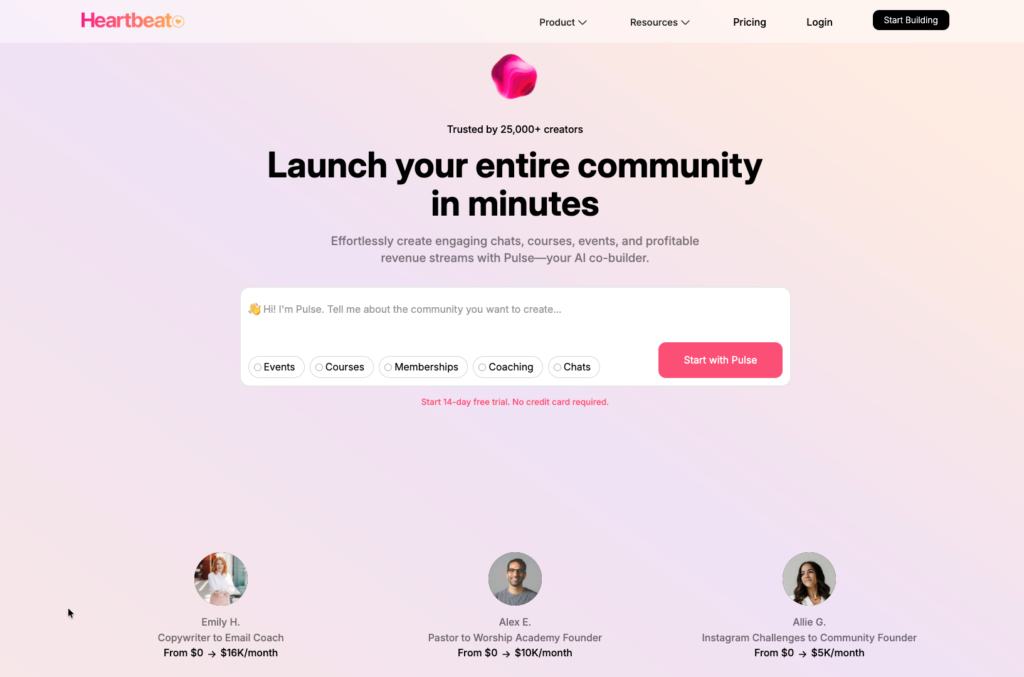
Heartbeat is the platform I recommend for creators and coaches in their early-to-middle stages of building a community business. It’s cheaper and even at that affordable price tag you get all the essential tools you need to start and grow your community such as workflows, upsells, and membership tiers.
Heartbeat also has strong engagement tools to keep your members active including: voice rooms, matchups, and chat. The course tooling also beats Circle’s for cohort-based programs but events are fairly basic.
Choose Heartbeat if you:
Circle vs Heartbeat: comparison summary
| Feature | Circle | Heartbeat | |||
| Best for | Creator memberships, SaaS customer hubs, masterminds, and any community embedded in a larger product. | Cohort-based learning programs, creator communities, and coaches running group coaching, accelerators, and masterminds. | |||
| Community building & management | Flexible and diverse Spaces. Lets you manage access at Space-level or bundle them using Access Groups. CRM-level member organization and segmentation. Strong engagement tools featuring threaded discussions, group chats, long-form posts, live events, and gamification. Advanced moderation with preemptive filters and AI that flags spam, and sentiment on community posts and comments. | Chat-first channels feel like Slack, with threads, reactions, custom emojis, and polls, plus voice channels with auto-transcripts for async audio. Member management leans on dynamic Access Groups. Matchups that pair people to keep the community active. Lighter moderation tools. | |||
| Online courses | Self-paced and scheduled courses with native video hosting, 700+ embeds, drip scheduling, AI video transcripts and auto-graded multiple-choice quizzes. No certificates, or graded assignments. | Self-paced and cohort-based models supported. Built-in assignment submissions and course-embedded discussion boards with matchups for accountability. No native video hosting on the entry plan, and no certificates. | |||
| Events | End-to-end community event hosting and management. Native live streaming ideal for hosting: community-wide events, webinars, and live workshops with scheduling and automated notifications. Streaming works on mobile, so members join from anywhere. | Scheduled events with automated reminders and native voice rooms. No real video streaming and requires Zoom or Google Meet integration to host live events. | |||
| Customization and branding | Theme customization, add your logo, and a custom domain on every plan. White-labeling , and fully branded iOS and Android apps are available, though the branded app is available on Circle Plus plan at custom pricing. | Add your logo, theme color, and a custom domain on every plan. White-label your community on the Grow plan and above. The branded mobile app is available on the Scale plan at no extra charge. | |||
| AI tools | Customizable AI agents that handle community tasks: answering questions, guiding members, sparking conversation, and offering support. AI also plugs into the workflow builder to moderate content, flag sensitive or off-topic posts, categorize discussions, and rename posts. | Pulse AI is a platform assistant. It reviews your community, asks about your goals, and returns an action plan: building courses and lessons, designing onboarding workflows, setting up pre-launch waitlists, configuring groups and access, and advising on structure. | |||
| Sales and marketing | Built-in website and landing page builder with prebuilt page and section templates, plus automated email workflows and full campaigns. Checkout supports upsells, discounts, and free or paid trials to boost conversion. | Handles the basics natively, with promo codes and bundles at checkout. The page builder (signup links) offers limited customization and lacks a visual drag&drop builder. | |||
| Third-party app integration | 18 native integrations including WordPress, Loom, Memberful and others. Zapier intergrations, Webhooks plus deeper API access (member API and data API) on higher tiers. | Limited integrations: Notion, Zoom, Google Calendar. API access exists but is far narrower than Circle’s. | |||
| Pricing | Expensive for starters. The lowest plan, Professional, starts at $129/mo, Business at $219/mo and Circle Plus at custom pricing offering branded apps, enterprise security, detailed reporting and AI automation. Has lower transaction fees, falling from 2% to 0.5% as you climb tiers. | Cheaper entry at $49/mo (Build), scaling to $849/mo (Scale). Has high transaction fees: up to 5% on the entry plan, still around 1.25% at the top, well above Circle’s. | |||
| Explore Circle.so | Explore Heartbeat |
Heartbeat vs Circle: my indepth review and experience using both
Heartbeat and Circle are two popular online community-building platforms available today.
At first glance, they have a lot in common. When you visit their websites or even sign up to each one of them and explore what they offer, it’s easy to assume they’re equally matched.
That was my initial impression as well.
However, after spending more time using both platforms, I began to notice important differences that set them apart.
Especially when it comes to things like community organization, member management, events, course creation and business growth tools.
In this section, I’ll take a deep dive into both Circle and Heartbeat, compare their key features, strengths, and limitations, and share my hands-on experience using each one. By the end, you’ll have a clearer understanding of which platform is the better fit for your community.
A) Circle’s Spaces are more flexible and granular than Heartbeat’s Channels .
In Circle, Spaces are the foundational building blocks of your online community. They’re what you use to structure, and organize your community.
Unlike Heartbeat, Circle’s Spaces are far more diverse in both format and functionality.
You get six different Space types to work with, including:
- Post Spaces: Publish forum discussions, announcements, and long-form content with rich embeds, video uploads, formatting tools, and code blocks
- Course Spaces: Build structured learning programs with lessons, modules, progress tracking, and drip-fed content
- Event Spaces: Schedule and host webinars, workshops, office hours, livestreams, and community calls
- Member Spaces: Create searchable member directories so people can browse profiles and connect intentionally
- Chat Spaces: Run real-time conversations similar to Slack or Discord channels
- Media Library Spaces: Organize files, recordings, templates, and downloadable resources into centralized resource hubs
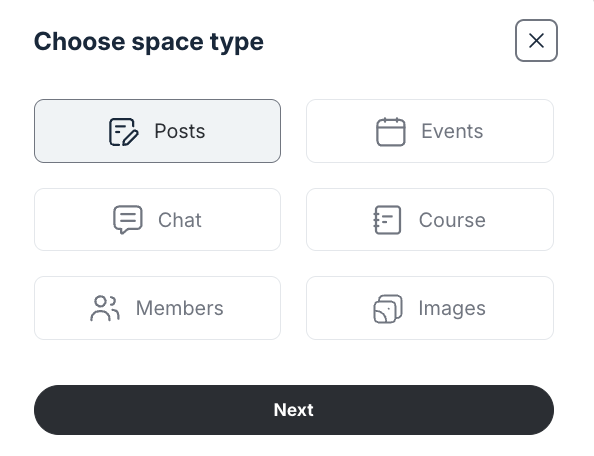
You can then organize related Spaces under broader containers called Space Groups.
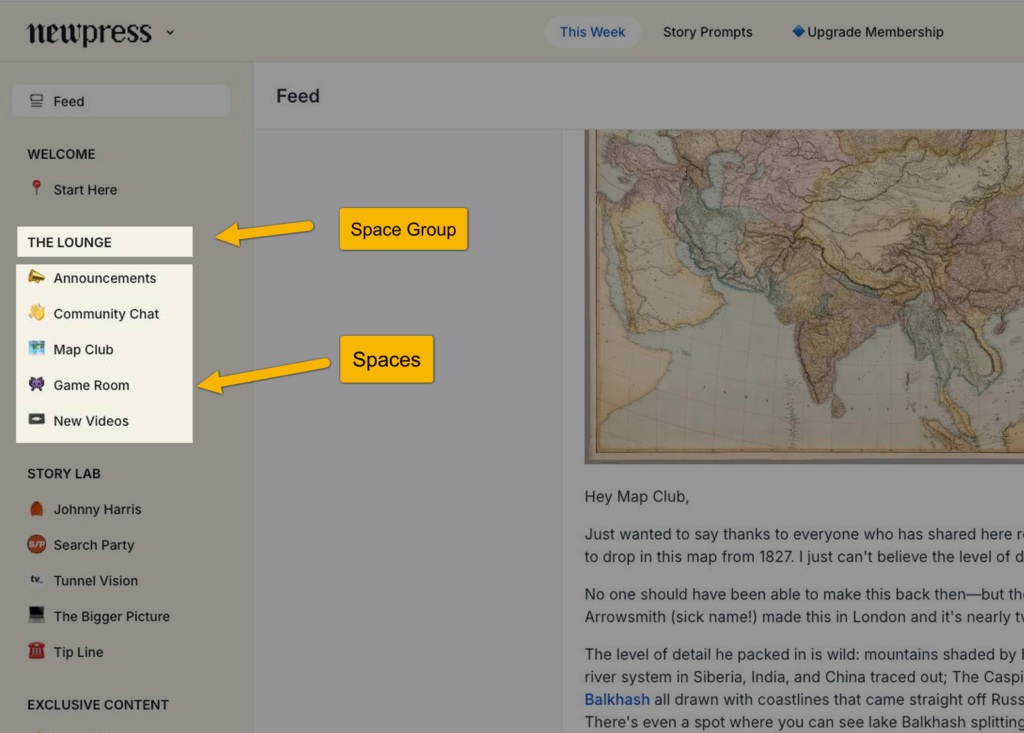
Together, Spaces and Space Groups let you create distinct community environments inside the same ecosystem — almost like building multiple mini-programs within one larger community.
For example:
You could group a Course Space, weekly Event Space, discussion Post Space, and a Media Library under one Space Group to create a cohort-based learning program.
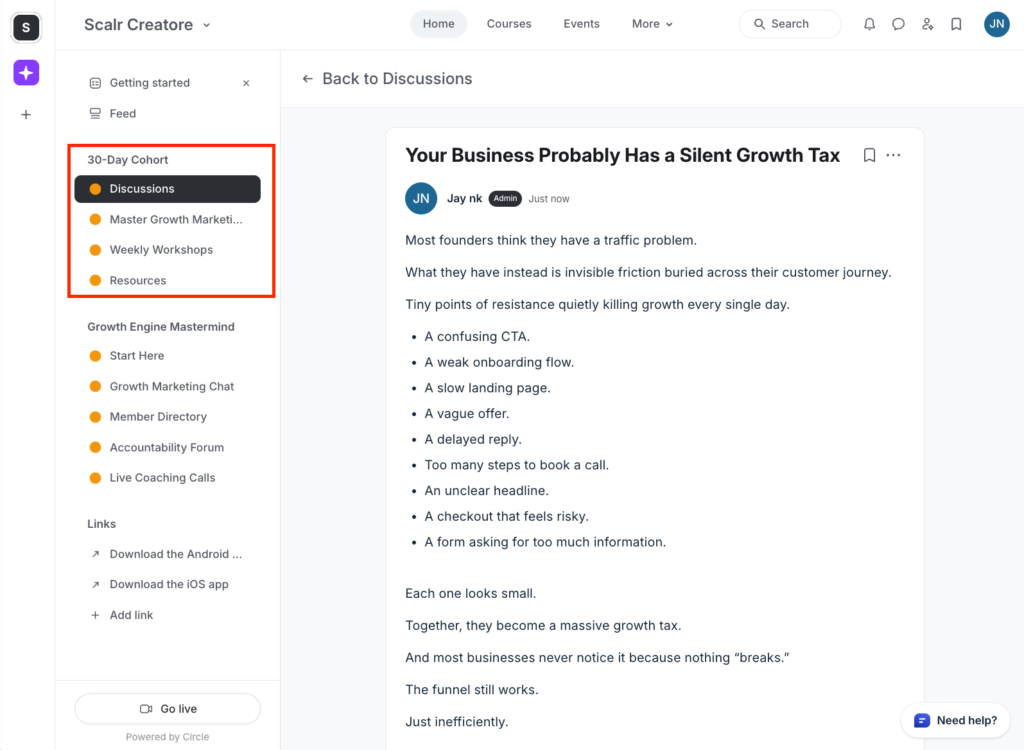
Or a paid Mastermind that could include a private chat space, member directory, accountability forum, and an event calendar for live coaching calls—under a different Space Group.
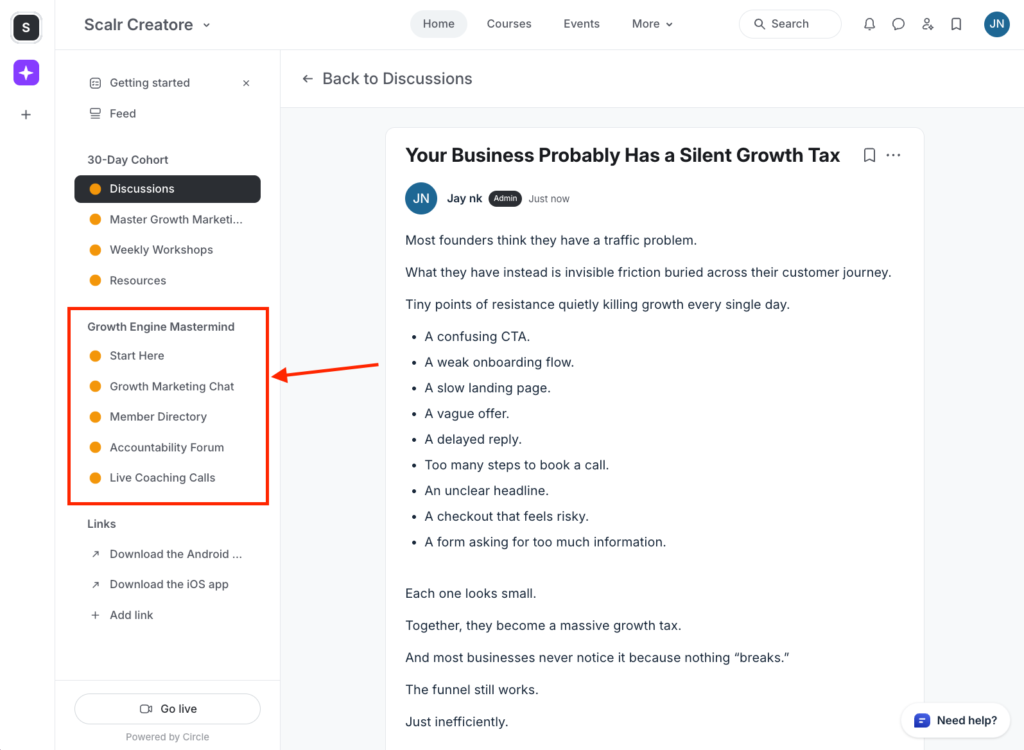
But what I also loved about Circle’s Spaces is the granularity that comes with them.
Because each Space functions as an independent configurable unit, you can model every Space differently depending on its purpose, audience, and workflow.
For example, you can:
- Set custom access permissions and visibility
- Build custom lock screens for gated Spaces
- Add topic boxes so members can filter and navigate content more efficiently
- Customize layouts and visual presentation per Space
- Add paywalls to monetize individual Spaces
- Create workflows and automations specific to that Space
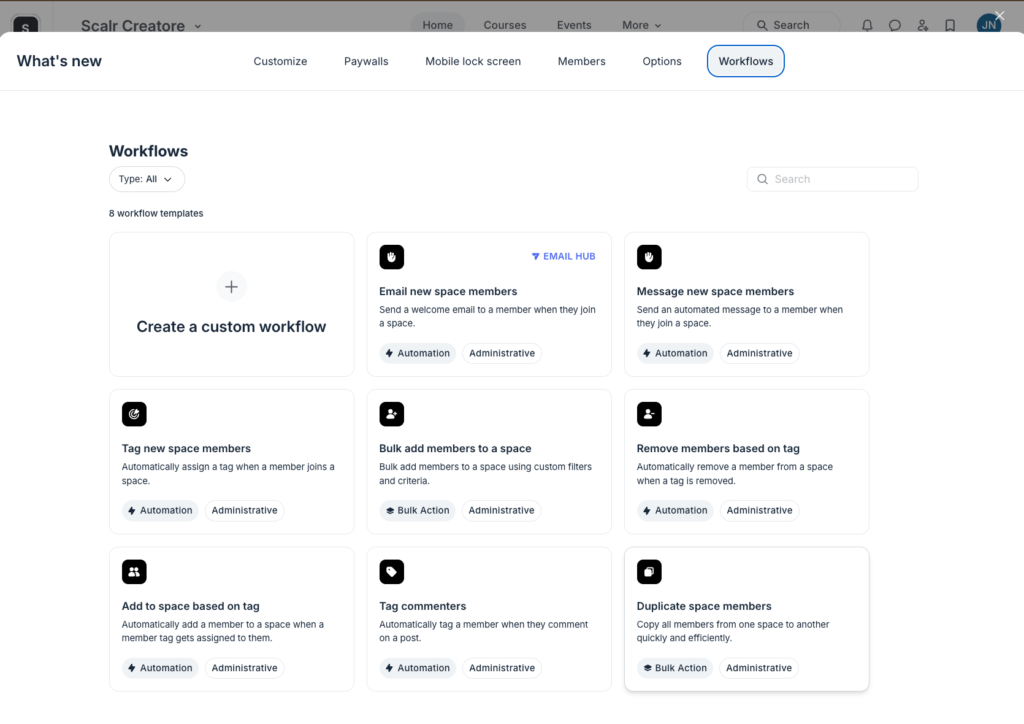
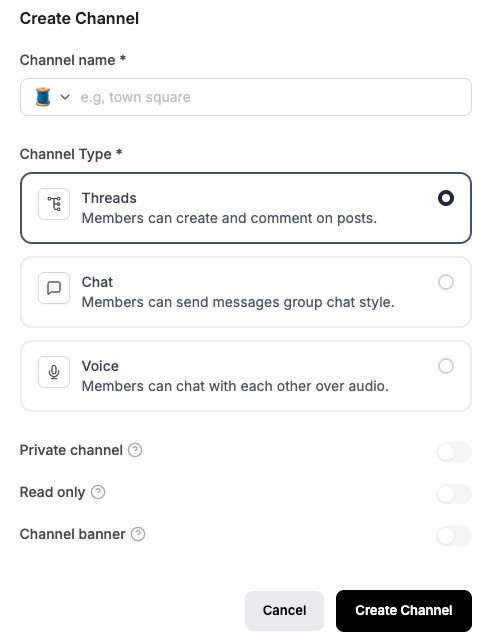
Meanwhile, Heartbeat’s Channels are primarily designed to organize conversations. They support three interaction formats including:
- Community discussions with threaded replies
- Group chats
- Always-on voice rooms
Features like courses, events, and document libraries still exist in Heartbeat, but they operate as separate top-level products.

But compared to Circle’s Spaces, Heartbeat’s Channels are less flexible.
As such you can’t:
- Paywall individual Channels and charge separately for access
- Create Channel-specific automations to personalize experiences
- Customize the layout and create unique lock screen pages
- Further organize your community posts and discussions into topics so members can easily navigate through channel content.
B) Circle has stronger community management tools especially for growing communities.
Both platforms provide a decent amount of tools to manage members and operations.
However, Circle outclasses Heartbeat in most aspects like migration, segmentation, moderation, automation and even tracking activities.
With both platforms, you invite new members to your community and even create custom onboarding workflows.
But if you want to migrate an existing member list, Circle makes the process much more seamless.
You can import members as a CSV file, map up to 15 data fields, and even edit imports without leaving the platform.
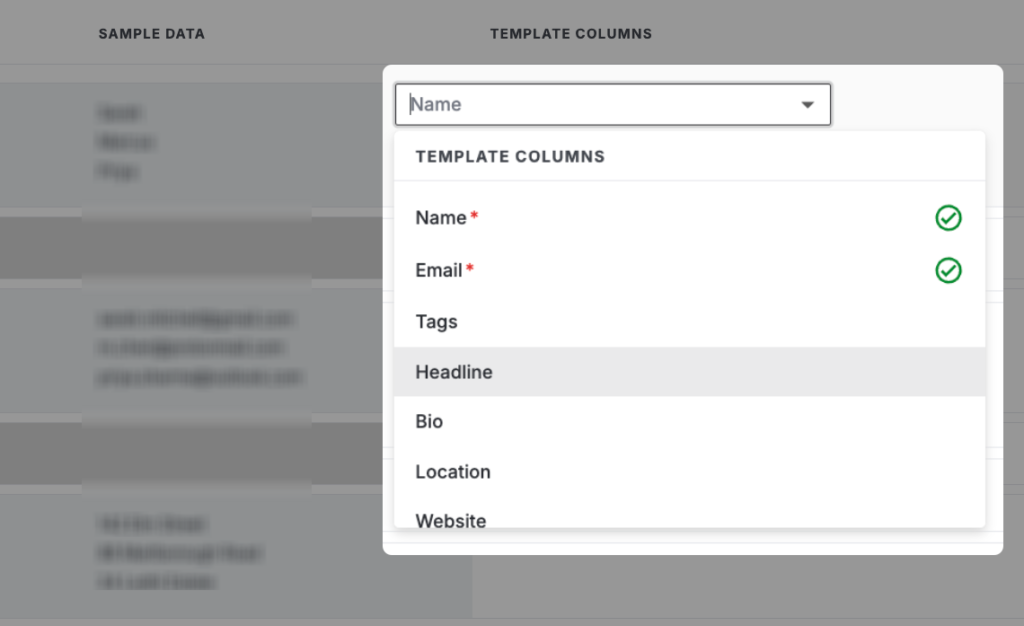
This is especially useful when moving from tools like Slack, Discord, or a CRM, or when onboarding large batches of users at once.
Heartbeat too offers native tools to help you migrate from other community building software like Circle, Peerboard and Slack.
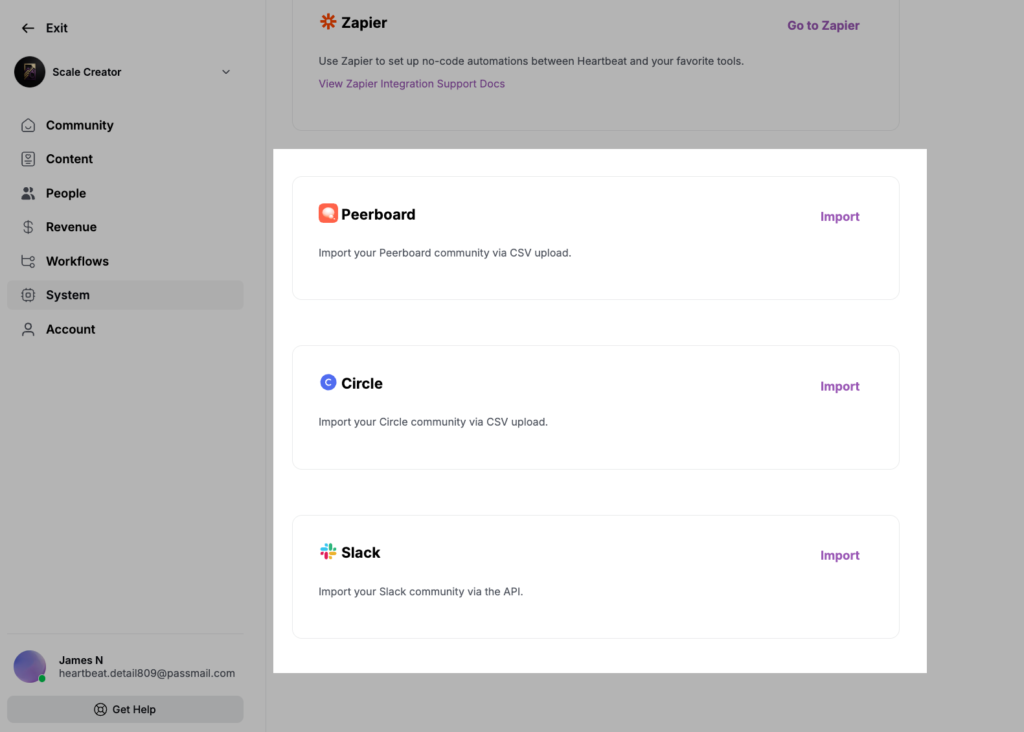
However, if you’re migrating from anything outside those platforms, Heartbeat doesn’t provide native tools to import your member list directly into the platform.
Both community platforms provide a central dashboard where you can view members, assign roles, and adjust permissions.
But Circle allows for more granular filtering across multiple dimensions, including: event RSVP status, subscription state, last activity, custom profile fields, segments and more.
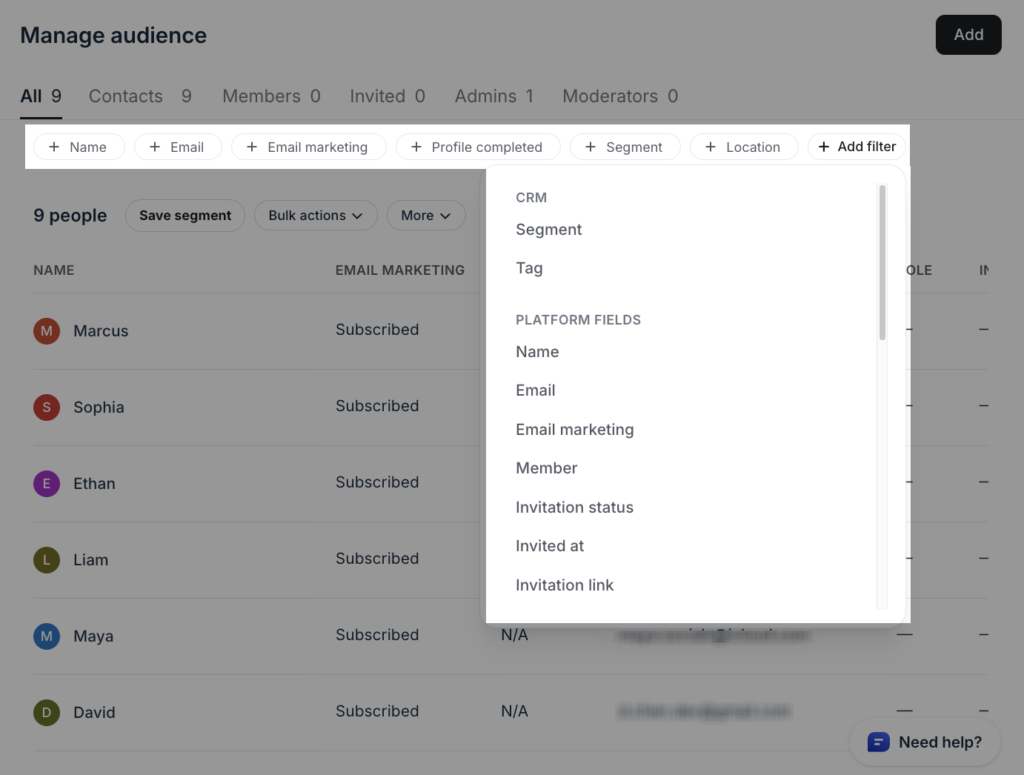
Essentially, making it feel closer to a CRM.
That said, this level of filtering makes it easier to segment your audience based on things like behavior, engagement, billing status, or interests.
Meanwhile, Heartbeat provides a more limited set of filters, such as: location, join date, last login, group membership and engagement activity.

As a result, managing larger communities inside Heartbeat can be cumbersome forcing you to rely on external CRMs for advanced audience organization and targeting.
Speaking of audience organization and segmentation, both platforms let you group members based on different attributes and behaviors while controlling permissions and access.
However, I found Circle’s layered segmentation system far more granular and sustainable than Heartbeat’s unified approach.
With Circle, you get three separate systems for organizing and managing members:
- Tags are simple labels. They are used to classify members (e.g., role, behavior, interest), but they do not control access on their own.
- Segments are dynamic filters built from tags, profile fields, and behavioral conditions. They continuously update based on the criteria you set them on making them useful for audience targeting, automation, engagement campaigns, and more.
- Access Groups let you control what members can access in the community.
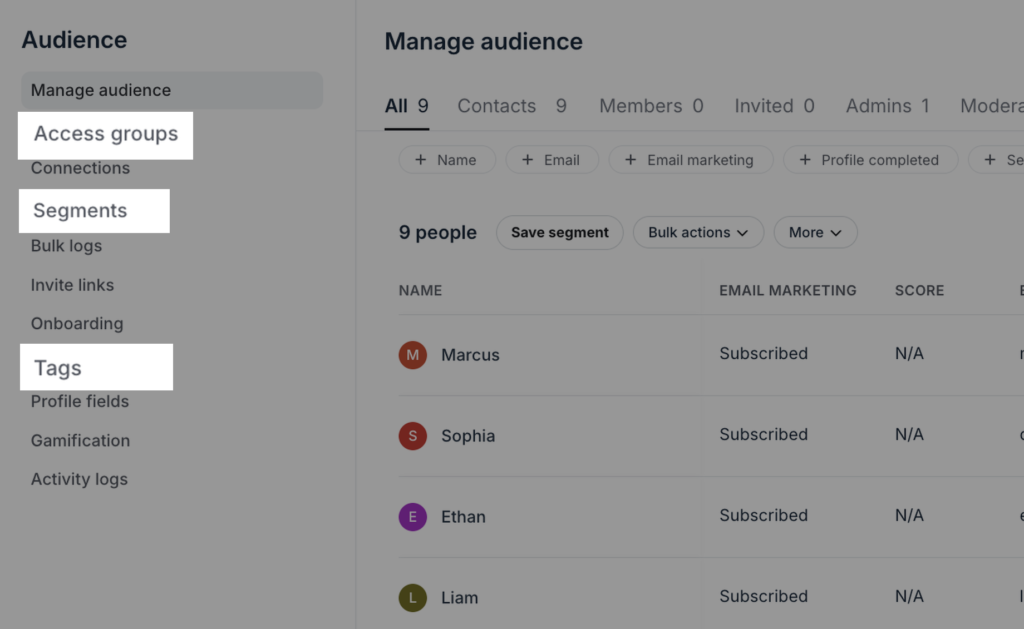
Because they are independent, you can reuse the same member data in multiple ways without unintentionally affecting access or permissions.
For example, you could create a segment of inactive paid members for a re-engagement campaign without changing what they can access inside the community. Or you could tag members based on interests and use those tags for event targeting, while keeping access permissions completely separate.
As a result, Circle reduces the risk of operational mistakes and gives you more precision when managing different member experiences.
Meanwhile, Heartbeat simplifies all of this into a single system called Groups.
Groups can operate in three modes:
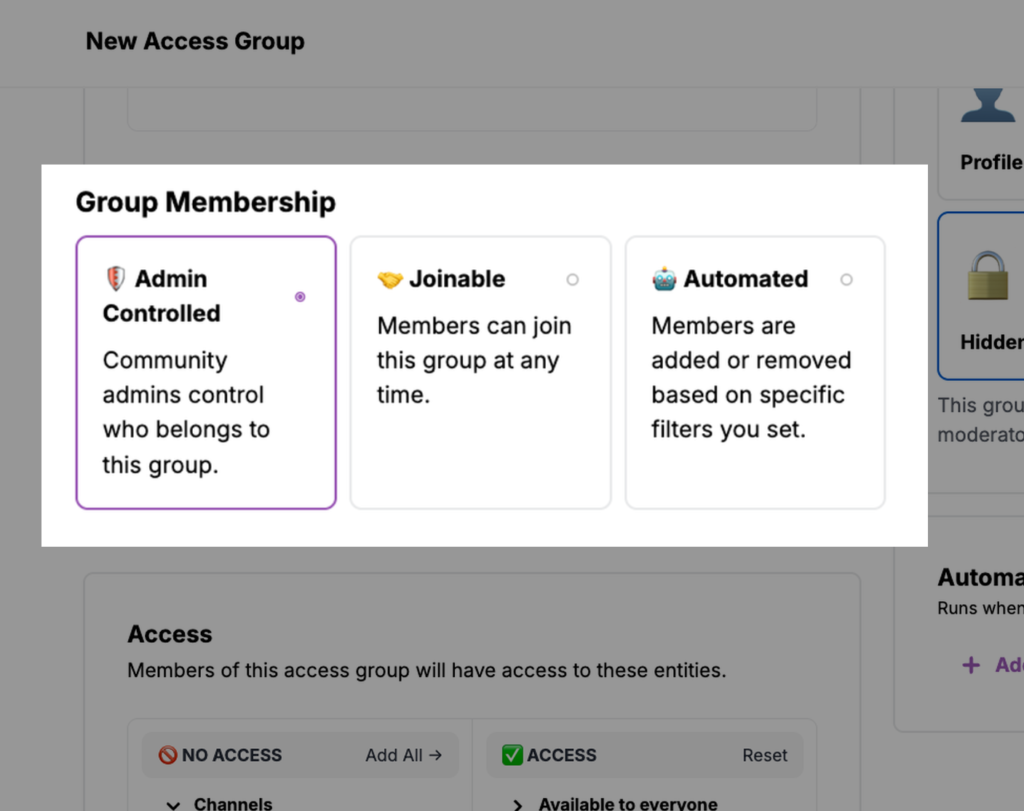
- Manual groups where admins assign members directly
- Joinable groups where members opt in themselves
- Automated groups where membership updates dynamically based on rules or criteria you’ve set
These same groups can also:
- control access
- organize members socially
- define visible community segments
However, it also means segmentation and access control are tightly coupled. A rule change doesn’t just update a member list in the background. It can directly change who gains or loses access to channels, content, or experiences inside your community.
As your community scales, this structure can make audience management harder to maintain safely and predictably. As a result, you’ll need to be more cautious when editing automations or restructuring groups because organizational changes can unintentionally impact member access.
Both platforms support automation and bulk actions, but Circle has a far more sophisticated workflow builder.
To start with, Circle offers a visual automation builder with a wide range of event triggers and actions. You can trigger automations based on events like joining a community, subscribing to a paywall, post activity, tag assignments, purchases, course progress, and more.
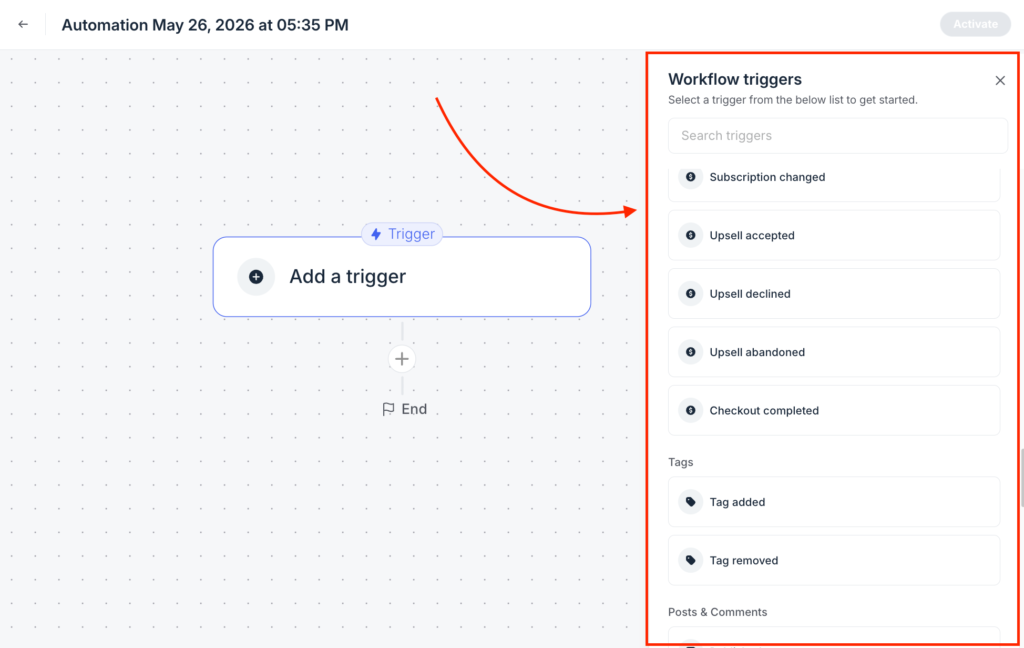
In total, Circle offers more than 100 automation triggers and actions, giving you more flexibility to build in-depth workflows and personalize member experience.
On the other hand, Heartbeat’s workflow builder is much more lightweight. It offers a simpler automation model with fewer triggers built around core community events such as:
- Joining a community
- Joining a group
- RSVP’ing to an event
- Course completion
- Lesson completion
- Email submission
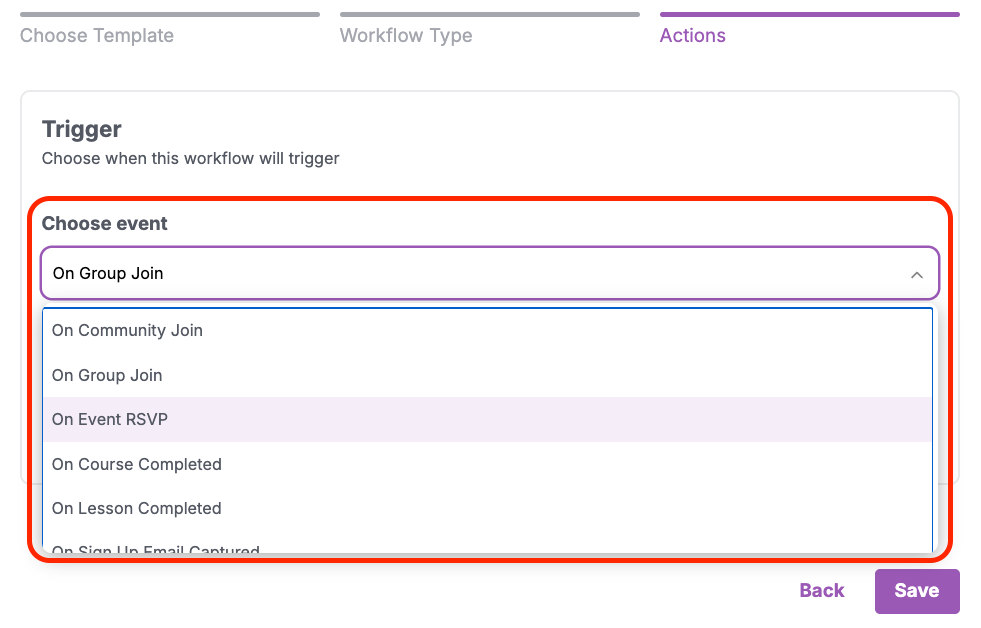
To be specific, Heartbeat currently offers up to 6 native automation triggers, which is way more limited compared to Circle’s workflow system.
The good news is that, unlike Circle that doesn’t offer workflows on its entry-level plans, Heartbeat provides them across all its plans.
But still, even with that advantage, you can’t really compare Circle’s automation builder capability with Heartbeat’s.
So let’s call a spade a spade.
Now, community management won’t be complete without comparing how both platforms fare when it comes to moderation.
Both platforms allow you to add moderators to manage content, enforce rules, and maintain community standards. However, Circle offers more advanced moderation controls out of the box.
You can:
- Create profanity filters to flag specific words
- Set thresholds for member reports before actions are triggered
- Automatically restrict or review members with repeated reports
- Escalate moderation actions such as content approval or account suspension
Beyond that, Circle integrates AI-assisted moderation directly into its workflow system.
Instead of relying only on static keyword filters, Circle’s AI tools can scan posts and comments for sentiment, harmful behavior, or policy violations and trigger automated actions such as:
- Flag inappropriate or harmful comments
- Report concerning posts for review
- Notify moderators automatically
- Send emails to members about rejected content
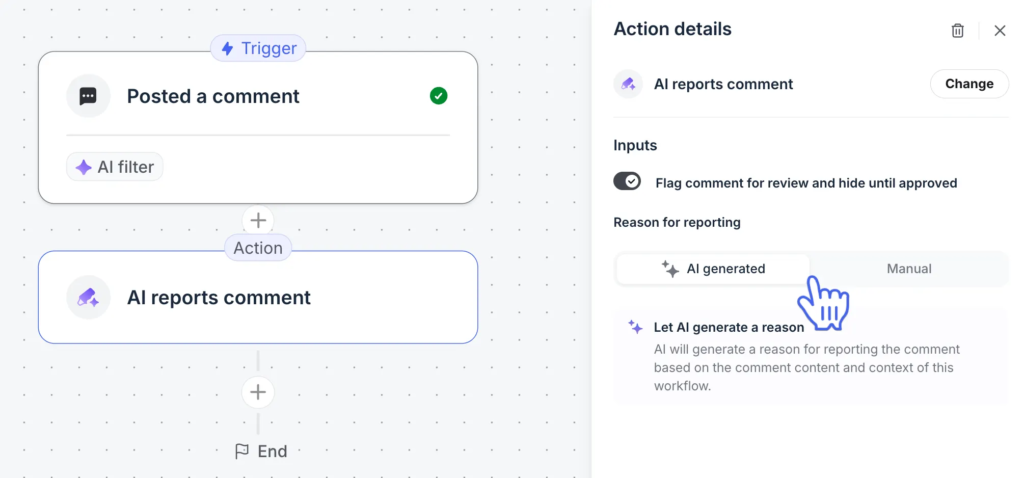
That gives moderators a more proactive system for managing large or highly active communities.
It’s worth noting, however, that Circle’s AI moderation features are locked behind its expensive plans.
Meanwhile, Heartbeat takes a much simpler approach to moderation. You still get the core tools you need to manage community behavior, including the ability to:
- Delete harmful comments, posts, or chat threads
- Silence disruptive or rule-breaking members
- Deactivate or reactivate accounts during behavioral reviews
- Mute or remove users from live audio and video spaces
But you don’t get more advanced automation-driven or AI-assisted moderation workflows as Circle even on its most expensive plans.
C) Both have strong community engagement tools, including forum posts, chats, and events, but Heartbeat stands out with its dynamic member matchmaking features.
At a baseline level, both Circle and Heartbeat support the core engagement tools you’d expect from any modern community platform, including:
- Discussion forums with posts and threaded comments
- Real-time chat rooms
- Reactions, replies, and lightweight social interactions like polls
But the deeper I dug into both platforms, the more I realized they optimize for different types of engagement.
Circle leans heavily into content creation, events and gamification, while Heartbeat focuses more on facilitating active member interaction and relationship-building.
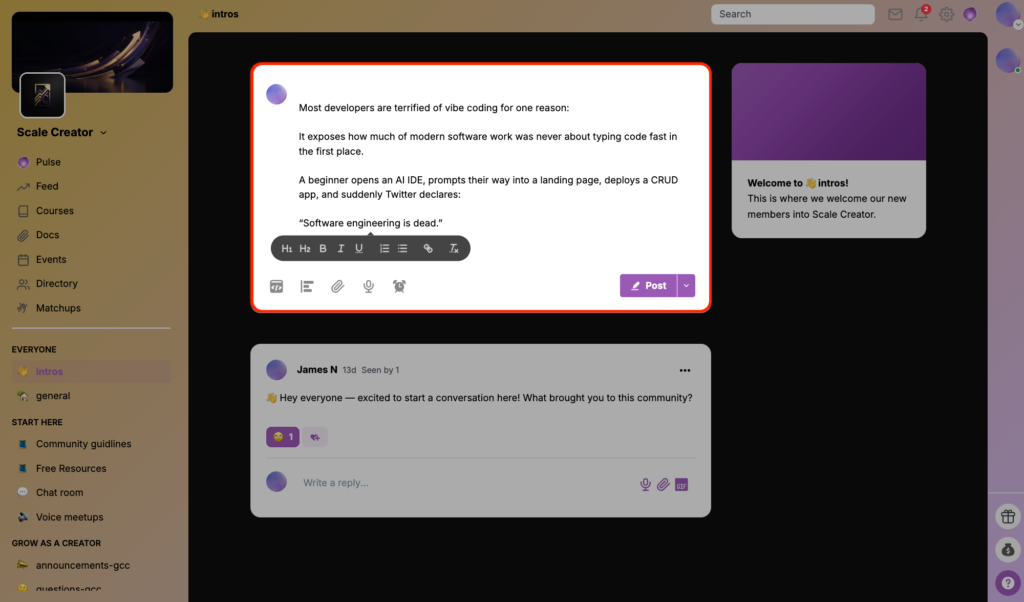
As such, Circle offers one of the best publishing experiences I’ve come across in any community platform.
Its post editor feels polished and flexible, allowing you to create rich community posts with formatting options like: heading tags, blockquotes, bullet lists, code snippets, buttons, polls, images, videos, and many other more blocks you can access through its “/” commands.
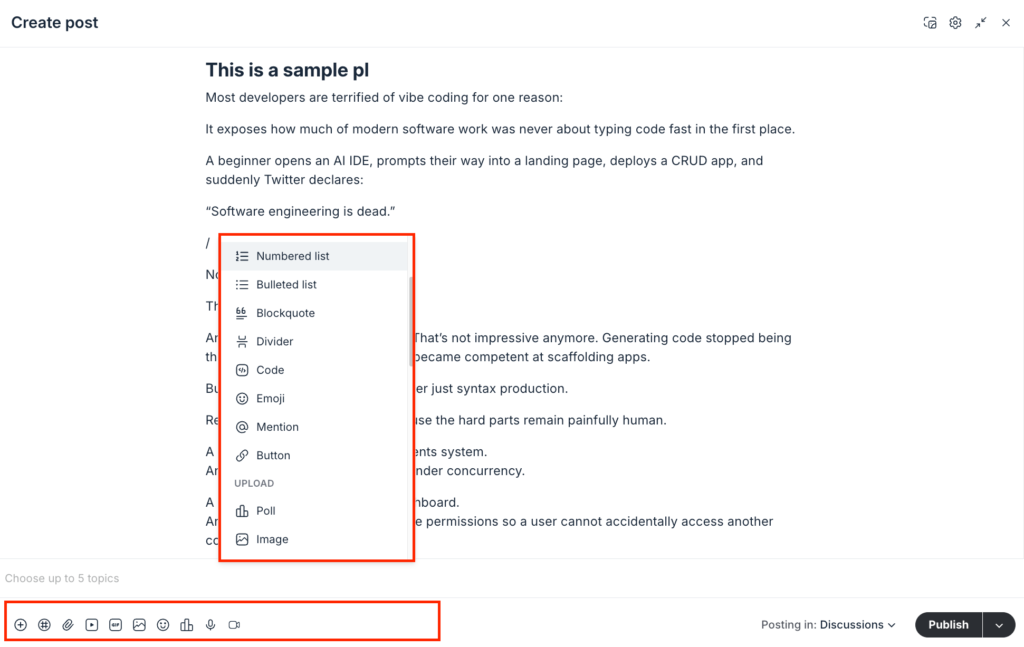
You can also embed content from more than 10 media hosting platforms, including YouTube, Loom, Wistia, and others.
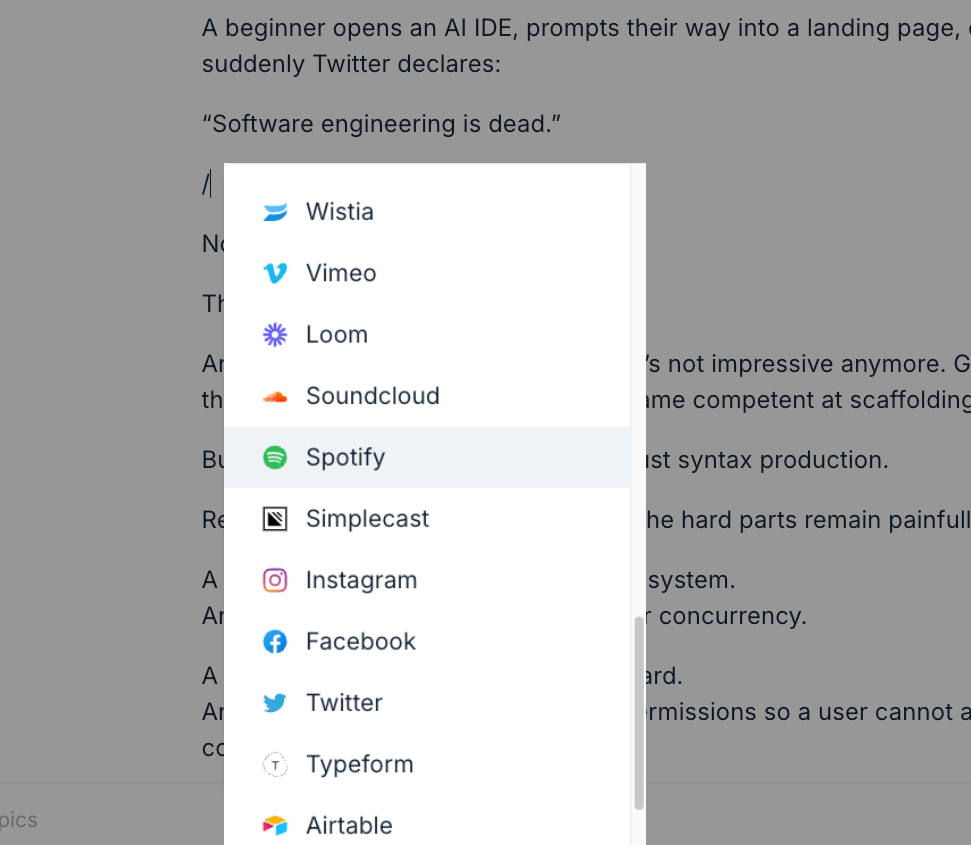
The publishing experience feels so seamless that it almost resembles using dedicated publishing platforms like Substack or Medium.
That said, Circle lets you publish both short-form discussions and more long-form, media-rich content, allowing your community to behave almost like hybrid forums and lightweight publishing platforms.
This enables you to create high-quality educational content, announcements, tutorials, newsletters, event recaps, and long-form discussions directly inside your community.
Meanwhile, Heartbeat’s publishing experience feels noticeably more lightweight. Its editor is more barebones, with fewer formatting tools, content blocks, and customization options..
But, Heartbeat offers Matchups that let you create a much more proactive engagement model compared to traditional community platforms where interaction depends heavily on members initiating conversations themselves.
MatchUps function like an automated networking and relationship-building system inside your community. Instead of relying entirely on members to organically discover and connect with each other, Heartbeat empowers you to actively facilitate introductions through automated pairing systems.
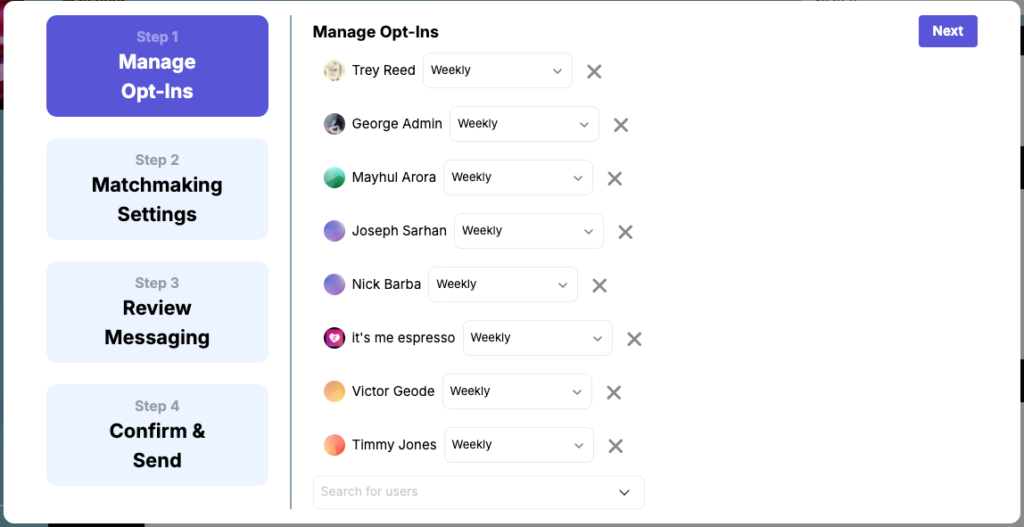
You can build a matchmaking pool where members are automatically paired:
- one-on-one for conversations,
- in small groups for collaboration,
- on recurring schedules (weekly, bi-weekly, or monthly)
These can come in handy if you’re looking to cultivate accountability check-ins, and networking conversations.
Circle does not natively offer an equivalent automated member-to-member pairing system. Any similar setup typically requires manual coordination or external tooling.
That creates a much more proactive engagement model compared to traditional community platforms where interaction depends heavily on members initiating conversations themselves.
For example, you could:
- Pair new members with experienced members for onboarding
- Match accountability partners weekly
- Create mastermind-style small groups
- Facilitate networking between founders, creators, or operators
- Connect members based on shared interests, goals, or participation levels
D) Both Circle and Heartbeat allow you to host and manage community events natively, but Circle’s live event infrastructure is significantly more refined and integrated.
Using the two platforms you can:
- schedule live events
- send reminders and notification emails
- allow members to RSVP
- manage recurring events
- host paid events or gated sessions
- integrate with external video conferencing tools like Zoom or Google Meet
However, Circle goes a step further by letting you host live sessions directly inside the platform through its native Live Rooms and Livestream tools.
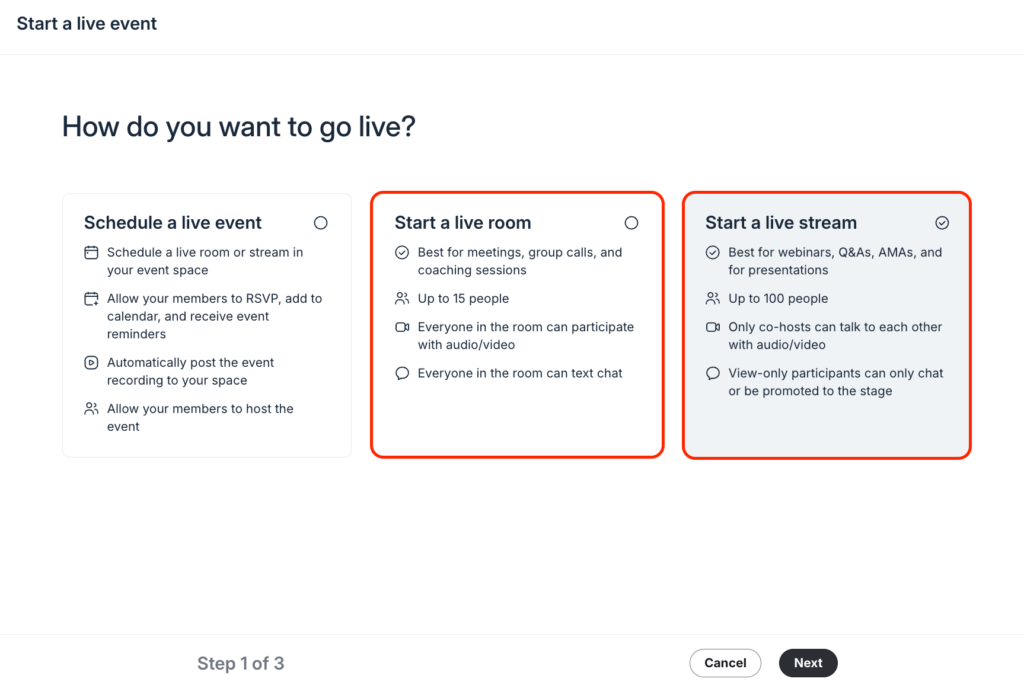
Live Rooms are designed for interactive sessions where members can join with their camera and microphone. They work especially well for:
- 1-on-1 coaching calls
- Group workshops
- Collaborative meetings
- Office hours
- Small community discussions
Livestreams, on the other hand, are more broadcast-oriented. Hosts and co-hosts appear on camera while attendees primarily participate through chat and reactions, similar to webinars or live broadcasts.
I tested both tools and the experience felt far more polished than I expected. The interface feels comparable to dedicated livestreaming and video conferencing software, so there’s very little learning curve for either hosts or members.
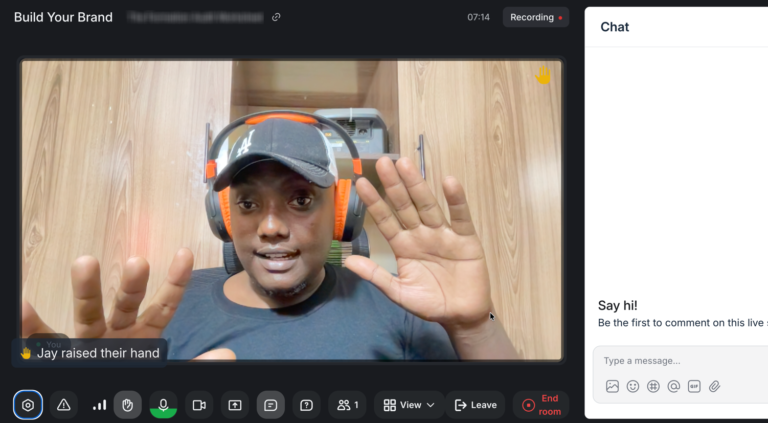
But the bigger picture is not just that Circle hosts live sessions natively. It’s how well it integrates into the broader community workflow.
For example, you can:
- Automatically record live sessions
- Publish recordings directly back into the community
- Keep replays attached to the original event thread
- Restrict link sharing so unauthorized users cannot join forwarded sessions
- Turn live sessions into evergreen community content
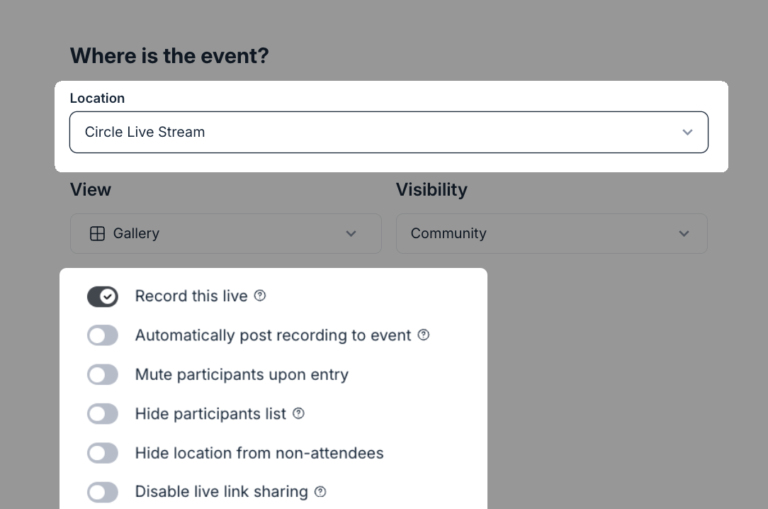
As a result, Circle treats events as long-term community assets. Your workshops, webinars, coaching calls, and live training can continue generating value after the event itself is over.
Meanwhile, Heartbeat has Voice Rooms and Channels that support live video feeds. But to me it felt more like Slack Huddles or Discord voice channels. Sure you could use them to hold casual live community hangouts. But there’s a reason many people prefer using Zoom events.
Essentially, it lacks a more refined infrastructure to hold end-to-end community events. For example, I could not find strong support for things like native replay management, post-event content workflows, or more advanced attendee access controls
E) Both platforms let you build and sell online courses, but Heartbeat offers a better structure for running cohort-based programs.
Circle and Heartbeat both let you build and deliver courses without paying for external tools like Teachable or LearnWorlds on the side.
However, when it comes to more advanced learning management features, both platforms lack:
- Randomized question banks
- Multi-format quizzes
- Advanced grading logic
- Competency-based assessments
- SCORM compliance
- Detailed testing analytics
- Certification tracking
Which is where dedicated online learning platforms like LearnWorlds still have an edge.
In my opinion, both Circle and Heartbeat will work perfectly fine for simpler online education products that don’t require detailed assessments such as: prerecorded video courses, memberships, and community-based learning programs.
But beyond that, I found Hearbeat to offer a better experience when it comes to hosting cohort-based courses.
It offers a cohort-based program building tool that lets you launch a learning group where students move through the curriculum together on a shared timeline.
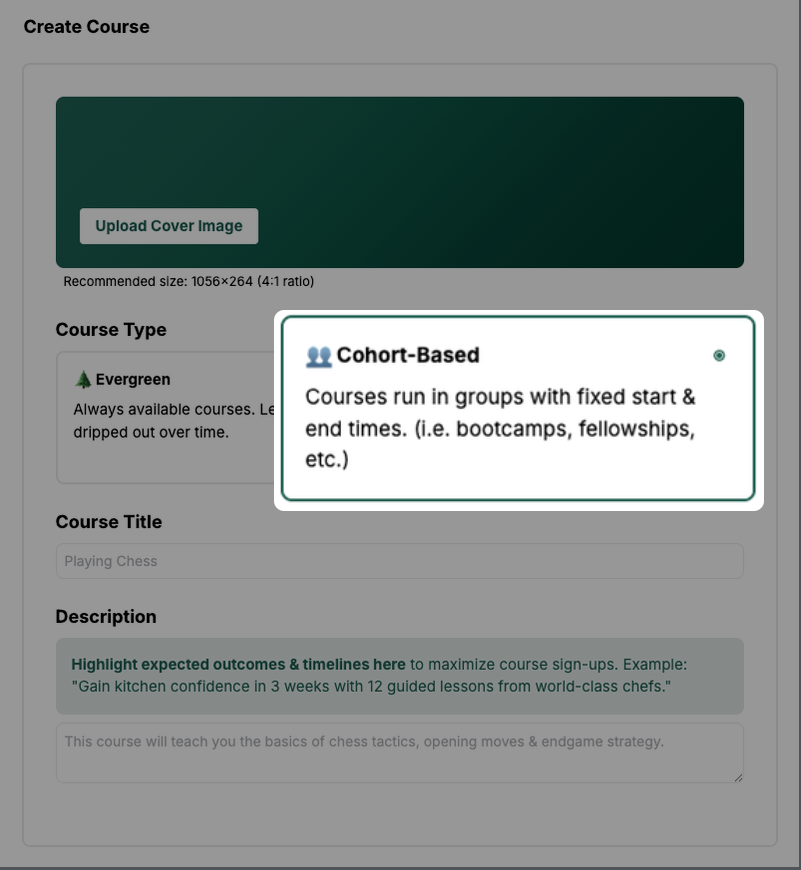
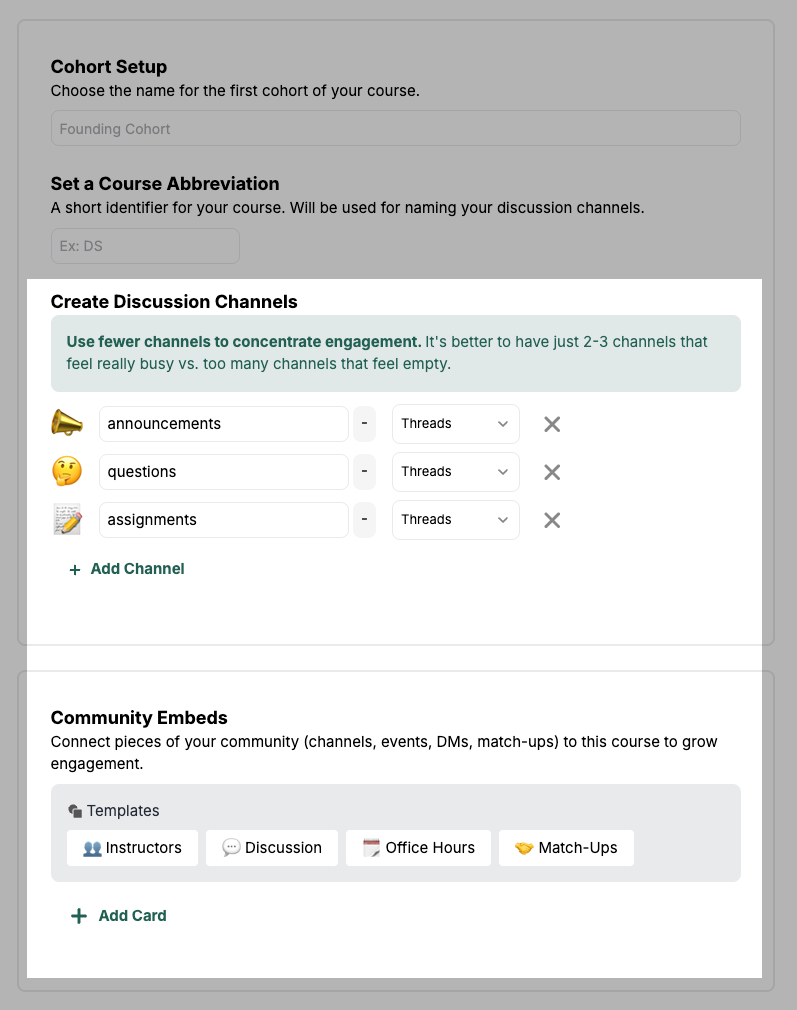
Inside your cohort program, you can add discussion channels to enhance engagement and cultivate accountability. And even better, embed other community experiences into your program, such as:
- Match-ups
- Events
- Documents
- Instructor profile
But that doesn’t mean you can’t replicate the same cohort-based experience in Circle. After all, its community software with courses as one of its core offerings.
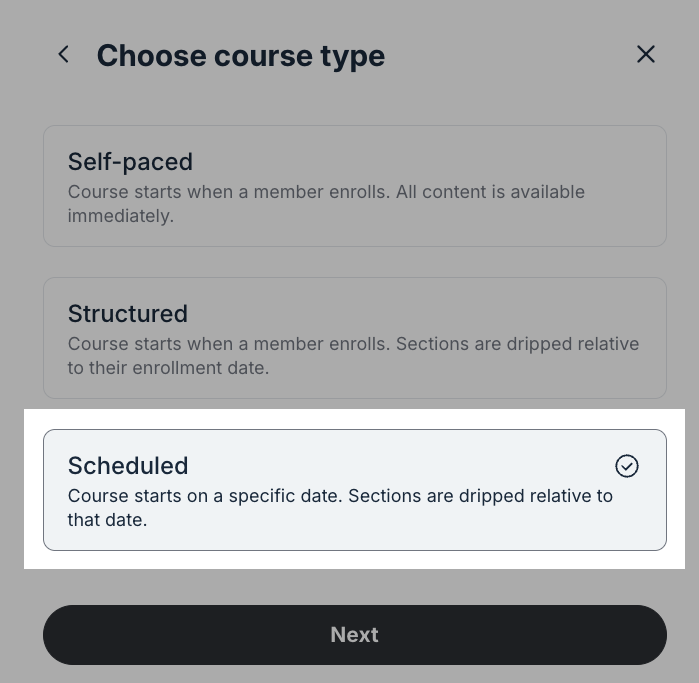
I tried doing so by using the “Scheduled” course model where I could set the specific date for the course and then drip the other materials relative to when the course starts.
After which I created separate spaces for discussions, events, resource libraries, and members directory.
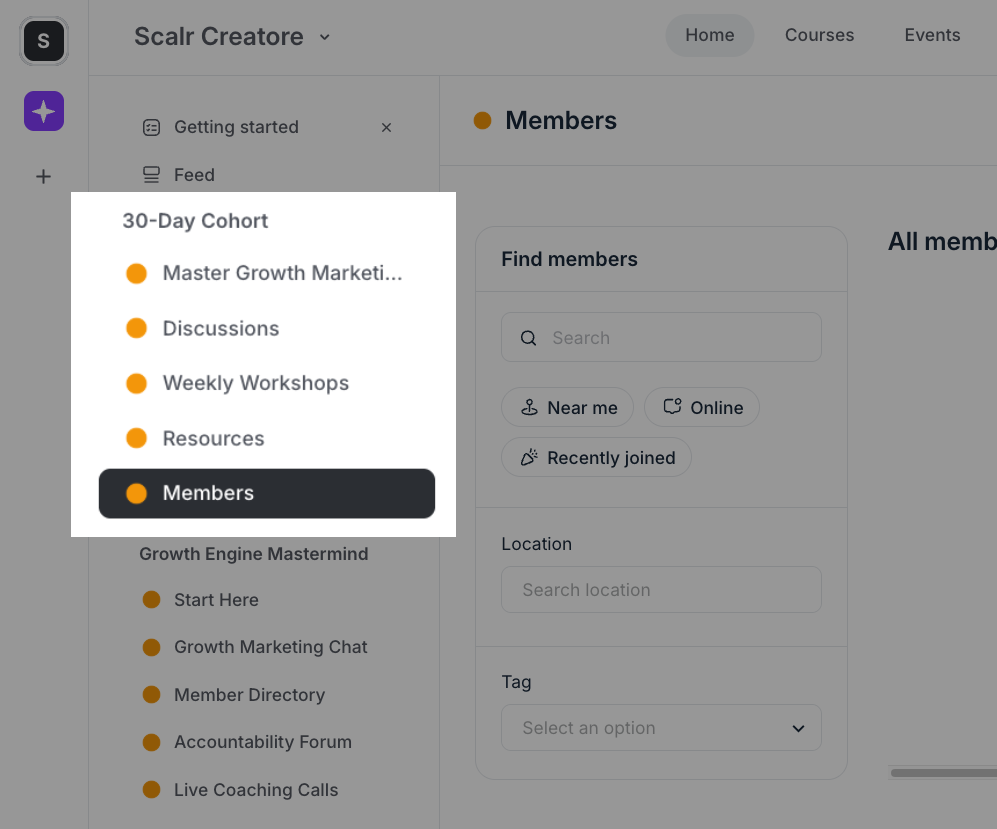
I then created an Access Group to bundle access to all the spaces. Much like a cohort group.
But as you can tell already, this looks more of a workaround. And when you’re building something with workarounds, anything could go wrong or even make it harder to scale.
Meanwhile, Heartbeat offers a dedicated tool for your cohort program. As a result, you get a platform intentionally designed for shared, paced learning experiences.
G) Circle has a more advanced page builder and email marketing suite
With Circle, you can build professional-looking web pages for your community, membership offers, events, and lead generation campaigns without relying on a third-party page builder. The platform includes a native drag-and-drop landing page builder along with up to 8 prebuilt page templates to help you get started quickly.

Beyond the templates, Circle provides a solid collection of content blocks covering most of the essential sections you’d expect on a landing page, including hero sections, pricing tables, call-to-action blocks, FAQs, testimonials, and more. Though I must admit that the template designs look quite similar just with minor design tweaks.

But even so, it doesn’t take you much time to whip together a design that feels like your brand. Simply, select the element you want to modify and the builder will open a right side panel with all the customization options you could make to that block.
What I particularly like is how easy it is to make those designs feel aligned with your brand. You simply click on any section you want to modify, and the builder opens a settings panel on the right-hand side containing all the customization options available for that block. This makes it possible to adjust layouts, colors, text, spacing, and other visual elements without feeling overwhelmed.
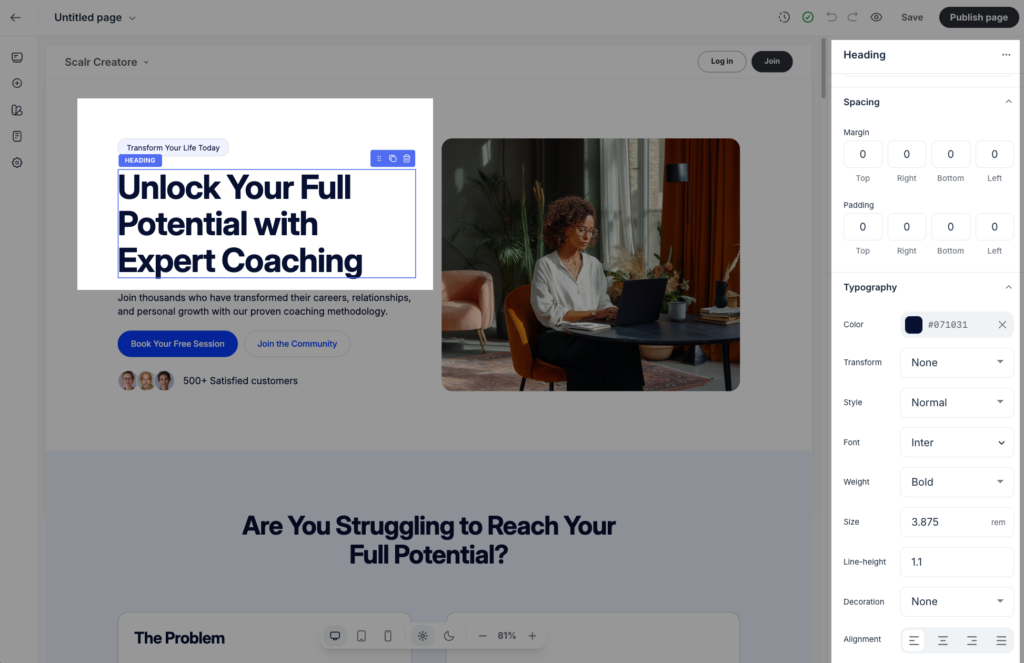
Of course, you won’t get the sophistication of dedicated page builders like Landingi or Leadpages. But from all the platforms I’ve used in membership space, community building and course creation, Circle has one of the best native landing page builders.
Meanwhile, it doesn’t have a native page builder. What you get to create instead is a “signup link” page.
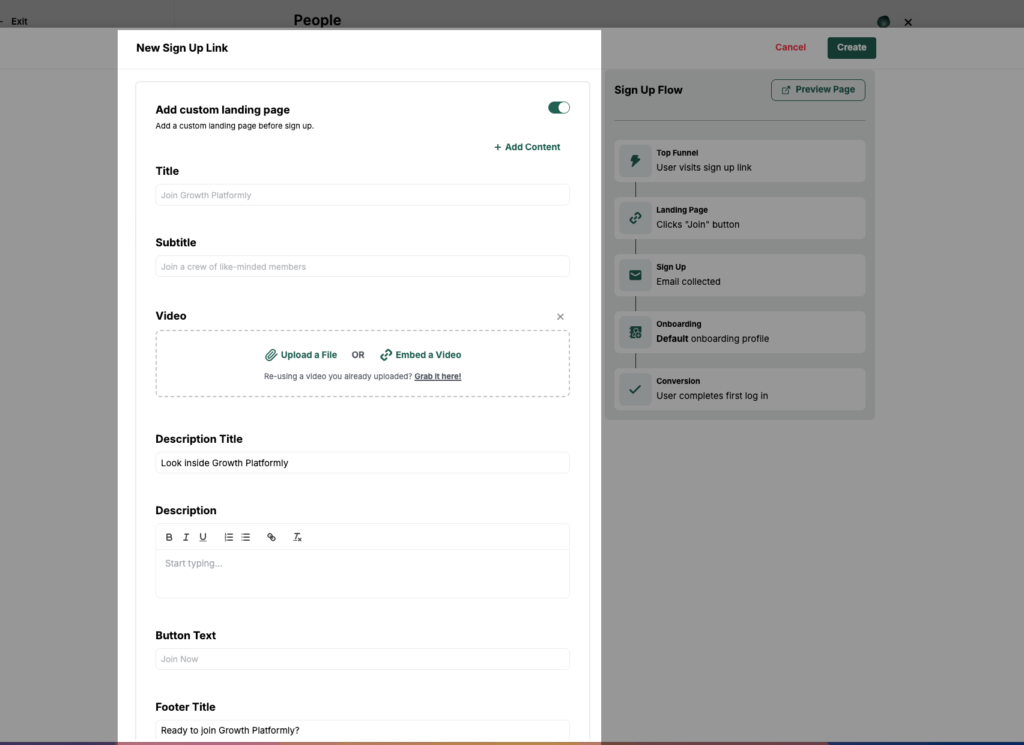
Think of it as a lightweight landing page for your community or offer.
You can add:
- A page title and subtitle
- Hero media like videos or images
- CTA buttons
- Descriptions
- Social proof elements
And that’s about it.
Unlike Circle, there is no visual drag-and-drop editor that allows you to build and preview your page in real time. To see how your page looks, you’ll need to open a separate preview window. You also don’t get access to section templates, advanced layout controls, or detailed customization for individual page elements. Instead, you’re working within a more rigid framework that largely inherits the styling and design settings of your community theme.For creators who simply need a functional signup page, this may be enough. But if landing pages are an important part of your marketing strategy, Circle gives you significantly more creative control and flexibility.

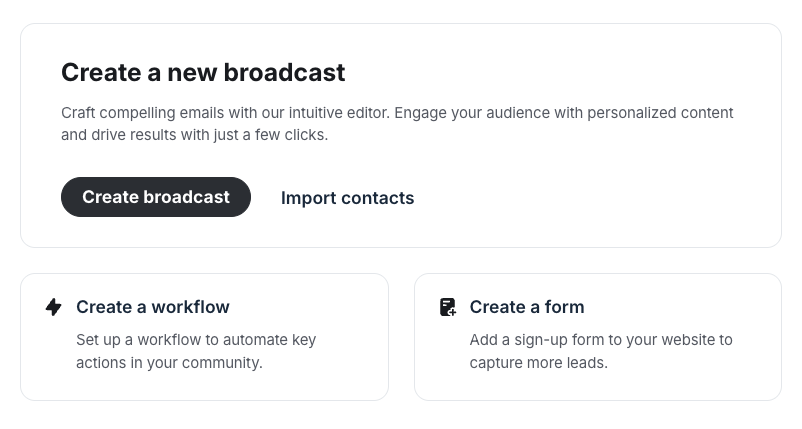
Speaking of marketing, Circle’s Email Hub is much closer to a complete email marketing platform.
With Email Hub, you can:
- Send broadcast emails
- Build automated email sequences
- Create custom signup forms
- Organize contacts using Tags and Segments
- Import subscriber lists from third-party email providers
On their own, those features already make Circle a capable email marketing solution. But where it really stands out is in how deeply its email tools integrate with the rest of the platform.
Because Email Hub connects directly with Circle’s automation system, you can build sophisticated email workflows that react to member behavior and community activity. For example, automations can be triggered when someone:
- Joins a community
- Purchases a membership
- Completes checkout
- Opens an email
- Clicks a link
- RSVPs to an event
This is the kind of behavioral automation you’d normally expect from dedicated email marketing platforms such as MailerLite or ActiveCampaign. As a result, Circle can handle far more advanced nurturing, onboarding, and engagement workflows than most community platforms.
This is the level of automation you’ll find on more advanced email tools like MailerLite and ActiveCampaign.
Now the bad news is that Email Hub (Circle’s email marketing suite) is offered as an addon. And to fully unlock its potential with workflows, you need to be on the Business plan and above. So basically, expensive.
Meanwhile, Heartbeat’s email tools are fairly basic. It feels closer to an automated member communication than a full email marketing platform.
Sure, you can:
- Send broadcast emails
- Create automated email sequences
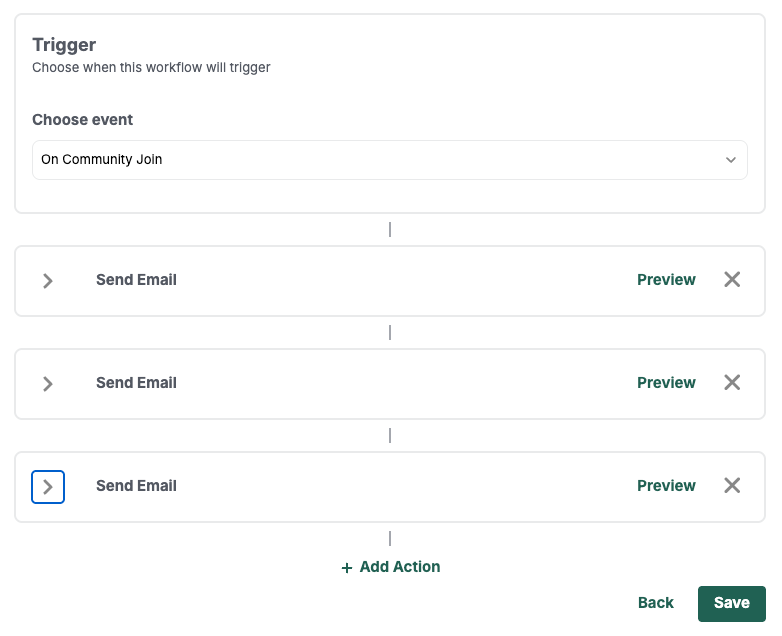
But the setup works well for onboarding and engagement automation as there are still some major limitations.
You don’t get:
- Advanced email design tools
- Newsletter-style builders
- Detailed campaign reporting
- Advanced segmentation systems
Heartbeat vs Circle: pricing review
 |  | |
| Entry paid | Professional: $129/mo annual. Unlimited members, 3 admins, 20 spaces, 200GB storage, 20 automations, 2% transaction fee. | Build: $49/mo monthly or $40/mo annual. 350 members, 5 workflows, custom domain, 5% transaction fee. |
| Mid | Business: $219/mo annual. 5 admins, 30 spaces, 500GB, unlimited workflows, API access, headless API, 1% transaction fee. | Grow: $149/mo monthly or $124/mo annual. 5,000 members, unlimited workflows, native video (50 hrs), API access, 2.5% transaction fee. |
| Top tier | Circle Plus: Custom pricing. AI Agents, custom SSO, branded mobile app, dedicated CSM, 0.5% transaction fee. | Scale: $849/mo monthly or $766/mo annual. Unlimited members, branded mobile app, 200 hrs video, dedicated onboarding, 1.25% transaction fee. |
Heartbeat has a cheaper entry-level plan but comes with steeper limits and charges high transaction fees. Circle is expensive upfront but offers better value for money in the long run.
One of the biggest differentiators between Heartbeat and Circle is pricing. Heartbeat starts with a cheaper entry-level tier, while Circle is more expensive even on its lower plans.
But once you look beyond the pricing pages and examine what you actually get — and the compromises you have to accept on each platform — it’s clear that Circle offers stronger long-term value for growing communities.
Heartbeat is cheaper than Circle, no question. Its lowest tier starts at $49 per month.

That’s 3X cheaper than Circle’s Professional plan, which costs $129 per month.
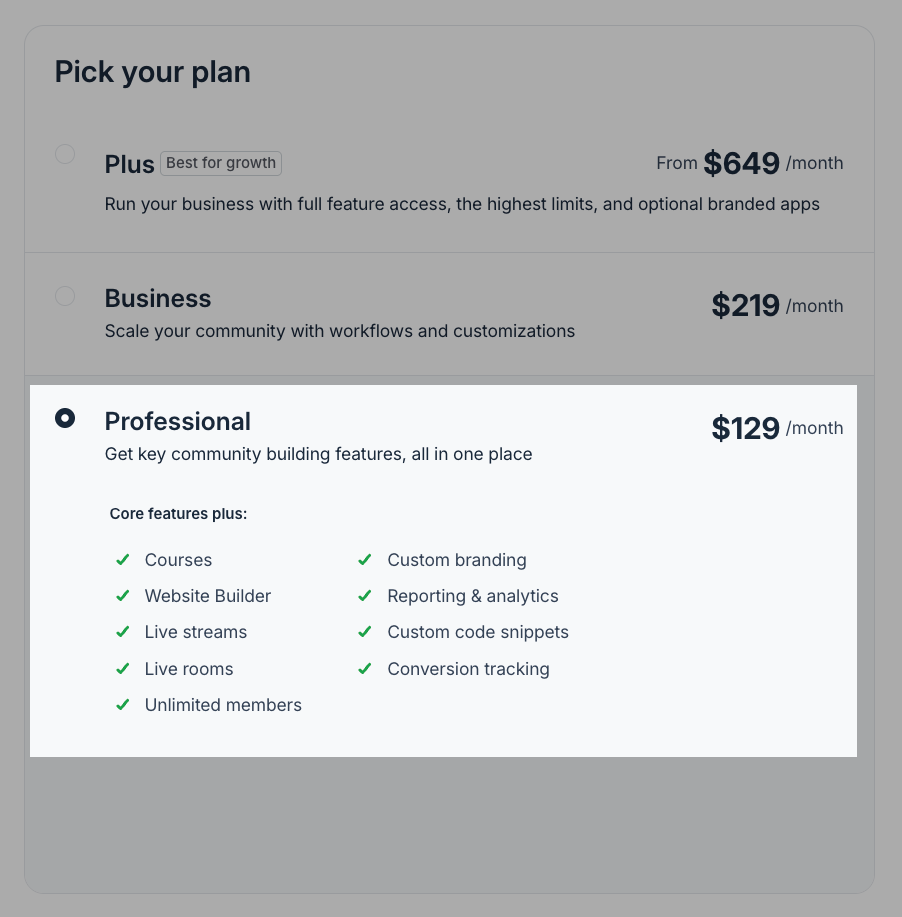
Scale up and that gap quickly closes.
First, let’s start with member limits.
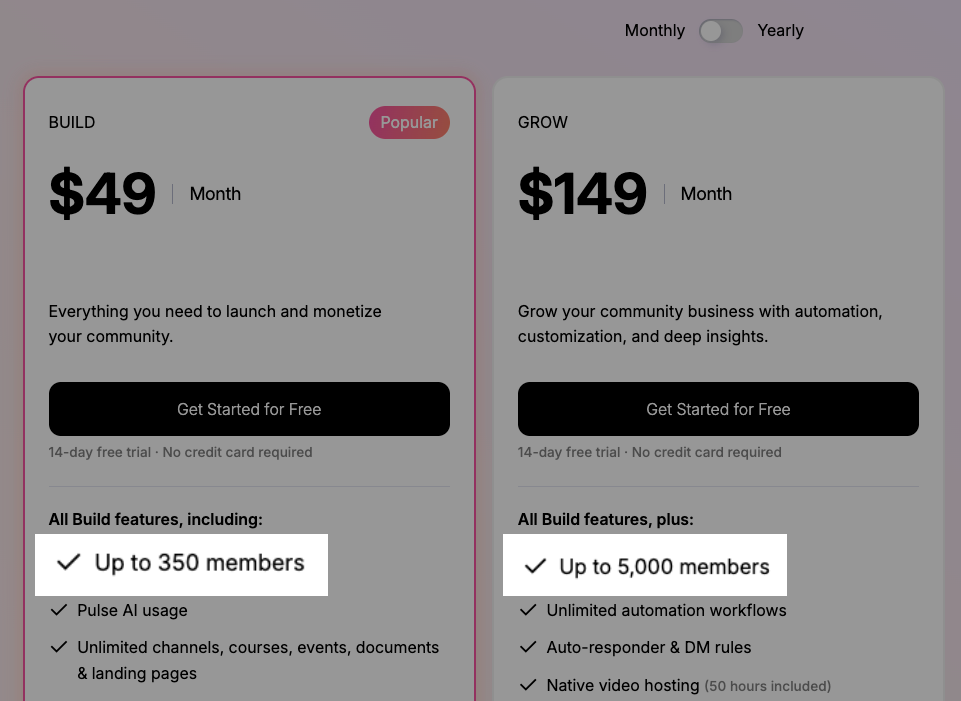
Heartbeat restricts how many members you can have in your community. The Build plan limits you to 350 members and 5000 on the Grow plan.
On the other hand, Circle doesn’t put any limits on members you can host in your community.
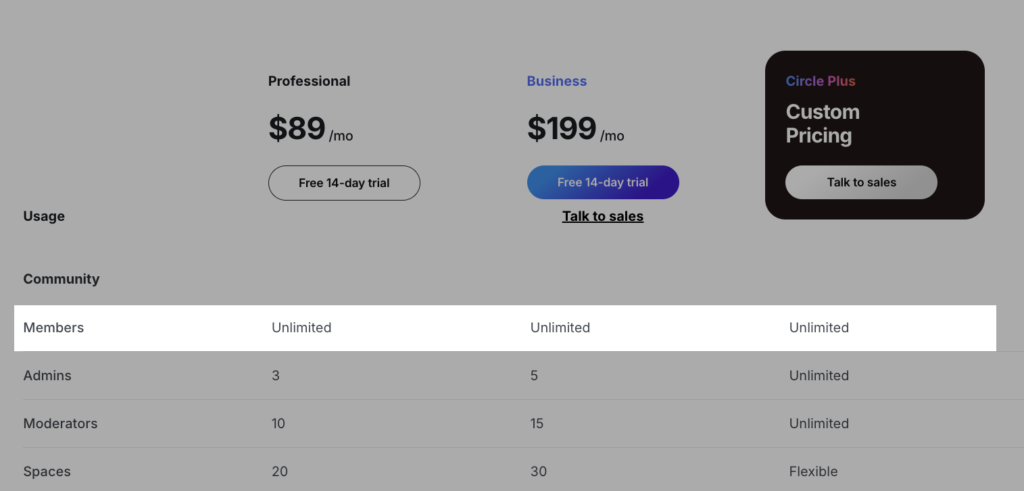
Instead, it limits the number of admins, moderators and spaces you can have per plan. Which makes sense. Because these are things you upgrade to get more because your community is growing.
Now transaction fees.
Heartbeat charges high rates across the board.
The Build plan includes 5%. Grow charges 2.5%. Scale charges 1.25%.
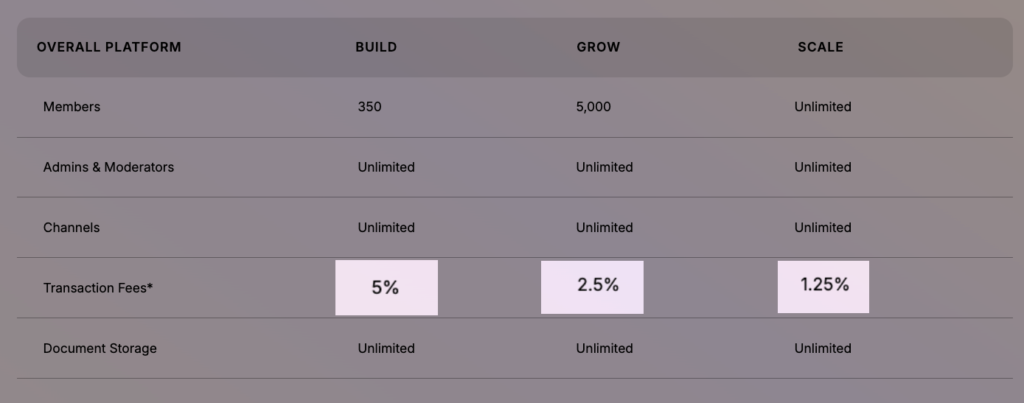
None of those numbers include Stripe’s fees, because Heartbeat processes payments through Stripe.
So on the Build plan, you’re actuall paying 5% plus 2.9% plus 30¢ per transaction.
Say you charge $30 a month and have 100 members. That’s $3,000 in monthly revenue. Heartbeat takes $150. Stripe takes $87 in percentage fees plus $30 in per-transaction fees. You hand over $267 before paying for your Heartbeat plan.
Meanwhile, Circle’s transaction fees are significantly lower. They start at 2% and go as low as 0.5% on its Circle Plus plan.
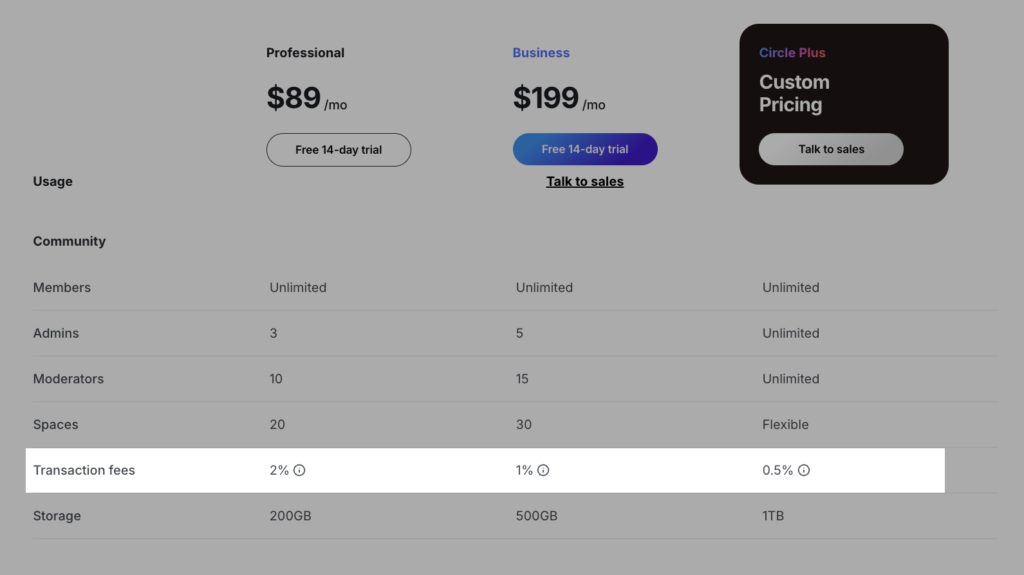
Circle’s transaction fees start at 2% and drop to 0.5% on Circle Plus. Stripe still takes its standard cut on top. Against Heartbeat’s 5% on the entry plan, Circle is a fraction of the cost.
Circle vs Heartbeat: Pros and Cons
Below are the benefits and the downsides of using either Circle or Heartbeat.
Circle Pros and Cons
Pros
Cons
Heartbeat Pros and Cons
Pros
Cons
Heartbeat vs Circle: which one’s the best for online community building
Most creators comparing these platforms are looking for a single solution that brings together community management, courses, events, and payments under their own brand.
As this review has shown, both Circle and Heartbeat deliver on that core promise. However, they take different approaches and excel in different areas.
Circle stands out for its mature community management tools, robust event capabilities, and a good enough online course builder.
Heartbeat, on the other hand, focuses heavily on member engagement. Features such as voice rooms and member matchups create opportunities for interaction beyond traditional discussion forums. It also has an advantage for creators who want to run cohort-based courses without relying on workarounds.
With those differences in mind, here’s my recommendation on when to choose either platform.
Choose Circle if you want:
- A platform with powerful community management tools that can support you as your community scales
- Enterprise-grade branding, customization, and security features
- Robust event hosting and management capabilities, including built-in live sessions that reduce reliance on external tools
- Better organization of content, spaces, and resources, supported by a strong search experience
- Built-in landing pages and email marketing tools
- Lower transaction fees
Choose Heartbeat if you want:
- To run cohort-based courses more easily and natively
- Alternative engagement formats beyond forum discussions and traditional gamification
- An affordable community platform for validating a new idea or building an early-stage community
Also explore how Circle compares with other leading community platforms:
