
5 Best Web Hosting Providers of 2026 [I Bought & Tested Them All]

2 years ago, I chose a web hosting service provider because it was cheap.
But it later cost me. BIG TIME.
On paper, the web host looked like a dream for every small business starting out and looking to scale.
Unlimited storage/bandwith, free SSL, NVMe SSD storage, LiteSpeed web servers (which are known to be exceptionally faster than typical Apache webservers) and a 99.99% uptime claim.
But then, my website began to grow. And everything began to unfold.
My site became ridiculously slow: loading in 10 seconds. I also experienced 30 minutes of downtime 2 times a week.
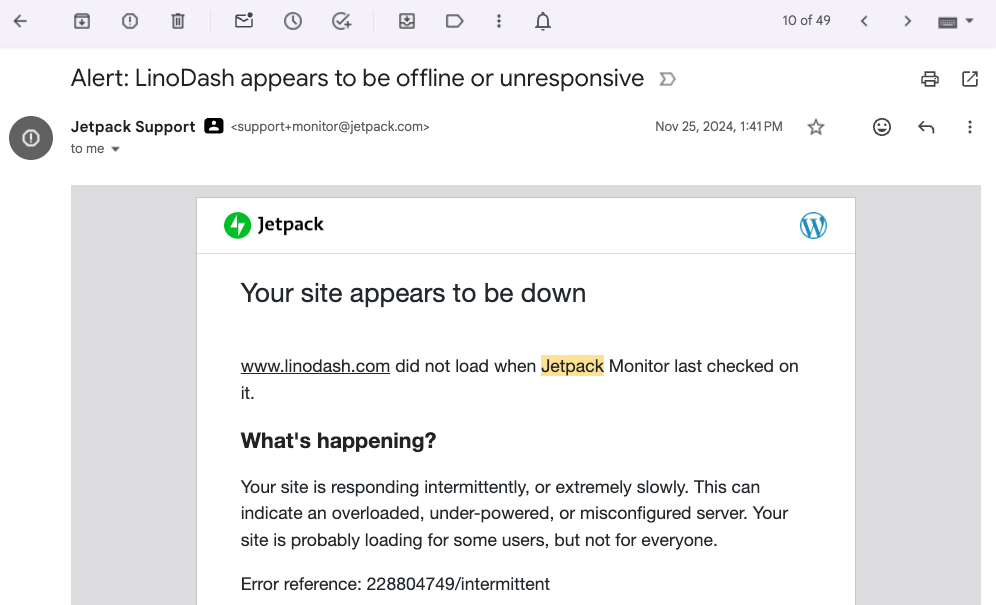
And when I reached out to their support team, they were often slow, inexperienced and sometimes never got back to me.
During that time my traffic took a sharp nose dive.
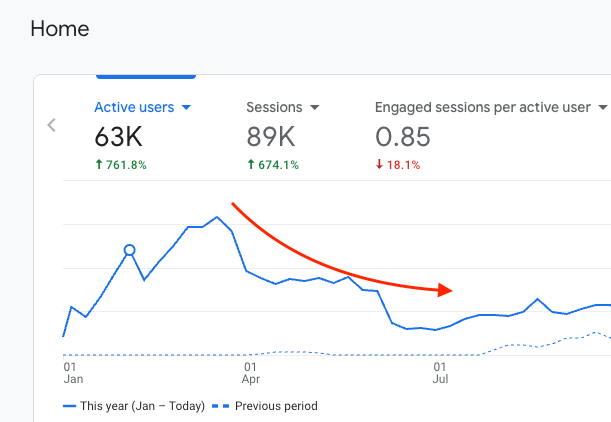
And I haven’t been able to scoop it back since then.
Given the experience I had to change how I judged a hosting provider. Many web hosts list shiny features like AI builders, free domains, Google Cloud hosting and what not.
But in real sense, what matters is:
- How fast are their servers?
- How consistent is their uptime?
- Can the server stay stable during traffic spikes?
- Is the pricing fair for the performance you get?
- How strong is their security?
- Does support solve issues effectively and fast?
Truth is:
You don’t have time to test each host to see how they measure up in all the 6 aspects.
So I researched and tested 15 popular hosting services to see how they measure up on the above aspects to help you make an informed decision.
From my experience and testing, the best web hosting providers are:
- Rocket.net – Best managed WordPress hosting overall
- Hostinger – Best for starters (free domain & best value for money)
- ScalaHosting – Fastest cloud VPS
- Cloudways – Best for flexibility and scalability
- LiquidWeb – Best eCommerce-optimized hosting
Best Web Hosting: A Quick Comparison Summary
| Host | Best for | Global TTFB | Uptime | Pricing |
| Rocket.net | Fast growing WordPress content sites, agencies, WooCommerce stores at scale, membership sites | 52.07 ms | 100% | $30 – $100/mon |
| Hostinger | Small blogs, Local service sites, Simple WordPress shops | 122.36 ms | 99.831% | $12.95 – $27.95/mon |
| ScalaHosting | Growing ecommerce sites with large catalogs, Small agencies managing multiple sites, High-traffic WordPress blogs | 48.46 ms | 100% | $49.95 – $239.95/mon |
| Cloudways | Custom website builds (Laravel, WooCommerce, Magento), API-heavy apps, High-growth stores needing elastic scaling, Agencies managing many projects | 350.75 | 99.99% | $11 – 3569.98/mon |
| Liquid Web | Large WooCommerce stores, High-volume transactional sites, Mission-critical digital businesses | 274.22 | 99.99% | $5 – $196/mo |
#1: Rocket.net
Best managed WordPress hosting with excellent customer support.
Pros
Cons
I currently host this website on Rocket.net.
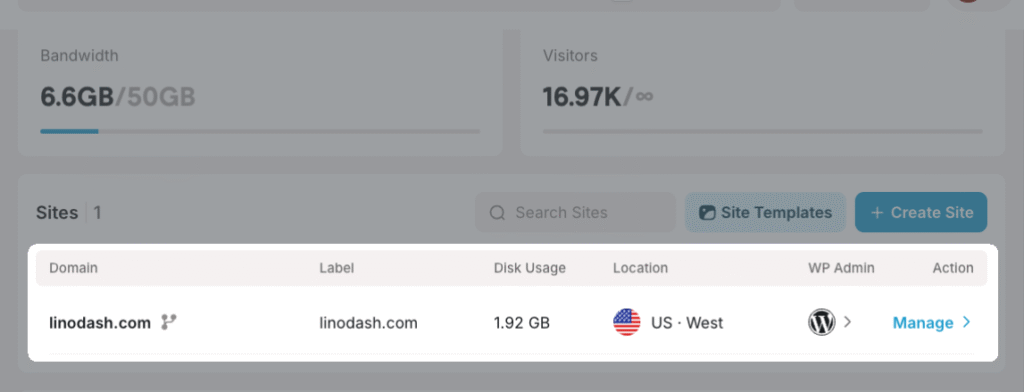
And the experience has been nothing but excellent.
In over six months since migrating, my site’s uptime has been stable and the page loading under a second.

Rocket.net is the best web host if you want the core workload of managing and optimizing your WordPress site taken off your hands while you focus on growing your website.
It’s built on high-end infrastructure featuring Cloudflare’s enterprise CDN, 32 CPU cores + 128GB RAM servers, NVMe storage, Redis, and Object Cache Pro (included for free), to deliver exceptionally fast load times even on resource intensive sites.
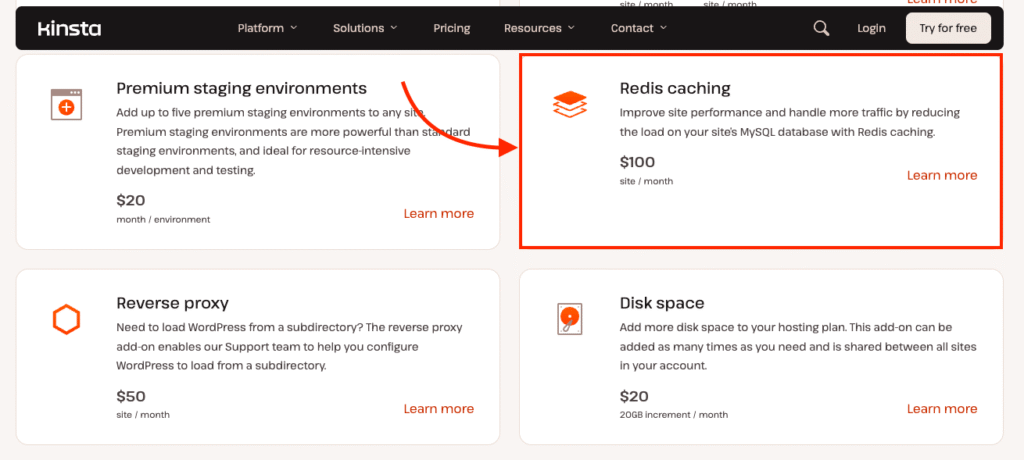
By comparison, popular managed WordPress hosts like Kinsta charge extra for Redis caching ($100 per month per site).
Rocket.net also includes unlimited PHP workers on every plan making it an excellent solution to host dynamic sites like membership portals, and ecommerce sites.
With platforms like Kinsta, PHP concurrency is capped. For example, the Single 750k plan provides 8 PHP threads, each limited to 256 MB of memory. That means only 8 uncached actions can run at once. When more people visit the cart, checkout, or account pages at the same moment, extra requests wait. That wait slows down your site and login portals leading to users leaving your site.
Time to First Byte (TTFB) measures how long the server takes to respond before any content loads. Google sets the benchmark at under 800ms, but that limit only reflects the minimum acceptable baseline.
Modern sites need more than “acceptable.”
I usually aim for a TTFB under 200ms because the server response lays the foundation for everything that follows.
Rocke.net’s TTFB was below 100ms across eight global locations with the fastest being Amsterdam loading in under 35.55ms.
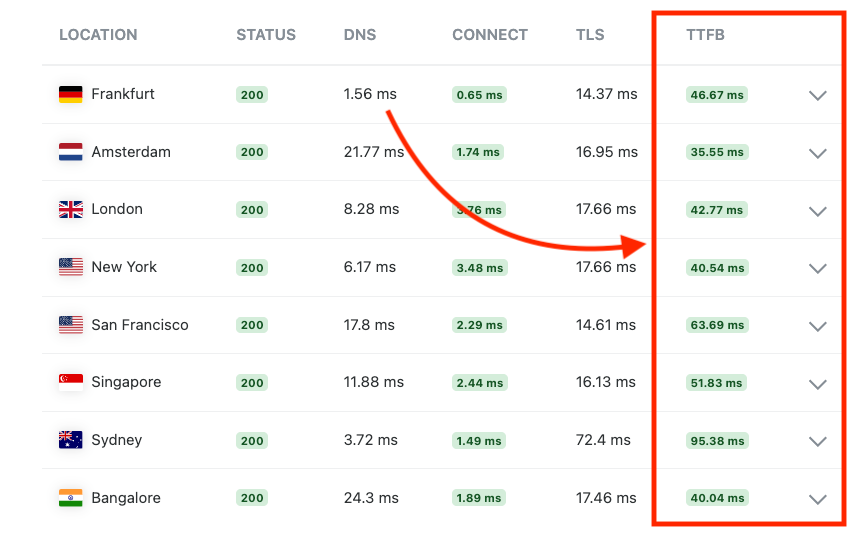
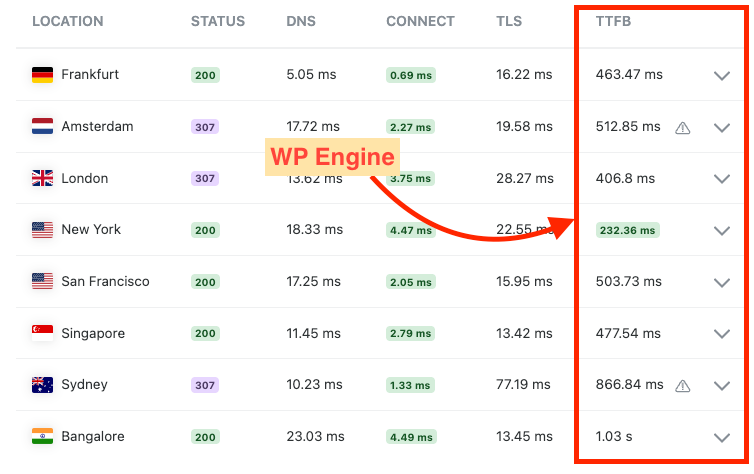
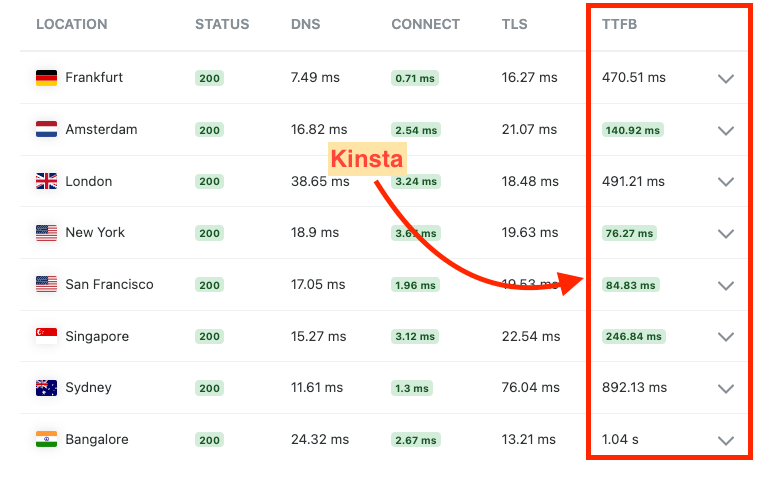
That’s impressive compared to WP Engine and Kinsta that were significantly slower.
Speaking of support, Rocket has one of the fastest and experienced customer support. It consists of specialized WordPress engineers to help you explore issues and resolve them. They are available 24/7 via a live chat and support ticket.
When I joined Rocket, their team helped me migrate from my previous host and the moment I changed my DNS, my website worked instantly.
Rocket.net pricing review

Of all the hosts I tested, Rocket.net offers the clearest pricing and the strongest value.
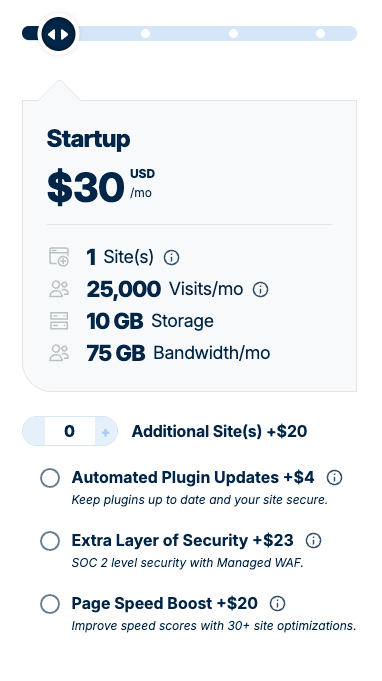
When you compare it with Kinsta or WP Engine, you see how much they push add-ons that should already be part of a managed WordPress plan. Kinsta charges about $100 per site each month for Redis (which is free and opensource). Rocket includes Redis, Object Cache Pro, and even a WP Rocket license at no extra cost. WP Engine on the other hand adds fees for automated plugin updates, a managed WAF, and Page Speed Boost on its Essential plan.
Across all Rocket.net plans you get access to unmetered bandwidth, unlimited PHP works and generous bandwidth limits starting at 50GB for its Starter Plan.
You also get $1 for your first month of hosting and the plans come with a 30-days back guarantee unlike platforms like Servebolt with an unrefundrable policy.
Below is a pricing breakdown of Rocket.net managed hosting prices.
- Starter: $30 per month (1 site, 10 GB storage, 50 GB bandwidth)
- Pro: $60 per month (3 sites, 20 GB storage, 100 GB bandwidth)
- Business: $100 per month (10 sites, 40 GB storage, 300 GB bandwidth)
Bottom line: Rocket.net is the best managed WordPress host if you want enterprise-level performance at an affordable price tag. It’s fast, reliable and has a transparent pricing structure. Choose it if you have a growing blog, high traffic business website and WooCommerce store.
#2: Hostinger
Most affordable for starters and small websites
Pros
Cons
Hostinger offers the best value for money for first timers. For your first year hosting, you can pay as low as $35 and get a free domain.
However, these are introductory prices and they shoot during the renewals (I’ve explained everything in this section). But even so, you get generous resource limits. For example, on its basic plan (Premimum) you can host upto 3 websites, access 20gb of storage and 40 PHP workers and upto 25K monthly visits.
Hostinger is simple to use, which makes it friendly for beginners. It uses its own custom control panel called hPanel, which feels more modern and easier to navigate than cPanel. You can install apps like WordPress with a one-click installer, build websites and easily manage your DNS records.
Among all the hosts that I tested, Hostinger is one of few shared hosting with an impressive and modern web hosting infrastructure. Apart from its starting package that uses typical SSDs, the rest use modern NVMe storage which are typically X10 faster than the later.
Their VPS servers run on 4th-generation AMD EPYC chips which are faster and can handle more load than Intel(R) Xeon(R) Silver. Their servers also use LiteSpeed servers which are faster than Apache and NGINX.

But how fast are Hostinger’s servers in real-world hosting scenarios?
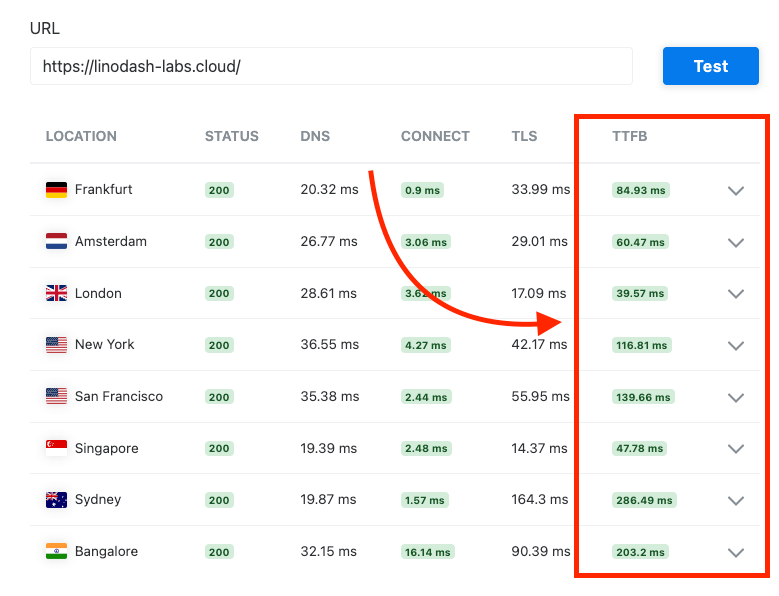
I ran TTFB tests on the Premium plan, and results were strong. Several regions, including Frankfurt, Amsterdam and London loaded in under 100 ms. The US and Australia were slower at around 130 and 286ms, which is still solid for shared hosting.
Now with Hostinger, you’re not limited to hosting WordPress sites. You can also deploy custom websites and host them with Hostinger. You can also build a custom website with its AI Website Builder. Think of it as a Squarespace-like site but hosted on Hostinger web servers.
Hostinger pricing review
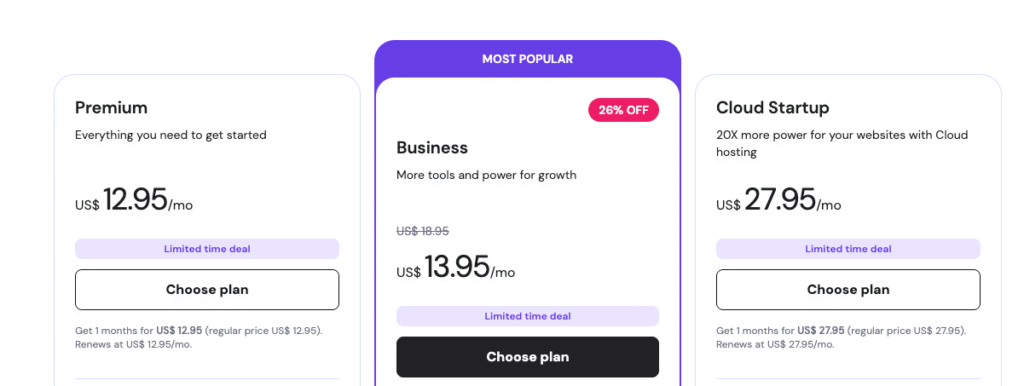
Pricing is the part of Hostinger I hated because the structure is messy and easy to misread.
Let me show you what I mean using the Premium plan.
As a new customer, the headline price is $1.95 per month. It looks like a bargain. But the problem is you only get that price when you pay for 48 months upfront. That’s four years locked into a host you haven’t even tested yet.
Choose a shorter term and the price jumps to:
- 12 months: $2.95 per month
- Monthly: $12.95 per month
And these are introductory prices.
Once your first term ends, the real price shows up.
The Premium plan renews at $10.99 per month when billed yearly. That’s a jump from $2.95 to $10.99.
Then there’s the free domain which is included in your first year of hosting. But renewal pricing jumps to $19.99 per year for a .com TLD.
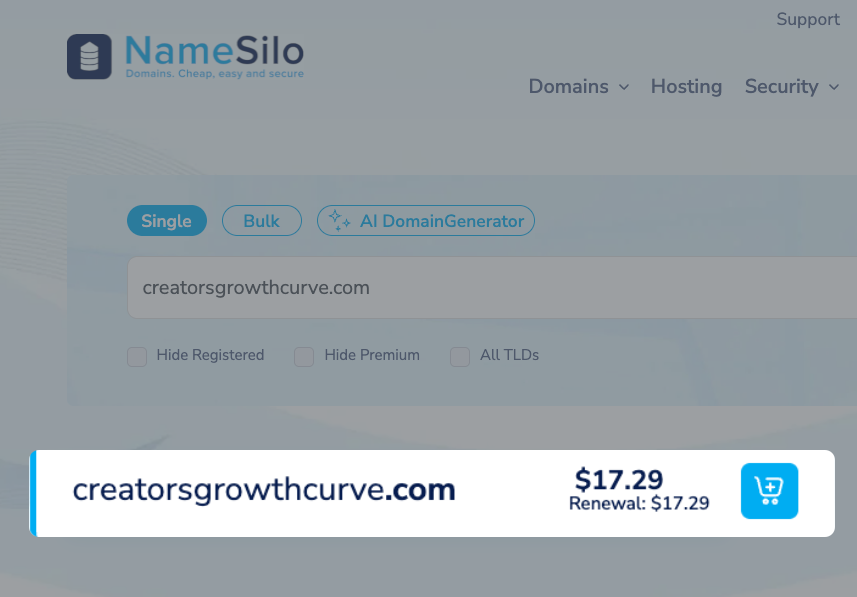
Which you can renew your domain at a lower cost of $17.29 with a registrar like Namesilo.
To be fair, Hostinger isn’t alone. Almost every budget host uses aggressive introductory pricing to draw you in, then bumps renewals to cover their actual costs. The issue is clarity. You have to dig through the fine print to figure out what you’ll really pay.
So instead of getting distracted by promo deals, here’s what Hostinger actually costs if you want honest pricing per month and per year.
|
Plan |
Promotional Price |
Renewal Pricing |
% Increase |
|
Premium |
$35.40 ($2.95/mo) |
$155.40 ($12.95/mo) |
+339% |
|
Business |
$45.00 ($3.75/mo) |
$227.40 ($18.95/mo) |
+405% |
|
Cloud Startup |
$119.40 ($9.95/mo) |
$335.40 ($27.95/mo) |
+181% |
Bottom line: Hostinger gives you more value as you get started. You get a free domain, an AI website builder and generous resources limits like storage, RAM and sites hosted. They also have excellent performance at such a low price. However, I don’t recommend them if you have a growing website, an ecommerce store or LMS sites that have demanding performance requirements.
3. ScalaHosting
Fastest VPS hosting with generous resource limits.
Pros
Cons
ScalaHosting is the best web host if you want the fastest and reliable VPS solutions at a good pricing. It has a modern and performance-optimized hosting infrastructure featuring:
- NVMe SSDs,
- AMD EPYC CPUs clocking to upto 4GHz,
- LiteSpeed webservers,
- Redis object cache.
Its VPS plans have generous resource allocation. You can use 100% of allocated resources to your server without artificial throttling. It also doesn’t limit the number of PHP workers, websites, inodes, bandwidth and traffic.
You can pick from standard managed VPS plans that come with predefined vCPU cores, RAM and storage allocation or customize your resources based on your needs.
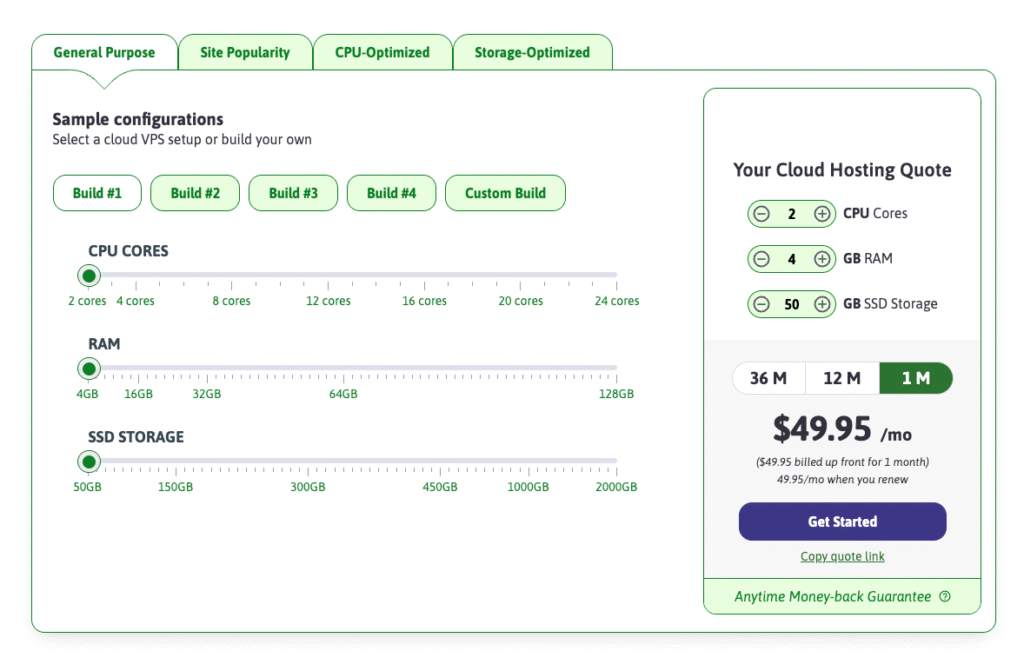
For example, I tested its Build #1 custom Cloud VPS where I allocated my servers 2 vCPUs, 4 GB RAM, and 50 GB NVMe for TTFB benchmarking.
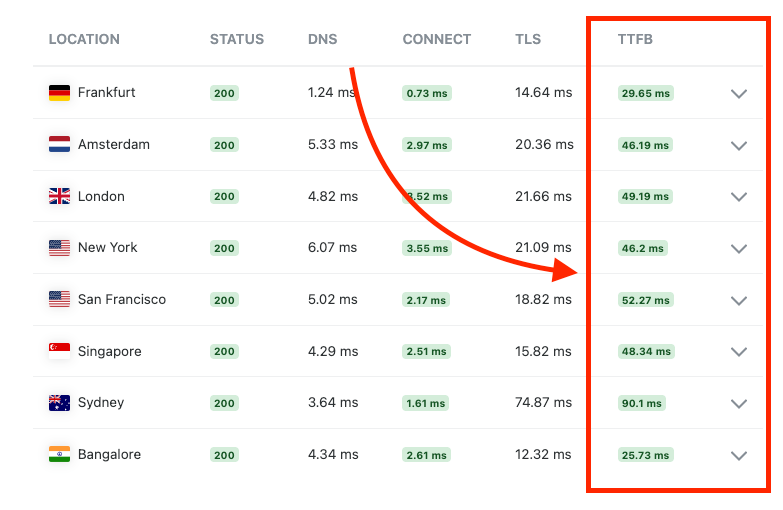
And after running the tests the TTFB results I got were impressive with the fastest region Frankfurt loading at 29.65ms and the “slowest” (Sydeny) 90.1 ms.
Impressive.
But this low global TTFB of under 100ms can also be attributed to ScalaHosting’s broader server presence in the US, Europe, Asia, and Australia which lower latency.

Speaking of support, ScalaHosting offers human support through live chat and tickets. One thing I realized about many hosts nowadays, (like Hostinger and Bluehost) is that they’re highly pushing AI support agents, which are annoying and in most cases unable to offer useful support (I see you Hostinger’s Kodee). ScalaHosting avoids that by keeping real agents available when you need help.
ScalaHosting pricing review

ScalaHosting offers both managed and unmanaged VPS hosting, with the managed plans being the best fit for users who want performance without handling server administration.
All VPS plans are fully customizable. You can pick exactly how much CPU, RAM, and NVMe storage you need
Here’s what ScalaHosting costs on its managed VPS plans which I recommend:
- Builder #1: $49.95/mon (upto 2 CPU cores, 4 GB RAM, 50 NVMe SSD)
- Builder #2: $91.95/month (upto 4 CPU cores, 8 GB RAM, 100 GB NVMe SSD)
- Builder #3: $165.95/mon (upto 8 CPU cores, 16 GB RAM, 150 GB NVMe SSD)
- Builder #4: $239.95/month (upto 12 CPU cores, 24 GB RAM, 200 GB NVMe SSD)
Bottom line: ScalaHosting VPS plans are the best you can find on the market. They use modern server hardwares with NVMe storage, high frequency processors, and high‑performance LiteSpeed/OpenLiteSpeed servers. You also get generous resource allocations with no PHP‑worker limits, making it perfect for resource‑heavy ecommerce stores, LMS platforms, and membership sites. Combine that with fast, expert‑level support. So to sum it up: great web hosting infrastructure, generous resource limits, and outstanding support team, is what you get with ScalaHosting.
Explore ScalaHosting VPS plans
#4: Cloudways
Best managed cloud hosting for flexibility and scalability.

Pros
Cons
Cloudways is the best managed cloud hosting provider for dev teams, ecommerce sites and agencies looking for flexibility, strong performance and scalability.
Unlike most managed hosting providers like WP Engine that limits you to WordPress CMS and AWS or Google Cloud Platform.
Cloudways lets you launch applications like Laravel, Magento, WooCommerce and custom PHP builds. You can also choose from multiple cloud providers including DigitalOcean, Vultr, and Linode.

This range gives you room to match your budget, workload, and performance targets.
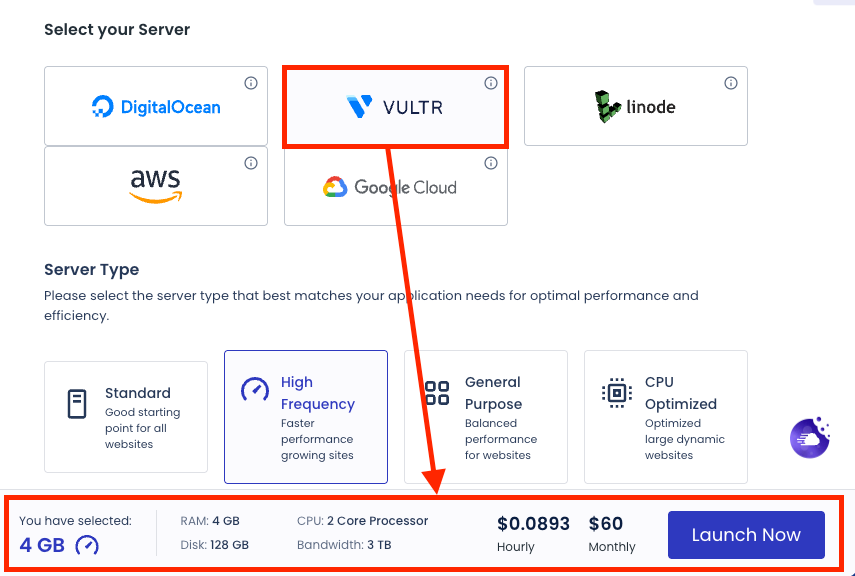
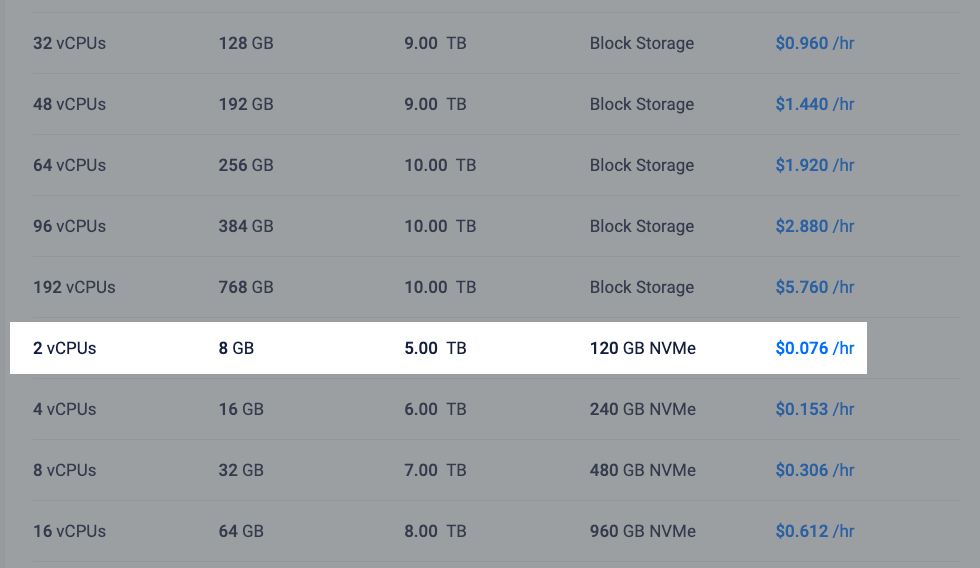
Cloudways acts as the management layer between you and the underlying cloud provider. Running servers directly from the provider is cheaper. For example, in Cloudways, the Vultr High Frequency with 4GB RAM, 2 core processors and 128 GB disk storage — will cost you $60 per month or $0.0893/hr
But you can get it at a slightly cheaper fee with twice the amount of RAM and bandwidth.
But, you have to consider that you’ll be managing the server yourself. Meaning you must configure your web stack, optimize PHP-FPM, manage caching layers, set up backups, secure the server, and handle system updates.
But in Cloudways they handle everything for you. And what you’ll need to do is simply configure your server resources based on what you need. You can scale CPU cores, RAM, storage, and bandwidth based on your real workload rather than default plan tiers.
When seting up a hosting environment for your website: Cloudways lets you choose between two web stacks.
- Hybrid Stack: uses NGINX as a reverse proxy in front of Apache and Varnish, which suits users who want broad compatibility with plugins and applications. This way, you can enjoy the speed and efficiency of NGINX for static content, and the compatibility and flexibility of Apache2 for PHP content.
- Lightning Stack: uses NGINX and Varnish with PHP-FPM via FastCGI. It handles static and dynamic requests more efficiently and produces faster execution times.
On top of that, it includes Redis Cache, and Object Cache Pro to boost performance for dynamic sites. But it doesn’t include Enterprise CDN on its Flexible plans, and instead you need to purchase it as an add-on costing $4.99 per month for 5 domains.
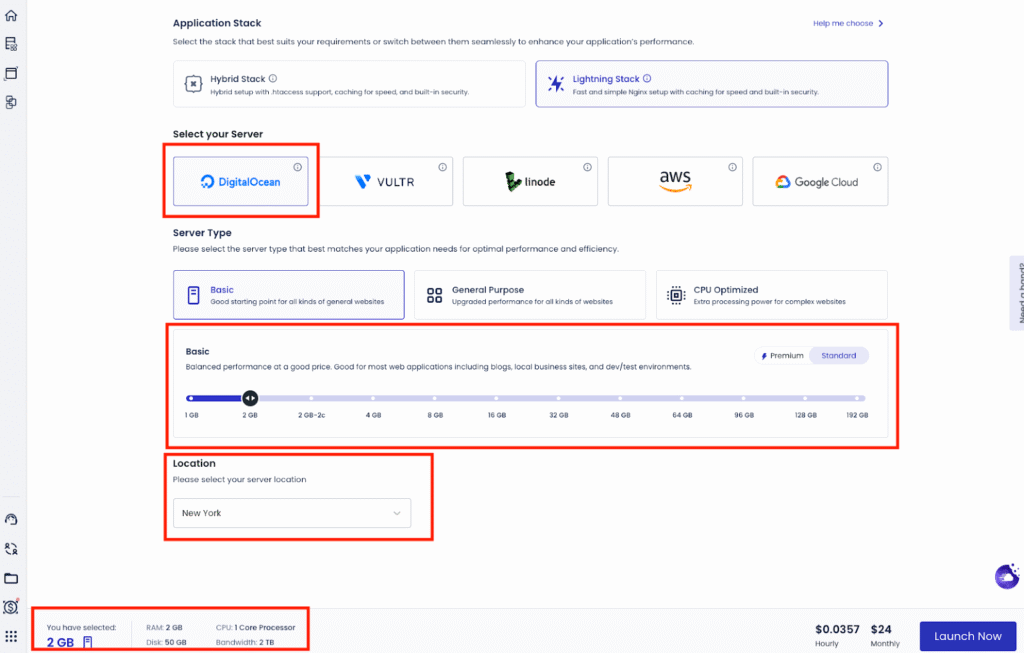
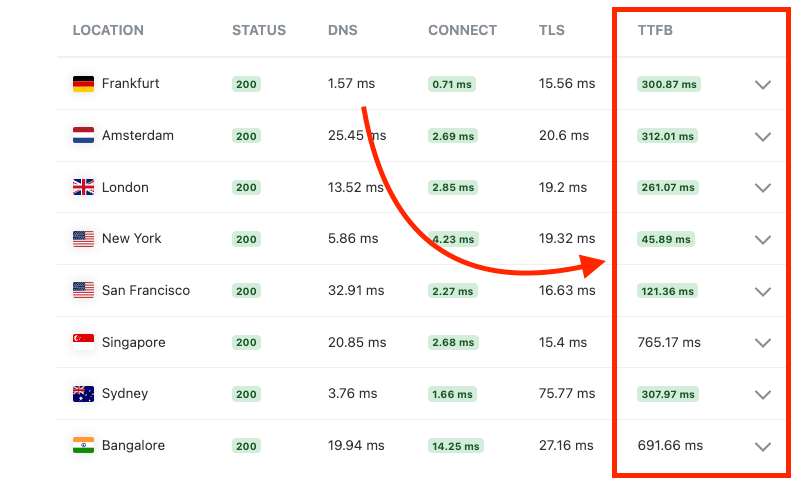
For performance testing, I used a DigitalOcean server with 2 GB RAM, 1 CPU core, and a clean WordPress install using the default WP 2025 theme. The server was located in New York.
The server loaded pretty fast in New York in under 30ms and stayed solid in London, Frankfurt, and Amsterdam. But slower in Australia and Asia, loading in over 680ms..
Cloudways also includes developer-friendly tools that help you work faster. You get staging environments for safe testing, on-demand backups for quick rollbacks, and Git-based deployments for cleaner workflows. These features make it a strong option if you manage multiple sites or push updates regularly.
Cloudways pricing review
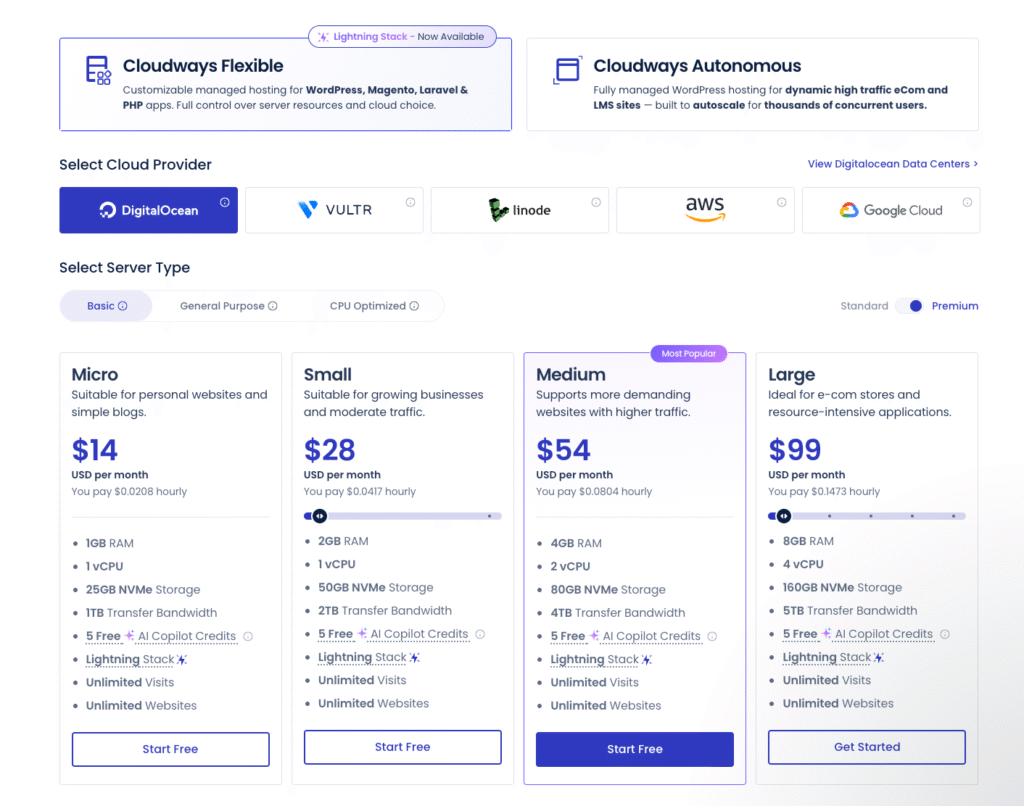
Cloudways splits its pricing into Autonomous for hands‑off autoscaling and Flexible for classic cloud servers.
If you run WooCommerce or an LMS and expect traffic spikes, l’d advise going with Cloudways Autonomous:
- Growth – $100/month: You get 1 baseline autoscale server, 150 GB bandwidth, 20 GB disk, unmetered visits, and 100 PHP workers per server plus Cloudflare Enterprise, Redis, Object Cache Pro + Relay, and 24/7 support.
- Scale – $200/month: It doubles the baseline autoscale servers to 2, bumps bandwidth to 250 GB and disk to 50 GB, while keeping unmetered visits and 100 PHP workers per server. It’s the sweet spot if you’re running campaigns and need more headroom without jumping straight to enterprise.
- Plus – $400/month: You get 3 baseline autoscale servers, 1000 GB bandwidth, 100 GB disk, unmetered visits, and the same 100 PHP workers per server. This is for serious course platforms or high‑GMV stores where uptime and instant scaling matter more than shaving off dollars.
Now, if you prefer to control your own scaling or want cheaper entry pricing, you can start with Cloudways Flexible where you can choose from various cloud solutions including Google Cloud, Vultr, Linode, Digital Ocean and AWS.
#5: Liquid Web
Best for growing ecommerce websites
Pros
Cons
I usually advise small or early-stage ecommerce brands to use Shopify because it removes a lot of the operational friction. It’s easier to use and has better infrastructure tailored for most small and mid-sized online stores.
But if you want enterprise-level resources and full control of your stack but don’t want the overhead of managing cloud servers yourself, Liquid Web is one of the few hosts optimized for ecommerce websites. I mean, they now own Nexcess which was widely regarded as among the best managed ecommerce hosting solutions.
To start with, LiquidWeb offers 18 data centers across the US, Europe, Asia, and Africa. It also comes intergrated with enterprise Cloudfare CDN with full WAF which speeds up content delivery for international buyers and also protects your site against sophisticated cyber threats.
Across its servers, Liquid Web uses NGINX with MariaDB instead of the common Apache and MySQL setup which many web hosts like Bluehost uses. This pairing lets you handle high-traffic, dynamic workloads more efficiently delivering outstanding performance for carts, checkouts, and product filter pages. It also includes free Redis and Object Cache Pro, and also supports autoscaling which immediately adjusts resources during traffic spikes.
Beyond the impressive server infrastructure, Liquid Web includes additional tools to help you drive revenue to your online store.
Their ecommerce bundle includes:
- IconWP’s WooCommerce plugins (checkout builder, product options, order bumps, and more),
- Recapture for abandoned cart recovery,
- Validar for address verification,
- ConvertPro for lead capture,
- Astra Pro theme for fast store design.
Liquid Web pricing review

Liquid Web offers several pricing plans. The range is broad, so it takes a moment to figure out what fits your store. The simplest way to choose is to match the plan to your workload instead of comparing every option side by side.
If you’re running WooCommerce, stick to the WooCommerce line. The plans come tuned for stores and include performance features you would otherwise pay for separately. You can pick between two paths:
- WooCommerce VPS (from $33 per month): You get dedicated vCPU cores, RAM, and more predictable performance under load.
- Managed WooCommerce (from $49 per month): Liquid Web handles setup, optimization, scaling, backups, and security. This option removes the need to manage the hosting stack on your own. It suits store owners who want to focus on revenue instead of server tasks.
If you need full control with the freedom to install platforms like Magento, OpenCart, or PrestaShop, choose their standard VPS plans. Prices run from $5 to $196 per month depending on the CPU, RAM, and storage you need.
Bottom line: Liquid Web is a strong choice for ecommerce because of its enterprise level resources, and plans built specifically for stores that need stability under load. You get optimized WooCommerce configurations, premium plugins included, reliable security, and hands-on support from specialists who understand high-traffic stores.
Wrapping Up – What Are the Best Web Hosting Service Providers to Choose Today?
I’d be lying to you claiming that there’s an overall best web host for every user. From my tests and review, it’s clear that no hosting solution excels at everything.
For example, Rocket was super fast but pricey for starting websites. Hostinger offers best value for starters but hikes pricing during renewals and Cloudways is flexible but has a learning curve.
Needs varry, which is why I did my best to show you where each excels, falls short and what type of site each they’re best suited for.
Based on my experience and my rigorous testing, here are my top 5 web hosting providers and when to choose each:
- Rocket.net: The best pick when you want reliable and fast managed WordPress hosting. Its servers run on enterprise infrastructure with strong global TTFB, built-in caching, edge delivery, and tight security. It suits growing to high-traffic WordPress and WooCommerce sites that need predictable speed and room to grow.
- Hostinger: A smart entry-level choice if you’re building your first site and want low upfront cost. It delivers good performance for simple blogs and small business sites. Once traffic climbs or you start handling dynamic workloads, I recommend moving to a managed VPS provider like ScalaHosting or a cloud setup like Cloudways.
- ScalaHosting: The strongest option when you want dependable VPS performance and helpful managed support. You get consistent speed, stable uptime, and access to SPanel, which removes cPanel licensing fees. It works well for agencies, ecommerce shops, and growing sites that need dedicated resources.
- Cloudways: Best when you want more control, flexible scaling, and strong performance without touching raw sysadmin work. Vultr High Frequency nodes offered the best results in my experience, outperforming DigitalOcean in my tests. AWS and Google Cloud are powerful but cost more, so choose them only if you need their global footprint or compliance levels.
- Liquid Web: Built for demanding ecommerce or resource-heavy projects. If you’re running WooCommerce, Magento, or a high-volume application, Liquid Web gives you high-capacity servers, strong security, and predictable scaling.