

In this Circle.so review, I’ll show you if it’s the right software to build your community on in 2026.
I’ll break down how it fairs in aspects like:
- Ease of use
- Community engagement and management
- Online course creation
- Event hosting
- Customization and branding
- Growth and marketing tools
- Reporting and analytics
- Value for money
I’ll also reveal how Circle compares to some of its competitors like Mighty Networks, Skool, Discord and Heartbeat.
But first, here’s a quick summary of things I liked and disliked while using Circle.
Things I liked about Circle
- Clean and modern interface: Circle has a minimal, sleek UI that feels similar to tools like Slack and Notion. It uses generous white space, a structured three-column layout, and a smooth slash-command editor. Everything feels intentional, premium, and easy to navigate.
- Spaces and Space Groups architecture: Circle lets you organize your community into separate containers called Spaces. They act as the building blocks of your community, each supporting various content types such as: discussions, chats, courses, events, or media library. You can then group these Spaces into Space Groups, which keeps everything structured, easy to navigate, and clean as your community grows.
- Access Groups that simplify access management: Instead of managing access Space by Space, Circle lets you bundle them into Access Groups and handle permissions from there. You can then connect these groups to offers or paywalls. Such that when someone subscribes to a paywall, they automatically get access to everything inside that bundle.
- Automation workflows: Circle’s visual workflow builder gives you trigger-based automations, bulk actions on filtered segments, and scheduled recurring tasks. This saves you time, reduces manual work, and helps you deliver a more personalized experience at scale. However, this feature is only available on Business plan and above.
- Live Rooms and Live Streams with native recording: You can host live sessions natively eliminating the need for third-party solutions like Zoom or Google Meet. You can use Live Rooms for smaller, interactive sessions like workshops, coaching calls, or community meetups. And for larger events, use Live Streams where only the host is on camera while attendees engage through chat. Ideal for hosting webinars and community-wide calls.
- Good customization and branding tools: You can change your theme color, add your logo, update your community icon, and match the overall look to your brand. You can also add space icons and banners, build custom landing pages, and host your community on a custom domain. On the Circle Plus plan, you can go a step further and build a fully branded mobile app for iOS and Android, complete with your own app icon and store listing.
- Impressive integration options: Circle integrates with over 20 popular tools, making it easy to connect your existing business stack. It includes native Stripe integrations for payments, Zapier for automation, and support for SSO connection. On the Business plan you unlock access to Headless API and Admin API for more advanced workflows and integrations. However, more advanced access like the Data API, which lets you pull and sync deeper community data into your own systems is still restricted to Circle Plus plan (their enterprise plan).
- Robust community post editor: Circle’s community post editor is easily one of its strongest features. You can use slash commands to quickly add different content types, and it handles rich text, images, files, polls, and embeds without any formatting issues. Embeds from platforms like YouTube, Loom, Figma, and CodePen render natively, and code blocks come with syntax highlighting.
- Custom profile fields: You can add custom data fields to member profiles like text, dropdowns, multi-selects, links and more. You can then use this data for segmentation, automation, and filtering.
- Member directory and search: Members can discover each other, and start conversations driving organic engagement.
- Gamification: You can gamify experiences inside your community by awarding members points and badges for actions like posting, commenting, completing courses, or attending events. The more points they accumulate the higher they’re going to rank on the leaderboard.
Things I disliked about Circle
- Sly pricing: Circle doesn’t clearly show what you’ll actually pay month-to-month on its pricing page. What you see upfront is the discounted annual rate, which makes the plans look cheaper than they are. For example, the Professional plan is advertised at $89/month, but that figure is based on annual billing. When you go to actually upgrade from the free trial, prices jump to $129/month. And the way it’s presented feels intentionally obscured.
- Basic online course builder: Circle’s course functionality works if your course is just a supporting layer to a community. But falls apart when education is the core product. There’s no native support for completion certificates, graded assessments, SCORM compliance, or gradebooks. Which means if you’re running a serious certification or upskilling program you’ll be required to integrate external tools or find workarounds.
- One content type per Space: Circle enforces a rigid structure where each Space can only host a single content type. If you want a hub with discussion, courses, and events together, you’ll need to create three different Spaces. Compare that to a platform like Mighty Networks that lets you mix content types in a single Space.
- Strict limits on livestream hours, and community spaces: Circle’s live session and space usage are tightly capped. The Professional plan gives you just 10 livestream hours/month, 100 attendees per stream, 15 live room participants, and 20 Spaces. Business only bumps this to 15 hours, 200 attendees, and 30 Spaces, which is still pretty tight for an active community.
- Email Hub is overpriced for what it does: Circle’s Email Hub add-on starts at $19/month which is slightly expensive considering what you get. The editor is basic, closer to a plain-text Notion-style interface with limited design flexibility, and there’s no meaningful template marketplace. Automations are mostly tied to community actions and remain fairly linear, while reporting is shallow with no serious optimization tools like A/B testing or advanced conversion tracking. Compared to dedicated email platforms like MailerLite, Email Hub is effectively a downgrade in functionality at a higher cost.
What is Circle.so?
Circle.so or simply Circle is an online community software founded back in 2020 by Sid Yadav (now CEO), Rudy Santino, and Andrew Guttormsen.
The trio were former Teachable employees.
While working there they realized that many online course platforms lack a better way to cultivate a community-based learning experience.
Many creators would build a course on a platform like Teachable, then create a group on Facebook to engage and support their learners.
Which broke the student learning experience.
To address that, they built Circle.
Today Circle has grown to become more than just an online community platform.
It also lets you:
- Create courses
- Host live events
- Send email campaigns to nurture your leads
- Build landing pages for your community membership business
- Launch branded mobile apps
Essentially, it’s evolved into something closer to a complete digital business platform.
So much so, they’ve been powering some of the most popular communities for creators, and coaches like:
Pat Flynn’s SPI community.

Jay Clouse’s The Lab.

And Ali Abdaal’s Productivity Lab.

My detailed review of Circle community platform
In this section I’m going to dive deep into Circle’s core tools and show you how they ACTUALLY measure up.
After reading this section you will be able to make an informed decision on whether Circle is the right community building software for you or not.
So let’s get into it.
1: Circle’s community spaces are granular, but limited to one content type each.
Circle lets you organize your community into separate containers called Spaces.
They’re like Channels in Slack, only that in Circle they support more content types beyond threaded chats.
You can create:
- Discussion boards: Let you publish forum posts, announcements, and even long-form community content.
- Course spaces: Allow you to build structured learning programs and drip-feed materials over time.
- Events spaces: Enable you to schedule and manage group calls, webinars, and live workshops.
- Members spaces: A directory for showcasing community members, making it easy to browse and connect.
- Images: While not limited to images, this space lets you share and organize media, ideal for building community resource libraries.
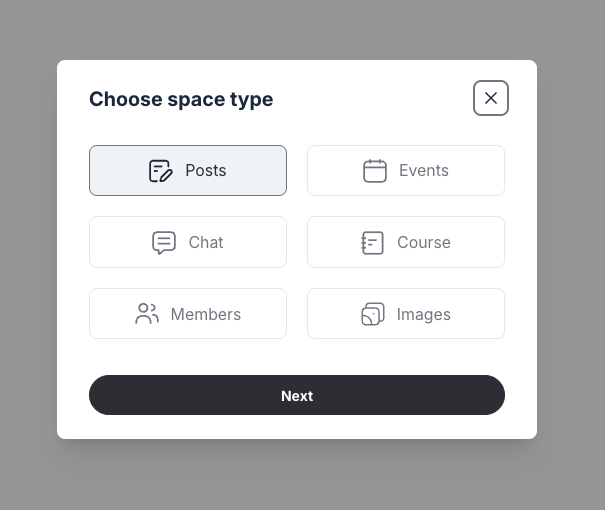
I found this organization and structuring useful as you can have different spaces for different topics and even content types which keeps your community tidy instead of having everything under one feed.
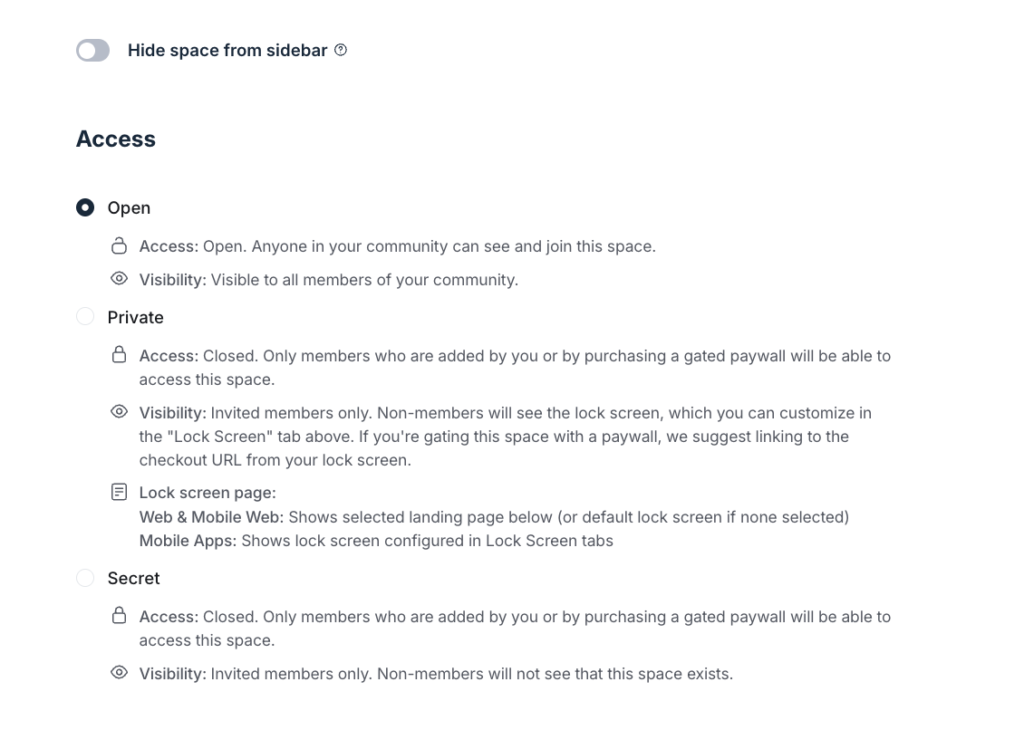
You can control visibility to these spaces by choosing to hide them from the sidebar. And even manage access by setting them as:
- Open for everyone to join
- Private for only members you’ve added or by purchasing a gated paywall
- Secret that allows you to hide your space from non members and only members can access it via invitation or by paying a gated paywall.
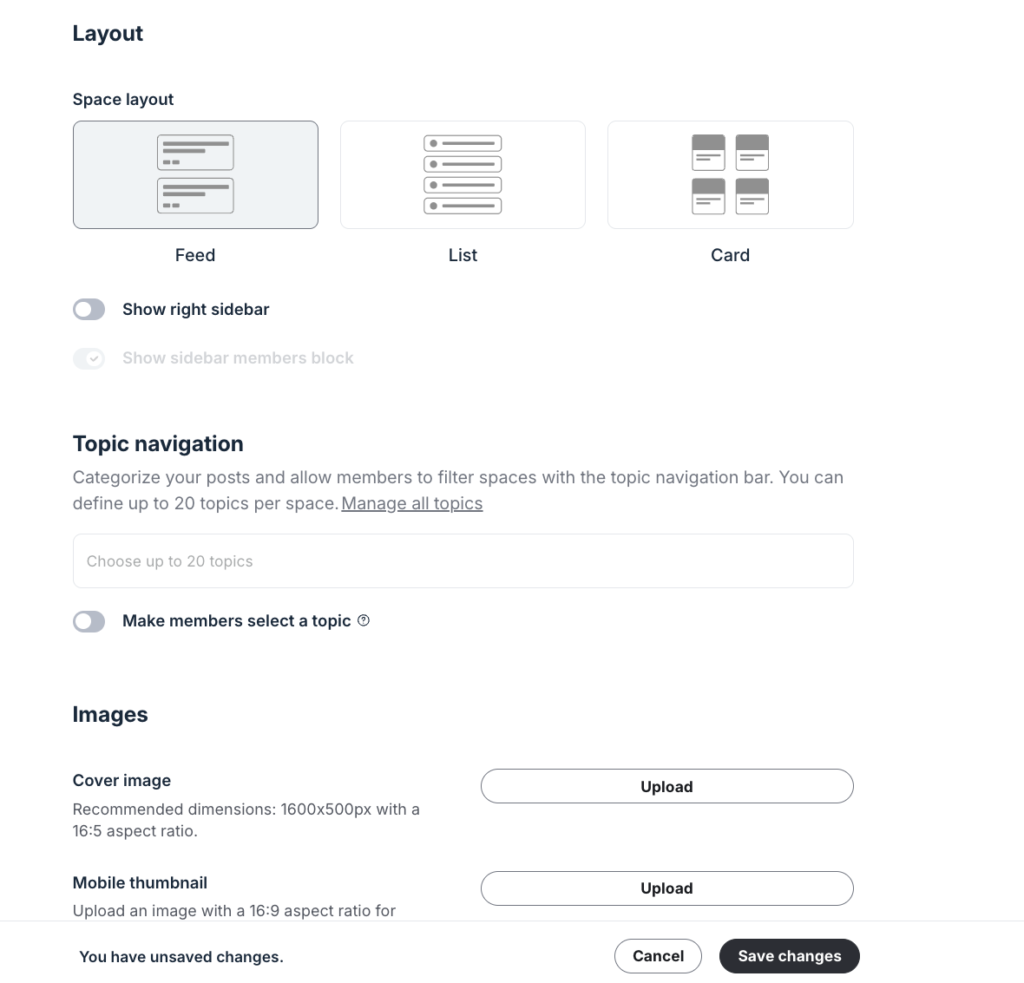
You can customize these Spaces by adding a space banner, choosing the layout and adding topics to help you categorize content inside them for better organization.
Once you’ve built your Spaces, you can organize them into Space Groups, which are themed collections that appear in the sidebar with the Spaces nested under them.

That said, while Circle’s Spaces are granular, they can also feel a bit rigid.
In that, you can have only one content type per space.
For example, you can’t combine various community content types like discussions, events and courses in a single Space like you can in Mighty Networks.

So if you’re building something like a cohort-based program and want:
- a discussion area for accountability,
- an events section for live sessions,
- and a member directory for networking,
you’ll need to create separate Spaces for each one.
If you have a lot of Spaces, they can pile up in the sidebar creating clutter.
Verdict: Circle’s Spaces and Space Groups make organizing a community intuitive and flexible. The separation between content types works well for keeping things structured, and the customization options are strong. But the system can become cluttered if your community setup gets too complex. The good news is that this is manageable. You can keep your structure tight and use tiered access to hide Spaces members don’t actually need to see.
2: Access Groups are the cleanest way to manage access at scale and they make building tiered memberships far more manageable.
What I loved more about Circle’s Space-type architecture are the nifty settings that comes with it like the ability:
- to paywall individual spaces,
- add members and even allow them to add others,
- attach an automation specific to that space.

That said, once you’re dealing with a large number of Spaces, managing access one by one quickly becomes unwieldy. Granting or revoking permissions individually for each Space isn’t a workflow you want to repeat across hundreds of members.
And this is where Access Groups come in place.
They let you bundle access to multiple spaces instead of doing it one space at a time.
Simply create an Access Group, drag in all the Spaces you want to bundle, and then assign members to that Access Group.
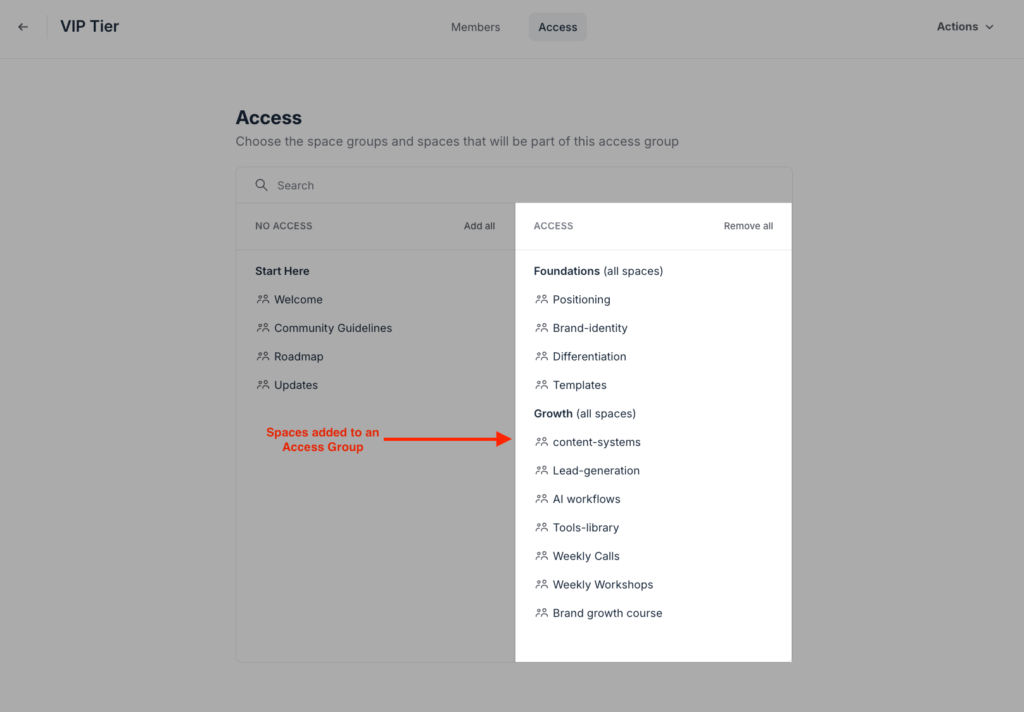
Anyone in the group automatically gets access to every included Space. You can also connect Access Groups directly to your paywall offers, so when someone makes a purchase, they’re automatically added to the appropriate group.

This is what makes Circle particularly effective for tiered memberships.
You can set up different Access Groups as membership tiers and link each one to a specific paywall with its own pricing.
For example, you can have a Basic tier that includes Spaces for welcome content, courses, and monthly events, and a Premium tier that adds more exclusive elements like—a private chat group, discussion forums, 1:1 coaching sessions, group calls, and high-level templates.
Then tie each tier to its own paywall, which grants access to the corresponding Access Group.
If you’ve ever tried to build a multi-tier membership on a platform without this kind of access bundling, you know the alternative is a mess of conditional logic and filters.
Verdict: Access Groups are one of Circle’s strongest features for managing memberships at scale. They remove a huge amount of manual work, make permission management far cleaner, and simplify the process of building tiered offers. Combined with Circle’s Space structure, they give you a flexible system that works especially well for creators, coaches, and membership businesses running multiple products or access levels.
3: Circle’s engagement features are deliberately minimal, which works well for thoughtful communities but feels barebones for high-energy ones.
Circle has a handful of tools to help you engage your community members. You can:
- Create the typical feed-like community posts that support reactions, threaded comments, mentions, polls, and rich media embeds.
- Host live calls through its native live streaming tool.
- Start a chat space.
- Run leaderboards with custom point values and levels.
- Award custom badges through member tags.
- Send weekly community digests to update members who haven’t login for a while.
But after spending time with Circle, I realized the platform naturally pushes communities toward more thoughtful, long-form interaction rather than fast-paced chat culture like you’d see on Discord.
For example, look at its post editor. It features rich formatting that lets you insert versatile content formats including videos, polls, images, code snippets, and audio.

And when a platform gives you that kind of publishing experience, people naturally start writing more detailed, value-driven posts instead of firing off quick one-line messages.
And it’s not just community posts.
Same thing with gamification.
You can award points when members receive likes, and the more points they accumulate, the higher they rank on the leaderboard. And yes you can customize the levels of the leaderboard, which is also cool.

But anything beyond that, yeah, you’ve guessed it—nothing.
- You don’t get frenetic stickers, confetti animations, and visually loud polls that you’ll find in platforms like Discord or even Mighty Networks.
- You can’t add streaks so you can’t bake daily habit formation into your community design.
- You can’t run challenges either without some workrounds.
So if your community strategy relies heavily on daily habit loops, engagement streaks, or constant activity triggers, Circle will probably feel limited unless you build workarounds yourself.
Personally, I don’t think Circle is trying to optimize for high-energy communities in the first place.
It feels much more suited for communities built around expertise, relationships, and depth rather than dopamine-heavy engagement mechanics.
Think:
- mastermind groups,
- learning communities,
- paid coaching cohorts,
- B2B peer networks,
- or high-trust creator memberships.
Those kinds of communities usually care less about streak counts and flashy engagement mechanics, and more about the quality of conversation happening inside the room.
For example, if someone is paying $10,000 a year to join a private mastermind, they don’t want to compete for badge counts or daily streaks. They want focused discussions, meaningful connections, and conversations that are dense with value.
Verdict: Circle’s engagement system is intentionally restrained. It gives you the essentials including: posts, live calls, chat, gamification, and member recognition. But avoids the hyper-stimulating mechanics that dominate platforms like Discord. That makes it a weaker fit for fast-moving social communities, but a strong fit for premium, high-trust communities where thoughtful conversations thrive.
4: Has strong member management tools, but most of the leverage is available on its high-end tiers.
One of the hardest things of running a community is managing members.
When I talk about that I mean:
- Can you organize members into meaningful categories based on roles, behavior, or activity?
- Does the platform give you a searchable, filterable member directory?
- Can you collect rich profile data for advanced segmentation?
- Are there moderation tools to help maintain a healthy community environment?
- Can you track how members engage with your community?
- And can you automate or bulk-manage repetitive tasks instead of doing everything manually?
Circle does a surprisingly good job across most of these areas.
In fact, even on its lower-tier plans, Circle’s member management is stronger than platforms like Skool, even at their highest pricing tiers.
But even so, a lot of Circle’s these capabilities are locked behind the Business plan and above.
So how does it fare?
Let’s start with the basics: adding members.
Circle gives you two main ways to bring people into your community:
- Import contacts through a CSV file.
- Invite them directly using an invitation link.
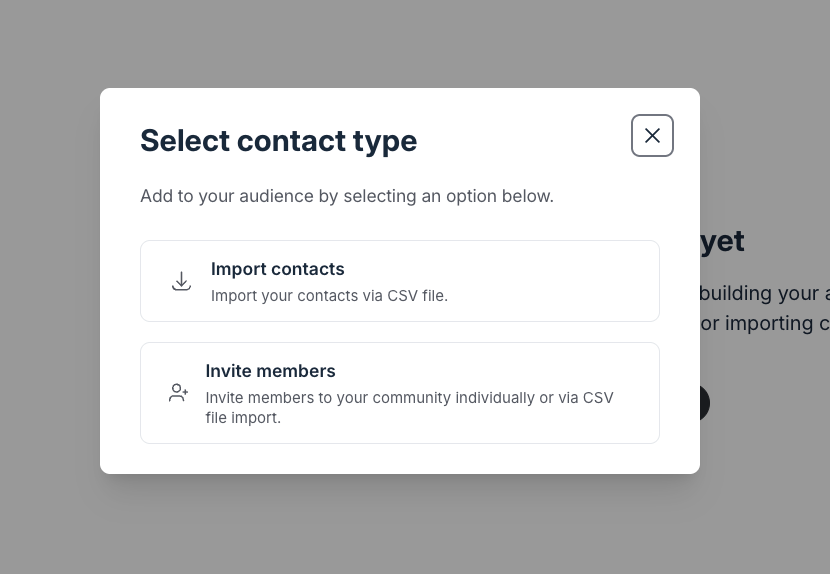
When you import your contacts you can map them up to 15 data fields, which gives you a decent amount of flexibility if you’re migrating from another platform or bringing in an existing audience.

Once members are inside your community, you can manage them through a searchable directory where you can filter people by:
- email,
- invitation status,
- roles,
- Spaces they belong to,
- and other member attributes.

From there, Circle gives you two important organizational tools: tags and segments.
Tags are simple labels you can apply to members to categorize them. For example, you could tag people as:
- VIP clients,
- course students,
- event attendees,
- or inactive members.
You can apply tags manually, or assign them through workflows.
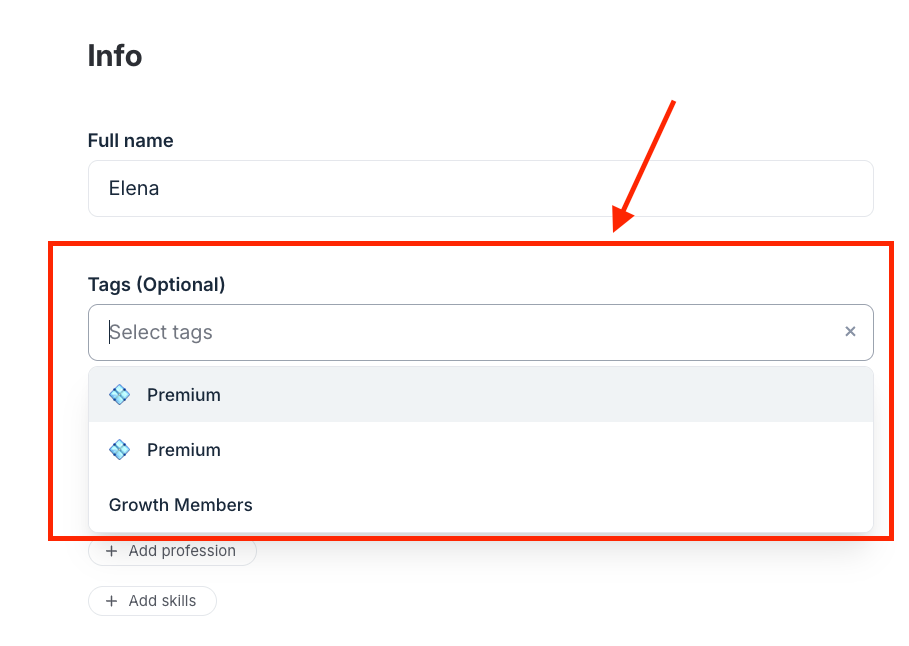
Meanwhile, segment is essentially a saved filter that dynamically groups members based on specific conditions or behaviors.
Once you create segments, you can run bulk actions and automations against them to personalize experiences.
For example, you can:
- identify at-risk members and send re-engagement emails,
- find people who skipped onboarding and push them back into your welcome flow,
- or automatically nudge members who’ve been inactive for 30 days.
The good part is that both tags and segments are available across all Circle plans.
But once you move to the Business plan and above, Circle becomes significantly more powerful.
That’s where you unlock more advanced features like custom profile fields and workflows.
Custom fields let you collect richer information from members during signup. While workflows let you automate actions based on members behaviors and dynamic filters.
When you combine workflows with custom profile fields, you can create onboarding systems that feel far more tailored.
For example, instead of giving every member the same generic onboarding experience, you can personalize the journey by:
- triggering automated welcome messages,
- assigning onboarding sequences,
- or sending reminders if someone goes inactive during their first week.
Moderation tools are solid overall.
Circle includes the essentials:
- ban,
- remove content,
- filter profanity,
- approve posts before publishing,
- and handle member reports.
On higher-tier plans, AI moderation can even flag off-topic content, harmful comments and hide them for your review.
AI moderation sits on Circle Plus, which carries no published price. The cheaper route to the same job is Professional at $89 plus the $49 custom profile fields add-on, which I priced against every rival in my guide to how Circle compares on member management.

Verdict: Circle’s member management is one of its strongest areas. The platform gives you strong filtering, segmentation, moderation, and onboarding capabilities that make managing large communities far easier than most competitors. But the experience is heavily tiered. The Professional plan gives you a solid foundation, while the Business plan and above unlocks the automation and personalization features that make Circle feel truly scalable.
5: The course builder is fine for simple self-paced learning but fairly basic for structured education
With Circle you can build and host your online course. It features a drag-and-drop curriculum builder that supports various content types including video, audio, text, downloadable files and more.
You can choose to upload content materials and host them natively onto the platform. Or embed them from external hosting platforms like Vimeo, Wistia and YouTube.

One feature I genuinely didn’t expect to like as much as I did was Circle’s native video recorder.
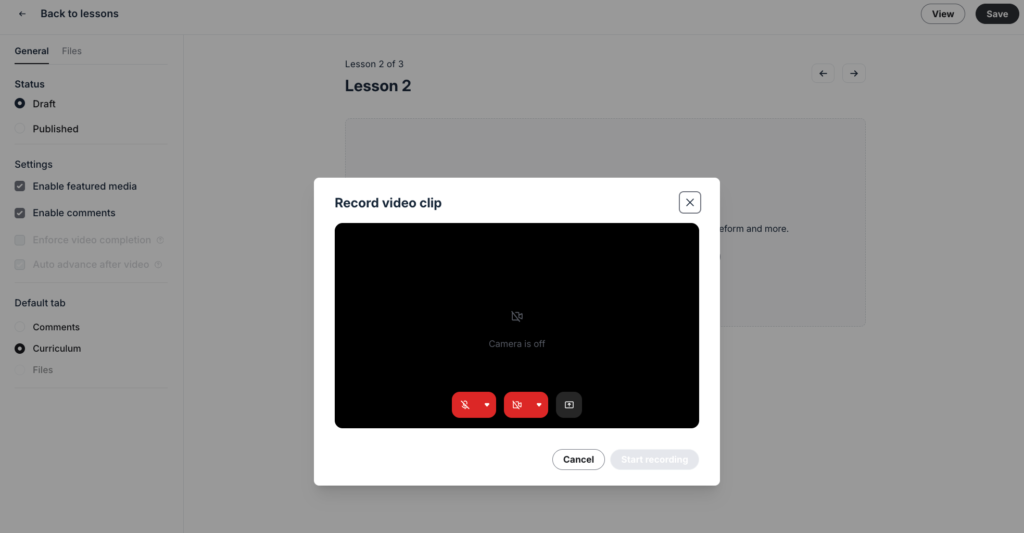
It works a lot like Loom. You can record yourself directly in the browser, capture your screen, and then save the recording both locally and inside Circle as a course lesson.

Circle also supports scheduled course delivery, though this depends on the course model you choose during setup.
If you create a self-paced course, you won’t get drip scheduling tools. To unlock scheduled lesson releases, you’ll need to choose either the Structured or Scheduled course models instead.

Speaking of assessments, Circle lets you assess your students with quizzes: which can be single choice or multiple answers with auto-grading supported.
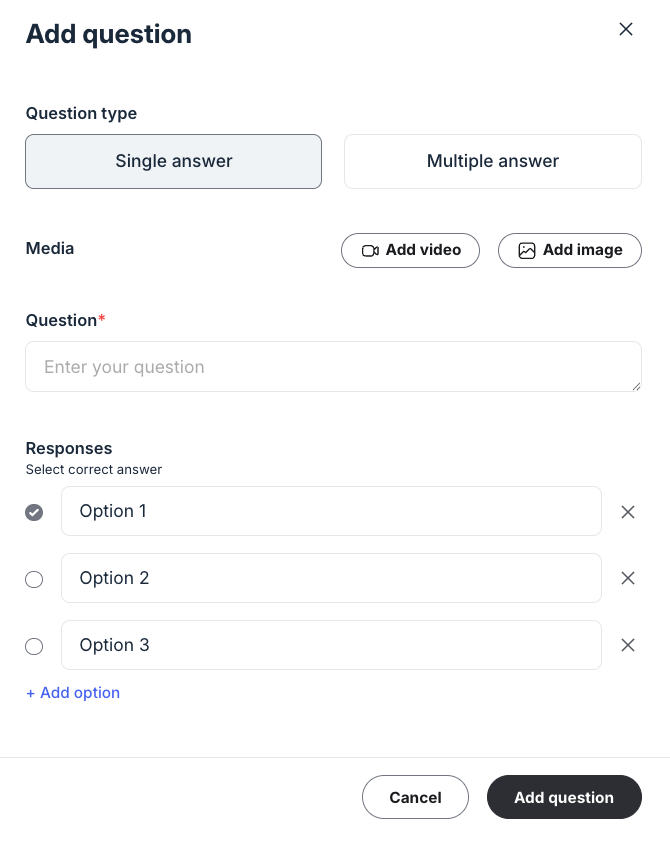
This is helpful for lightweight learning experiences.
But compared to dedicated course platforms like Teachable or LearnWorlds, Circle’s assessment system is fairly basic.
You can’t create:
- open-ended questions with file upload enabled,
- randomized exams,
- interactive quizzes,
- media-based assessments.
And beyond quizzes, Circle lacks many of the deeper online learning elements you’d expect for structured education including:
- SCORM compliance
- Students gradebook
- Detailed progress tracking
- Course certificate issuing
Verdict: Circle’s course builder works best for simple learning programs like creator courses, coaching programs, and community-led learning. But for structured education, certifications, or outcomes-driven training programs, you’ll be forced to integrate a more comprehensive LMS platform like LearnWorlds, Teachable and Thinkific.
6: Circle has decent events management and livestreaming tools but puts hard limits on session participants and attendees.
Events are one of the most valuable engagement tools a community platform can offer.
They create a level of interaction and connection that discussion posts and chat threads simply can’t replicate. It’s how members get direct access to you and to each other in real time.
Circle handles events surprisingly well overall because it bundles scheduling, reminders, and live streaming directly into the platform.
So instead of integrating tools like Calendly for booking and Zoom for hosting, you can manage everything from one place.
To create one, open the Events tab and click New event.
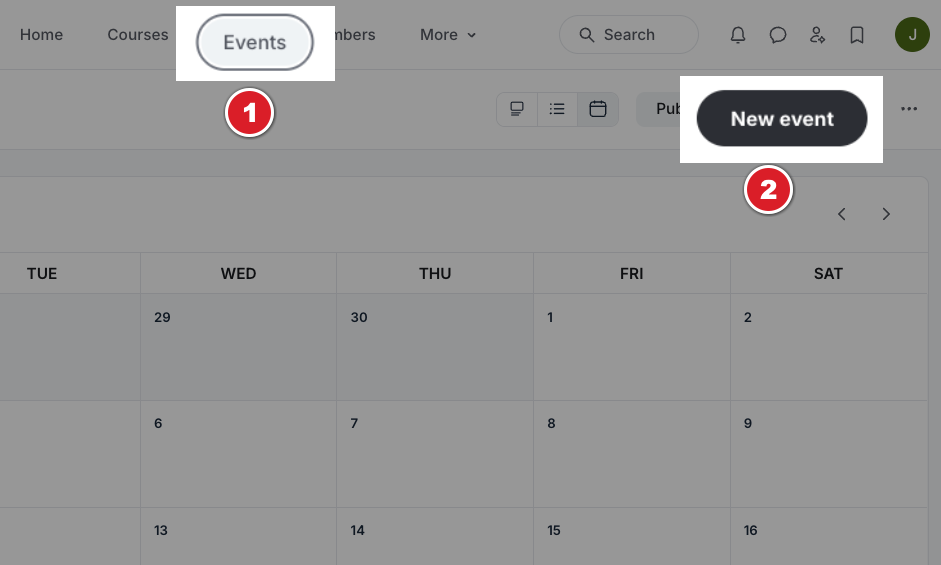
You’ll be prompted to add your events details, location, which community Space to host it, and whether it’s free or paid.

From there, Circle gives you three ways to run your sessions:
- In-person events
- Circle’s native live tools (Live Rooms and Live Streams)
- Third-party platforms like Zoom or YouTube Live
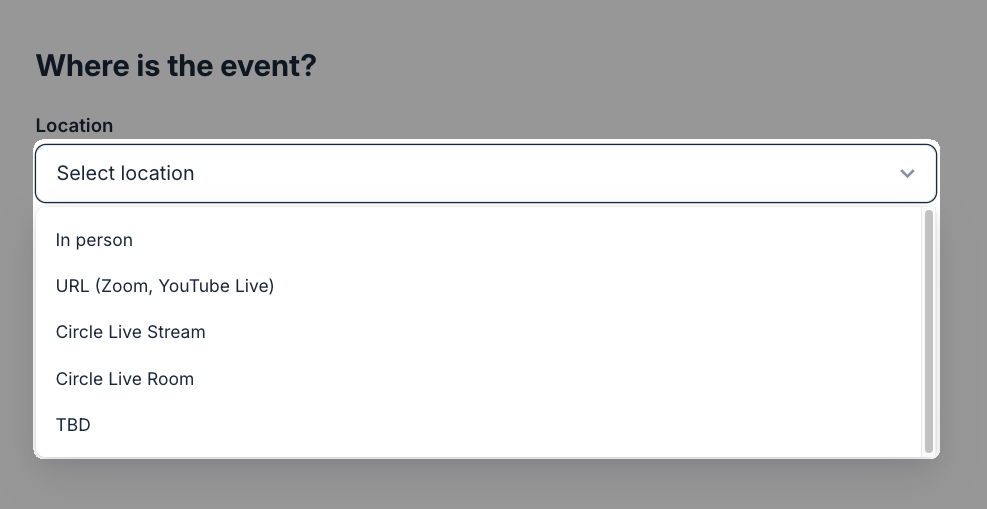
When you choose Circle’s native tools you get access to:
- Live Rooms – are designed for interactive group calls where everyone can join with cameras and microphones. They work well for office hours, workshops, coaching calls, and collaborative sessions.
- Live Streams – are more presenter-focused. You’re on camera while attendees watch and interact through chat, which makes them better suited for webinars, launches, AMAs, and larger community announcements.
I tested Circle’s livestreaming tools myself, and honestly, the experience was smoother than I expected.
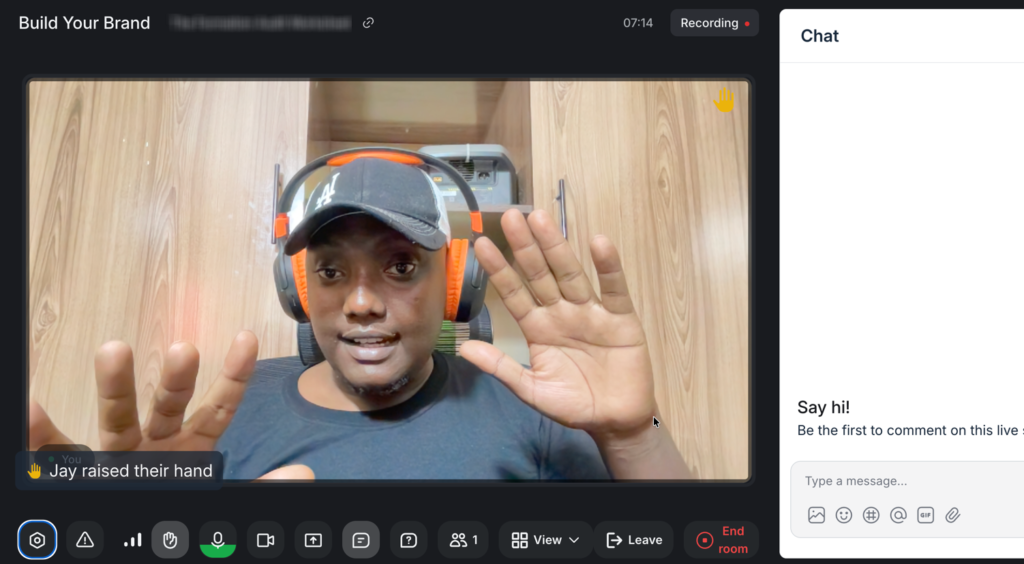
The interface feels familiar to video conferencing tools like Zoom and Google Meet, so ZERO learning curve. Video quality was sharp, audio stayed stable, and I didn’t experience noticeable glitches or bugs during testing.
When you host your live sessions with Circle’s native tools you get extra controls and tools you don’t get when you route events through third-party apps like Zoom. You can:
- Auto-record sessions and post the recording straight to the event Space
- Hide the location and recording from anyone who didn’t attend
- Disable link sharing so unregistered members can’t join even if someone forwards them the link

But even so, Circle puts some hard usage limits on attendees, participants, and hours for your live sessions.
For example, the Professional plan limits you to 100 Live Stream attendees, 15 Live Room participants, and 10 hours of live video.

If you’re frequently hosting live events and workshops in your community, you’re going to hit the ceiling fast.
At that point you’ll have two options:
One, buy add-ons to extend your attendee count and livestreaming hours, which cost $20 per 100 attendees and $50 for extra 10 hours.

Two, revert to using more familiar tools like Zoom and Google Meet with industry standard limits.
Now, compare Circle’s caps to a platform like Skool.
Skool allows up to 10k attendees on its live webinars.
That’s 100 times more attendees on Skool’s $99-a-month plan than what Circle gives you on its Professional tier at $129/mon.
Verdict: Circle’s events system is clean, well-integrated, and intuitive to use. The native livestreaming experience feels polished, and the built-in controls around recordings, gated access, and event management are strong additions for paid communities. But the hard caps on attendees, participants, and livestreaming hours will limit you if you’re going to frequently host live events. For smaller coaching groups and intimate communities, Circle works well. For large-scale webinars, and workshops, you’ll likely end up leaning on external tools anyway.
7: Circle’s page builder is good for simple landing pages, but it won’t replace advanced website creation tools like Squarespace, Systeme and Webflow.
Circle lets you build landing pages and websites directly inside the platform.
In theory, that means you could avoid integrating separate tools like Leadpages for page building because Circle includes native tools for that.
But I’ll be misleading you, by claiming that it can entirely replace these tools.
So how good is Circle’s website builder?
Circle gives you up to eight page templates and more than 45 prebuilt content blocks to work with.

And honestly, the templates are well-designed and look professional.
Still, variety is limited. Many of the templates feel and look the same.
That said, there’s a good chance your landing pages will end up looking fairly similar to any other creator who’s used Circle to build their pages.
The builder is clean, intuitive, and immediately familiar if you’ve used builders like: Elementor, Leadpages, WordPress Block Editor or Systeme

You get a handful of elements you can add to your page designs including videos, buttons, paragraphs, headings, forms and more.
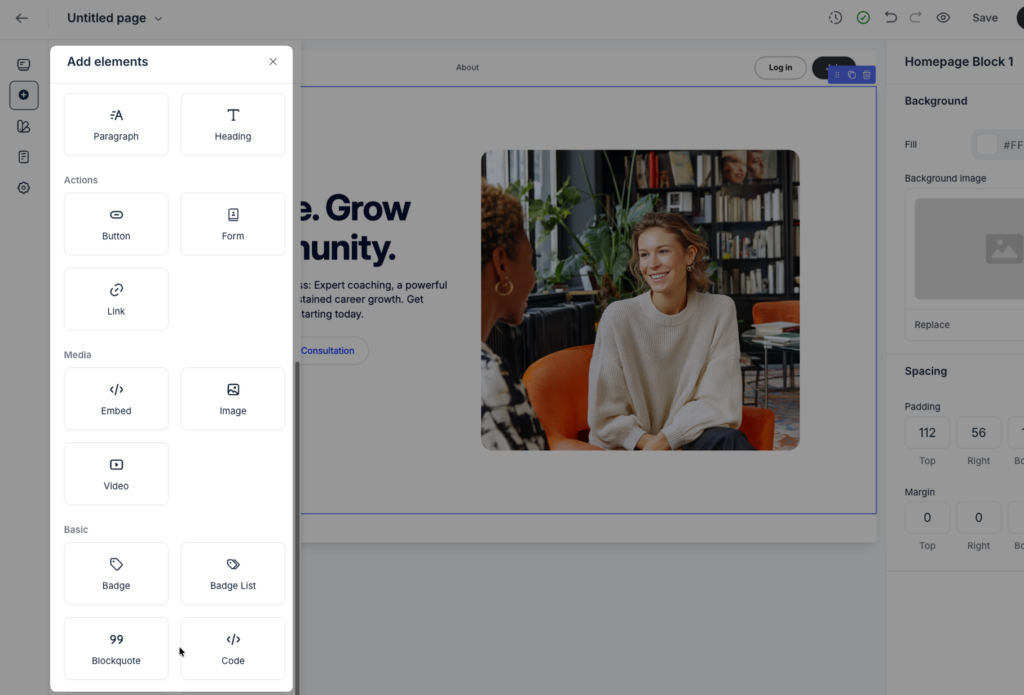
And when you click an element, Circle opens a settings panel on the right side where you can customize and style your design.

For a community platform, this is a capable page builder.
But compared to dedicated builders, Circle’s doesn’t give you full creative control to build unique looking website pages.
You don’t get pixel-level control, you can’t drag elements across a free-form canvas, and you can’t write custom CSS to override the system.
What you do get is a builder that creates pages that:
- look clean,
- load quickly,
- and work well on mobile without much effort.
And honestly, for many creators, that’s enough.
Verdict: Circle’s page builder is better than I expected for a community platform. It’s clean, beginner-friendly, and capable of building good-looking landing pages. But it’s still limited which makes it a good choice for simple pages connected to your community. But in the longterm, I don’t recommend it to create your business website because it gives you less design and building control.
8: Email Hub lets you send broadcasts and automated workflows but it’s expensive.
Circle includes a built-in email marketing tool called Email Hub.
Using it, you can send both:
- one-off broadcast emails,
- and automated email sequences.
Because Email Hub is deeply integrated into Circle itself, you get a handful of automation scenarios that you don’t get on many email marketing software.
You can trigger emails based on actions like when a member:
- joins the community,
- updates a profile field,
- clicks a link,
- RSVPs to an event,
- joins a Space,
- gets added to an Access Group,
- purchases through a paywall,
- converts from a free trial.
And more…

That kind of behavioral automation is valuable because it lets you create onboarding flows and engagement systems that feel tightly connected to the actual community experience.
But there are a few caveats.
- In order to use its workflow automation builder, you need to be on their Business plan and above.
- Email Hub is available as an addon so it’s not included into their base plans.
Compared to dedicated email marketing platforms, I found Circle’s Email Hub expensive for the feature set you get.
Pricing starts at $19/month for up to 1,000 contacts.
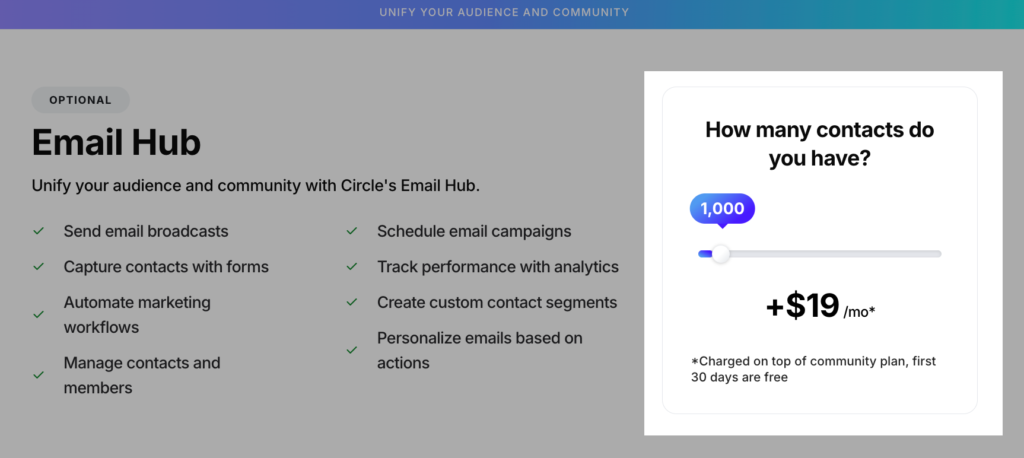
Now compare that to platforms like MailerLite, which costs less for a similar contact count while offering significantly deeper email-marketing functionality like: campaign autoresend, multivariate testing, dynamic emails, better templates, a custom HTML editor, and pop-up forms with exit-intent triggers.
Verdict: Circle’s Email Hub works best as a community operations tool but not as robust for full-scale email marketing. Its biggest advantage is how tightly it integrates with member activity in your community which makes onboarding and engagement automations feel seamless. But once you move beyond community-focused emails into newsletters, lead nurturing, advanced segmentation, or conversion-driven email marketing you’ll find more value with dedicated tools like ActiveCampaign, MailerLite, or Drip.
9: Circle’s Paywalls are tightly integrated and conversion-friendly, but limited to Stripe payment processing.
Circle lets you charge for community access through a feature it calls Paywalls.
You can lock content, Spaces, courses, or entire access groups behind a payment, and Circle handles the checkout, payment processing, access provisioning, and subscription renewals end to end.
But Circle Paywalls only work with Stripe.
If you live in a country where Stripe isn’t supported, you cannot use Paywalls at all.
As such you’ll need to handle payments through a third-party checkout tool like ThriveCart and Lemon Squeezy via a Zapier workflow.
However, if you are in a Stripe-supported region, the toolkit is solid.
At checkout, you can configure:
- Free trials to lower the barrier to entry
- Discount codes for promotions and launches
- Payment plans for higher-ticket offers
- Currency localization across 25+ currencies
- Post-purchase upsells that appear between checkout and the thank-you page
Because Circle’s checkout runs on Stripe, you get access to its payment method library, including:
- Cards
- Apple Pay and Google Pay
- Pix in Brazil
- iDEAL for Dutch banks
- Bancontact in Belgium
- SEPA across the EU
- BNPL options like Afterpay and Klarna
10: Customization is good enough for most communities and on the Plus plan you can build a branded mobile app.
Circle lets you customize your community by letting you:
- Upload your logo,
- Choose your theme colors,
- Choose between light and dark mode,
- Add space icons and banners,

Across all plans, you can also connect a custom domain. And on the Business plan and above you can:
- remove Circle branding entirely (white-labeling),
- use your own domain for transactional and notification emails,
- and create a more seamless branded experience across the platform.
And on its Plus plan, Circle goes even further.
You can build a fully branded mobile app for both iOS and Android, complete with your own app icon, purchase workflows, app notifications, community resources and App Store presence.
When you compare Circle’s customization and branding to platforms like Skool, you can clearly see that it pulls ahead on most aspects.
For example, Skool is far more restrictive, you get basic branding like a logo and icon, but no custom domain and very limited visual control beyond that.
Verdict: Circle offers a solid level of branding and customization for most community use cases, especially if you’re building a membership or coaching business. It covers the essentials including: custom domains, branding, themes, and even white-labeling on higher plans. This makes it a good choice for coaches, professional creators and businesses that want to tweak the community platform to feel and look like their brand.
11: Circle.so pricing review

Circle offers two paid plans and one custom plan:
- Professional: $89/month for unlimited members
- Business: $199/month
- Circle Plus: custom pricing
At first glance, looks like a solid deal for what’s included.
Or at least, that’s the impression.
But the deeper you go, the more you realize that what’s listed on the pricing page isn’t what you actually pay.
For starters, Circle doesn’t clearly show you the actual monthly pricing. The figures on their website are discounted annual billing rates. You only see the real month-to-month cost after creating an account.
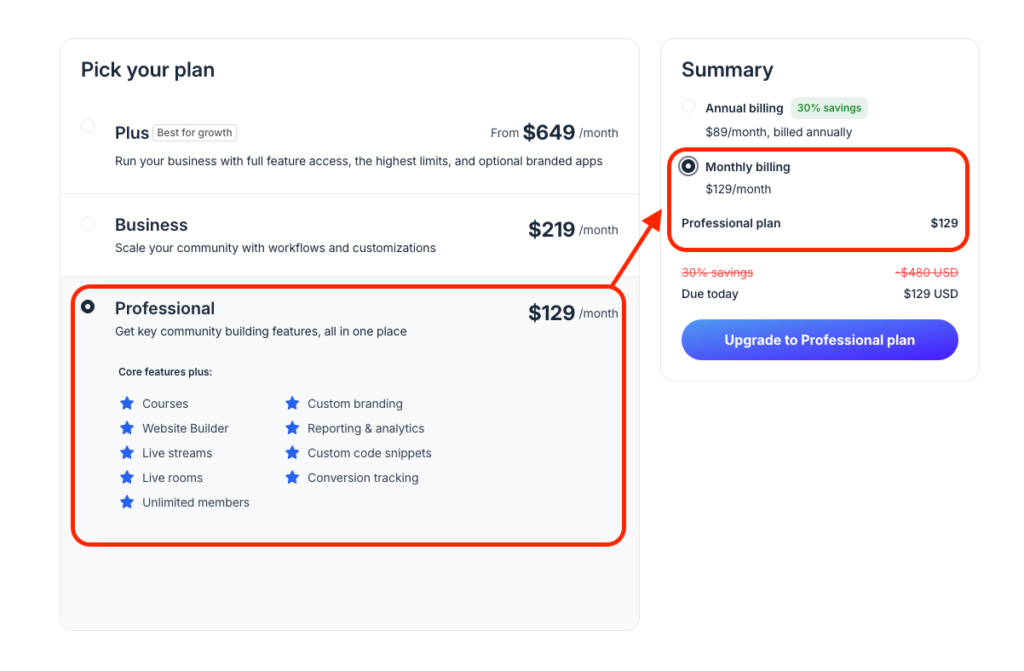
For example, the Professional plan is advertised at $89/month on their website but when you try to pay for the same plan on a monthly billing once you’ve created an account the cost jumps to $129/month.
To be fair, this isn’t unusual in the software world. Many platforms do the same.
For example, Kajabi advertises $143/month for the Basic plan, but that same plan costs $179/month if you pay monthly.
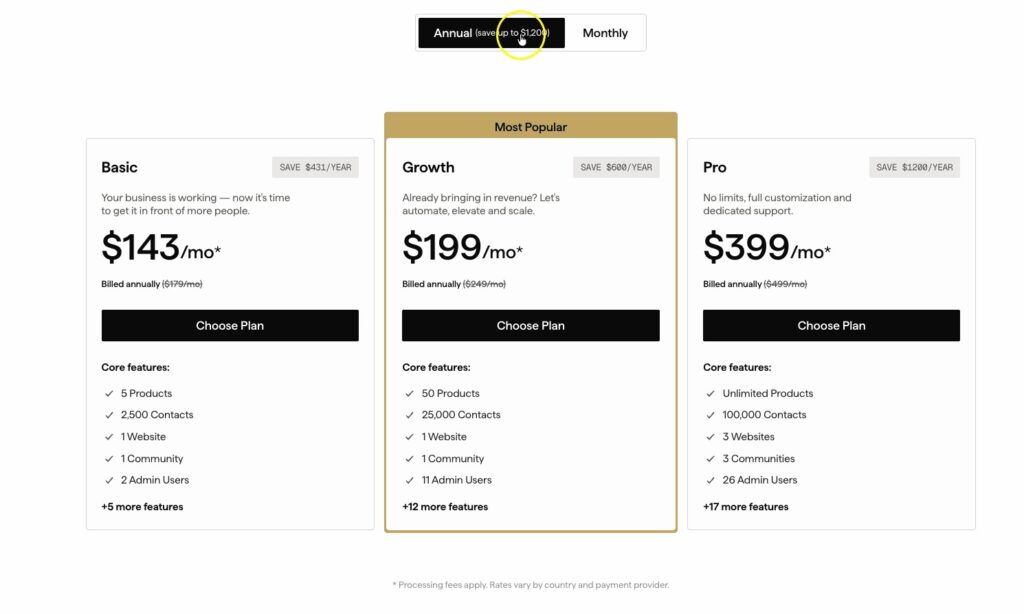
However, you have to understand that Kajabi lets you view how much you are going to pay on a monthly basis right on their pricing page.
But for Circle they don’t allow you to view the monthly pricing. And what you get is this fine print that tells you that the prices that you see there are based on annual billing.

In my opinion, this feels deliberately sly, especially for first-timers. It’s easy to fall for the prices included on the front page when signing up. But when your free trial ends and you want to actually pay for the subscription, that’s when you realize that the prices you saw on their website aren’t what you say..
But the issue isn’t just how pricing is presented but how costs stack up over time.
Circle places limits on key features across its Professional and Business plans, including spaces, admins, moderators, automations, bulk actions, livestream attendees, and live room participants.
Once you exceed those limits, you’ll need to purchase add-ons, typically ranging from $10 to $50 per month.

And did I mention transaction fees.
Generally, Circle charges 2% on the Professional plan and 1% on the Business plan for every payment transaction. But those fees are exclusive of Stripe’s standard 2.9% + $0.30 fee.
That means at $5,000/month in revenue on the Professional plan, you’ll be paying Circle an extra $100 as transaction fees on top of your subscription. Still that doesn’t count the transaction fees Stripe charges because Circle uses Stripe to process payments.
And again, this isn’t something new. For example, Heartbeat charges 1.25% – 5% across its plans which are some of the highest transaction fees in the market.

Verdict: Circle isn’t a low-cost community platform, even at the entry level. But to its credit, it offers some of the best community-building tools you’ll find. But once you scrutinize the pricing structure, it starts to feel like Circle is constantly trying to squeeze more revenue out of you. As your community grows and you outscale your allocated resources, you’re forced to either buy add-ons, which aren’t cheap, or upgrade to a more expensive plan. And once you factor in the transaction fees on top of subscription costs, it becomes clear that Circle really does nickel-and-dime you.
Circle.so pros and cons
Pros
- Clean, and modern interface
- Spaces and Space Groups for better community structuring
- Access Groups that give granular access control.
- Strong moderation tools
- Online course hosting
- Native video and screen recorder
- Built-in live event hosting
- Robust post editor
- Gamification
- Advanced member organization with tags and segments
- Workflow automation builder
- Branded mobile apps
- Built-in landing page builder at no extra cost
Cons
- Strict limits on spaces, and live streaming hours
- Basic online course builder
- Transaction fees on top of Stripe fees
- Useful features locked behind expensive tiers
Final verdict: is Circle worth it?
Circle offers some of the best online community building tools you’ll find. But like any other software out there, it has some shortcomings. It’s not cheap, its course creation tool still needs some work, and it charges you transaction fees on top of Stripe payment processing fees.
But if you look on the bright side and see the value it provides everything begins to make some sense.
The interface is polished. The user experience feels premium. The mobile apps are solid. The Spaces and Access Groups architecture gives you the flexibility to organize a serious membership business. And features like workflows and AI agents will save you time once your community starts scaling.
That said where’s my opinion on when to choose Circle and when not:
Choose Circle if:
- You run multiple paid programs, cohorts, or memberships under one brand.
- You want advanced community management tools.
- You’re looking to create long-form community content
- You want a platform with event hosting and management tools built-in
- You want a polished, professional product that carries your brand.
- You already run a monetized community generating consistent revenue.
- You want advanced integrations like API access, headless integrations and data API
Don’t choose Circle if:
- You haven’t validated that people will pay for your community because testing demand in Circle is expensive.
- You run low cost community memberships
- You need a more advanced course creation tool with things like certificate issuing, rubric-based grading, or open-ended assessments.
Best Circle.so alternatives
- Mighty Networks: The closest Circle alternative. Multi-type spaces, better member engagement features, branded apps, and stronger course features. (Check my detailed Mighty Networks vs Circle review)
- Heartbeat: affordable and better course creation tools.
- Vectore: Best for building online learning focused communities.
- Kajabi: Best all-in-one digital business platform. Strong course creation, integrated email marketing, and robust funnel tools.
- LearnWorlds:the best stack for serious education businesses.
- Skool: best alternative for beginners due to its simplicity and low entry cost