My Detailed & Honest Skool Review in 2026

Last year, I reviewed Skool and gave my candid and objective view.
Skool is intuitive, gets the basics done, but certainly not worth $99 per month.
Since then, few things have changed:
1) Skool became cheaper.
Yay!
They introduced a $9 per month plan that lets you create unlimited courses and host unlimited group members.
But there’s a catch.
This plan also includes a 10% transaction fee.
2) They’ve added more features like livestreaming, webinars & content hosting.
Meaning you don’t need tools like Zoom for web conferencing. And now you can host your course materials natively on the platform.
Lately, I decided to give Skool a fresh trial.
Specifically to see in detail how it measures up in aspects like:
So, in this Skool review, I’ll share my personal experience with the platform to show you if it’s worth your time and money.
Let’s get right into it.
What is Skool?
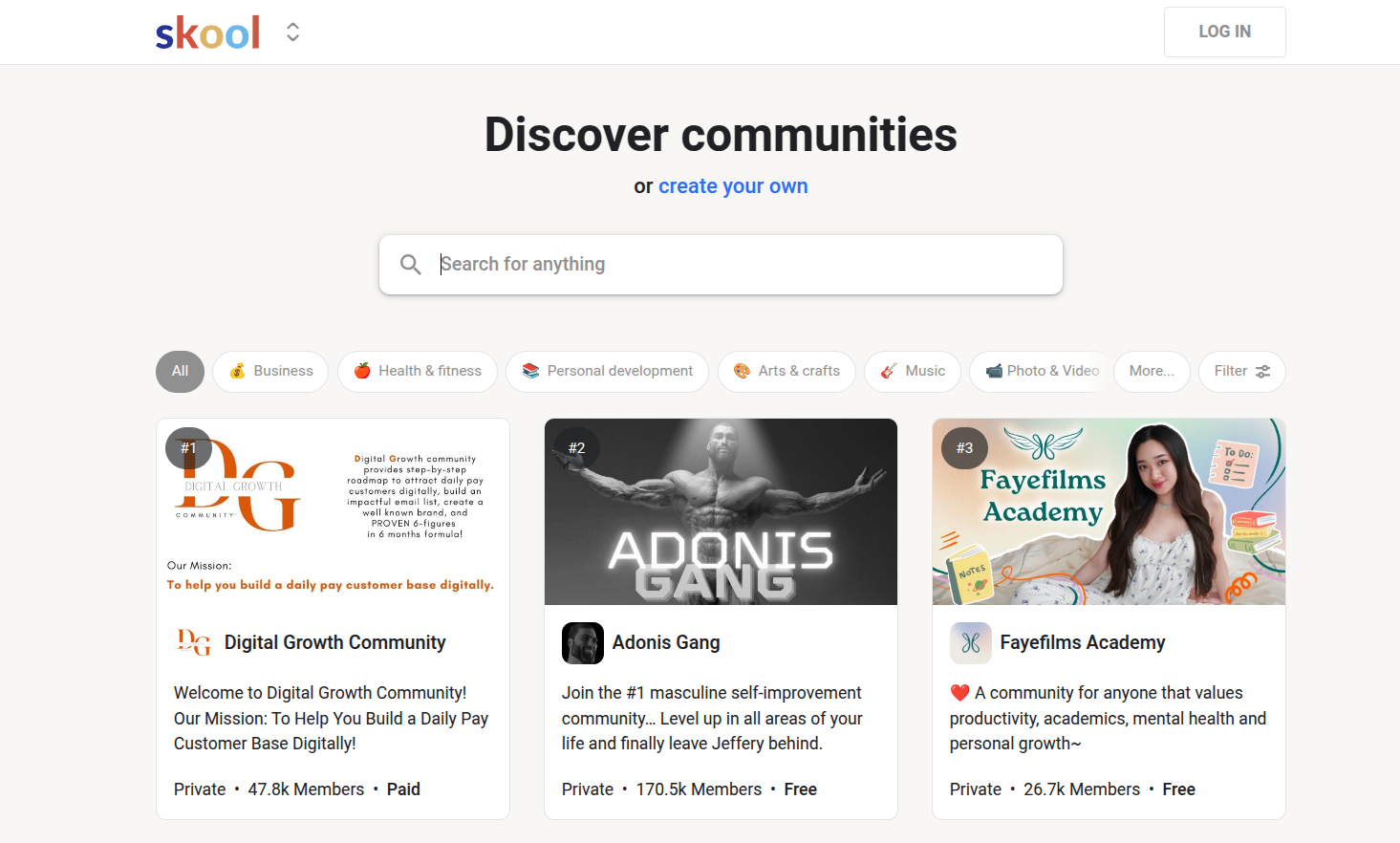
Skool is an online community platform founded in 2019 by Sam Ovens and Daniel Kang.
Sam Ovens is a successful course creator and consultant. He noticed a major gap in traditional course creation and LMS platforms—most lacked a seamless way to integrate courses with communities. To address this, he teamed up with his friend Daniel Kang, and together they launched Skool.
However, when Alex Hormozi invested $400 million in the platform, Skool’s popularity skyrocketed.

Since then, the platforml has been on a hype ride, enjoying the marketing and exposure for the internet business coach.
To give you a quick overview, Skool is an all-in-one platform that promises to have everything you need to bring an online community and courses all in one place where members can learn, share, and grow together, much like a social learning environment.
Some of its features include:
- Skool games
- Classrooms ( or simply its online course builder)
- A community forum
- Leaderboards
- Events manager
- Email broadcasts
- Messaging
- Community search
- Community marketplace
I’ll explore each of these features to show how effective each one is.
But before that, let’s tackle one aspect that Skool’s fans frequently rave about—the user interface—and see if their claims hold up.
Skool Review: User Interface

UI Rating
It’s easy to use but the UI looks outdated.
Skool’s user interface hasn’t changed much since my last review.
It still has the same minimal layout that mirrors classic forum platforms or Facebook Groups. While that makes it instantly familiar, it also feels dated compared to modern community tools, like Circle.
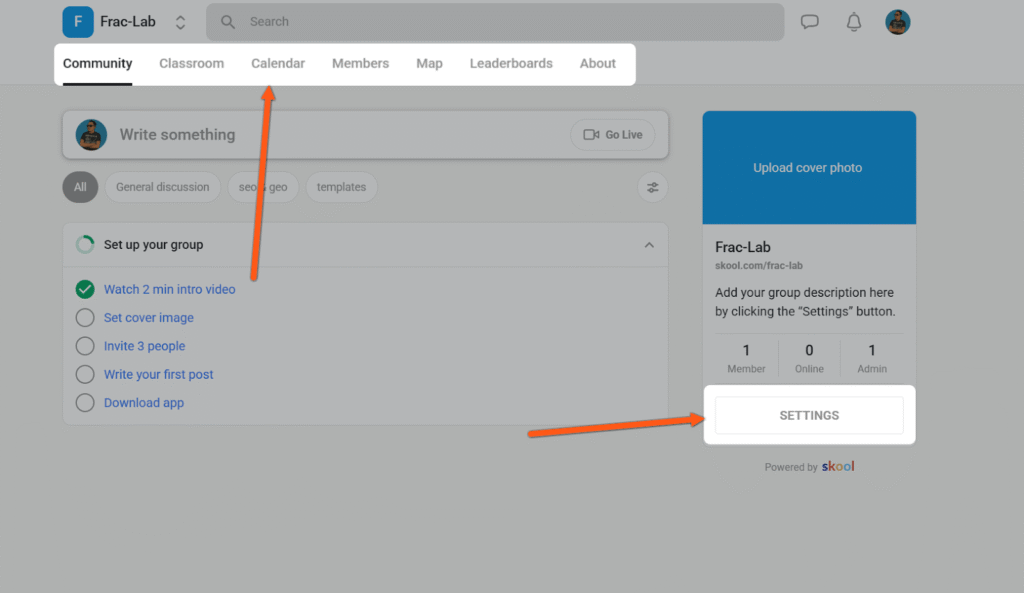
The dashboard looks clean and is refreshingly easy to use. Primary tools like tools like—community, classroom, calendar, and members directory— are conveniently located in the top navigation bar for quicker access. While additional features like reporting, plugins, and leaderboards are accessible through the “Settings” menu in the right sidebar.
If I compare how much time it took me to figure out other platforms’ interfaces and tools like Circle and Mighty Networks, navigating Skool was a breeze.
Skool also has a mobile app that allows you to connect with your members on the go. It’s clutter-free, loads very fast and it’s easy to navigate. During my testing, I didn’t encounter any bugs or glitches.
However, the interface felt outdated and barebones. In a time when users judge software by its look and feel, a dated design can make your brand appear less premium. That perception can influence how potential members value your community.
Overall, Skool offers an intuitive user experience on both web and mobile devices, but the outdated design can limit how high-end your brand feels to potential members affecting your bottom line.
Skool Review: Online Course Creation
Skool Online Course Creation
Lets you host your learning materials and drip feed lessons but it lacks built-in assessment tools such as quizzes, exams, and surveys.
Skool features a simple drag-and-drop course builder that lets you structure your content using Folders and Pages. Essentially:
- Folders become modules
- Pages become lessons
Its course player follows a classic design for most online course builders. Modules, lessons and progress tracking appear on the left side with the lesson content displayed at the center.for most online course builders. Modules, lessons and progress tracking appear on the left side with the lesson content displayed in the center.
Within each lesson, you can include multiple content types such as text, videos, images, and code snippets.
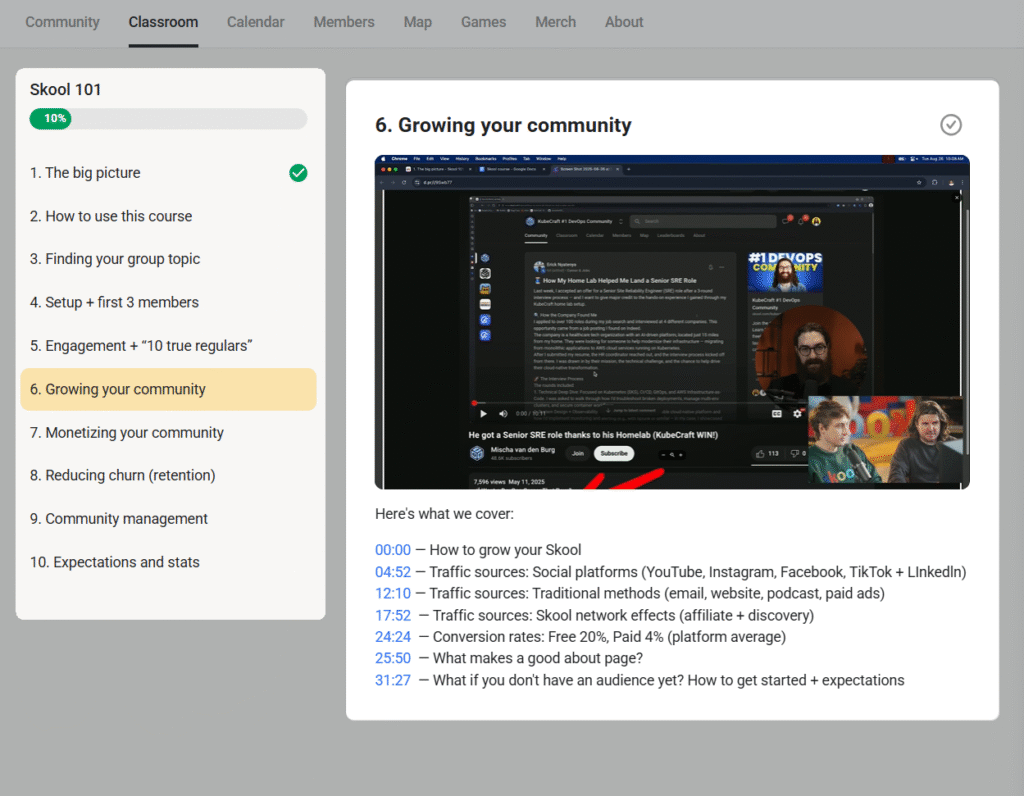
Within each lesson, you can include multiple content types such as text, videos, images, and code snippets.
Skool now allows you to host course materials directly on the platform—a notable improvement for creators who want to manage everything in one place. Alternatively, you can embed videos from YouTube, Wistia, or Loom if you prefer hosting externally.
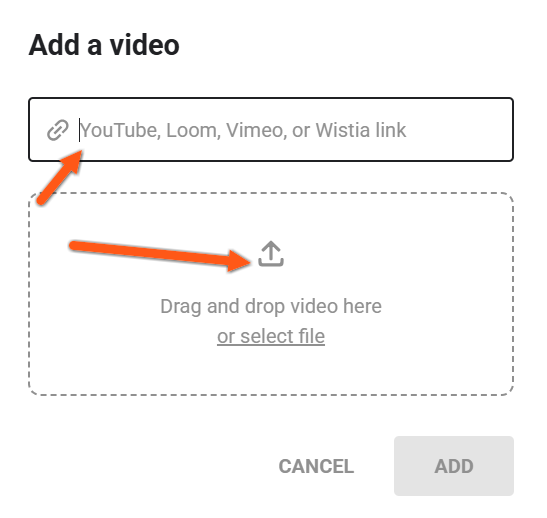
You can also attach supplemental resources like templates, worksheets, and checklists to your lessons, giving students practical materials to apply what they learn.
In addition, you can upload video transcripts to make your lessons easier to follow and even drip feed lessons based on each student’s enrollment date, helping maintain a structured learning flow

However, Skool lacks built-in assessment and certification tools. You can’t create quizzes, graded assessments, student surveys, and issue course completion certificates. Platforms like Kajabi, Teachable, or Thinkific offer these features out of the box, giving instructors better control over progress tracking and student engagement. If you’re an educator wanting to run upskill programs where you to assess students, understand how they’ve comprehended your knowledge and afterwards issue a completion certifica want , you’ll need to rely on third-party integrations for such.
Skool Review: Events Management
Skool Events Management
Skool lets you host live events and livestream sessions directly inside your community, supporting up to 10,000 participants.
Skool has greatly improved when it comes to hosting events. Previously, you had to rely on third party video conferencing software like Zoom to host your community calls, events, webinars and workshops.
Now, using Skool Call and Webinars, you can natively host your live sessions for 10000 participants, saving you the cost of using third-party platforms.
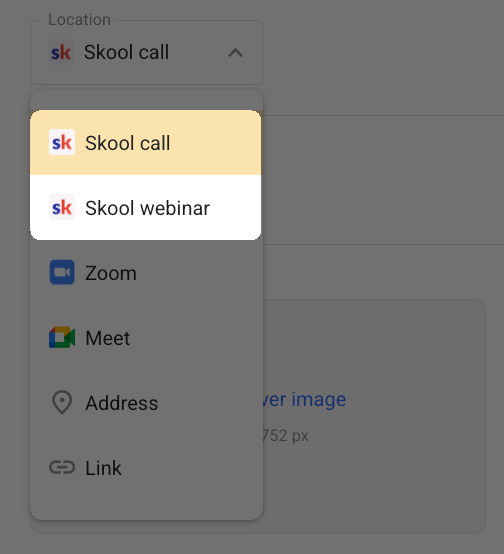
That’s a lot more than many platforms I’ve ever reviewed. For comparison, Circle limits livestreams to 100–2,000 attendees and live rooms to 30–150 participants depending on your plan.
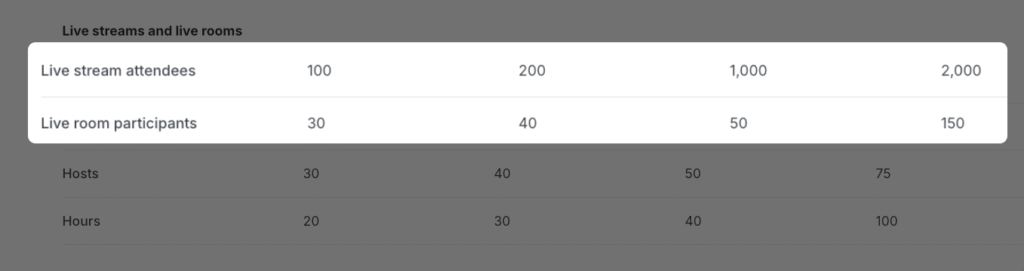
With Skool call, you can host collaborative sessions where participants can join with their camera and microphone, making it ideal for interactive workshops, group coaching, or mastermind calls where two-way communication matters.
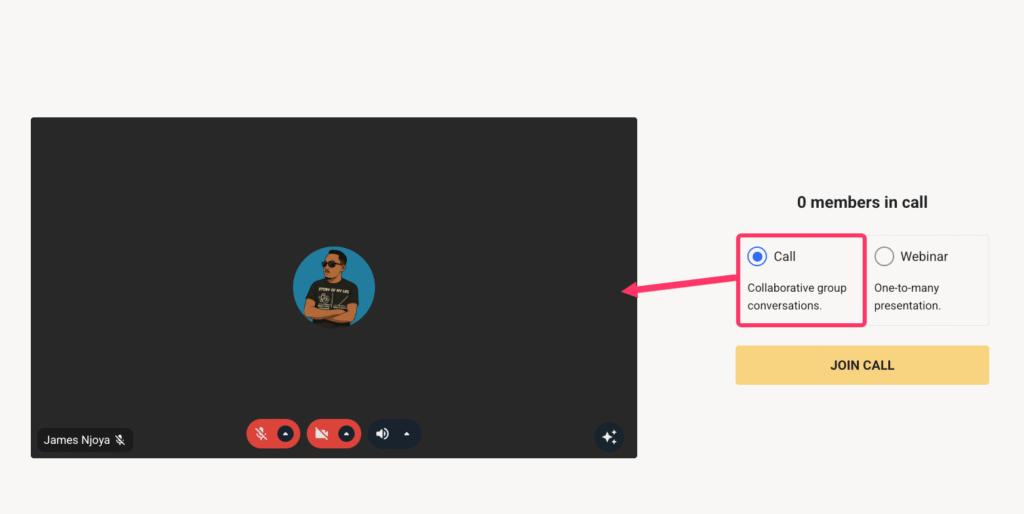
Meanwhile, Skool webinar lets you run full webinars directly on the platform leting you livestream your video feed to thousands of attendees. When needed, you can even promote attendees to the stage, allowing them to join the discussion with audio and video.
On both your Skool call and webinar, you can record your live sessions and choose to reshare them into your community or repurpose as course materials.
If you prefer to use other third-party services like Zoom or Google Meet, you can also embed their links directly in your Skool events.
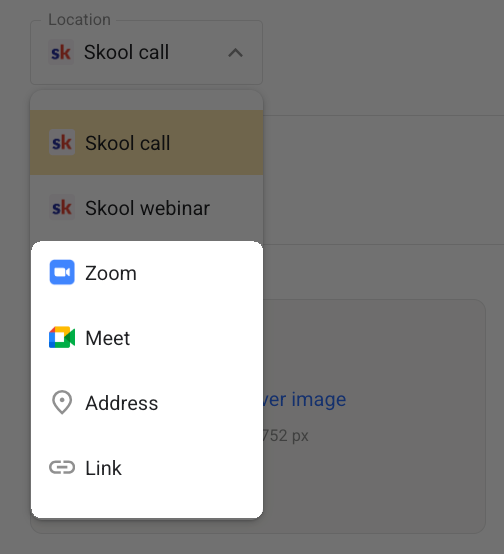
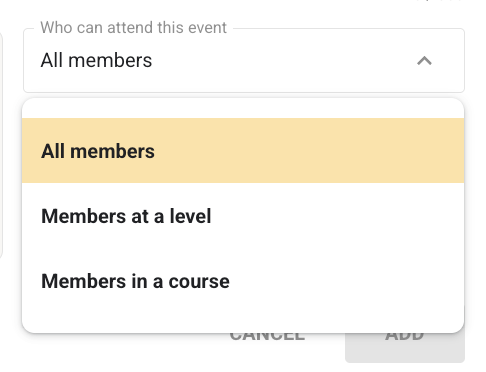
The platform also includes a community-wide events calendar where you can schedule and organize sessions. Events can be recurring or one-time, open to all members, or restricted based on membership level or course enrollment.
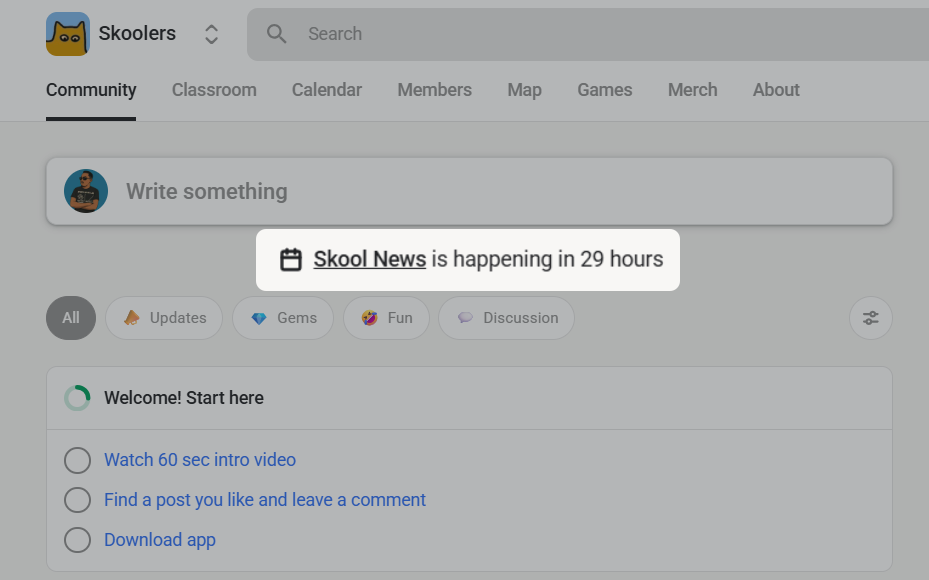
Members can view upcoming sessions both in the calendar…

…and on the community feed, where they can RSVP with a single click.
Skool Review: Community Engagement & Management
Skool Community Building
You can start simple threaded discussions, but gamification and members management tools are shallow.
Unlike Circle or Mighty Networks, which let you create multiple spaces under one community, Skool restricts you to one group per community. All your discussions, announcements, and posts live inside this central feed. While this keeps things simple, it limits flexibility for creators who want to separate conversations by topic, cohort, or course.
In your group, you can create posts, and add other content types like images, file attachments, polls, videos, and GIFs. Members can engage with posts by leaving comments and likes. And if they feel like one of the members posts is inappropriate or it breaks the community rules, they can take action by reporting it to the admin, where you can choose to take action like deleting it.
Once you’ve created your posts you can choose to automatically send an email broadcast to all members in your group updating them. You can further choose to pin your post to the feed which can be handy if you’re making important announcements and you don’t want the post buried in your forum feed.
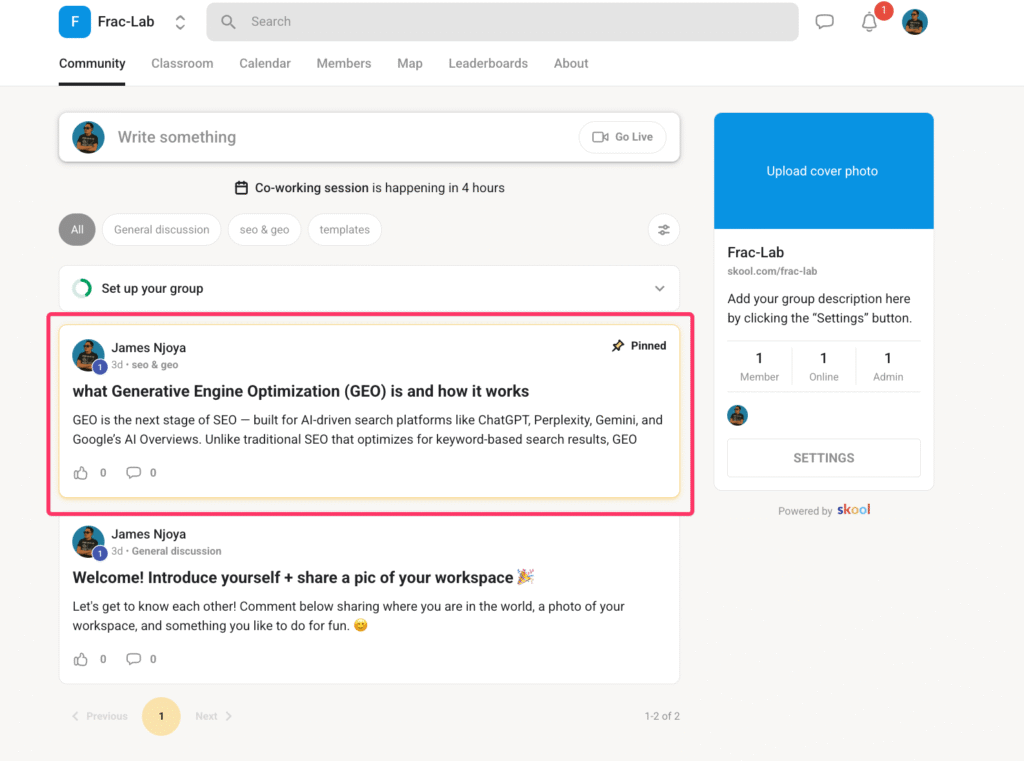
Posts can be organized into categories, displayed at the top of the community feed.
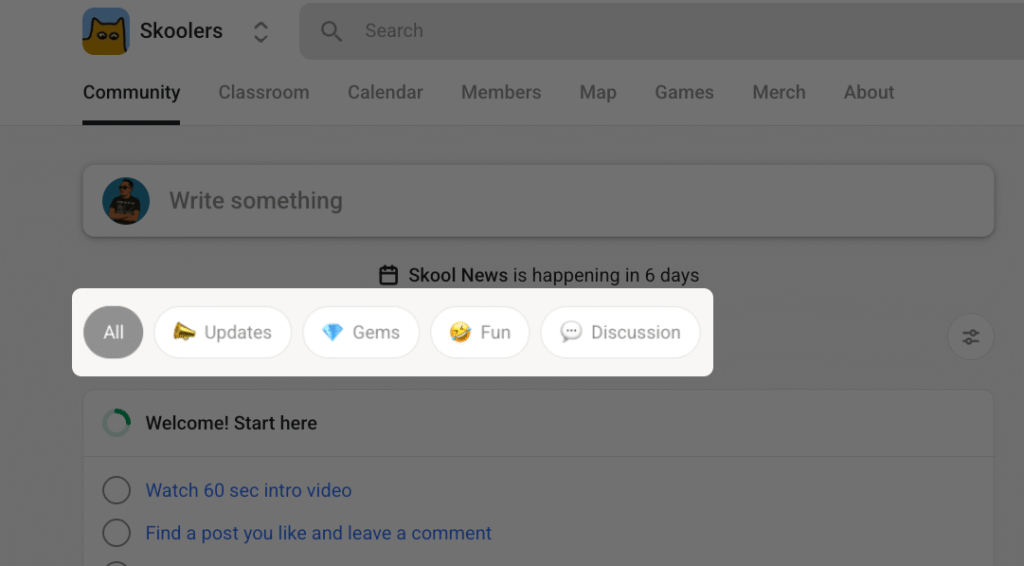
Members can filter discussions by topic, popularity, or recency. However, filtering options are limited compared to platforms like Mighty Networks, which lets users sort content by location, member type, or activity category.
Engagement tools
Beyond discussions, Skool includes community engagement tools such as leaderboards, direct messages (DMs), and live events. However, it doesn’t support group chats, which limits real-time interaction.
Its leaderboard system lets you incentivize participation by rewarding points to members when they receive likes or comments on their posts. You can rename leaderboard levels to fit your community’s theme, but you can’t modify the scoring logic or introduce custom rewards.
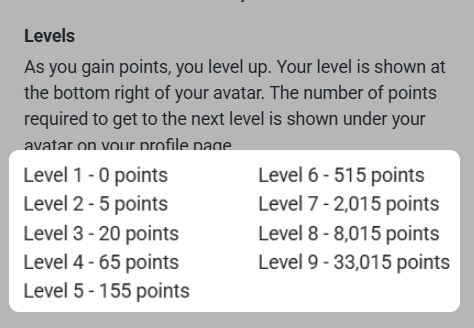
Skool also doesn’t include other gamification elements like challenges, badges, or custom gifts that can make participation more interactive. This makes the system functional but surface-level compared to platforms like Mighty Networks with strikes and custom badges.
Member management & moderation
Skool provides basic tools for managing members and maintaining community order. The Member Directory lets admins view all members, assign roles, or promote moderators to assist with engagement oversight.
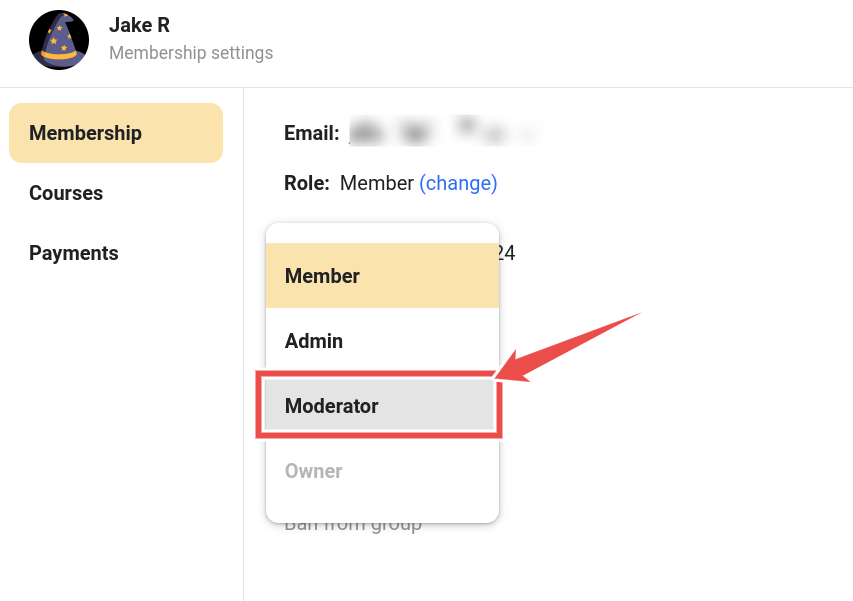
You can edit, delete, or pin posts, and control who can create or comment within the group.
Member onboarding is straightforward. You can invite users through links or enable approval-based enrollment for controlled access.
Once members join, admins can track participation using built-in insights that show discussion activity, course progress, and overall contribution. Removing inactive or disruptive members is simple and can be done from the admin dashboard.
Moderation tools are minimal. You can assign moderators and ban users, but Skool doesn’t support automated content flagging, spam detection, or profanity filters—so maintaining quality requires hands-on oversight. Additionally, Skool only allows a limited number of custom member fields, restricting how much profile information you can collect for segmentation or personalization.
Bottom line: Skool’s community system is clean, lightweight, and easy to manage. It’s effective for simple communities focused on discussion and shared learning. But if you need deeper segmentation, advanced gamification, or complex member management, that’s where Skool begins to fall flat.
Skool Review: Sales and Marketing Features
Skool Marketing and Sales Tools
Relies on third-party apps for page building, email marketing and sales funnels
Skool offers no built-in marketing system for promoting your community or courses. It lacks the basic tools needed to attract, nurture, and convert leads within the platform.
You can’t:
- Build custom sales pages, optin page, or full websites
- Send email marketing campaigns to leads or members
- Create automated workflows to manage community and business processes
In that case, you’ll rely on external tools for that, which can quickly add up the costs.
On the sales side, Skool keeps things simple. You can set pricing for your community or courses, and Skool handles checkout through its payment processor. It supports payments via credit/debit cards, Google Pay, and Apple Pay. During checkout you can also:
- Offer 7-day free trials to boost conversions
- Enable affiliate referrals, letting members earn commissions for inviting new paid members
However, Skool doesn’t support order bumps, upsells, or post-purchase offers, which limits your ability to increase average transaction value.
Skool Review: Customization and Branding
Skool Brandability Rating:
No custom themes, community white-labelling or branded mobile apps
If you want a community space that reflects your brand’s identity, Skool is the last platform that you’ll want to go with.
Its customization options are extremely limited. You can only:
- Add a group icon
- Set a group name
- Upload a cover image
- Switch between light or dark mode
And that’s all.
You can’t:
- Use a custom domain
- Add brand colors or typography
- Display your logo in the forum header
- White-label your community
- Build a branded mobile app for your community
This means every group you create will still live under skool.com, and will look like every other Skool community.
Skool Games Review: Useful or Just a Clever Marketing Ploy?
The Skool Games is essentially a contest where community owners compete to attract more paying members to their groups.
The objective is to grow their audience, generate revenue, and improve their community-building skills.
Here’s how it works:
- You create a community on Skool and work to bring in paying members.
- You compete with other participants to see who can generate the most revenue each month.
- The top 10 winners get exclusive opportunities to meet with experts like Alex Hormozi.
On paper, this sounds like a win-win. You grow your business, get to meet Alex Harmozi and his team, and more “importantly” earn some “bragging” rights. Shut up! Who wouldn’t want to meet Alex Harmozi and let him coach you.
But here’s the catch though.
First, to join Skool Games, you’ll need to sign up for Skool’s 14-day free trial where you’ll need to submit your credit card information.
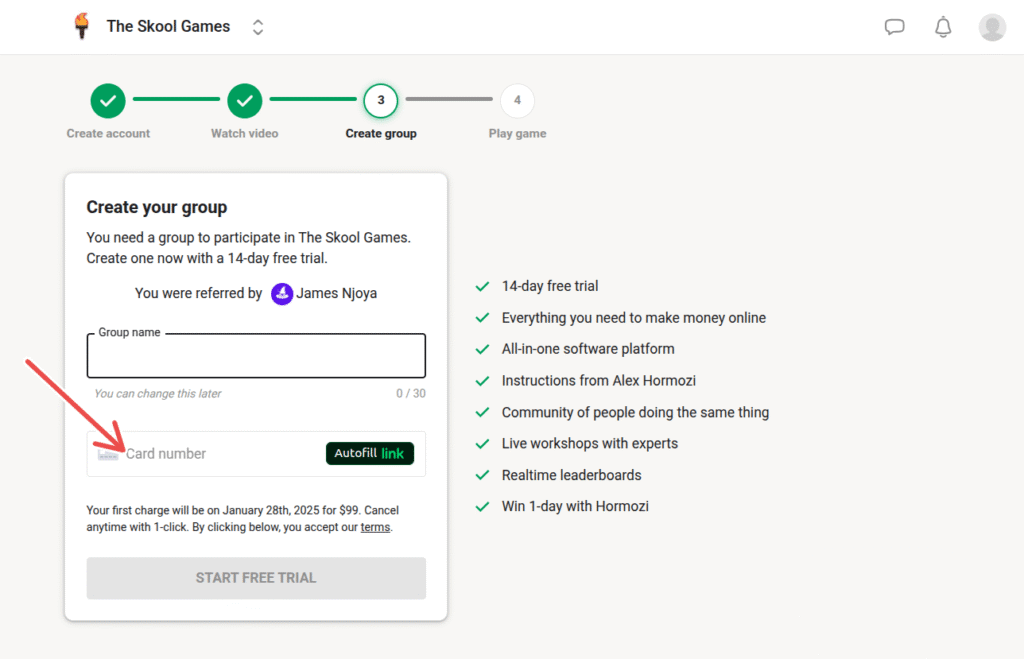
But the Skool Games last for one month. This means you still need to pay the $99 per month subscription to continue playing.
Now, call me skeptical, but this feels like a sneaky way to lock you into paying for the subscription.
By the time the trial ends, you’re already invested, and canceling feels like giving up, even if Skool’s platform doesn’t fully meet your needs.
To be fair, there’s a lot to like about Skool Games. It motivates you to grow your community, and the gamification aspect makes it fun.
Here’s where Skool Games loses me.
Its structure encourages relentless competition, where your success depends on out-earning others. For many, this means prioritizing revenue over genuine community-building.
To me, that kinda dilutes the overall purpose of a community—building authentic connections and offering value.
Don’t get me wrong—making money is rewarding. But you have to ask yourselves: Is your community providing genuine value to your members? Because if you win and your members don’t, what’s the point?
My thoughts?
Skool Games is a clever gamification strategy, no doubt.
It motivates action, provides resources, and adds a competitive edge to community-building. But, it feels like a sneaky marketing tactic to lock users into the subscription.
Because if it weren’t they’d offer a 30-day trial to match the competition’s duration.
Skool Pricing and Transaction Fees
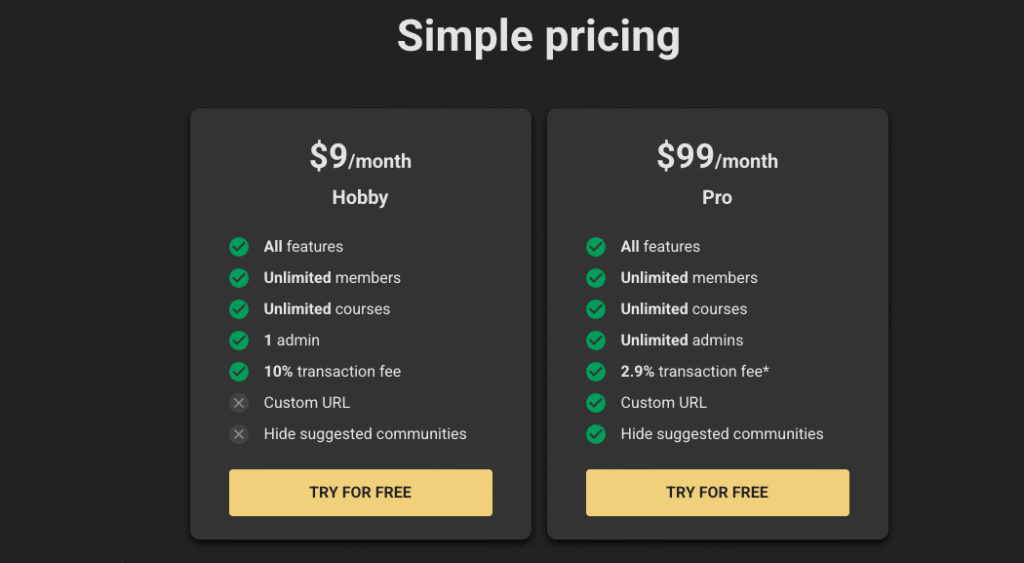
Skool keeps its pricing simple with two plans:
- Hobby Plan – $9/month
- Pro Plan – $99/month
Both include unlimited members and courses, along with full access to key features such as course creation, events, and livestreaming.
The difference lies in admin limits and transaction fees:
- Hobby Plan: 1 admin, 10% transaction fee
- Pro Plan: Unlimited admins, 2.9% + $0.30 per transaction for payments below $901 USD, or 3.9% + $0.30 for payments above that threshold
At first glance, Skool appears extremely affordable. Starting a community for $9 a month sounds like a bargain. Until you factor in the 10% transaction fee and the inability to customize your group’s URL. That combination can quickly offset the initial savings, especially for creators earning consistent revenue.
Upgrading to the Pro Plan removes most of these restrictions. But you can still get more value from other platforms at the same price tag. For instance, Circle’s Professional plan costs $89/month, slightly cheaper than Skool Pro, yet offers features Skool lacks—such as hosting your community on a custom domain, creating richer member profiles, and building custom website pages for branding flexibility.
Skool Pros & Cons
Pros
Cons
Skool Review: Is it a Good Choice for Online Community Building?
In this Skool review, I did my best to be objective and share my honest take on Skool as a community software.
Skool deserves credit for a few things:
- It’s incredibly easy to use, even for beginners.
- It’s community-focused, avoiding the clutter and complexity of all-in-one systems like Kajabi.
- It lets you host live sessions for up to 10,000 attendees directly inside your community.
- Its pricing model is simple and transparent, avoiding the confusion of multiple tiers.
However, Skool also has some limitations:
- The course builder is basic and lacks assessment or certification tools.
- Community organization is restricted to a single group per community.
- Branding options are minimal, which can make professional customization difficult.
But should you use it to build an online community?
If you want a straightforward, easy-to-manage platform that lets you monetize your community and run live events without complexity, Skool is a solid choice. It’s ideal for coaches, small community builders, and creators who value simplicity over advanced customization.
However, if you need stronger community organization, deeper engagement tools, or advanced branding control, platforms like Circle or Mighty Networks will serve you better.
Best Skool Alternatives to Choose From
- Circle: Offers the best overall features with robust customization, community engagement, and seamless integration options.
- Mighty Networks: Excels in flexibility and branding, making it ideal for creators who want to build highly personalized community experience.
- Heartbeat: An affordable yet feature-rich option that balances cost and functionality for smaller communities.
- Kajabi: The ultimate all-in-one platform with built-in sales and marketing tools, perfect for those who want everything under one roof.
Also Read: