My Stan Store Review After Using It for 3 Months

Stan Store promises to replace 5 different apps in your creator monetization tech stack—all with ONE link.
Think of tools like:
- Kajabi for course creation
- Calendly for bookings
- Linktree for link in bio
- Manychat for instagram AutoDMs
- MailerLite for email marketing
- Circle forcommunity building
All for as low as $29 per month.
Which is a bold claim actually.
But is it as good as it claims to be? Can it replace dedicated platforms in your creator business stack?
Short answer? Not really.
But why does every creator on TikTok, X, and Instagram seem to use it?
In this Stan Store review, I’ll provide my honest deep dive into the platform to show you if it’s worth the hype and price.
What is Stan Store?
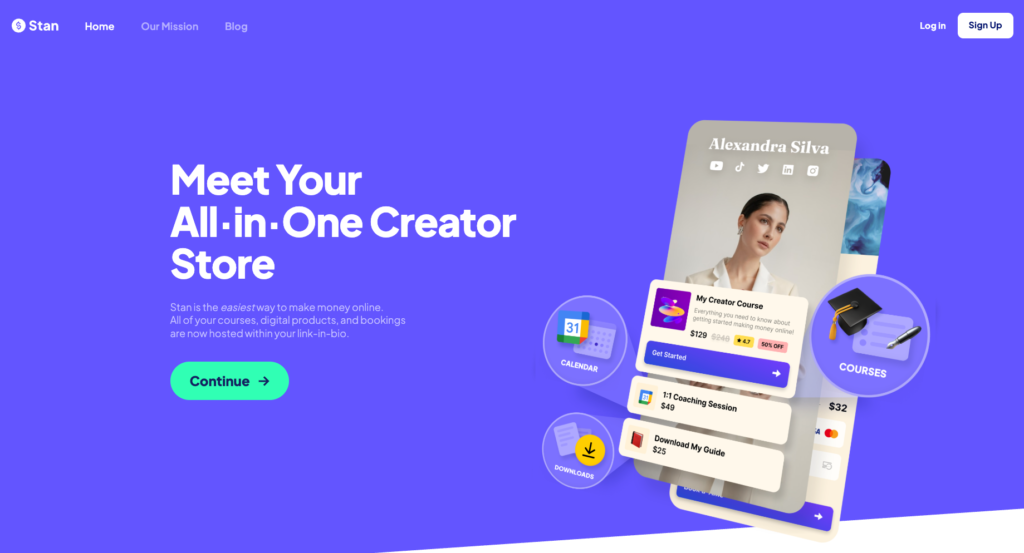
Stan Store or simply Stan is a digital storefront that lets creators sell courses, digital downloads, coaching, and memberships all on one-page. It’s designed to make selling online simple, especially for creators and businesses that rely on social media as their primary source of traffic.
John Hu (now CEO) founded Stan Store after experiencing the friction of being a viral creator without a functional way to monetize his audience. He realized that to actually sell a digital product or service, he had to patch together a dozen different tools.
So he partnered with Vitalii Dodonov (now CTO) to build the tool he wished he had:
An all-in-one e-commerce and link-in-bio platform that handles the technical while empowering creators to sell their knowledge and digital products without knowing how to build websites.
Since then, Stan Store has massively grown to a multi-million dollar business attracting inverstors like Steve Ballet and GaryVee.
At its core, Stan Store is like Shopify for creators.
It solves 3 common problems that many creators face while trying to sell their skills and products online:
- Technical savvy
- High software costs
- And the friction of selling directly from social platforms like Instagram and TikTok
Many traditional digital product platforms have steep learning curves. Comprehensive creator monetization platforms like Kajabi do cover everything, but they’re expensive and have dense tools that make them hard to navigate for first timers.
As a creator, you don’t want to pay $143 per month just to sell 5 digital products plus learn how to navigate the new interface before you even are able to sell.
In other words: you want a tool that simply works.
One that lets you upload your product, set a price, and—voilà.
Which Stan Store lets you do easily.
Now let’s talk about selling itself.
If you’ve ever sold online: especially on TikTok or Instagram…
… you know that they only allow one link in your bio.
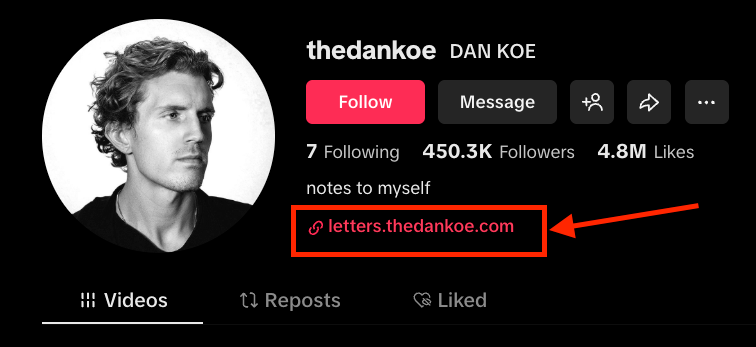
But what if you want to sell more than one product?
Let’s say you want to sell:
- A course
- Coaching calls
- Digital downloads
- A community membership
Normally, you have to choose one product to link to.
Do you link to your course?
Or should you push your high-ticket coaching offer instead?
What if you didn’t have to choose?
What if you could share one link that shows all your products, lead magnets, and special offers on a single page?
Something like this…
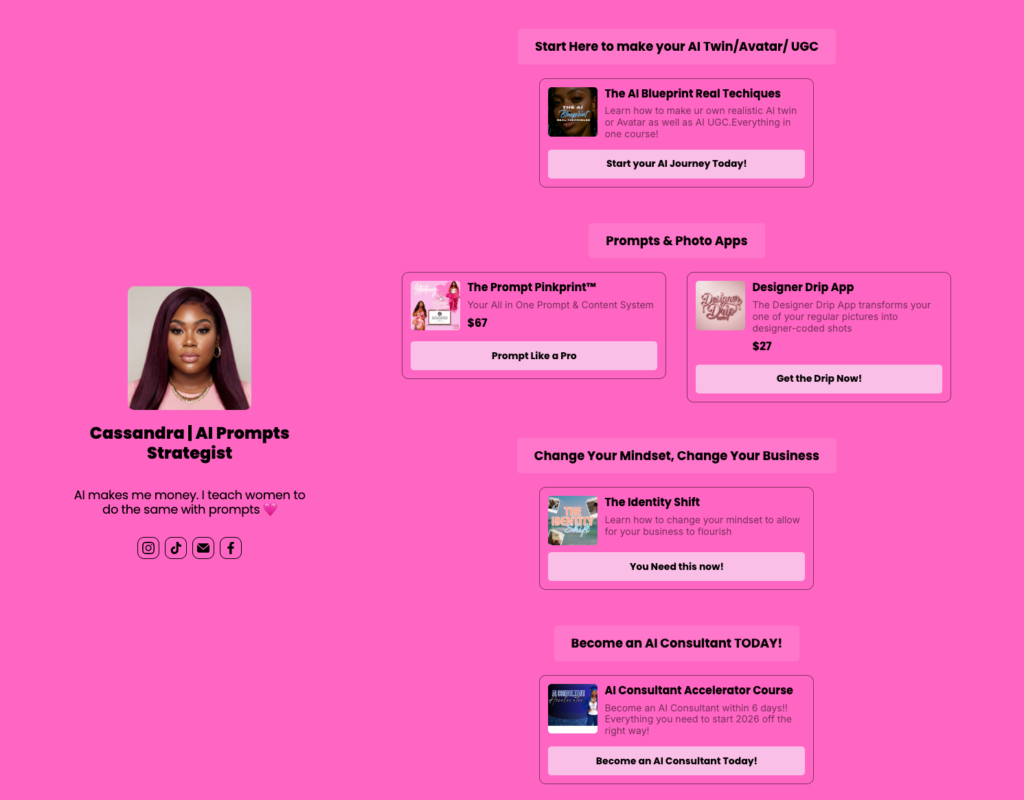
Game-changer, right?
This is what Stan Store lets you do. It simplifies selling by letting you list multiple products on a single page where your customers can buy in one click.
Things I Liked About Stan Store
- Simple and easy to use dashboard: You can launch a functional storefront in minutes. The interface is intuitive, removing the need for technical skills or coding. It prioritizes a mobile-first layout that ensures your products look native to the platforms where your audience already spends their time.
- Good online course builder: The platform hosts video and text content. The course player is intuitive and optimized for mobile consumption, allowing your students to learn on their phones.
- No platform transaction fees: While many platforms (like Heartbeat and Kajabi) that take a percentage of every sale, Stan Store allows you to keep 100% of your revenue. That way, you only pay the flat subscription and standard payment processor fees.
- 1-tap mobile checkout: The checkout process is engineered for high conversions. By minimizing clicks and forms, it reduces the friction that usually leads to abandoned carts, especially for impulsive social media buyers.
- Integrated booking and calendar: Stan Store syncs with Google and Outlook calendars to prevent double bookings and handles the payment and scheduling in one flow, replacing the need for an external tool like Calendly.
- Multi-product support: Beyond coaching and online courses, with Stan you can sell other digital product formats including downloads (e.g ebooks, templates and plugins), community memberships, webinars and even custom products or services.
- Intergrates with familiar tools: Stan Store capitalizes on the tools that many coaches and creators might be using already or are familiar with. For example, instead of building a custom solution for video broadcasting and have users deal with buggy experiences, it has direct integrations with Zoom and Google Meet that are easier and familiar with many users.
Things I Disliked About Stan Store
- Basic tracking and analytics: The analytics dashboard is too simple for serious scaling. It gives you a high-level view of your income but makes it difficult to track the specific lifetime value of a customer or see which traffic source is driving the most profit.
- Limited customization tools: Every Stan Store looks nearly identical. You have very little control over typography, layout, or branding beyond basic colors. Stan also doesn’t let you host your digital store on a custom domain.
- Shallow online learning tools: The course builder lacks essential LMS features like quizzes, assignments and the ability to issue certificates of completion. Therefore, if your goal is to sell high-value educational programs like masterminds, upskill courses, bootcamps, or certification programs, you will need to find an alternative platform.
- The $99 marketing paywall: Essential marketing tools like discount codes, email sequences, and analytics pixels are locked behind the $99 Pro plan.
- Choice paralysis for large catalogs: The single-page design fails if you have more than a few dozen products. A long list of offers becomes a cluttered mess that confuses customers which can reduce conversions.
My Stan Store User Experience Review
Stan Store has a modern and clean user interface. It features all its tools on the left sidebar of the dashboard which is easy to find.
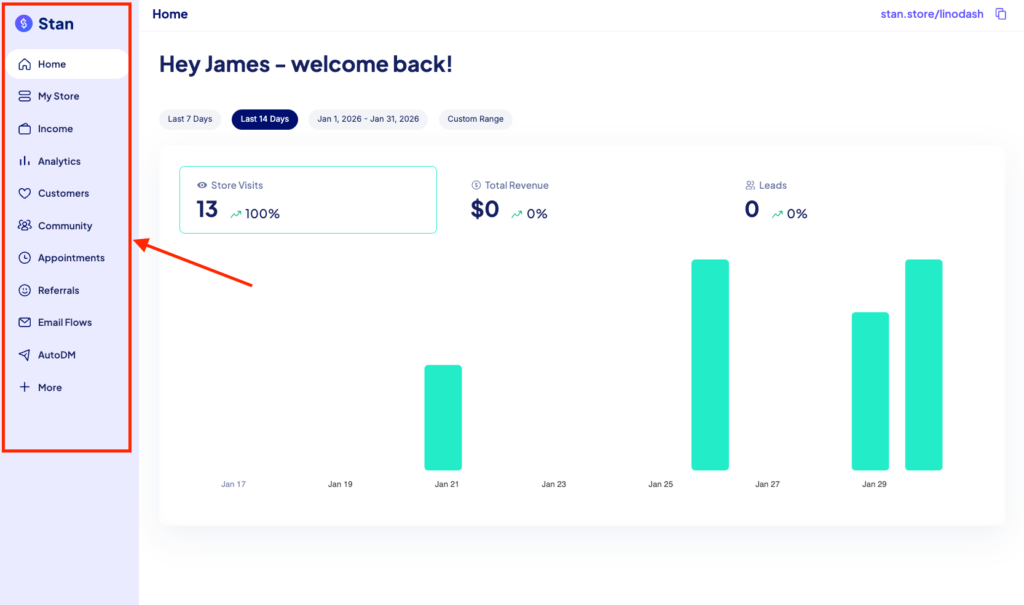
The onboarding process is smooth, with clear microcopy guiding you through each step of setting up your store. During my test, I was able to get the store fully up and running in under an hour.
Managing the store on a daily basis feels like using a mobile app. It’s mobile-friendly, so tweaking prices, adding products, or checking stats while on the go is super straightforward. Its page builder is responsive and shows you exactly how the store looks on a phone as you edit it.
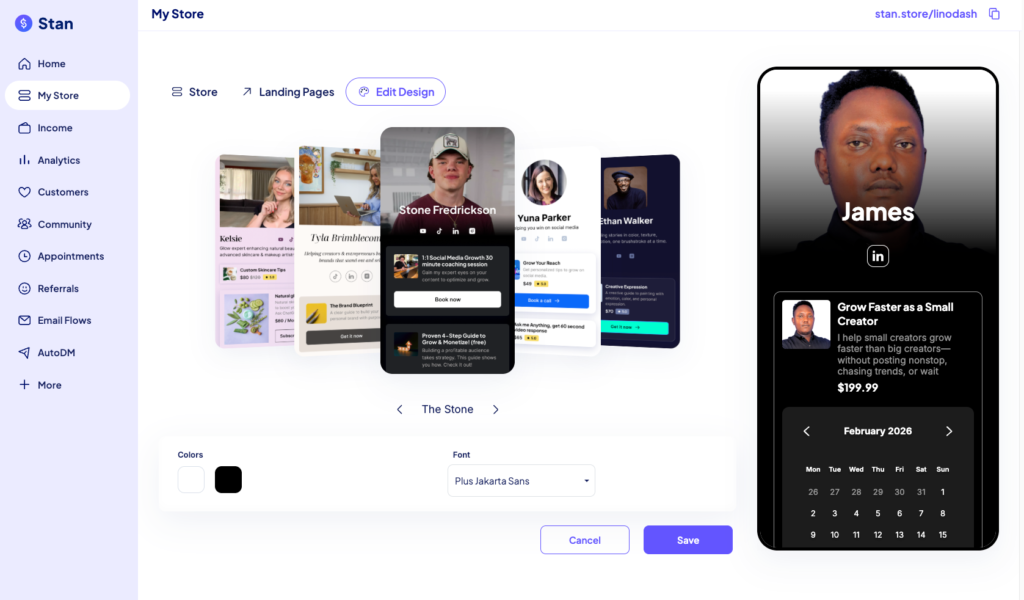
Because the platform assumes your customers are coming from a social media app, the transition from a link-in-bio to a completed checkout is seamless.
Stan Store Review: Digital Products
Digital products in Stan Store include anything you can deliver through a download link or a private login. That includes courses, coaching calls, communities, downloadable files, memberships, paid webinars e.t.c
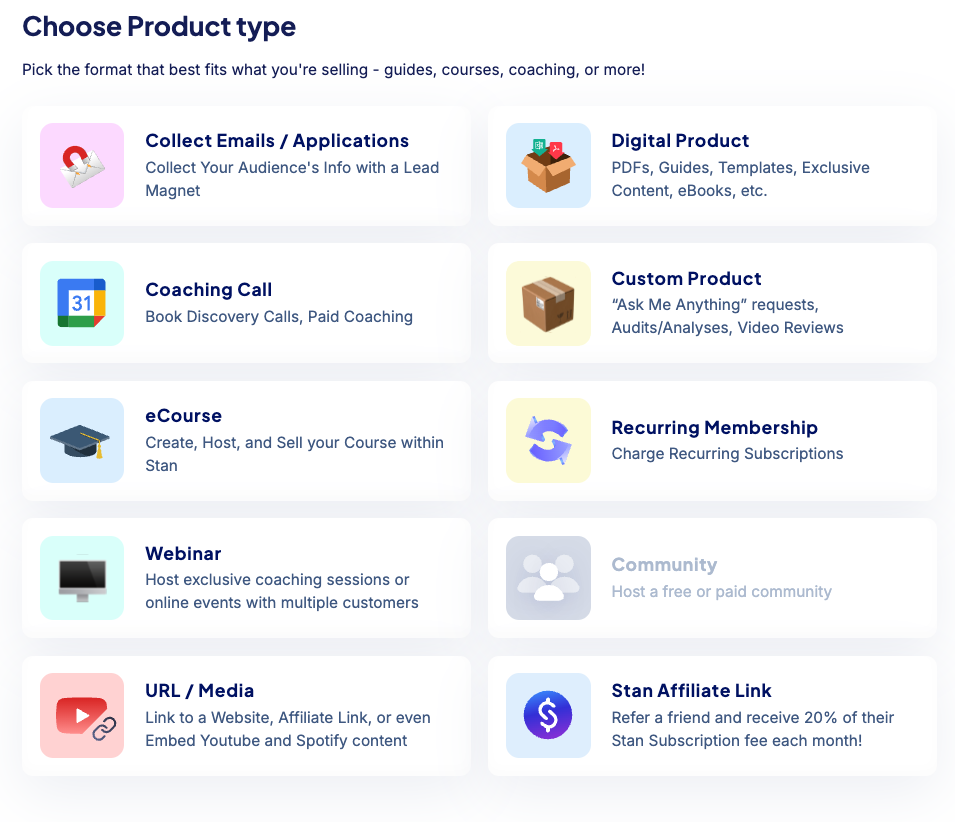
In this section, I’ll review the top digital products you can sell with Stan Store to see how they fare, plus compare creating and selling them on its competitors like Kajabi, Circle, Paperbell, e.t.c.
Starting with…
#1: Online Courses
Stan Store offers a simple drag-and-drop course builder that lets you organize your curriculum into modules and lessons.
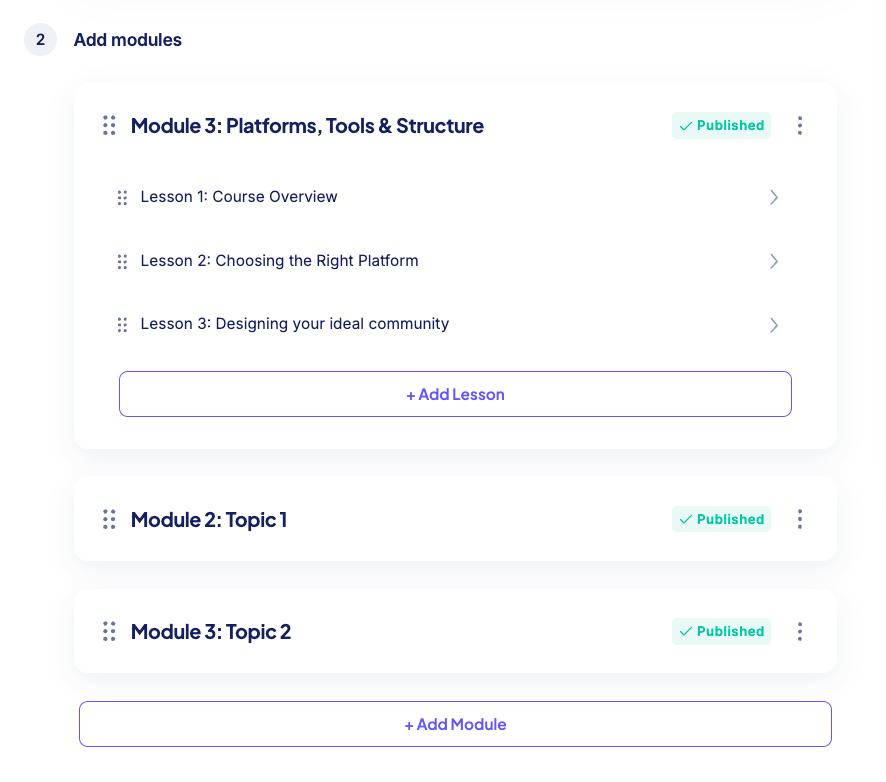
You can natively host your video lessons, or embed them from third party platforms like Loom, Wistia and YouTube. You can also drip schedule your modules, add text instructions, and downloadable files such as templates, and checklists to support learning.
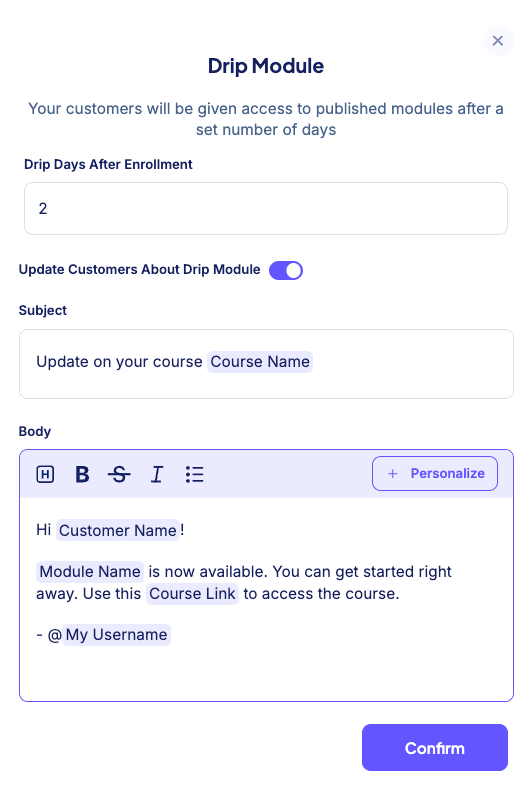
The course player is sleek and intuitive, even on mobile, making it easy for students to consume content on the go.

However, when it comes to student engagement and management Stan Store doesn’t:
- Let you create quizzes and assignments to see how well your students have grasped your materials.
- Support SCORM compliance.
- Allow you to issue completion certificates.
- Provide detailed student progress reports to track engagement.
That said, if you’re planning on running bootcamps, upskilling programs, or certification-based courses, you’ll need a platform with more robust learning management features and Stan Store wouldn’t be a good fit.
Verdict: Stan Store’s course builder is a solid option for creators and coaches selling simple, self-paced or mini courses where assessments aren’t essential. However, educators and online instructors who need advanced tracking, reporting, and assessments will find more value with platforms like FreshLearn or LearnWorlds.
#2: Online Community Building
Stan Store community features are too basic to build a high value and engagement online spaces.
From what I found, it best works when you’re looking to start a simple forum where you and your members can post or share their thoughts and others can engage by liking or leaving a comment.

But if you’re looking for a serious online community builder, Stan Store still has a long way to go.
Let’s start with community organization.
Stan Store uses simple categories to group discussion posts into specific topics to keep your feed organized.
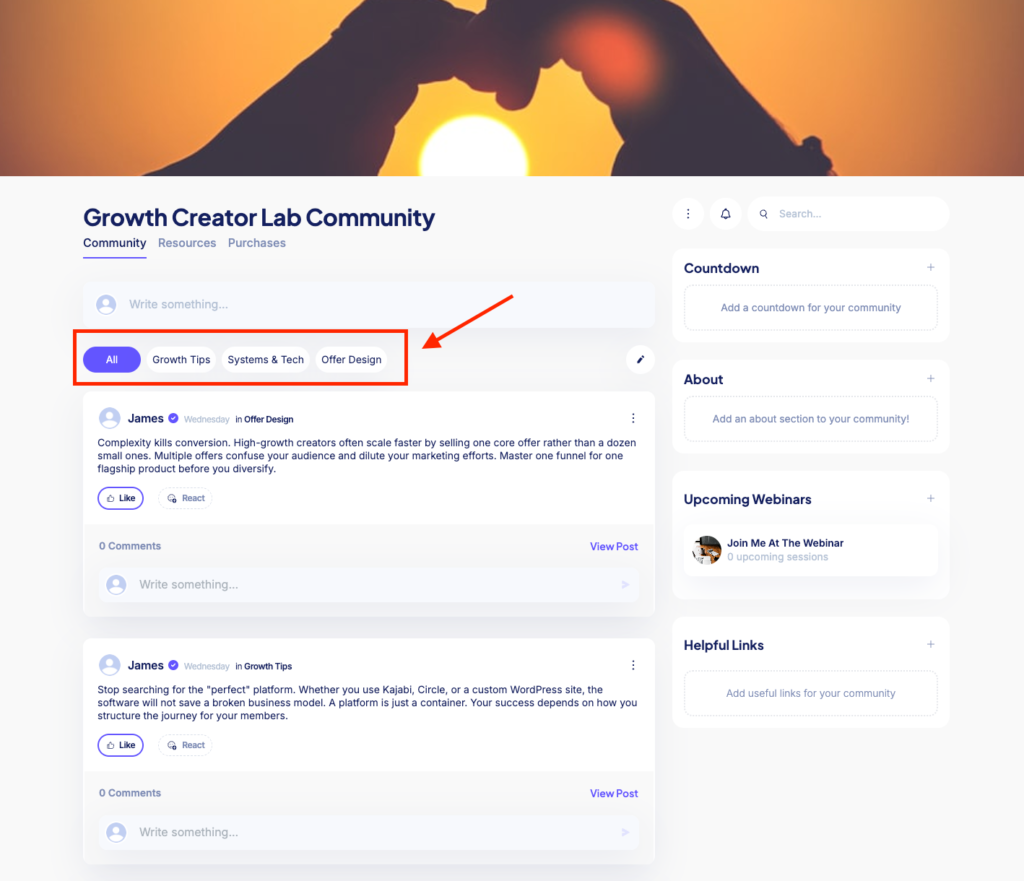
However, the platform lacks the hierarchical depth found in competitors like Circle or Mighty Networks. It does not support “spaces” or “channels” which allows you to create distinct areas for different community content types like posts, discussions, chats, events and live sessions.
You also can’t create private channels or spaces where you can give access to specific community members. So everyone in your community accesses everything.
In your community you can engage members with threaded posts, multimedia content and events.
But still it lacks native interactive tools to encourage member participation, such as polls, icebreaker questions, quizzes, or gamification elements like challenges, leaderboards and badges.
Moderation is reactive and mostly manual.
- Both Admins and Moderators can delete any post or comment that violates community standards.
- You have the ability to manually remove any member from the community.
However, there are no automated keyword filters or shadow banning features.
It also lacks a searchable or filterable member directory, making it difficult for members to find and connect with peers based on specific interests or expertise.
Verdict: Stan Store community building tool works well for creators who want a low-maintenance, flat-structure group where every paying member is treated equally. However, if you need to build a more sophisticated ecosystem with multiple tiers, detailed member profiles, multiple chapters, strong members engagement features or automated moderation, you’ll want to go with a more robust community software like Circle or Mighty Networks.
#3: Online Coaching
Stan Store acts both as your storefront and scheduling tool, eliminating the need for third-party booking platforms like Calendly.
You can configure:
- Meeting duration and timezone
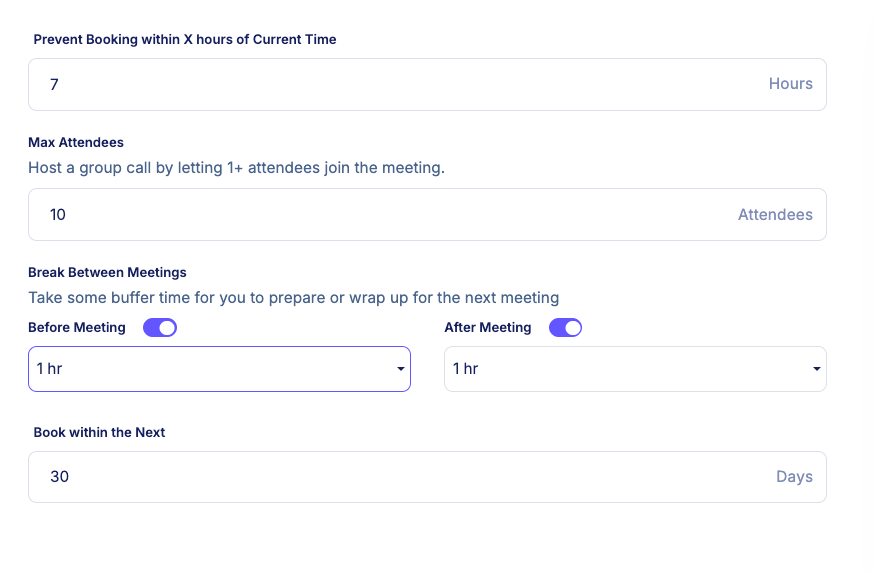
- Advance booking limits (e.g., clients can only book up to 30 days ahead)
- Last-minute booking restrictions to prevent same-day or short-notice calls
- Buffer times before and after sessions
- Availability rules, including blocking off holidays or specific dates
- Maximum attendee limit (e.g., 10–20 participants). Once the cap is reached, booking automatically closes to prevent overbooking.
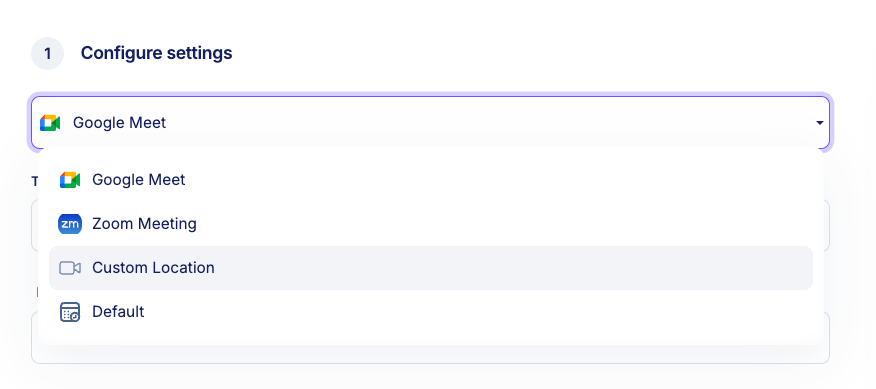
Stan Store syncs directly with Google Calendar, Outlook, or iCal, ensuring availability stays accurate across platforms. However it doesn’t offer native live streaming like Kajabi. Instead, it relies on integrations like Zoom, Google or custom solutions for live meetings and sessions.
Clients can view your real-time availability, select a time slot, and complete payment in a single flow. And after doing so:
- A Zoom or Google Meet link is automatically generated
- The event is added to both calendars
- A confirmation email is sent instantly
You can also set up a followup automation to email your clients a link to the recording or a feedback form after the call ends. However, the ability to send automated email workflows is only available on its high end plan: Creator Pro.
Stan Store also lacks a built-in client portal for storing call recordings, notes, or homework. Any post-session materials must be:
- Sent via email
- Or delivered through a separate Stan Store product (e.g., a member area)
Verdict: Online coaching on Stan Store simplifies booking experience for clients. It’s an excellent fit for creators and coaches who want to sell individual sessions or group calls without operational complexity. However, compared to well-rounded coaching platforms like Kajabi or Paperbell, Stan Store lacks deeper infrastructure for managing ongoing client relationships, session history, and centralized client data.
#4: Webinars
Stan Store allows you to host both free and paid webinars. However, it does not host the live video stream. Instead, it serves as the registration front and relying on integrations with Zoom and Google Meet.
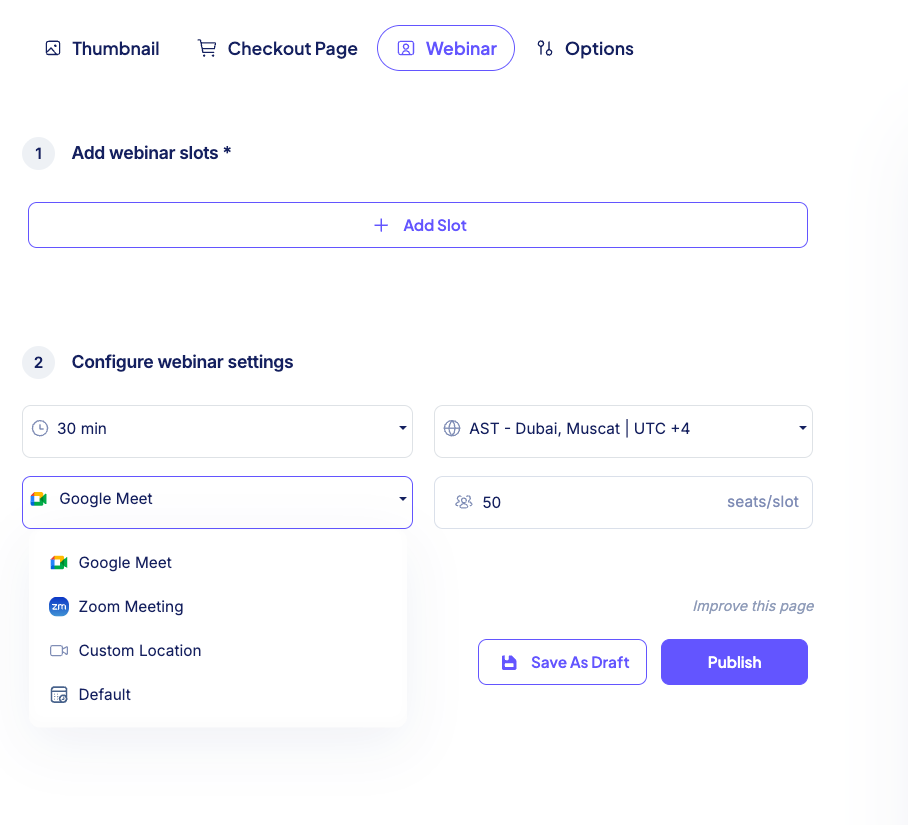
When a customer registers, Stan Store automatically generates a unique meeting link and sends a confirmation email immediately after purchase. You don’t need to manually manage invite links or attendee lists, and automated reminders.
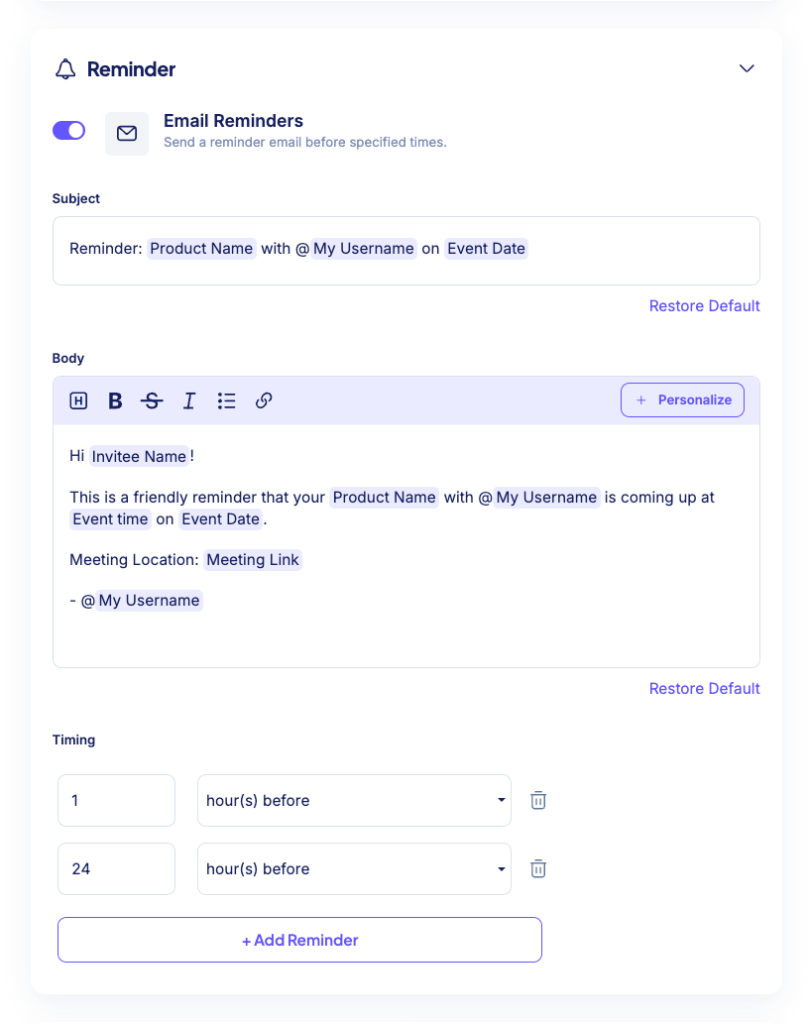
Stan Store also supports multiple time slots for the same webinar, allowing you to run recurring masterclasses or live workshops without creating a new product each time. This works well for creators who want to repeat the same session on different dates while keeping their setup simple.
Because the webinar is hosted externally, Stan Store does not record or store the session automatically. If you want to offer replay access, you must upload the recording manually after the event, either as a digital link or as part of a course or member area.
Verdict: Stan Store webinar setup is best suited for simple, low-volume paid workshops and creator-led events. For more advanced needs it has some clear limitations. Unlike Kartra’s webinars, Stan Store does not support evergreen or pre-recorded webinars, offers no native interactive features like polls or Q&A, and provides only basic sales analytics rather than detailed viewer behavior insights. A separate Zoom or Google Meet subscription is also required.
#5: Memberships
Stan Store supports recurring memberships by automating billing and access control, turning a simple storefront into a predictable subscription-based revenue stream.
Billing operates on a straightforward, set-and-forget model. You can choose weekly, monthly, or yearly subscription cycles, with payments processed automatically through Stripe or PayPal.
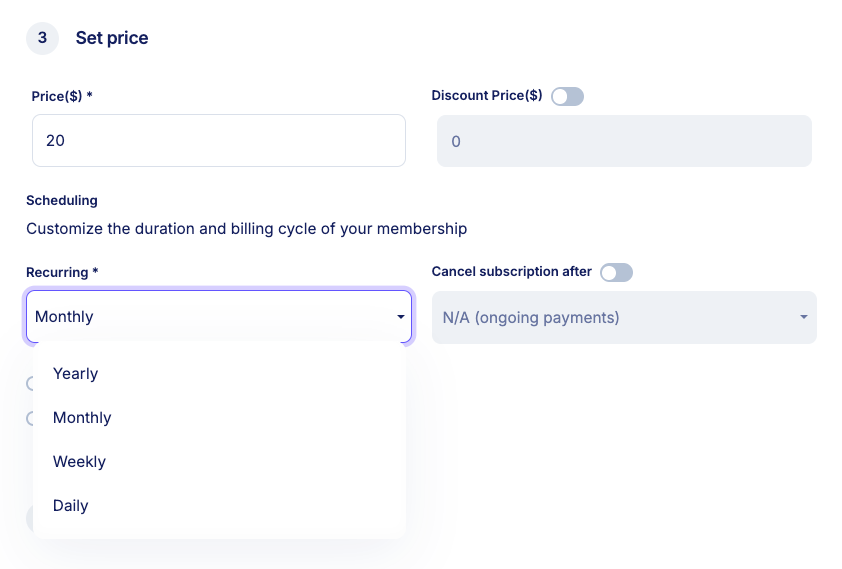
If a payment fails, Stan Store attempts to recover it before revoking access, reducing involuntary churn. You can also offer discounted first periods to lower the barrier to entry, a common strategy for higher-priced memberships.
While the system is intentionally simple, you can create multiple membership products at different price points. However, Stan Store lacks a native solution to offer pricing tiers under the same memberships. Instead, you’ll need to find workarounds like creating different products for each tier.
For ongoing management, Stan Store provides basic visibility into your subscriber base. You can view active members, see when they joined, and track lifetime value.
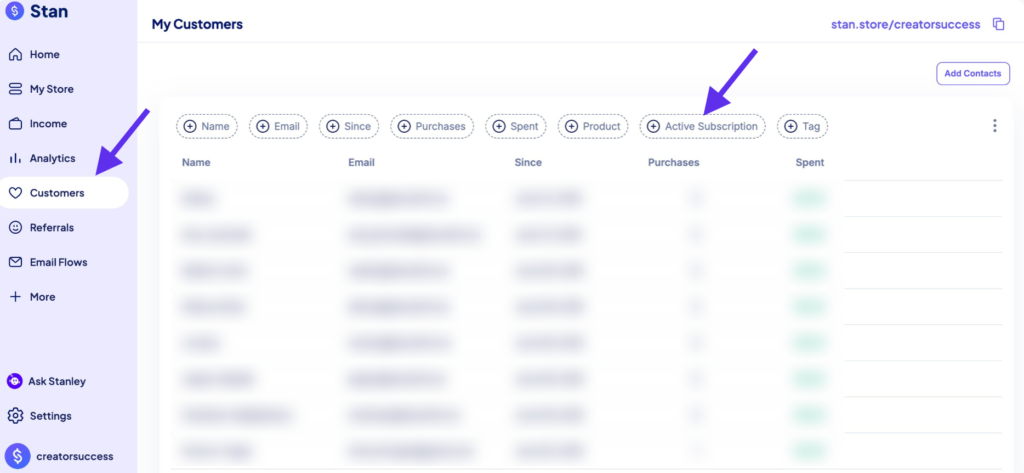
Members are able to cancel their subscriptions themselves, and you can monitor overall churn trends, though the cancellation flow does not include exit surveys or feedback collection.
Stan Store Review: Sales and Marketing Tools
Stan is built to simplify selling. It avoids the dense marketing tech stack you’ll find in creator business platforms like Kajabi, Systeme and Kartra.
Given that, I didn’t expect much when it comes to things like website building, sales funnels, email marketing, contact management and checkout building.
But let’s see how it fairs.
#1: Landing Page Building
A landing page is any page you build to drive a specific action from a visitor. That can be:
- Collecting an email address for your newsletter.
- Selling a subscription to your product.
- Registering a guest for your webinar.
Like this is a good example of a landing page.

I wanted to find out how well Stan Store can build landing pages.
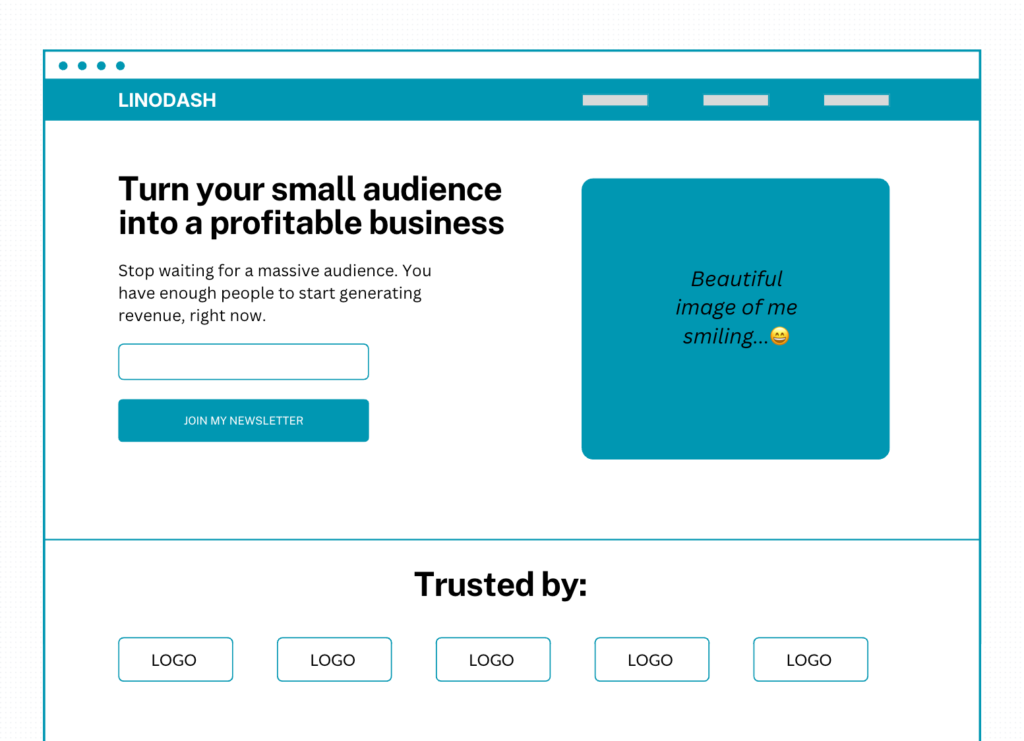
Essentially, a page that I could use to generate leads to my newsletter.
Something like this, from my wireframe:
Now, Stan Store takes a different approach when it comes to page building.
First, you need to select a design for your product pages and landing pages. Think of them as themes. The design you choose will determine how your landing pages will look.
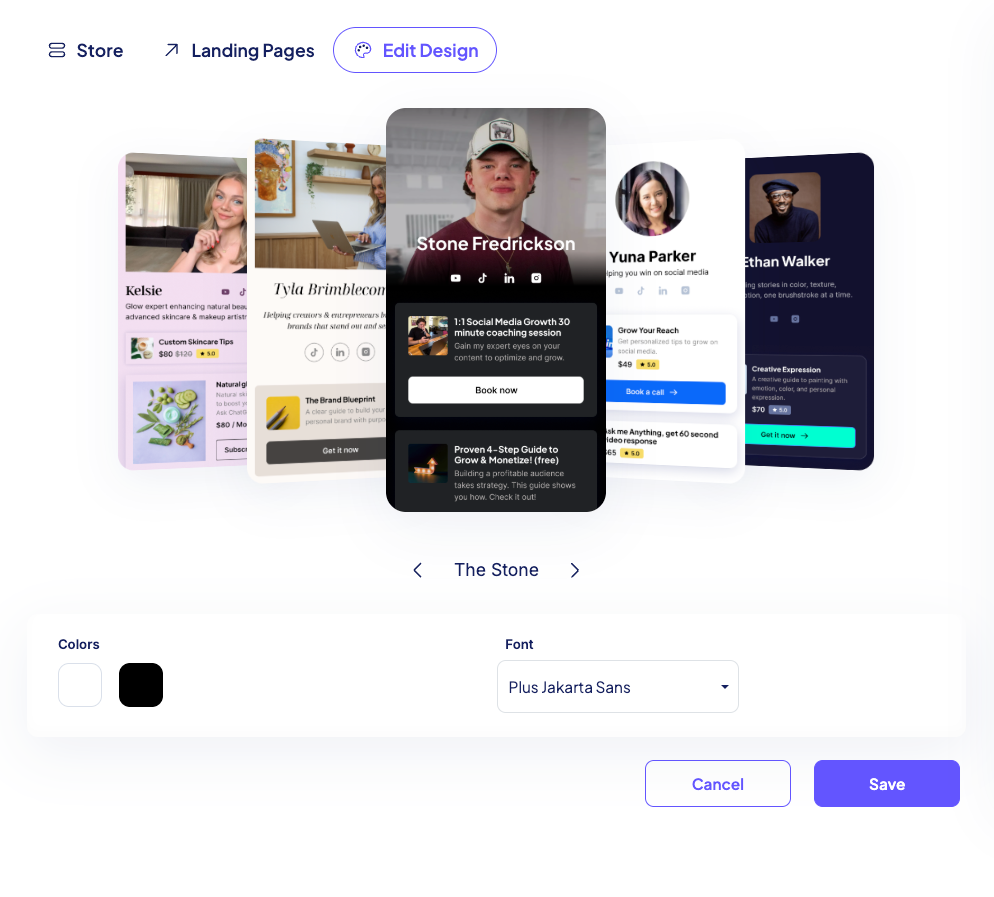
Once you’ve selected your ideal theme, you can choose two brand colors and a font from its collection of 10 fonts.

From there, you can proceed to the “Landing Page” tab and choose the product that you’re looking to build a landing page for.
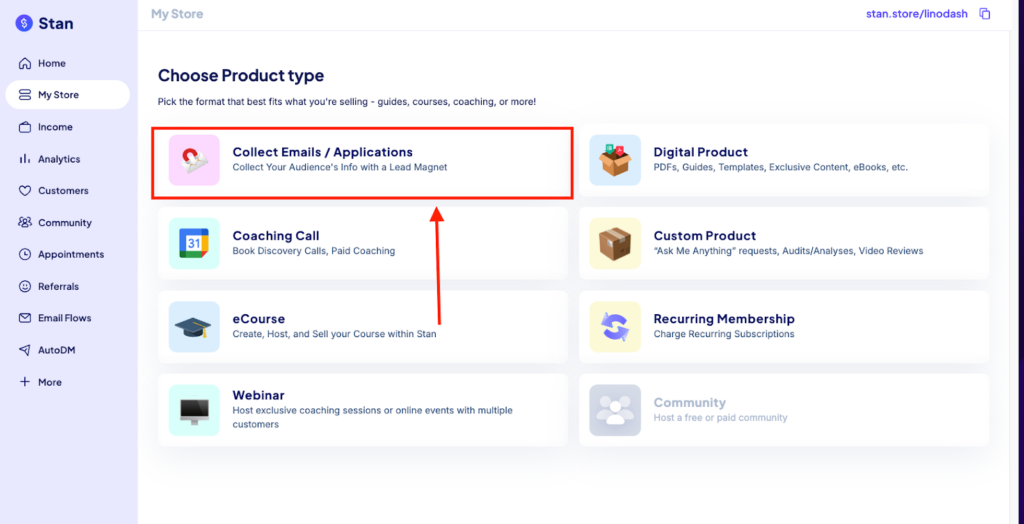
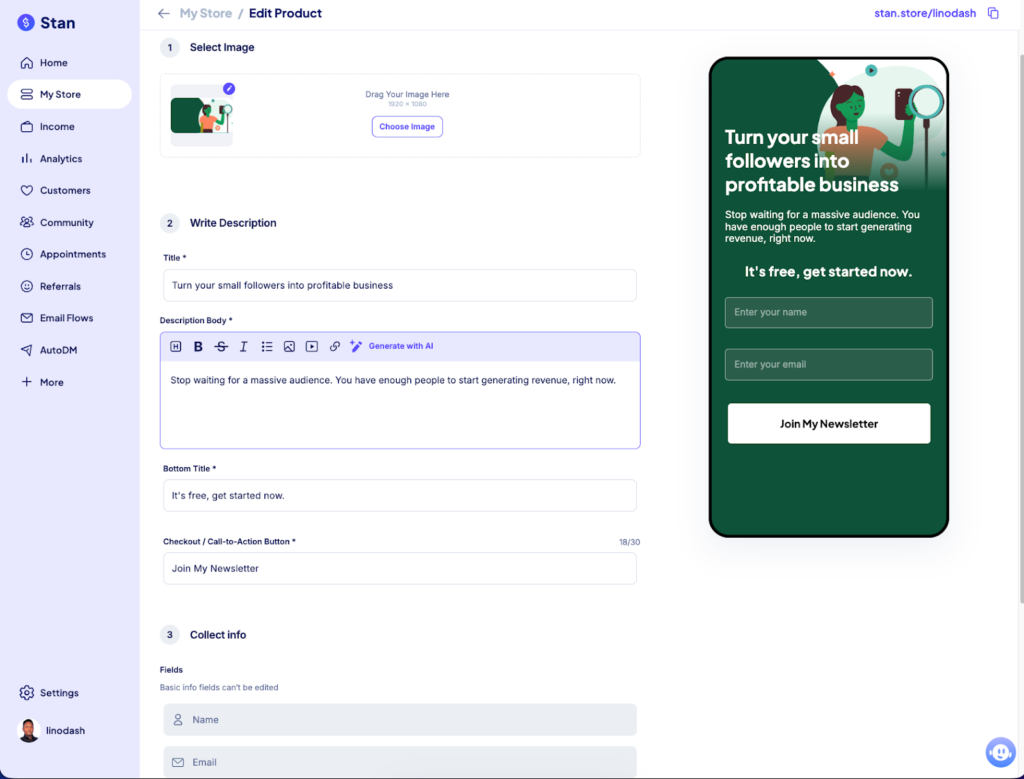
Stan Store will direct you to its builder where you can add content to your page including:
- A header image
- Heading and description
- CTA text
- A form field
You’ll also be able to preview your design in real-time to see how it looks on mobile devices. But you can’t preview on other devices like tablets and desktop devices.
And that’s about it.
Unlike well-refined landing page builders like Systeme, with Stan Store you can’t start from a blank canvas or create custom layouts using containers, columns, rows, or grids. You can’t drag in additional elements like hero sections, testimonials, or CTA boxes, or style them using padding, margins, or custom CSS. You’re locked into a predefined template with very little freedom to customize the design the way you want.
And I get it—Stan Store intentionally limits flexibility to avoid technical complexity when setting up pages. But the downside is that your pages end up looking basic and uninspiring.
I also noticed that Stan Store doesn’t let you host your pages or website on a custom domain. Your store and pages will live on a Stan Store subdomain instead. On top of that, you can’t customize your page URLs, so you’re stuck with long, messy permalinks for both your store and landing pages.
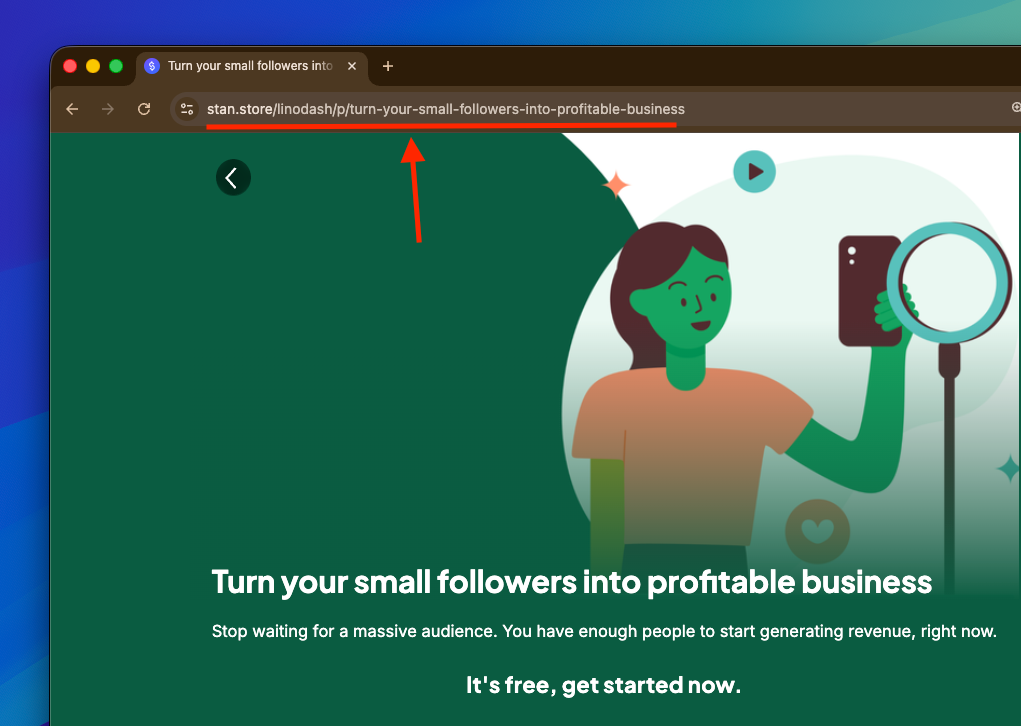
Verdict: Stan Store’s landing page builder is fast, simple, and beginner-friendly, but that simplicity comes at a cost. While it’s enough to get a basic, mobile-optimized page live quickly, the lack of layout control, customization, custom domains, and brand flexibility makes it hard to create pages that feel truly professional or on-brand. It works if you just want something functional, but it falls short if your landing pages are a core part of your marketing or brand experience.
#2: Email Flows
Stan doesn’t include email workflows in its base Creator plan. To access them, you need to upgrade to the Creator Pro plan, which costs $99 per month.
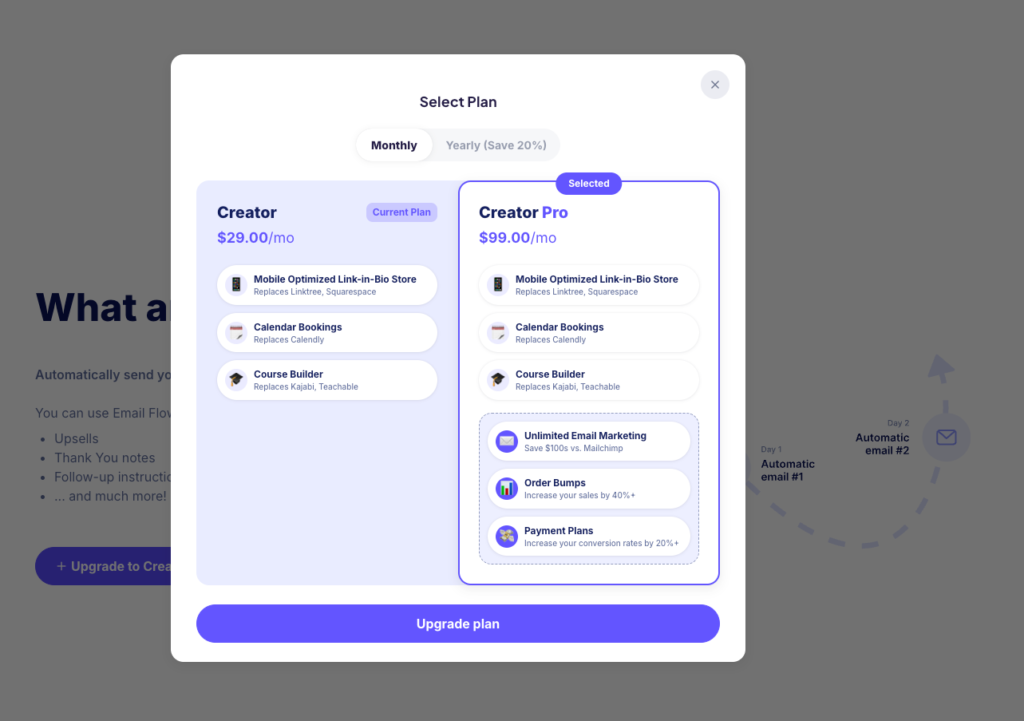
That’s fair to some extent, considering there’s no limit on the number of emails you can send or the number of subscribers you can have.
Email marketing isn’t cheap. For context, I pay $15 per month for up to 1,000 subscribers on MailerLite.

Still, I decided to spend the extra $68.98 to see how good Stan Store’s email marketing tools actually are.
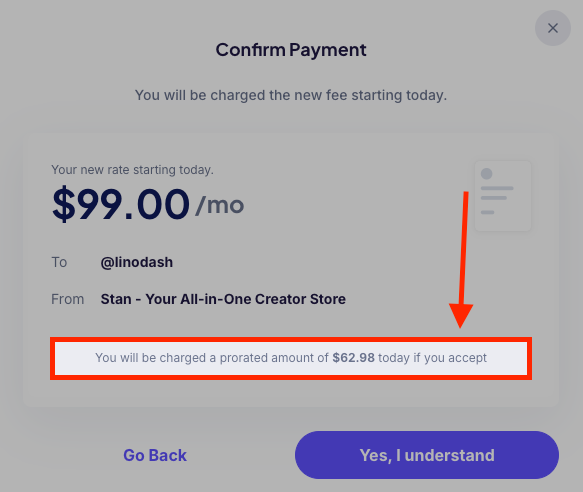
And almost immediately, I ran into limitations.
First, Stan Store’s email workflows are extremely basic. You can only trigger a workflow based on three events:
- After a customer buys a product
- After a cart is abandoned
- On a specific date
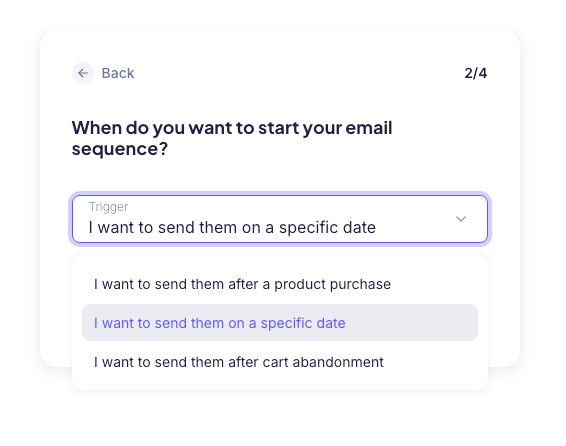
That said, the flows themselves are very limited.
You can only build linear workflows that progress based on the number of days after someone purchases a product or signs up to your list.
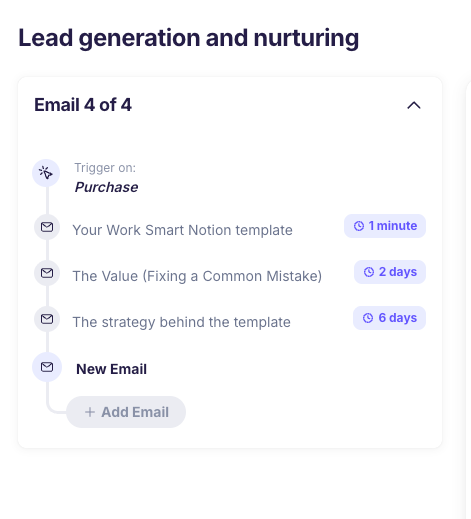
You can’t trigger emails based on deeper user behavior—like joining a segment, clicking a link, or updating a field.
There’s no support for advanced rules such as conditional logic or A/B testing. You also can’t add actions inside workflows, like adding subscribers to segments or groups, triggering webhooks, or moving users between steps. These are standard features in dedicated email marketing tools like MailerLite and Kit.
The email designer is also very basic, with no real option to create emails that feel or look like your brand. It functions more like a simple text editor—you can write text, add basic formatting like bullet points, and insert images here and ther.
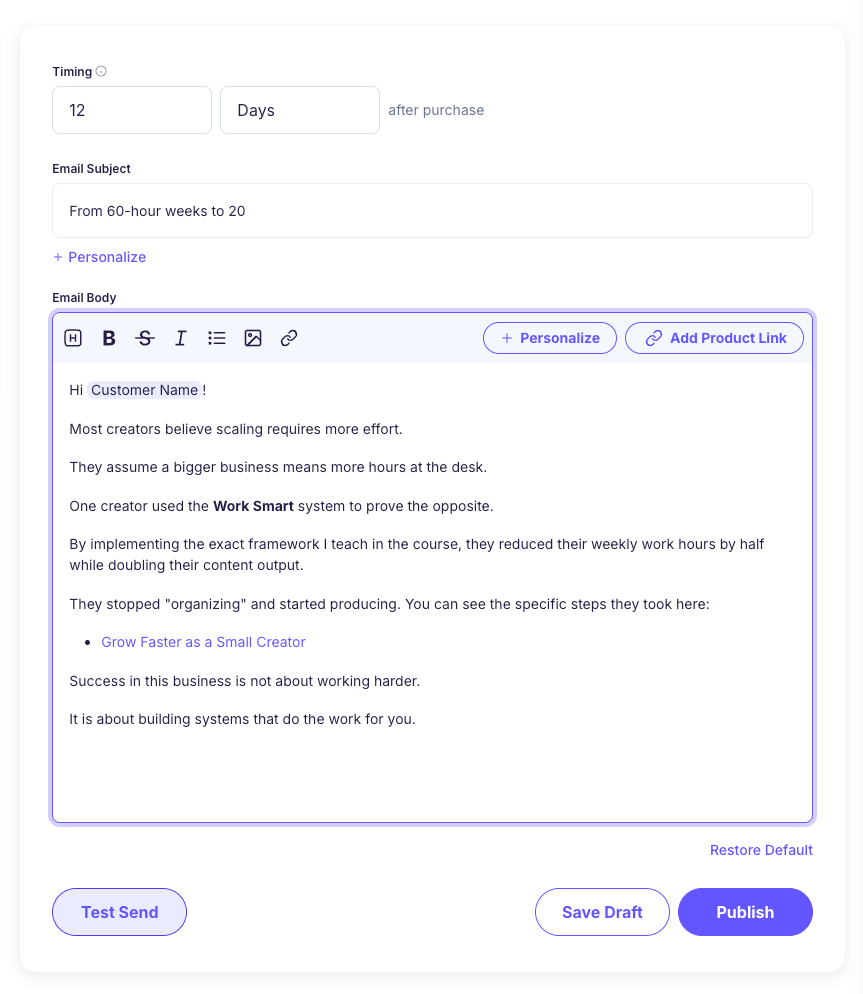
But that’s it.
You can’t add elements like video embeds, CTA buttons, or even your logo.
Verdict: Stan Store’s email flows work if your needs are simple—basic follow-ups, purchase confirmations, and abandoned cart emails. But for $99/month, the automation feels underpowered. The lack of behavioral triggers, conditional logic, workflow actions, and branded email design makes it hard to justify using it as a primary email marketing tool. It’s fine as a lightweight add-on to a storefront, but it doesn’t come close to replacing a dedicated email platform like MailerLite.
#3: Checkout Building
Stan Store uses a mobile-first, single-page checkout to boost conversions. It natively supports Apple Pay and Google Pay, allowing customers to complete a purchase with a single tap.
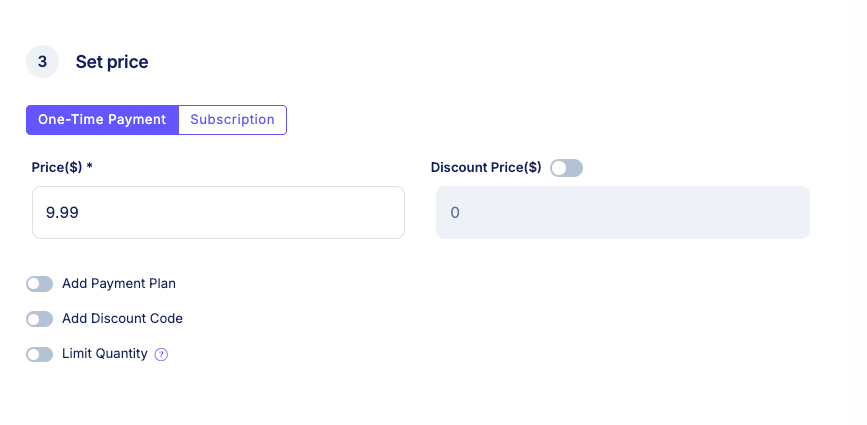
On the Creator Pro plan ($99/month), you get access to several tools to improve conversion rates and increase average order value:
- Order bumps
- Payment plans
- Quantity limits
- Discount codes
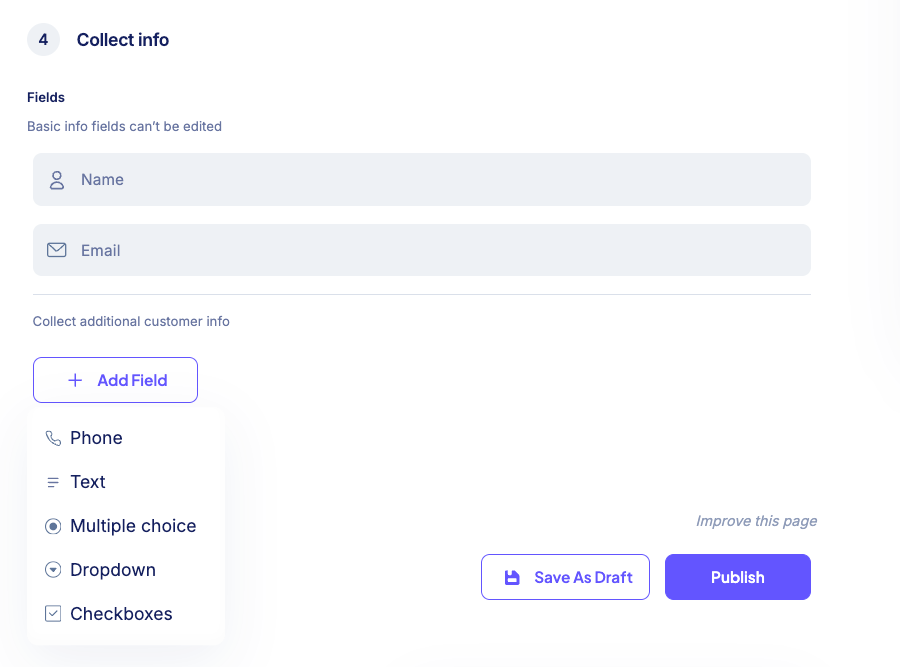
You can also collect additional customer information by adding custom fields to your checkout. Supported field types include:
- Text and phone number
- Dropdown menus
- Checkboxes
While Stan Store’s checkout is fast and efficient, it lacks many advanced features you’d find in dedicated checkout tools like ThriveCart, including:
- Checkout templates
- Native A/B testing
- Localized tax automation
- Multiple order bumps
- Post-purchase upsells
- Free trials
- Tax-inclusive pricing
Stan Store Review: Pricing
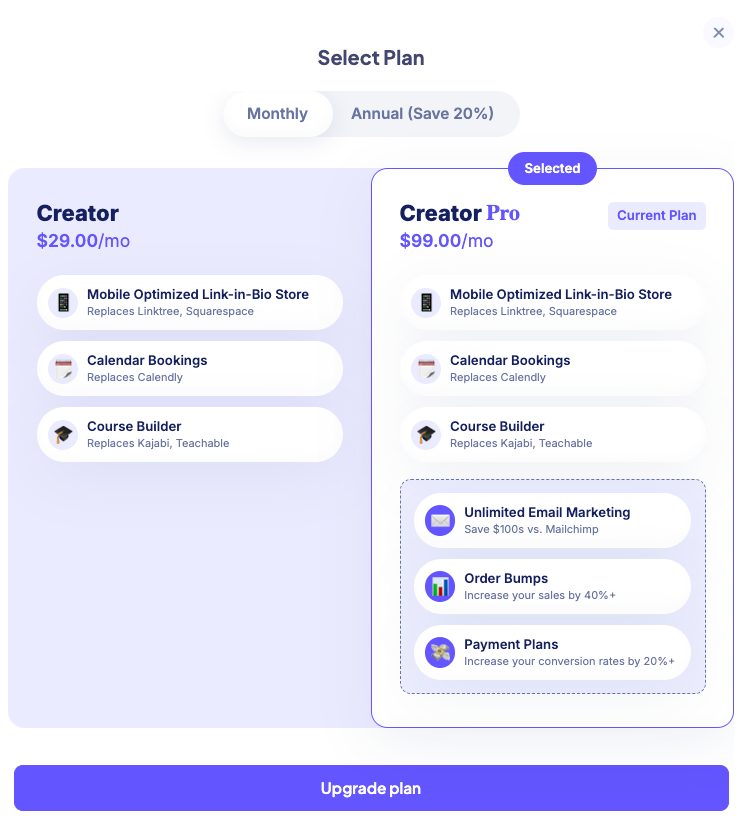
Stan Store is generally affordable, especially if you sell enough to justify a flat monthly fee over transaction-based costs.
Its pricing is straightforward: $29/month for the Creator plan and $99/month for the Creator Pro plan, with no platform transaction fees (you only pay Stripe/PayPal processing).
If you’re a social-media creator who wants a simple storefront and selling tool that integrates directly with your audience without extra fees, Stan’s pricing has a lot of upside. You keep 100% of sales revenue, and you can avoid unpredictable fees charged by other marketplaces.
However, when you step back and compare Stan Store to other all-in-one platforms, its value quickly starts to break down.
Platforms like Systeme.io let you start selling for free with up to 2,000 subscribers. Even its most expensive plan, Unlimited, costs $97 per month—slightly cheaper than Stan Store’s Creator Pro—yet includes a far more robust marketing stack. You get advanced email automation, funnel and page builders, deeper customization, and even the ability to sell physical products, all without platform transaction fees.
So while Stan Store looks reasonably priced on the surface, it becomes expensive relative to what you actually get. You’re paying a premium for simplicity and speed, but giving up flexibility, scalability, and marketing depth that competing platforms offer at the same or lower price point.
Stan Store Pros and Cons
Pros
Cons
Stan Store Review: Final Verdict
In this Stan Store review, I did my best to show how the platform actually performs in real-world scenarios and what you truly get with its two paid plans.
The truth is, many of the tools Stan Store claims to replace is marketing hype. Stan Store delivers the basics. But once you dig deeper, its limitations become clear. Branding options are minimal, learning management features are basic, and advanced selling tools are largely absent. You’ll still need third-party apps for essentials like video conferencing, client management, website building or communities.
That said, Stan Store thrives as an entry-level platform. If you’re selling online for the first time and want to avoid complicated setups, it’s a solid choice. It’s affordable, straightforward, and unlike marketplaces such as Gumroad or all-in-one platforms like Kajabi, it doesn’t take a cut of your sales, meaning you keep your full margins.
That said, choose Stan Store if:
However, don’t use Stan Store If:
Best Stan Store Alternatives
Below are my top Stan Store alternatives and when to choose them:
- Systeme.io: best budget all‑in‑one platform
- Kajabi: Most comprehensive all-in-one creator business platform.
- Payhip: best free starter platform
- Circle: best for community‑centric businesses
- FreshLearn: best for course creators & academies
Also read: