6 Best Skool Alternatives to Build Courses & Communities (2026 Update)

After testing 30 course creation and community platforms, the best Skool alternatives are:
What Is Skool and Why Look for Alternatives?

Skool is a community and course platform built for creators, coaches, and educators who want to sell access to knowledge through paid memberships.
It was founded in 2019 by Sam Ovens (now CEO) who’s an entrepreneur known for building and scaling online education businesses.
He noticed that many course platforms lacked an intuitive way to cultivate a community-first online learning experience. Most of them were complex, expensive, or required using multiple tools.
To address this, he teamed up with his friend Daniel Kang (now CTO), and together they launched Skool.
Skool’s core selling points are simplicity and affordability.
The platform strips community building down to a few essentials including: discussions, basic lessons, events, and payments. All at a fixed pricing of as low as $9 per month.
But this simplicity also comes with some serious tradeoffs that will make any serious creator, online coach or educator to search for better alternatives.
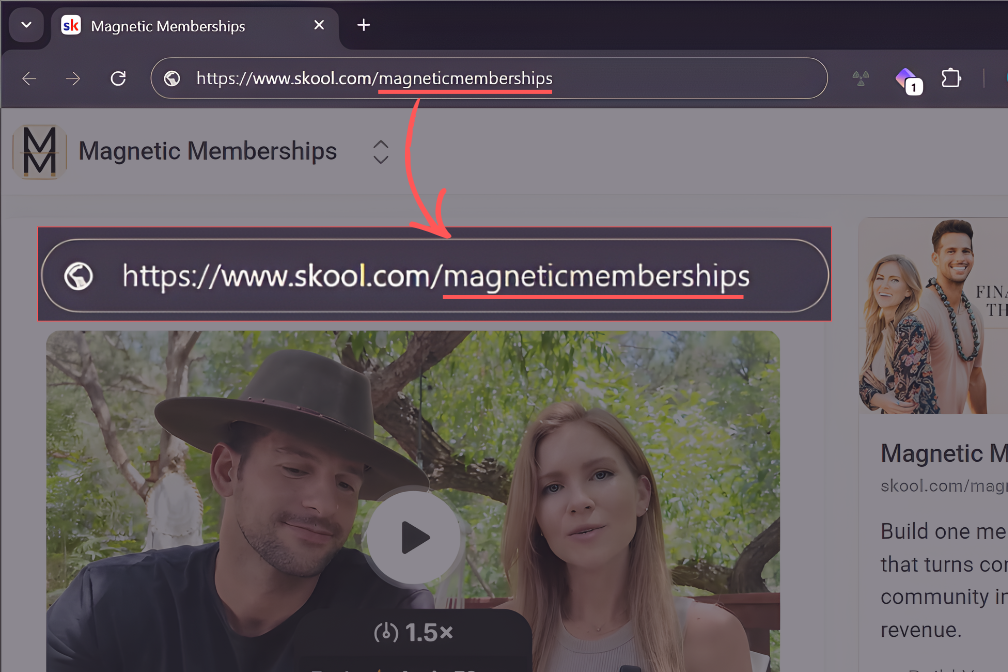
- Branding is almost nonexistent: Skool gives you very little control over your brand. You cannot host your community on a true custom domain. Layout and visual customization are minimal. Even on its Pro plan, the so-called “custom URL” feature they’ve included is just a Skool subpath like skool.com/yourbrand, and not a real custom domain. Essentially, you are operating under Skool’s brand, not yours. The experience feels similar to running a Facebook Group, except you can charge for access.
- Basic course creation tools: Skool lets you upload lessons and organize content, but that ends there. It doesn’t let you build quizzes, exams, certificates, or structured assessments that let you learn how well your students have grasped your materials. In essence, you can only host content, but you cannot design a serious learning experience.
- Built-in distractions: Skool behaves like a community marketplace. On the Starter plan, you cannot remove the suggested communities tab. Members are exposed to other groups while inside your space. That creates constant exit paths and weakens focus. A paid community should feel contained and intentional.
- Weak community management tools: Managing a small group in Skool is fine. Managing a growing community on Skool is painful. It lacks advanced segmentation, flexible access rules, and powerful moderation tools. You cannot create layered spaces for different member types or automate onboarding in a meaningful way. There are no AI workflows to handle common questions or personalize early interactions. As membership grows, manual effort grows with it.
- No built-in marketing & sales tools: Many modern community platforms are extending beyond discussions and events. They’re also offering native page builders, email marketing features and simple funnels to support growth. This reduces reliance on third-party tools and simplifies operations. Meanwhile, Skool provides none of this. There is no way to create a landing page that explains your value, frames expectations, or pre-qualifies members. There is no native email system to onboard users, segment them by behavior, or follow up when engagement drops. There are no built-in flows for trials, upsells, renewals, or reactivations. Given that, you’ll have to integrate third-party apps for that.
- Low barrier attracts low-quality offers: Skool’s accessibility has another side effect. It attracts a high volume of low-effort, low-value communities. A quick look on Reddit or similar forums shows frequent skepticism toward Skool-hosted offers. The platform is not inherently untrustworthy, but reputation matters. When prospects associate a platform with poor experiences, your offer inherits that skepticism before they even have a chance to evaluate your content.
Skool Alternatives: Quick Summary
| Platform | Bottom line | Pricing/mon |
|---|---|---|
| Circle | Best Skool alternative for building online communities. It has strong branding, management, and engagement tools. | $129 – $499 |
| Mighty Networks | Strongest runner-up. Visually rich with solid course creation tools, memberships, and native events. | $95 – $425 |
| Heartbeat | Easiest to use for community-based learning and cohort-based courses. Clean UI, less distractions and affordable pricing. | $49 – $129 |
| Teachable | Best online course-first platform. Better for structured learning. | $39 – $399 |
| Kajabi | All-in-one business software for creators, coaches, and educators. Strong product delivery plus native tools for marketing and sales. | $89 – $499 |
| Bettermode | Best for flexibility and customization. Great solution for enterprise brands and SaaS businesses looking to build customer communities and help centers. | $0 – $59 |
Best Skool Alternatives for Building Courses, Communities, Cohort-Based Programs, and Memberships.
By now, you know that Skool isn’t a good choice if you want better branding, structured learning experience and stronger community management tools. It’s time I show you stronger solutions that better address Skool’s shortcomings.
In this section, I’ll break down the best Skool alternatives with a practical lens. I’ll explain what each platform is actually good at, where it falls short, and who it best fits.
#1: Circle.so
Best Skool alternative for: advanced branding and robust community management tools.
Circle is the best Skool alternative if you want more branding control and better community management features.
Unlike Skool, Circle lets you better customize your community, host it on a custom domain, white-label it and even publish branded mobile apps.
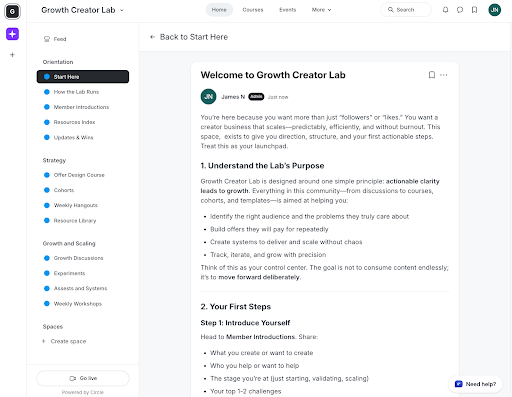
You can change your community appearance by applying your ideal theme colors, uploading your logo and custom icons for your spaces.
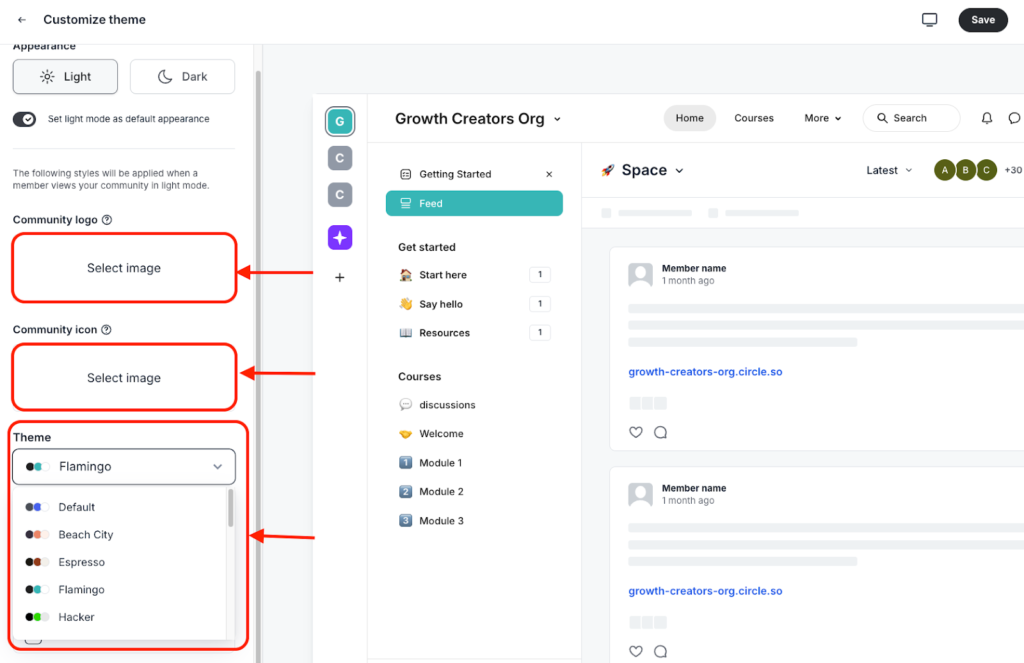
After playing around with its customizer, I was able to transform this community from the default layout…
… to something like this.
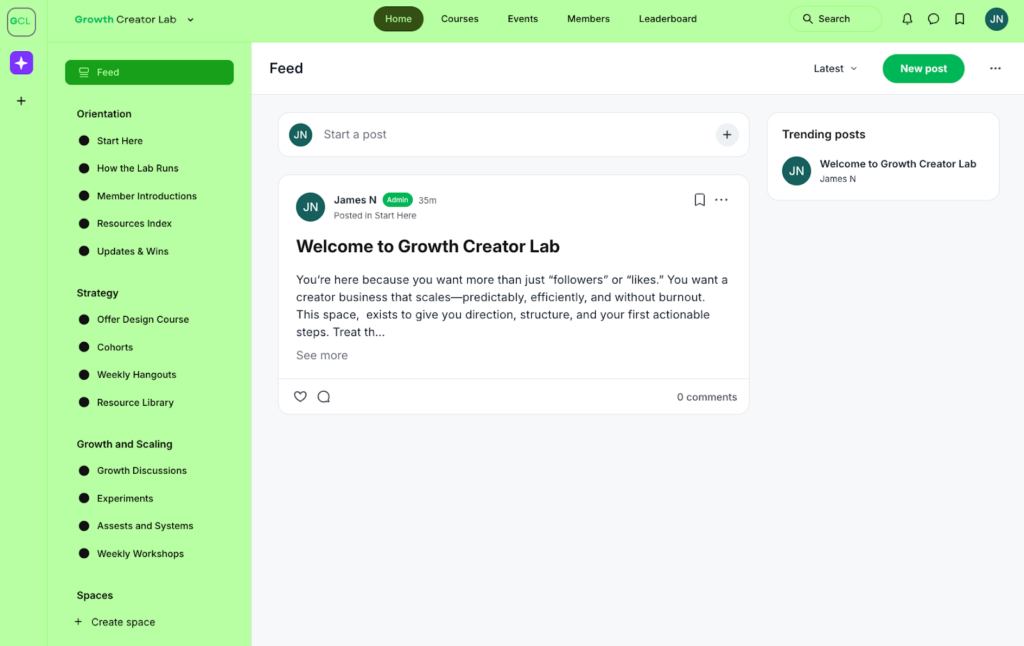
Compare that to Skool. The only thing I could change was the community icon, and adding a cover banner.

Speaking of branding, with Circle you can host your community on a custom domain on all its plans.
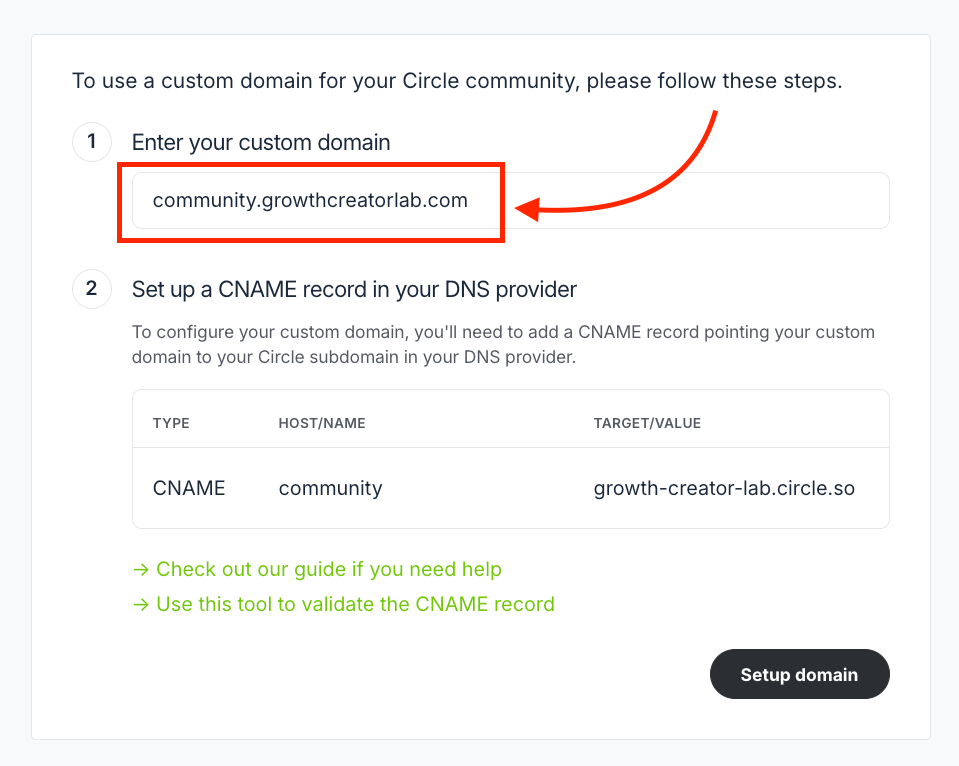
Unlike Skool that only lets you host it in the subfolder under Skool’s domain.
Even more interesting, Circle lets you create branded mobile apps although this feature is available on its Plus plan.
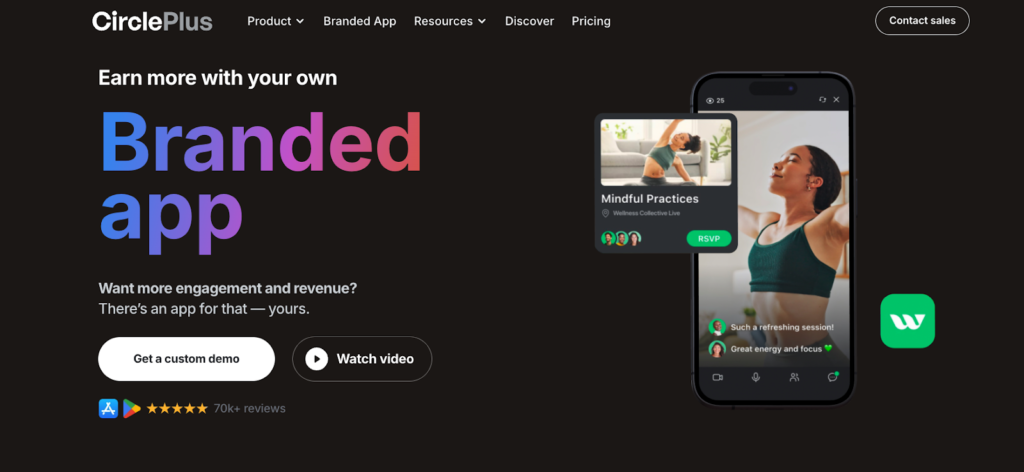
Essentially, the Circle team designs the apps for you and submits them to Google Play and Apple App stores.
These custom mobile apps will feature all your community aspects including discussion boards, chats, resources, courses and events that members can access on the go on their mobile devices.
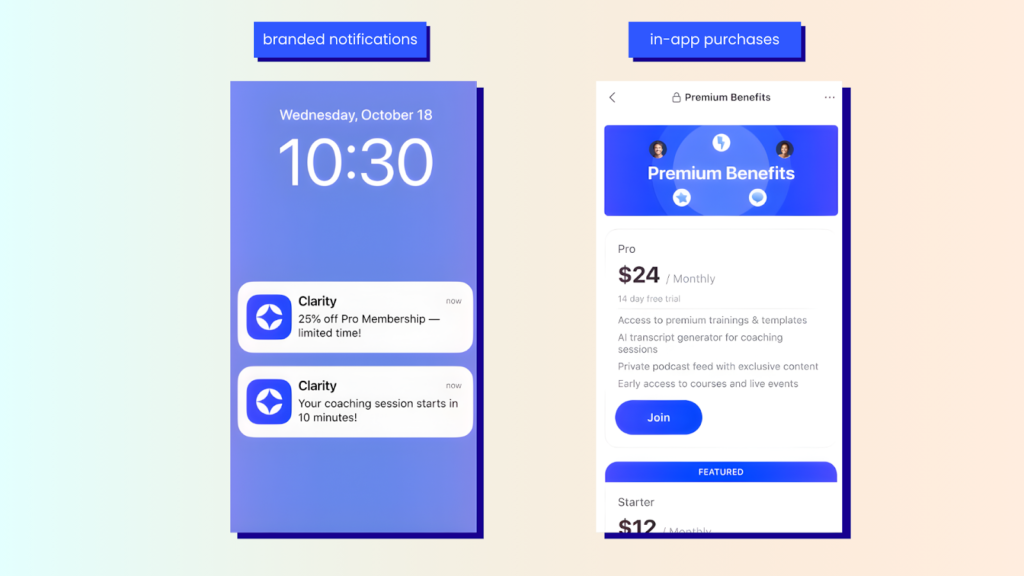
They let you send branded notifications to update members about your new content, events or offers which boostes engagement. Moreover, you can enable in-app purchases to let members pay for memberships without needing to go to their browsers, making it easier to drive revenue.
Community organization is one area that Skools struggles with.
You can’t create separate channels for discussion forums or events. Your feed ends up being bloated and cluttered.
Meanwhile, Circle offers superior organization tools which makes it a solid choice for growing and large communities.
You can organize your community into separate containers called Spaces. Each one can serve as a course, an events hub, a discussion board, a chat room, or a media library.
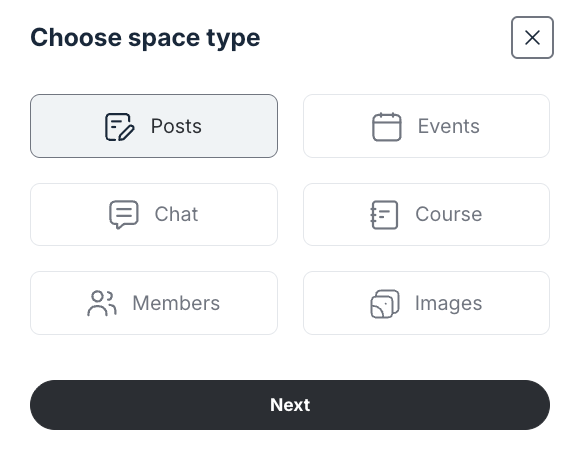
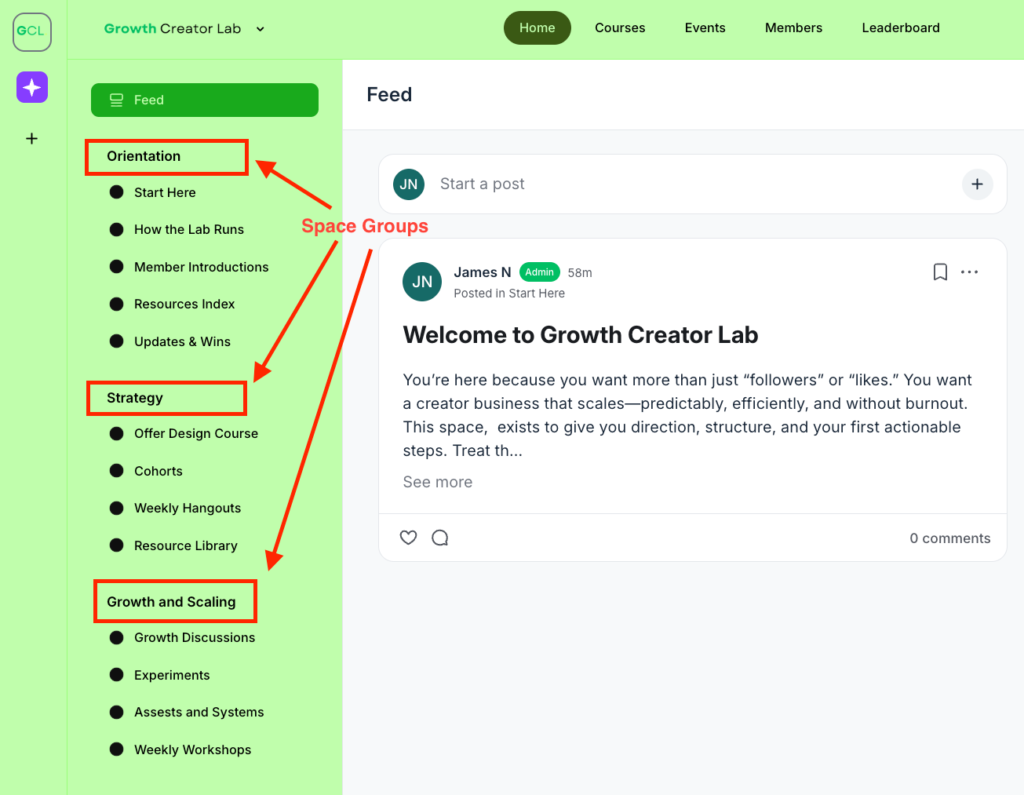
These spaces are displayed on the left side-bar of your community under specific categories called “Space Groups” where members can easily access them.
You can grant access to Spaces individually by setting them as open, secret or private.
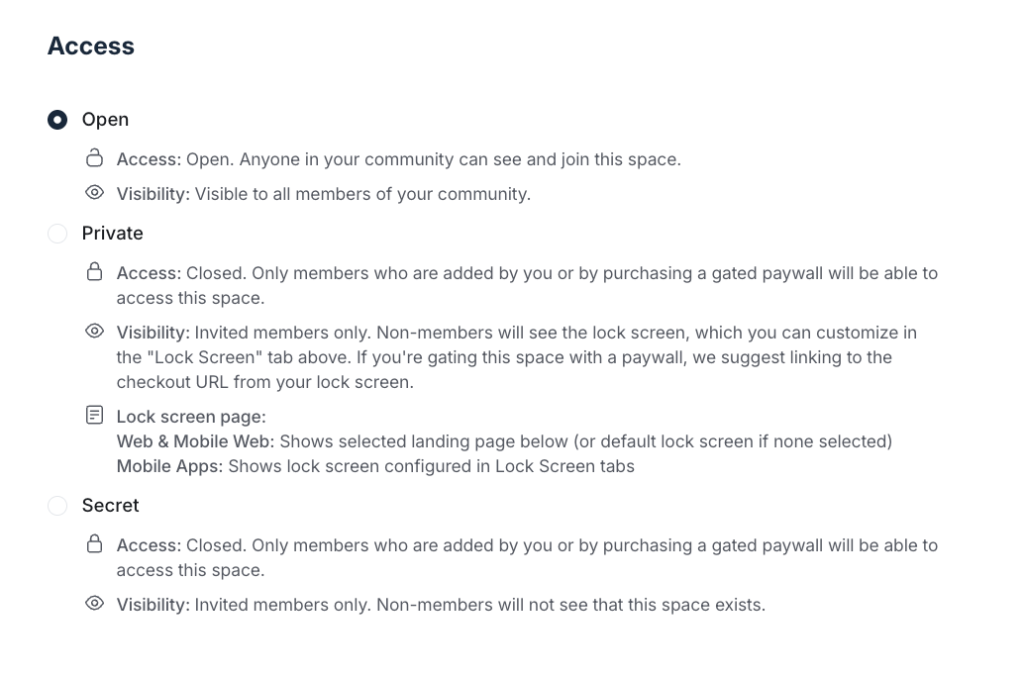
Or you can use Access Groups that lets you bundle access to multiple spaces.
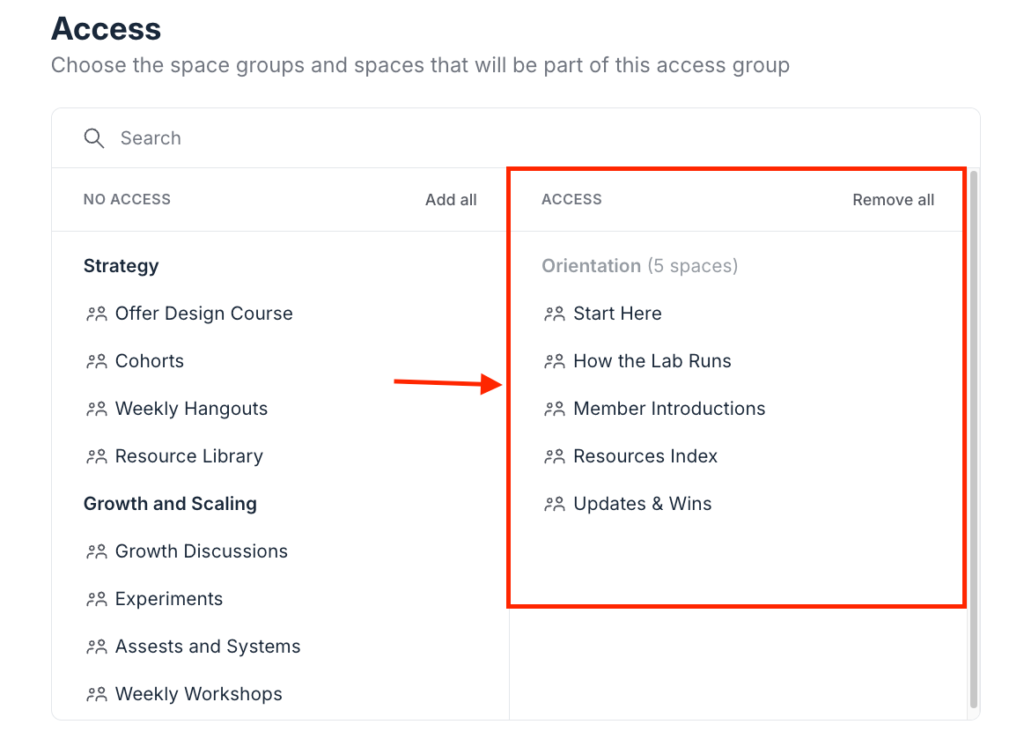
This lets you create access rules and payment plans that make it easier to offer multi-level memberships in your community.
Circle.so Pricing
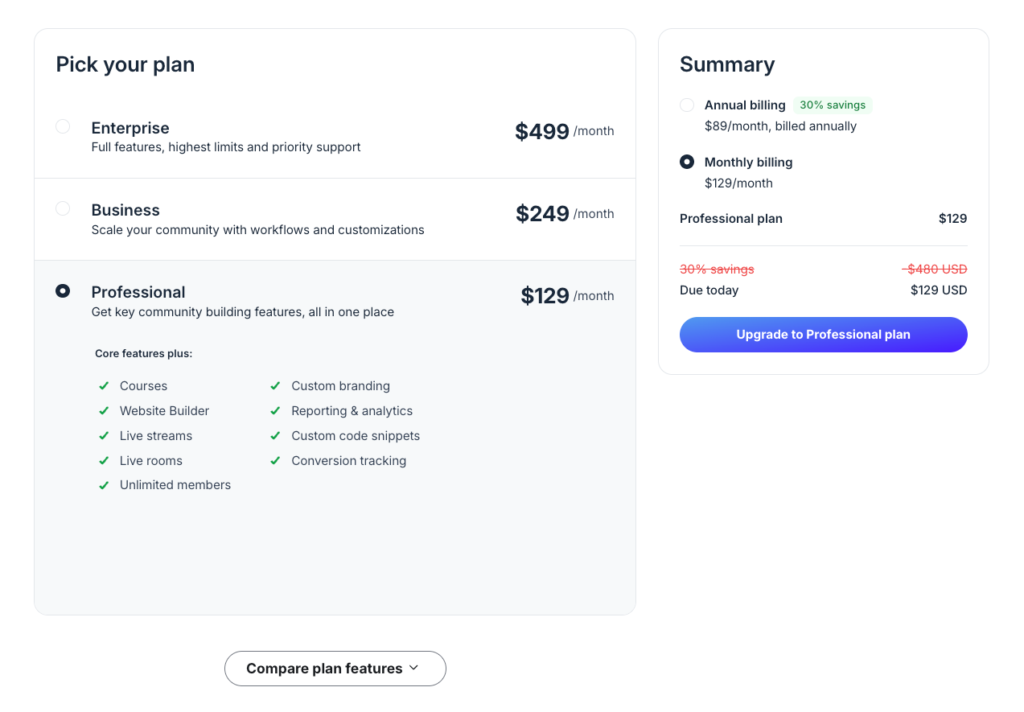
Circle isn’t the cheapest Skool alternative out there. But at a premium price tag, you get more value for money as it offers advanced branding and community management tools— areas Skool struggles to deliver.
Below is a quick breakdown of Circle’s plans on monthly billing.
- Professional: $129 per month
- Business: $249 per month
- Enterprise: $499 per month
- Circle Plus: custom
Circle.so Pros and Cons
Pros
Cons
Bottom line: Circle is a better alternative to Skool for if you want platform that lets you build professional online communities. It has superior community management tools and stronger branding capabilities. Meanwhile, Skool feels barebones. Choose Circle if you’re a creator, coach or business looking for a well-rounded community software
Also read: Circle vs Skool
#2: Mighty Networks
Best for: building high-engagement online learning communities.

Both Mighty Networks and Skool let you build online learning communities and gamify engagement. But Mighty Networks is generally a better solution if you want stronger online community engagement and better learning tools.
With Mighty Networks you can build interactive experiences to keep members active through social mechanics that feel native.
For example, inside your community discussions, both platforms let you create polls. And in Skool they’re plain, simple, and easy to ignore.
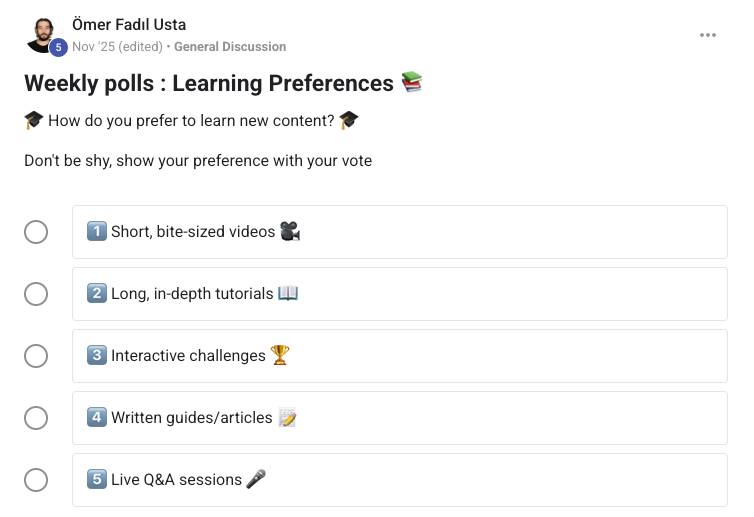
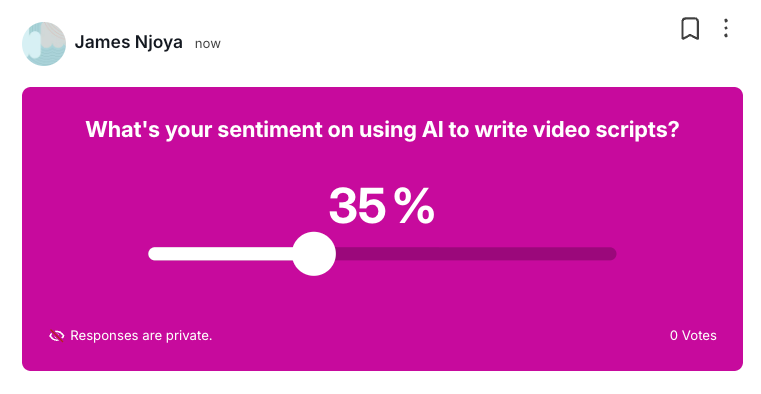
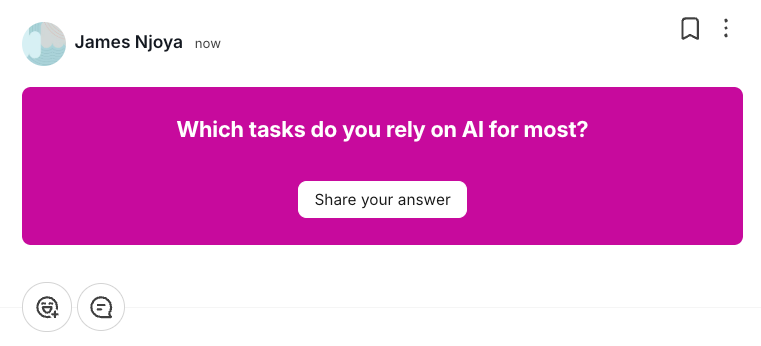
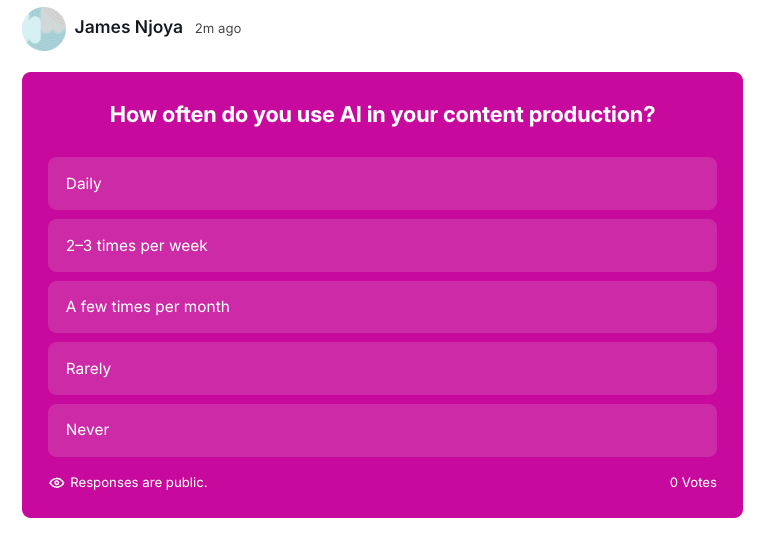
But in Mighty Networks you can choose from 4 different visually appealing poll formats to drive participation:
That includes hot-or-cold voting.

Percentage sliders,
Question-based polls.
And multiple choice polls.
Aside from polls, Mighty Networks makes it easy to engage new members in your community using icebreakers
Icebreakers are question prompts inviting new members to introduce and share something about themselves as soon as they join your network. This reduces early drop-off and makes the community feel alive from day one.
When it comes to learning, Mighty Networks supports both traditional and cohort-based courses.
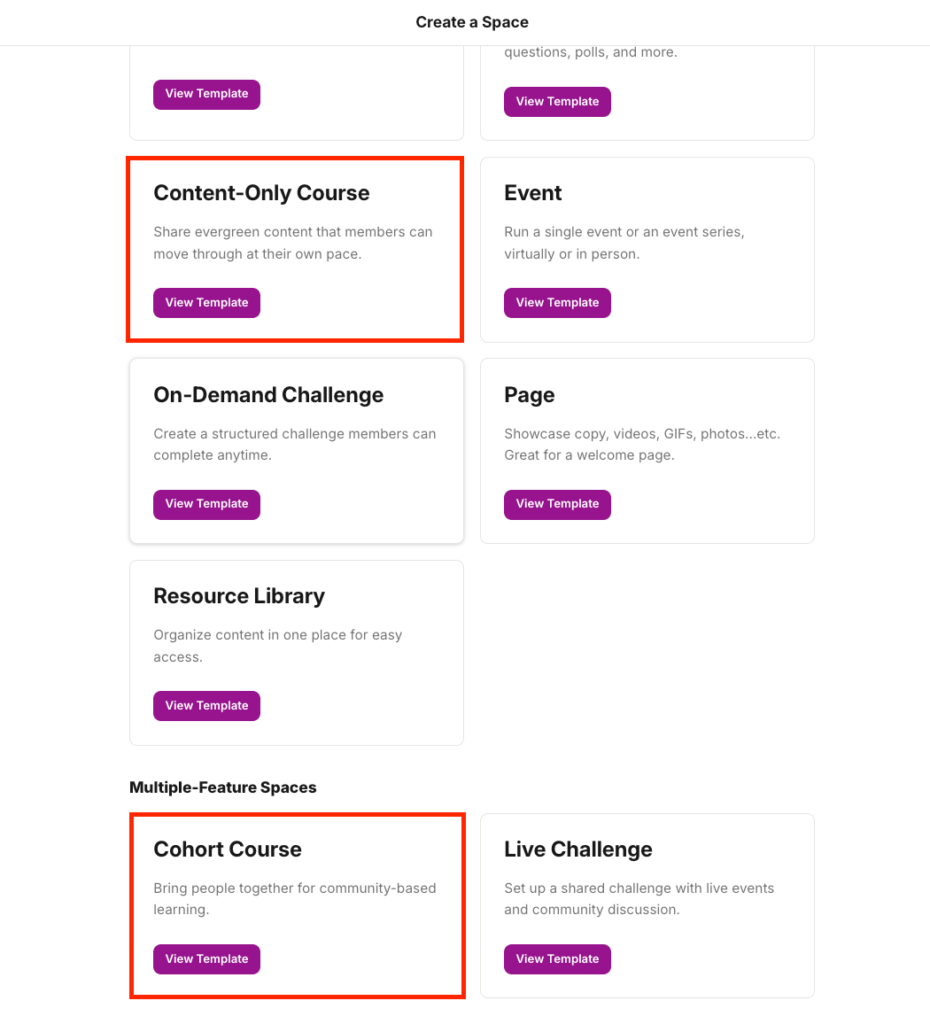
With self-paced courses you can natively host your video lessons or embed from third-party video hosting platforms like Wistia, YouTube and Vimeo. You can drip schedule your content materials, attach downloadable files in each of your lessons, and assess learners with quizzes.
In cohort-based programs, Mighty Networks combines course creation, discussion boards and a members directory in one space. You can upload your course materials, launch threaded discussion posts, host live events, add quizzes, polls and allow members to interact with each other.
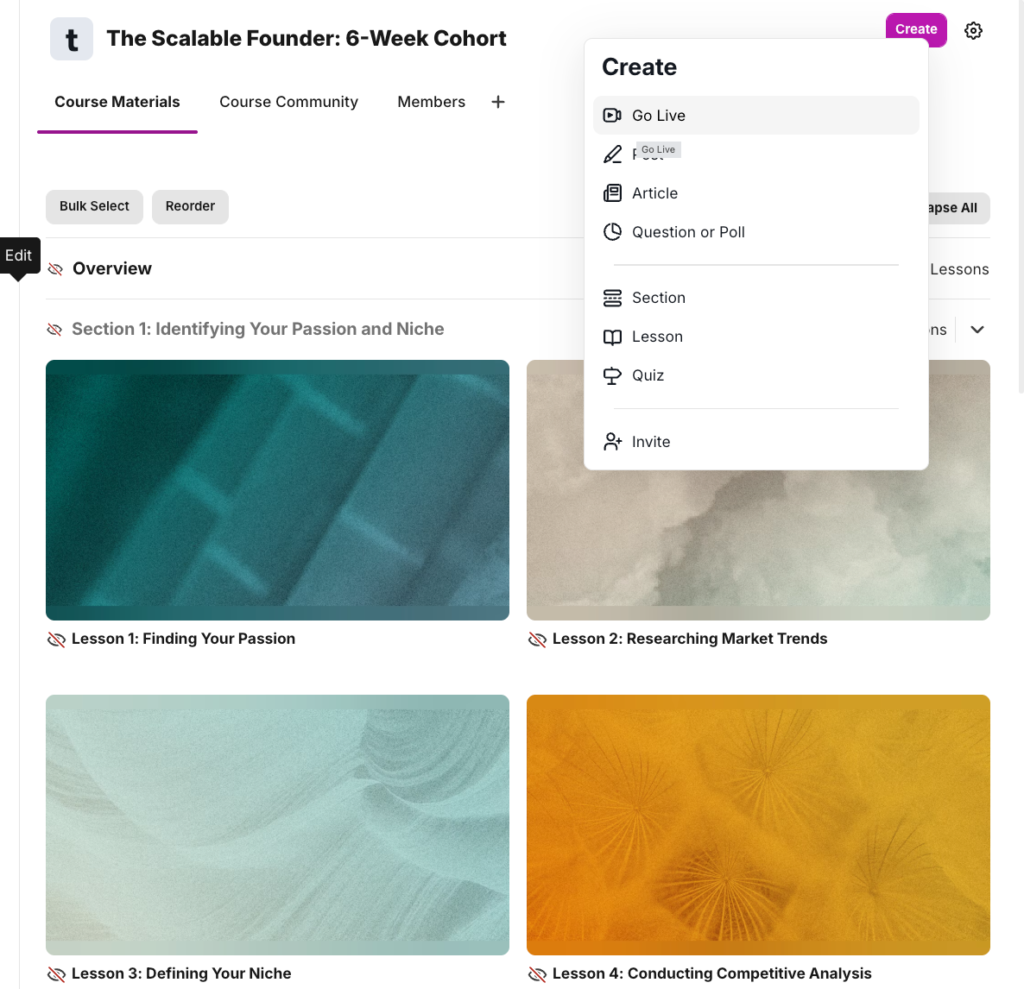
This lets you cultivate a community based learning experience without offering access to your entire network.
Mighty Networks Pricing
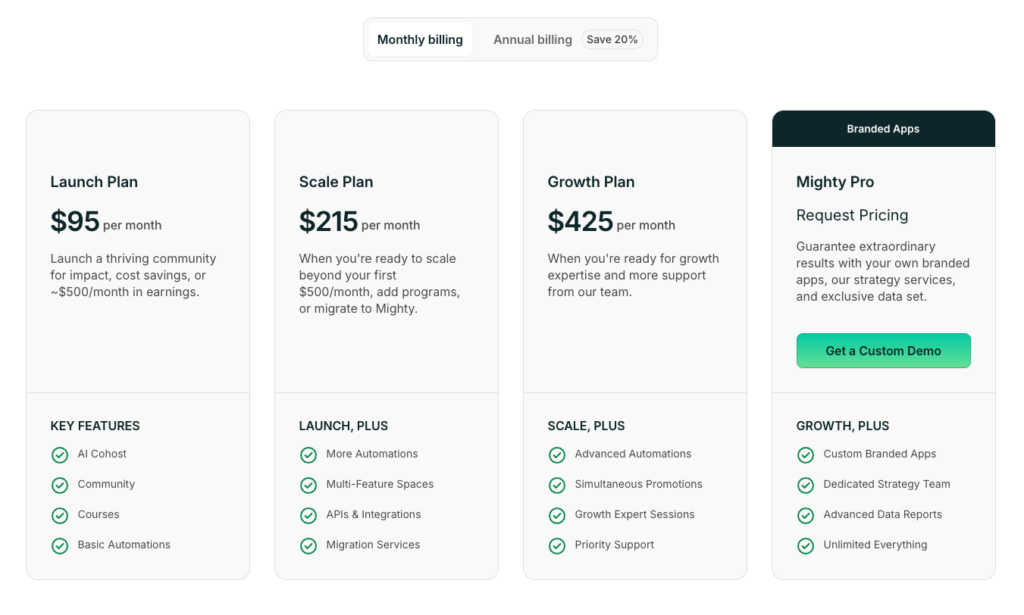
Mighty Networks offers three paid tiers plus a custom plan that includes branded mobile apps. All plans provide solid customization and allow you to host your community on a custom domain. You also get strong learning tools featuring on-demand courses, live cohorts, resource libraries, quizzes, and SCORM support.
- Lauch Plan: $95 per month
- Scale Plan: $215 per month
- Growth Plan: $425 per month
- Mighty Pro: request pricing
Mighty Networks Pros and Cons
Pros
Cons
Bottom line: If I were to choose one community platform to replace Skool when it comes to online learning, I’d definately choose Mighty Networks. I loved its visual appeal and AI tools like People Magic and Mighty CoHost. The platform excels at hosting challenges and cohort-based courses. Because Mighty prioritizes engagement, few tools beat the community-based learning experience it provides.
Also read: Mighty networks review and Circle vs Mighty Networks.
#3: Heartbeat
Best for: starters looking to launch their community membership without complicated setups.
Community platforms like Circle and Mighty Networks are sophisticated. Hence they have a bit of learning curve for beginners. Which is one of the huge reasons that people end up choosing Skool.
Heartbeat is the simplest platform I have used. Its clean layout and seamless setup allow beginners to start immediately. You and your members can access all core tools, including courses, events, the resource library, and the member directory on the left sidebar which is super convient.
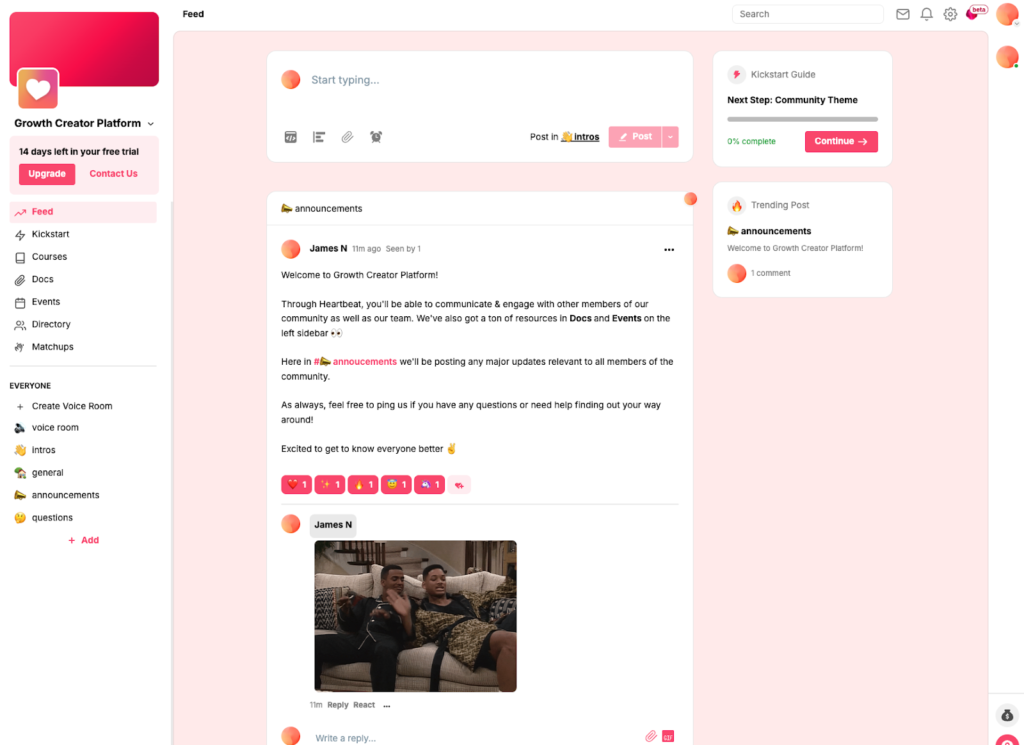
Same with platforms like Circle, in Heartbeat you can organize your community into distinct spaces called Channels. They can take various formats including chats, voice rooms or threaded discussions.
Both Skool and Heartbeat empower you to build courses and host learning materials natively. However, Heartbeat expands beyond self-paced content by offering cohort-based courses to increase engagement.
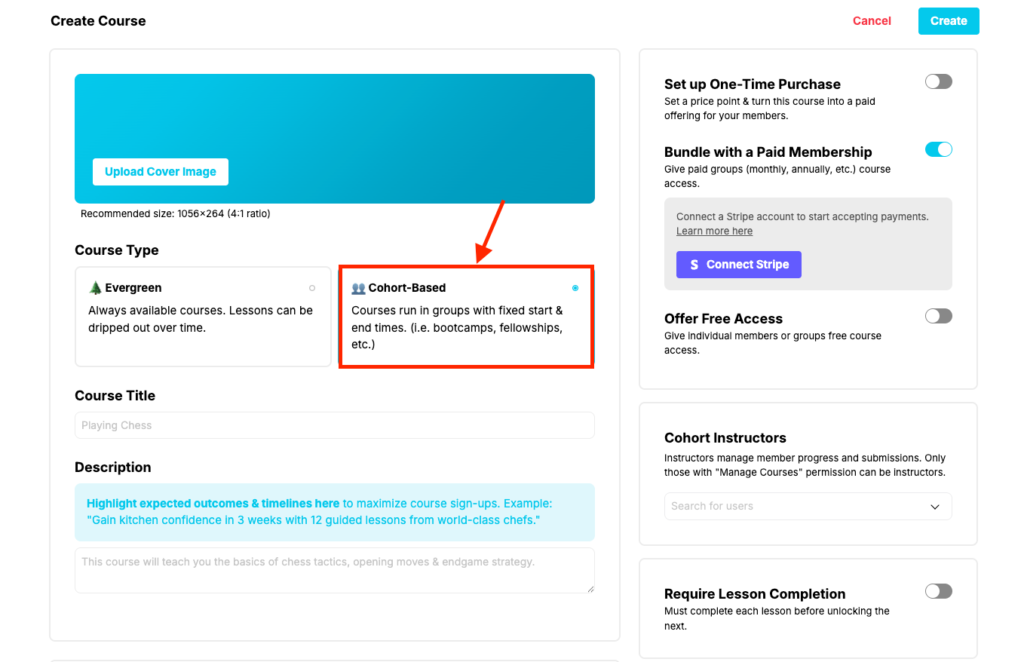
You can offer these cohorts as one-time purchases, free access, or bundles within paid memberships.
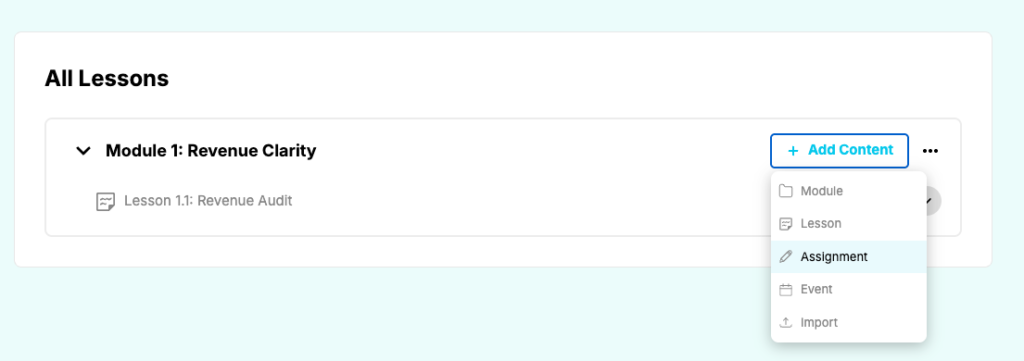
To make learning interactive, you can embed support forums, discussion boards, or live sessions directly into your cohorts. Both self-paced and cohort-based paths support assignments and live events.
While Skool lets you attach resources to individual lessons, Heartbeat provides a dedicated content library. This allows you to bring your course materials in one place that’s more convenient. That way, Members can search and access files in one place rather than digging through classroom tabs to find a specific PDF.
To make your community interactive on the go, Heartbeat offers Matchups. This feature allows you to automatically pair members for coffee chats or peer-to-peer accountability sessions. Instead of just hoping people will network, you can program your community to facilitate these relationships, which boosts engagement without much manual oversight.
Heartbeat Pricing
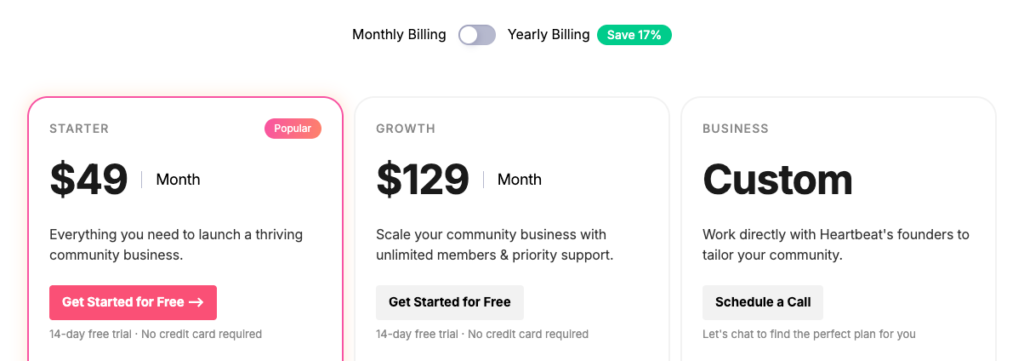
Heartbeat is one of the most cost-effective Skool alternatives I have tested. While other solutions on this list often charge more for basic functionality, Heartbeat allows you to launch a community for under 50 dollars.
Unlike many competitors, Heartbeat does not gatekeep essential tools. The entry-level plan includes private channels, courses, events, and automated workflows. You can host your community on a custom domain, apply your brand colors, and access native integrations like Zoom and Google Calendar.
Here are Heartbeat’s paid plans:
- Starter: $49 per month (up to 1,000 members)
- Growth: $129 per month (unlimited members, API access and email whitelabeling)
- Custom: Tailored plan for unique requirements
Mighty Networks Pros and Cons
Pros
Cons
Bottom line: Heartbeat offers more functionality than Skool without added complexity. It provides superior course creation tools, better branding options, and automated workflows that simplify community management. Choose Heartbeat if you want Skool’s simplicity combined with more features and good value for your money.
#4: Teachable
Best for: educators and creators who need a robust yet intuitive platform to create and sell online courses.
Skool’s course tools are basic. It lacks student assessments like quizzes and exams and offers limited progress tracking. In contrast, Teachable is a course-first platform and the best Skool alternative for entrepreneurs who require advanced teaching tools.
While both platforms host materials natively, Teachable provides a superior curriculum builder. Its drag-and-drop interface allows you to add various formats, including video, audio, multi-media embed, and PDFs. You can also embed Zoom sessions directly into lessons to host live workshops improving learning experiences for students.
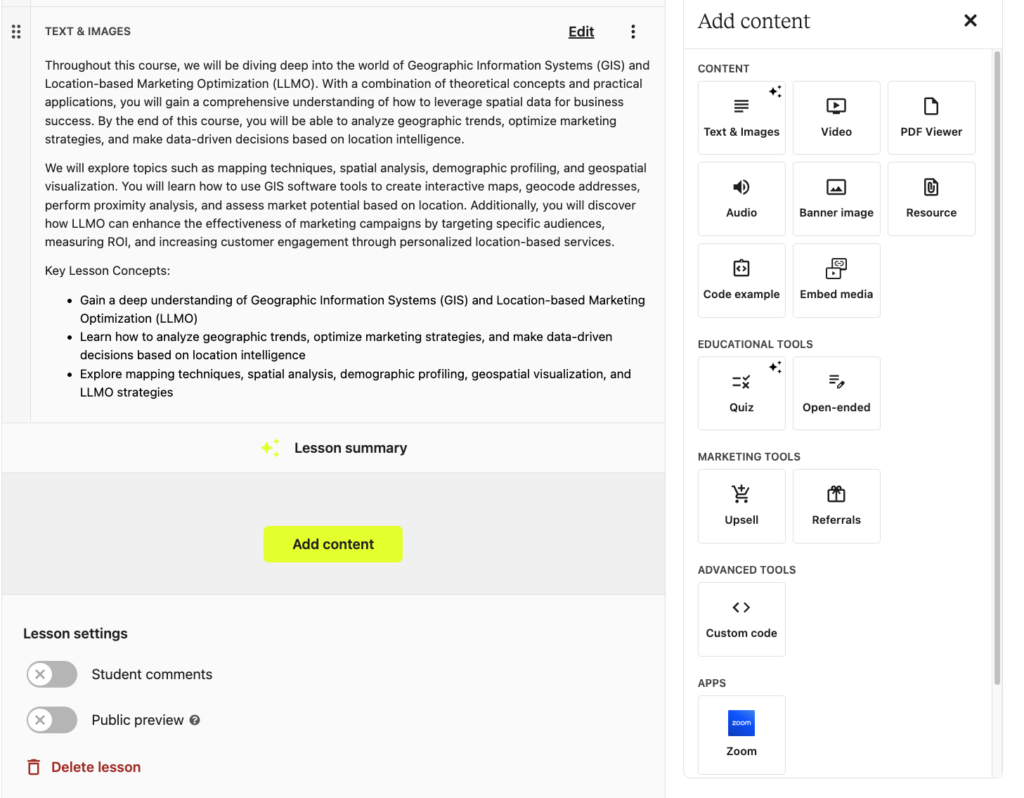
Unlike Skool, which lacks internal assessment tools, Teachable allows you to insert quizzes, set passing scores, and provide structured feedback on assignments. Upon completion, you can automatically issue branded certificates, giving students a tangible win that builds social proof for your brand.
Aside from courses, Teachable empowers you to build structured coaching programs, sell digital downloads and community memberships. You can sell them individually or bundle them under a single membership.
Teachable Pricing
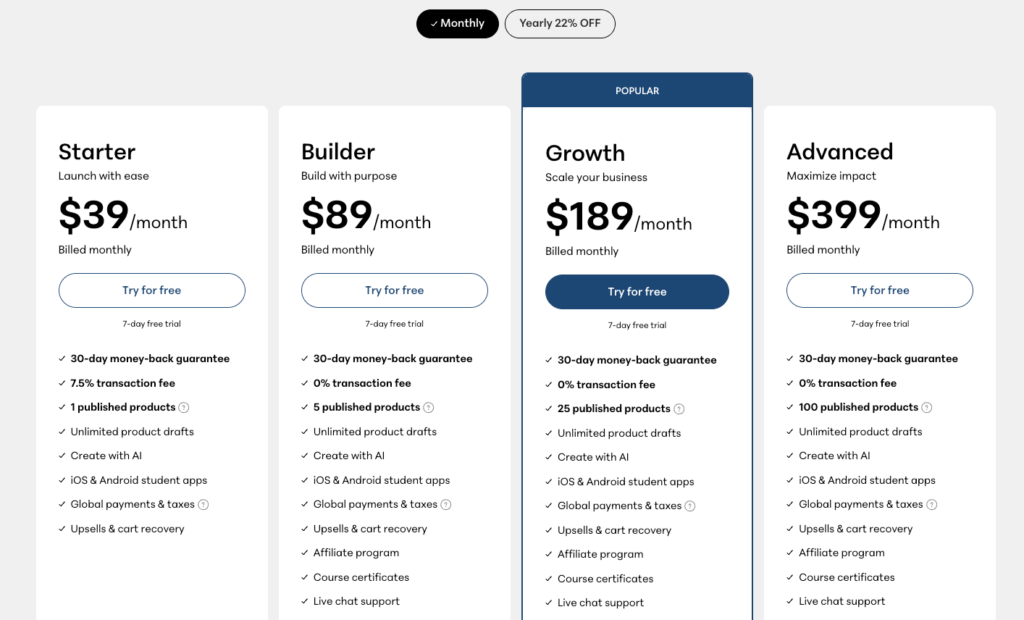
Teachable plans are centered on the number of products you can sell and students you can enroll.
- Starter Plan: $39 per month. This plan allows for 1 published product and charges a 7.5% transaction fee. It supports global payments and tax handling, while also providing tools like upsells and cart recovery. However, it is restricted to 100 students.
- Builder Plan: $89 per month. It allows up to five published products with a 0% transaction fee. This tier includes an affiliate program, course certificates, and increases the enrollment cap to 1,000 students.
- Growth Plan: $189 per month. ExpandS your limit to 25 products. It removes transaction fees and includes custom admin permissions, and automated subtitles. Student enrollment is capped at 5,000.
- Advanced Plan: $399 per month. Supports up to 100 products, 5,000 students and offers unlimited integrations.
Teachable Pros and Cons
Pros
Cons
#5: Kajabi
Best for: creators, coaches and knowledge entrepreneurs looking for an all-in-one digital business growth engine.
Kajabi is the strategic choice for established creators and knowledge entrepreneurs who have outgrown the “one-trick pony” nature of Skool. When you use Skool, you are forced to pay for external tools like Kit for your email marketing as it doesn’t have a native marketing and sales tech stack.
Meanwhile, Kajabi features an all-in-one solution that replaces the need of using third party tools. With it you can build end-to-end sales funnels, professional websites, lauch email campaigns, and create high-conversion checkout pages.
When it comes to courses Kajabi offers native assessment features. You can build quizzes, and assessments to get feedback and track students’ progress. You can set mandatory passing scores, and issue completion certificates.
Aside from hosting and selling courses, Kajabi lets you build an online community where you can engage your students and offer more value. It also lets you sell other digital products like coaching, digital newsletters, cohort-based courses and downloads like ebooks and templates. In Skool it will require you additional tools to sell such products or workarounds.
Kajabi Pricing
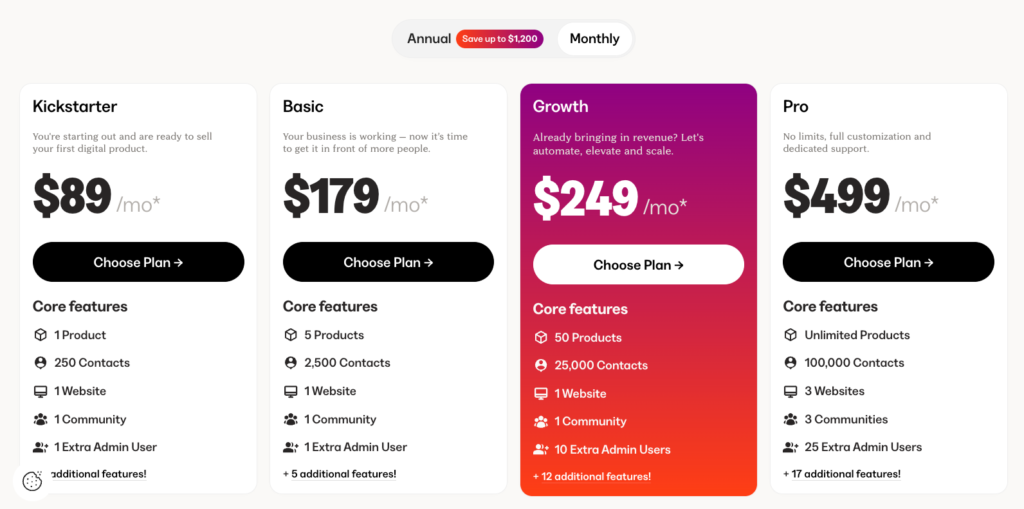
Kajabi is a premium all-in-one platform with a pricing structure that reflects its extensive feature set. While it is more expensive than Skool, it replaces the need for separate email marketing, funnel building, and website building tools.
- Kickstarter Plan: $89 per month. It limits you to 1 product and 1 community. While you get access to core tools like the website builder, sales funnels, and landing pages, your reach is limited to 250 contacts.
- Basic Plan: $179 per month. Increases your limits to 5 products and 2,500 contacts. It remains restricted to one website and one community but is a practical starting point for serious course businesses that have outgrown the Kickstarter tier.
- Growth Plan: $249 per month. Allows for 50 products and 25,000 contacts. It introduces advanced features like the affiliate program, advanced automations, and the ability to remove Kajabi branding from your site.
- Pro Plan: $499 per month. Offers unlimited products. It supports up to 100,000 contacts, 3 websites, and 3 separate communities. This plan also unlocks premium features such as the branded mobile app, custom code editor, and API access.
#6: Bettermode
Highly modular and customizable (best Skool alternative for building branded and enterprise online communities).
Skool’s basic and outdated layout will make your brand feel like a commodity. Meanwhile, Bettermode is super customizable which lets you build custom communities that feel and look like your brand. You can drag and drop specific designs and functionalities—like a Q&A forum, a job board, or a resource gallery—to create a destination that matches your business model.
You also get access to 24 sleek community design templates to help you get started fast.
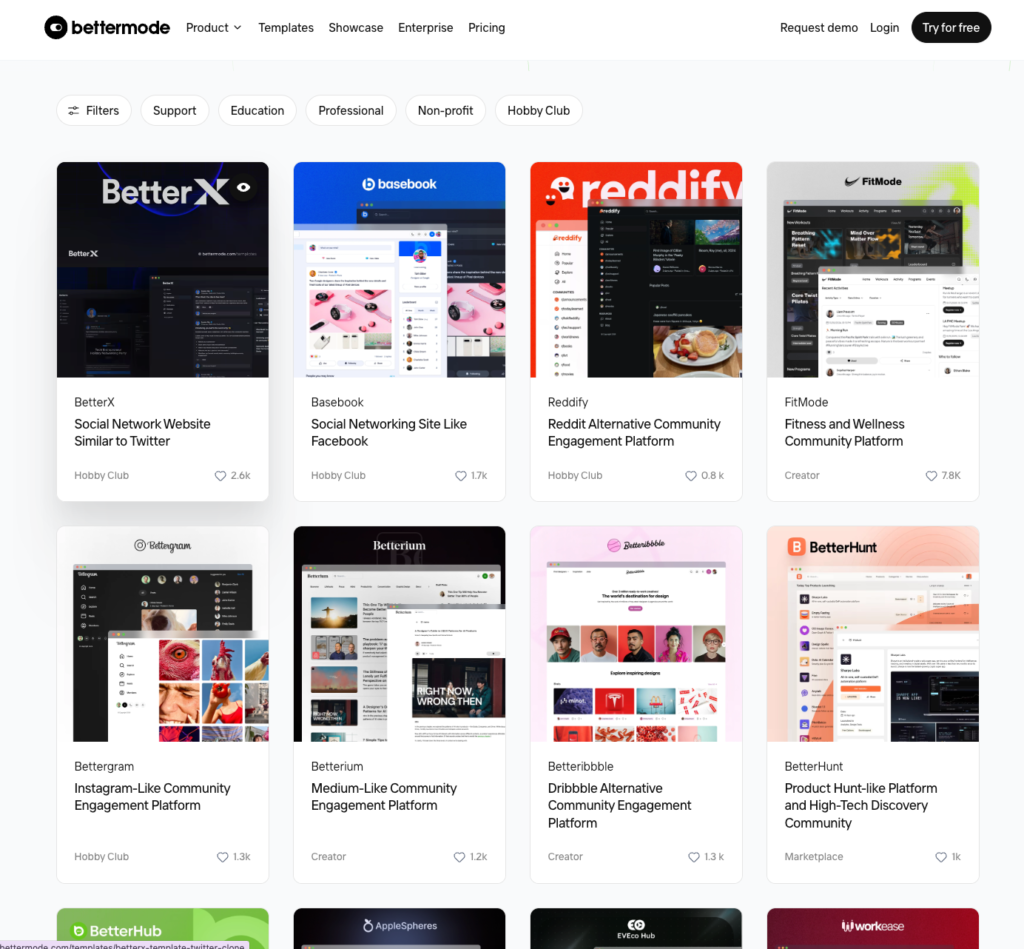
Of all community platforms I’ve tested, Bettermode is the only on this list that feels like a custom-built SaaS product rather than a templated space.
Bettermode Pricing
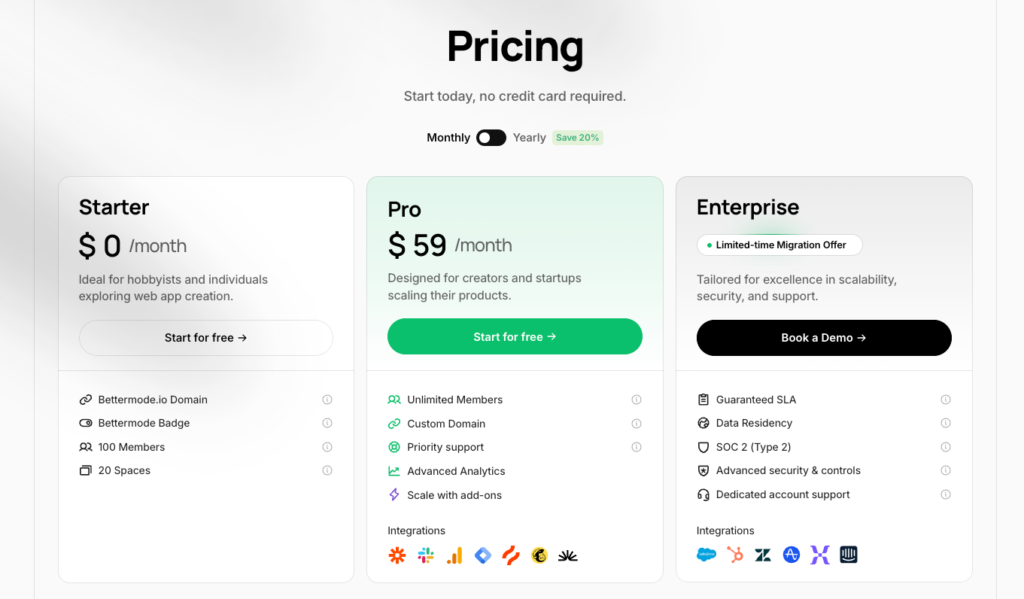
Bettermode is surprisingly affordable. It offers a FREE tier that can serve as a testing environment, since it comes with some steep limits.
- Free: plan, you cannot use a custom domain, and your community will feature Bettermode branding. You are also limited to 100 members and 20 spaces.
- Pro: costs $59 dollars per month. Supports unlimited members and allows you to use a custom domain. You also gain access to advanced analytics and can scale your community using built-in add-ons. This price point is competitive because most community software in this range charges significantly higher fees.
- Enterprise: Is tailored for large businesses that require high scalability and professional security. It includes advanced controls such as data residency and SOC 2 Type 2 compliance. Enterprise users also receive guaranteed SLAs and a wider range of native integrations, making it the best fit for branded customer communities.
Conclusion: What is Better than Skool?
After 170 hours of testing, it is clear that Skool has a long way to catch up. While its simplicity allows you to launch a community quickly, the platform lacks the depth and features required for a professional paid membership. During my tests, I found Skool’s branding, membership management, and course creation tools wanting.
That said, here are my top recommendations as stronger Skool alternatives:
- Choose Circle.so if you want a professional, white-labeled experience with native livestreaming and deep community organization.
- Select Mighty Networks for building engaging community-based learning experiences.
- Go with Heartbeat for an intuitive, affordable, workflow-driven community with a built-in knowledge base.
- For advanced teaching and certifications, use Teachable.
- Choose Bettermode if you need advanced customization and design options.
Finally, if you need a complete sales and marketing engine that handles everything from email to funnels, Kajabi is the definitive choice.