


Building an online community is a huge thing now for digital creators, online coaches, and businesses looking to forge a strong connection with their audience, receive feedback, and boost customer loyalty. And when it comes down to tools, Mighty Networks and Circle are two of the most popular platforms.
Both offer essential features for building engaging online communities and monetizing them through courses, coaching programs, and memberships. But how do they measure up?
Short answer: choose Circle if you want the easier platform to run, a cleaner interface, stronger moderation and a workflow builder (from its Business plan). Choose Mighty Networks if you want to mix courses, chat and events inside one space, stronger gamification, course certificates and a slightly lower price: $79 a month against Circle’s $89 on annual billing.
I’ve been using both platforms for some time now to see where each thrives and falls short. In this Circle vs Mighty Networks comparison guide, I’m going to show you how the two tools stack up in terms of:
- Ease of use
- Community building capability
- Online course creation
- Customization and branding
- Monetization
- Affordability
Let’s go.
Circle vs Mighty Networks: quick verdict

Circle
4.8/5
- Pricing $89 to $419/month billed annually ($129 to $499 month to month)
- Best for Creators and coaches who want a simple, polished community with courses
- Transaction fees 2% on Professional, 1% on Business and Scale, 0.5% on Circle Plus
- Free trial 14 days, no card

Mighty Networks
4.3/5
- Pricing $79 to $354/month billed annually ($95 to $425 month to month)
- Best for Communities that mix courses, events and chat in one space
- Transaction fees 2% on Launch, 1% on Scale, 0.5% on Growth and Mighty Pro
- Free trial 14 days, no card
Choose Circle if…
- You want a clean interface that members and admins pick up quickly
- You need strong moderation, such as keyword filters and member flagging
- You want built-in workflows (20 on Business, unlimited on Scale)
- You want a white-labeled community without a custom plan (Business and above)
- You plan to add email marketing in the same tool with the Email Hub add-on
Choose Mighty Networks if…
- You want courses, chat, events and a feed together in one space
- Gamification matters: badges, streaks, points, leaderboards and a member referral program
- You want to award course certificates without a third-party tool
- You want unlimited spaces on every plan
- You want the lower price at every matching tier on annual billing
While both Circle and Mighty Networks share many similarities, they differ in several aspects:
Circle: build online learning spaces without complicated systems

Circle is more user-friendly than Mighty Networks. Its UI is less cluttered, and its navigation is clear and easy to use. All core features and building blocks are conveniently placed on the left sidebar, which is the standard navigation for most web applications.
Circle also provides robust community management tools, including Circle AI, workflow automations (from the Business plan) and advanced moderation features.
However, unlike Mighty Networks, which lets you combine various features in one space, Circle restricts you to a single feature per community space. Which means, you can’t have discussions and online courses in a single space.
Due to its simplicity and ease of use, Circle is ideal for beginners, growing creators, and online coaches looking to build learning-focused community spaces without having to deal with the complexity that comes with traditional LMS platforms.
Mighty Networks: build a branded community with multi-tier memberships
On the other hand, Mighty Networks is more flexible and highly customizable. You can combine features from different space types into a single space.
For example, you can have discussions, live events, and online courses in a single space, independent of other community spaces. It’s like having a mini-community inside your main community, which is something you cannot do in Circle.
Mighty Networks offers better community engagement tools, including polls, badges, leaderboards, and a dynamic feed, although its native live streaming tool is somewhat basic. It also offers better branding features, allowing you to customize individual community spaces and elements to match your branding requirements.
Given that, Mighty Networks best suits growing online communities looking to bring learning and courses into a single platform. It is also an ideal solution for businesses seeking better branding features, the ability to build custom white-label community apps (on Mighty Pro), and the option to build multi-level communities.
Circle vs Mighty Networks at a glance
Prices are month to month, with the annual-billing rate in brackets, as listed on each vendor’s pricing page in November 2026.
| Feature | Circle | Mighty Networks |
|---|---|---|
| Starting price | $129/month ($89 billed annually) | $95/month ($79 billed annually) |
| Plans | Professional $129 ($89), Business $219 ($199), Scale $499 ($419), Circle Plus custom | Launch $95 ($79), Scale $215 ($179), Growth $425 ($354), Mighty Pro custom |
| Free plan or trial | No free plan. 14-day free trial, no card, plus a 30-day money-back guarantee | No free plan. 14-day free trial, no card |
| Transaction fees | 2% Professional, 1% Business and Scale, 0.5% Circle Plus, plus Stripe processing | 2% Launch, 1% Scale, 0.5% Growth and Mighty Pro |
| Members and spaces | Unlimited members. 20, 30 or 100 spaces (unlimited on Circle Plus) | Unlimited members and spaces on every plan |
| Admins and moderators | 3 and 10, 5 and 15, 10 and 100, unlimited on Circle Plus | 3 and 10, 5 and 15, 10 and 100, unlimited on Mighty Pro |
| Courses | Self-paced, structured and scheduled courses, native video, quizzes. No certificates | On-demand, cohort and live courses, challenges, native video, quizzes, badges and certificates |
| Live streaming | 100, 200 or 500 attendees; 10, 15 or 20 hours a month | 100, 200 or 1,000 viewers; 20, 30 or 40 hours a month |
| Automations | Workflows from Business (20), unlimited on Scale | Basic automations on Launch, more on Scale, advanced on Growth |
| Email marketing | Email Hub add-on, from $19/month for 1,000 contacts | None built in. Kit integration from Scale |
| Branding | Custom domain and CSS on every plan, white-label from Business, branded app on Circle Plus | Custom domain, logo and colors on every plan, branded apps on Mighty Pro |
| Mobile apps | iOS, Android and desktop | iOS, Android and web |
| Best for | Simple, polished communities with courses and strong moderation | Course-led communities that want engagement tools in every space |
Circle vs Mighty Networks: pricing
Mighty Networks is cheaper at every matching tier
On annual billing, Mighty Networks costs $79, $179 and $354 a month against Circle’s $89, $199 and $419. Month to month the gap at the entry tier grows to $34 ($95 against $129), shrinks to $4 at the middle tier ($215 against $219), and is $74 at the top self-serve tier ($425 against $499).
| Circle | Mighty Networks | |
|---|---|---|
| Entry plan | Professional: $129/month ($89 billed annually) | Launch: $95/month ($79 billed annually) |
| Middle plan | Business: $219/month ($199 billed annually) | Scale: $215/month ($179 billed annually) |
| Top self-serve plan | Scale: $499/month ($419 billed annually) | Growth: $425/month ($354 billed annually) |
| Custom plan | Circle Plus (branded apps) | Mighty Pro (branded apps) |
| Transaction fees | 2% / 1% / 1% / 0.5% | 2% / 1% / 0.5% / 0.5% |
| Storage | 200 GB / 500 GB / 1 TB / 1 TB | 200 GB / 500 GB / 1 TB / 4 TB |
Mighty Networks pricing
Mighty Networks has three self-serve plans and a custom one. Annual billing gives you two months free.
- Launch: $95/month or $79/month billed annually. Community, courses, events, AI Cohost, basic automations, 3 hosts and 10 moderators, 2% transaction fee
- Scale: $215/month or $179/month billed annually. Adds more automations, API access, Zapier, Kit and Google Analytics integrations, paid one-time events, 5 hosts and 15 moderators, 1% fee
- Growth: $425/month or $354/month billed annually. Adds advanced automations, growth expert sessions, priority support, migration services, 10 hosts and 100 moderators, 0.5% fee
- Mighty Pro: custom pricing for your own branded iOS and Android apps and full community services, 0.5% fee
Every Mighty Networks free trial runs on the Growth plan for 14 days with no card. The old Explore plan is no longer on its pricing page, and Growth is now sold month to month as well as annually.
Circle pricing
Circle also has three self-serve plans and a custom one. Its pricing page shows the annual rates; the month-to-month prices only show once you sign up.
- Professional: $129/month or $89/month billed annually. Community, courses, live events, website, payments, gamification, custom domain and mobile apps; 3 admins, 10 moderators, 20 spaces, 2% fee
- Business: $219/month or $199/month billed annually. Adds workflows, APIs, activity scores, custom profile fields and Circle branding removal; 5 admins, 15 moderators, 30 spaces, 1% fee
- Scale: $499/month or $419/month billed annually. Adds AI agents, unlimited workflows, webhooks and custom SSO; 10 admins, 100 moderators, 100 spaces, 1% fee
- Circle Plus: custom pricing for branded apps, unlimited admins, moderators and spaces, and the Email Hub with 10,000 contacts; 0.5% fee
Circle’s fee comes on top of Stripe’s processing fees. Extra admins cost $10 a month each, and extra spaces $20 a month per 10.
Admins, moderators and spaces
The two now cap admins and moderators identically: 3 and 10 on the entry plan, 5 and 15 on the middle plan, 10 and 100 on the top self-serve plan, and unlimited on the custom plans. Members are unlimited on every plan of both.
The real difference is spaces. Circle allows 20 on Professional, 30 on Business and 100 on Scale, where Mighty Networks does not cap them at all.
Verdict: Mighty Networks is the cheaper of the two at every matching tier and does not cap spaces. Circle matches it on admins, moderators and entry-level fees, but its top self-serve plan still charges 1% where Mighty Networks’ Growth plan charges 0.5%.
Circle vs Mighty Networks: user experience
| Circle | Mighty Networks |
|---|---|
| ⭐⭐⭐⭐⭐ Provides a user-friendly interface for both members and community hosts. Supports keyboard shortcuts for quicker navigation. | ⭐⭐⭐ Offers greater functionality but has a steeper learning curve. Some tabs are less intuitive, and some menus can be confusing. |
Circle UI is simpler to navigate than Mighty Networks
Circle has a clutter-free layout that’s easy to navigate for both admins and community members. The layout is consistent across all tabs with all its core settings conveniently grouped in the left sidebar, making them readily accessible.
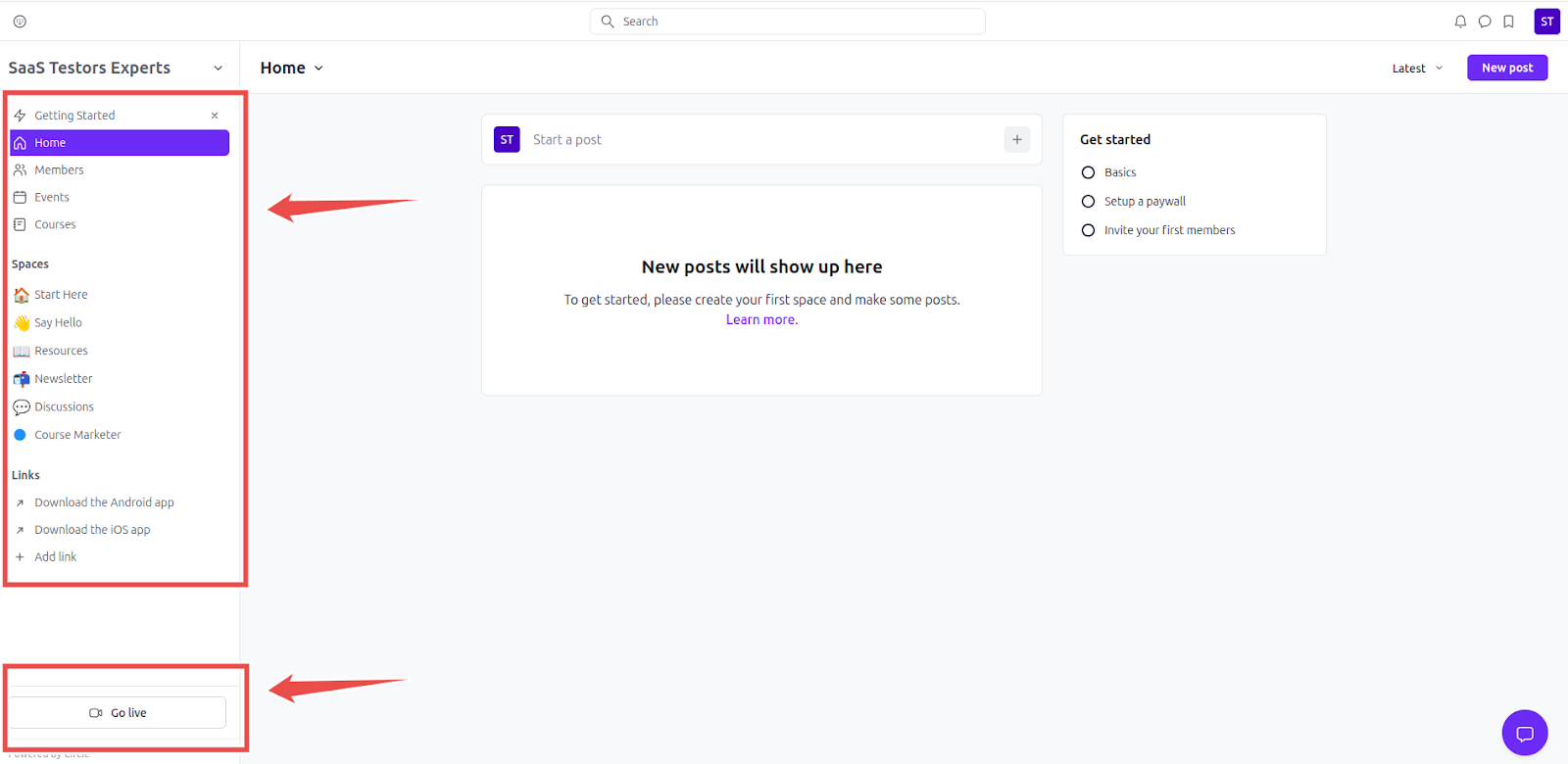
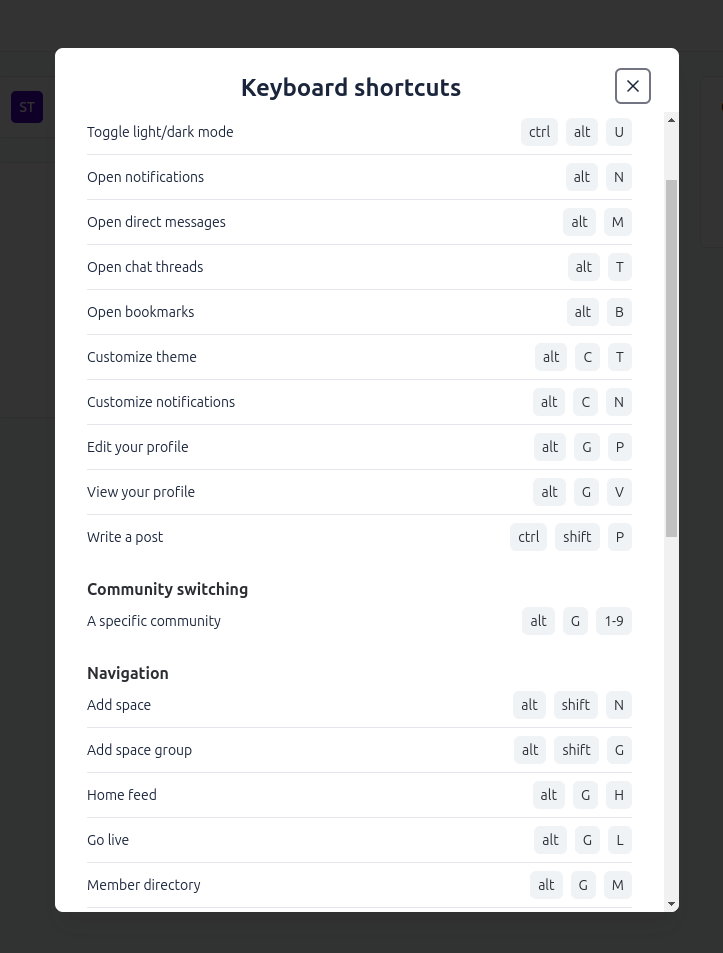
Circle even takes it a step further by offering keyboard shortcuts, allowing you to perform common actions (such as adding a new space, or opening the theme customizer) quickly reducing the number of mouse clicks.
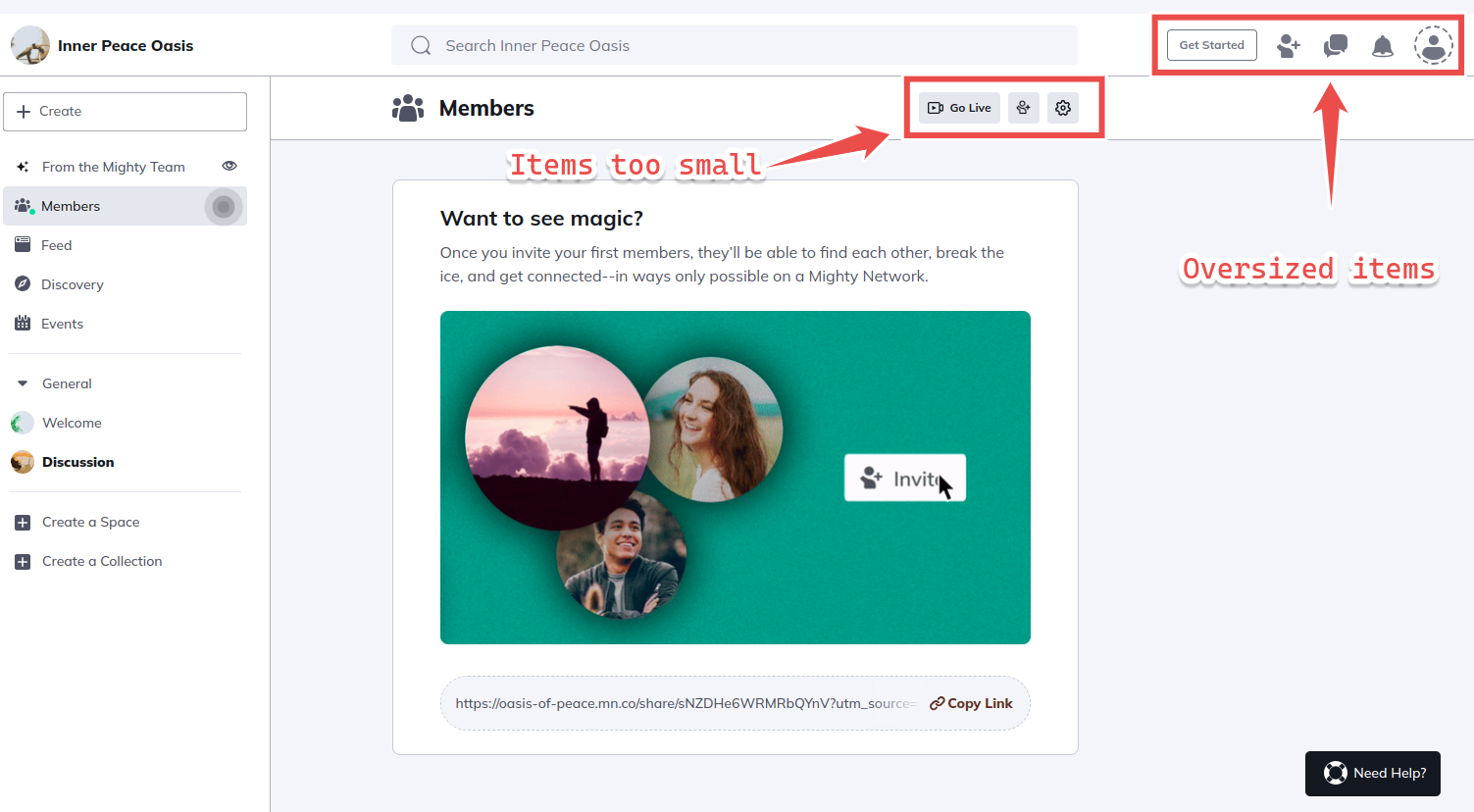
On the other hand, the Mighty Networks interface has some quirks that make it feel less intuitive. Its layout elements are inconsistently sized, with some feeling overly large and others appearing too small.
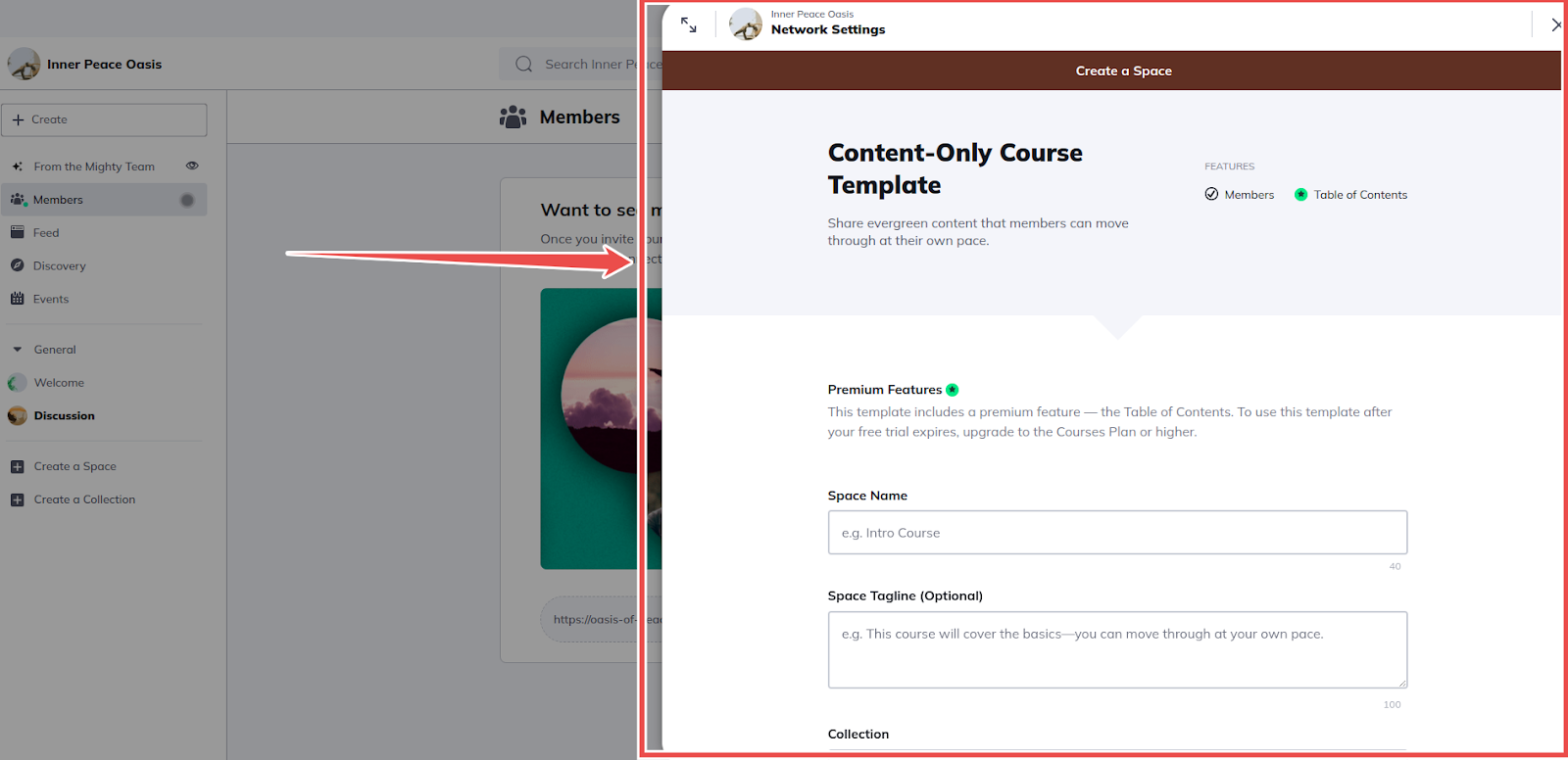
Additionally most of its tabs open as popup windows by default that appear on the right side of the interface which requires extra clicks to feel usable.
I also found Mighty Networks’ UI to be a bit misleading. For example, when creating an online course, the platform has two navigation items labeled “Create” in its course space: a button in the top bar and a text link halfway down the interface.
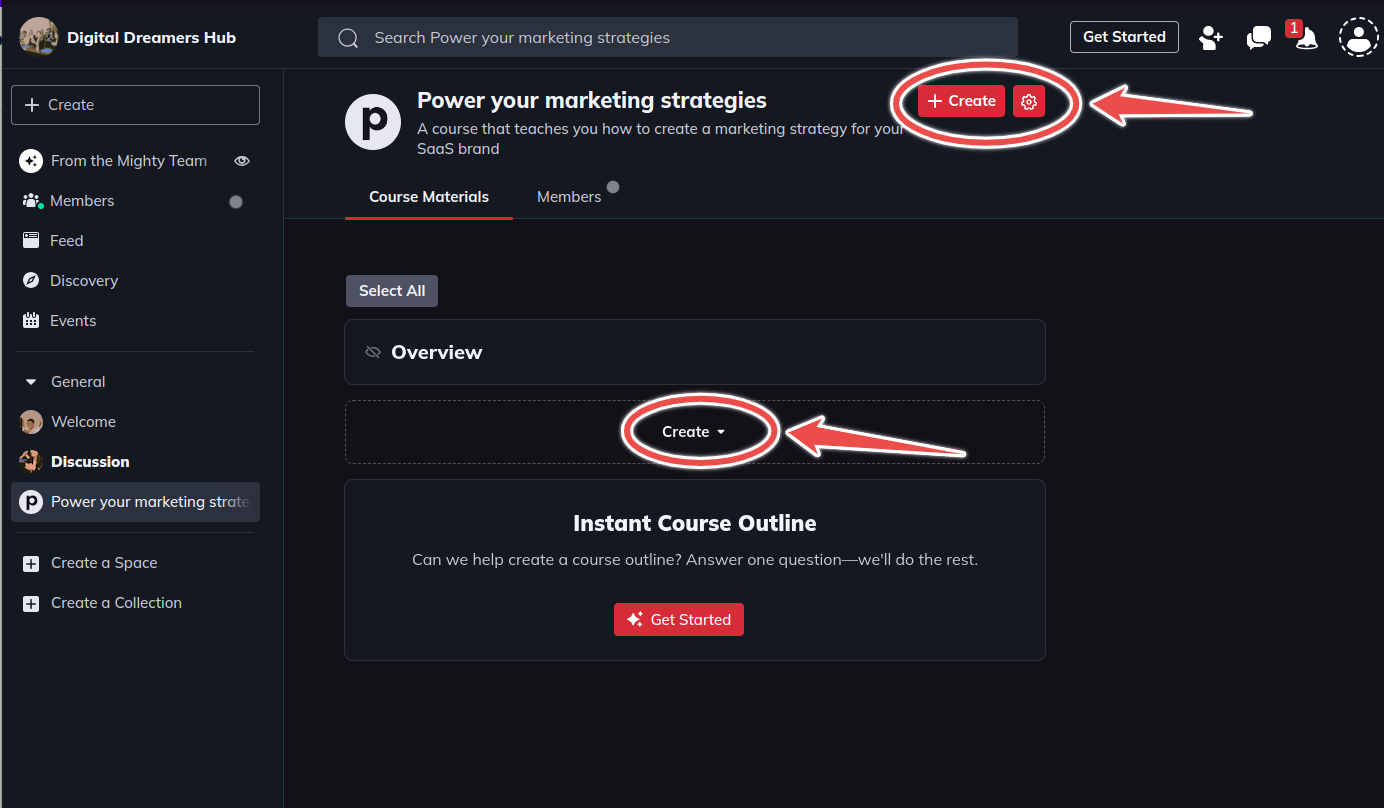
If you are creating a course, you might expect that clicking the top “Create” button would allow you to start structuring your course by adding modules and lessons.
That’s the most visible item, right?
But that’s not the case.
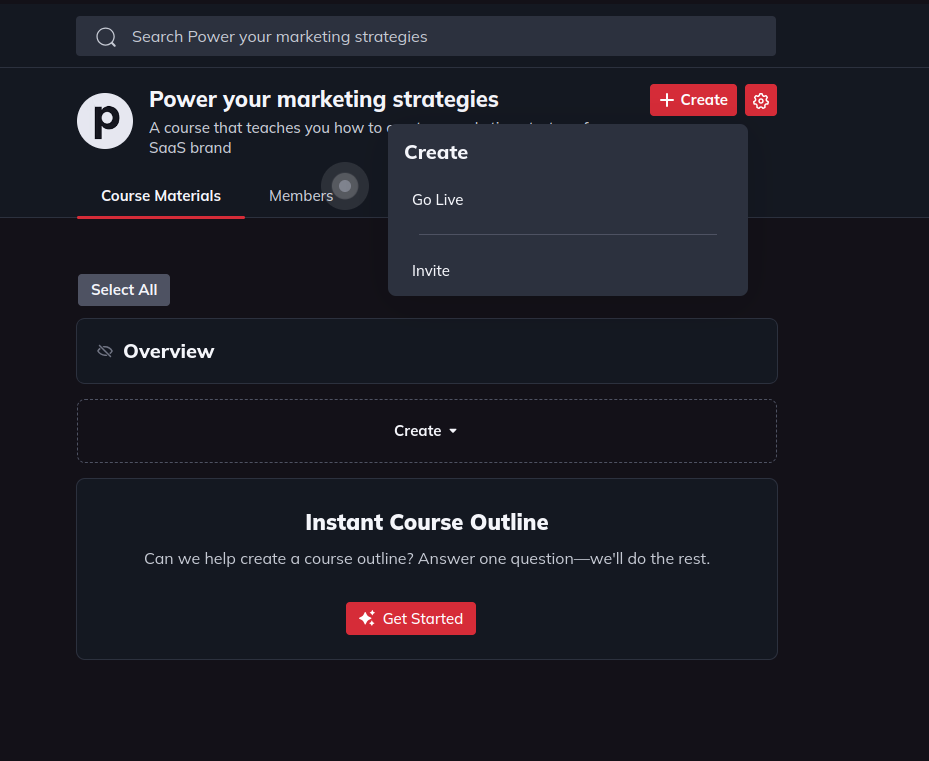
Instead, clicking the button displays the options to “go live” and “invite” members to your course space.
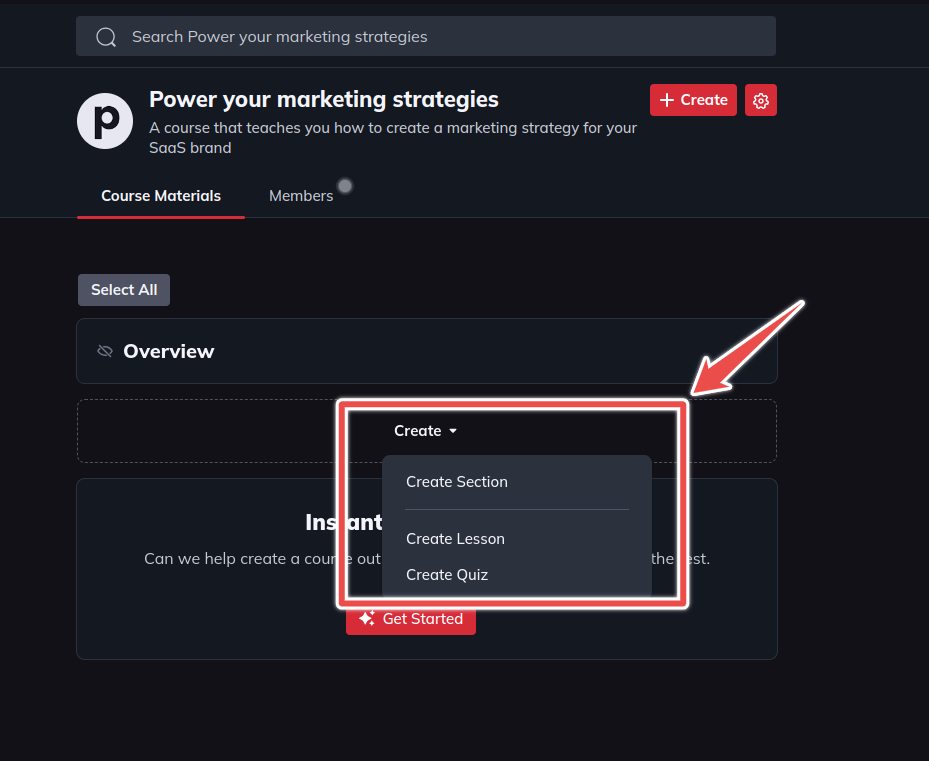
Meanwhile, adding modules to your course requires you to click on the less visible navigation link that’s halfway down the interface.
Verdict: Circle easily wins over Mighty Networks due to its simplicity and clutter-free interface. Mighty Networks UI feels less polished and it’s hard to navigate for new users.
Circle vs Mighty Networks: community building and management
| Circle | Mighty Networks |
|---|---|
| ⭐⭐⭐⭐ Keeps it simple with one content type per space. Includes workflow automation and offers better moderation features | ⭐⭐⭐⭐⭐ Flexible spaces that can support different content types. Superior gamification features. |
Mighty Networks spaces are flexible while Circle maintains a rigid, predefined structure
Mighty Networks provides over five community space types, including a feed, chats, courses, events, resource libraries, and more.
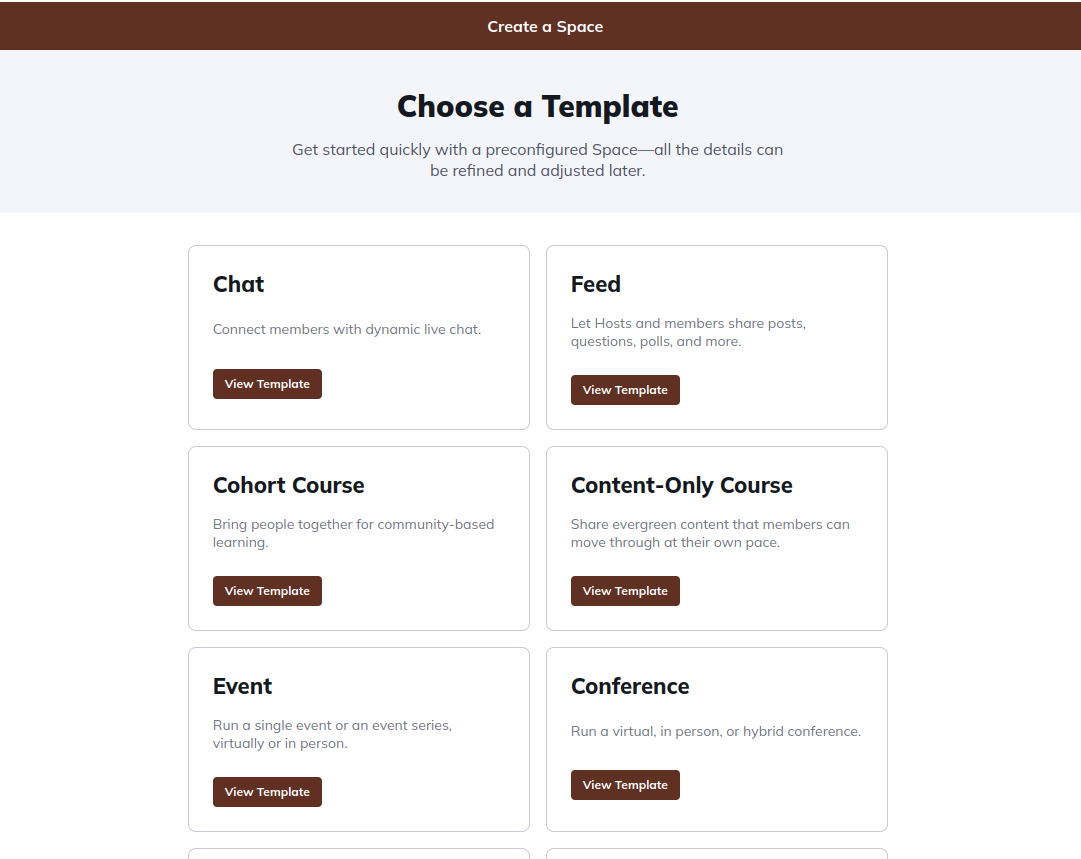
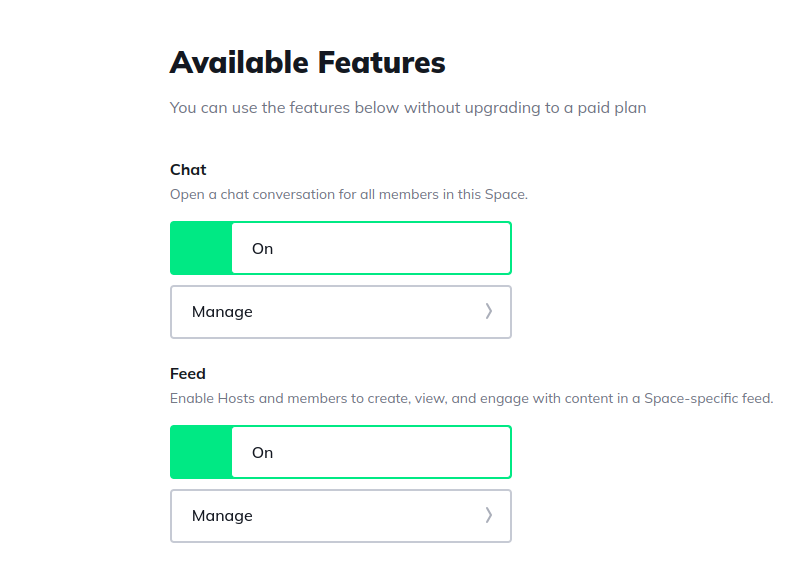
However, what makes Mighty Networks Spaces different is that you’re not restricted by the functionality of the space type included. Instead, it lets you mix and match features from different categories, creating dynamic “super spaces.”
For example, if you select the “Content-Only Course” template, you can also incorporate features like a feed, chats, and events within the same space. This encourages community-based learning and fosters more interactive and engaging environments.
Meanwhile, Circle follows a more structured and predefined approach to space design. Each space type in Circle is isolated with its own set of features.
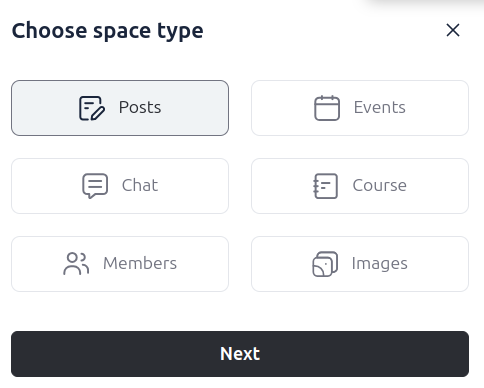
For example, a “Course” space will have unique features for building online courses but won’t include functionalities like event calendars, discussion posts, or chat options
To access these features, you’ll need to create entirely separate spaces, which can lead to a disjointed community experience, especially for complex membership models.
Both platforms allow you to engage members using live events, polls, discussion boards, leaderboards and chats but Mighty Networks goes a step further with better gamification
Mighty Networks allows you to create discussion boards, live events, and group chats around specific topics. On the discussion boards, you can post long articles, quick updates, questions, or polls to get the conversation going.
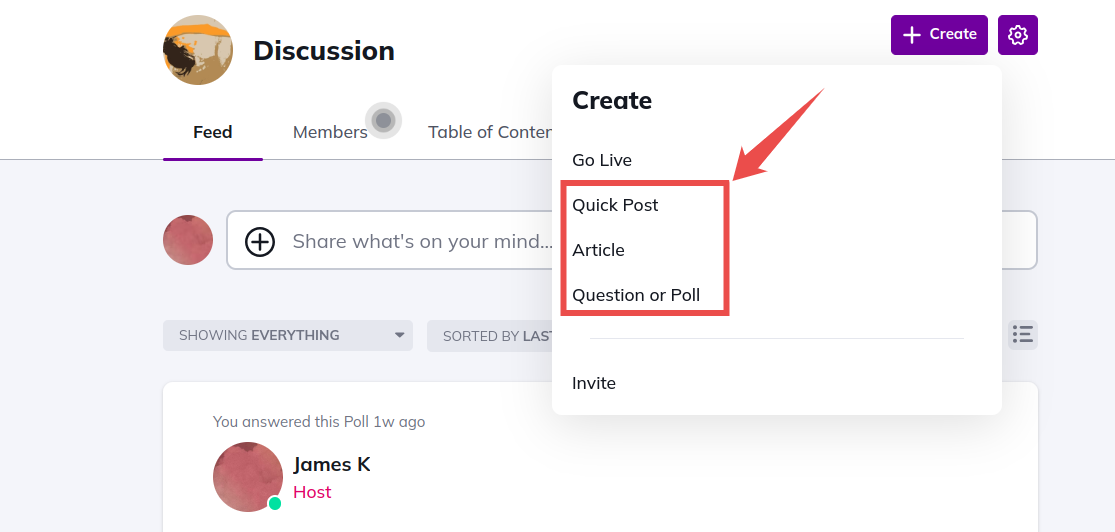
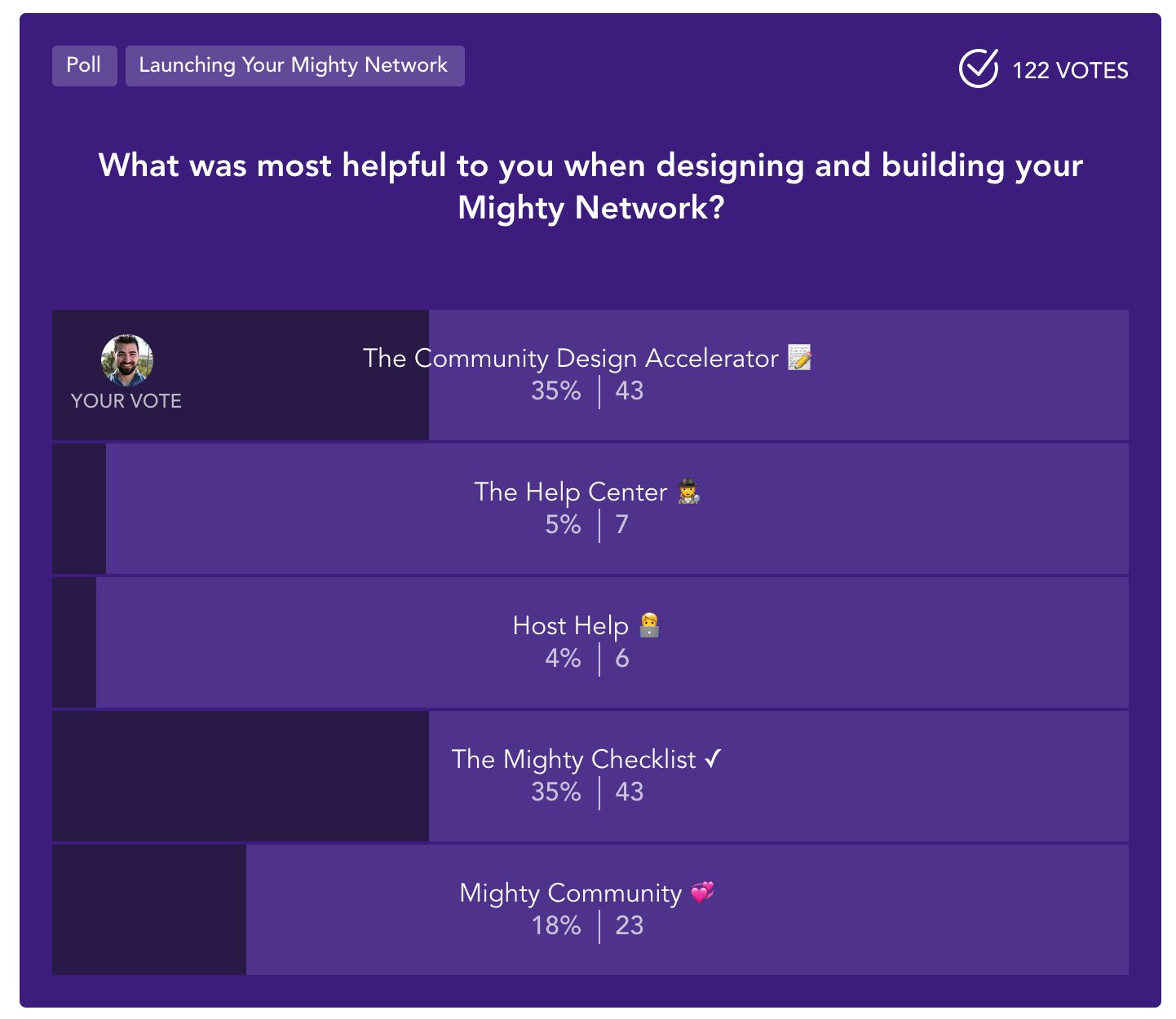
One thing I love about Mighty Networks is the flexibility in creating polls. You can make a simple question, a fun quiz with multiple choices, or a percentage-based poll. Depending on the poll type you’ve chosen, Mighty Networks does a great job of displaying them in a visually appealing way to invite members to engage with them.
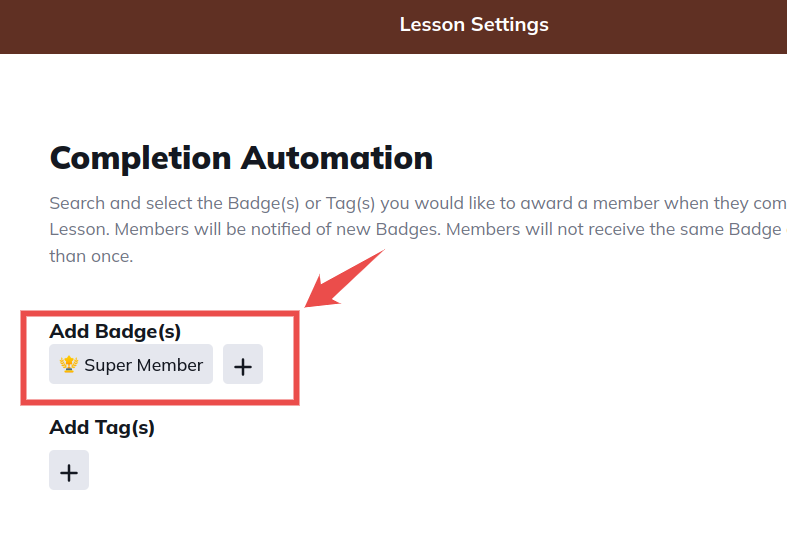
But it doesn’t stop there. It also allows you to take community engagement up a notch with gamification features like badges, leaderboards, and an Ambassadors program. You can reward your most active members with custom badges for their contributions or automatically when they complete course lessons.
Its Ambassadors program is another fantastic way to grow your community and boost engagement. Using the program you can encourage members to invite others to join your community where you can reward them with points, discounts, merchandise, and more.
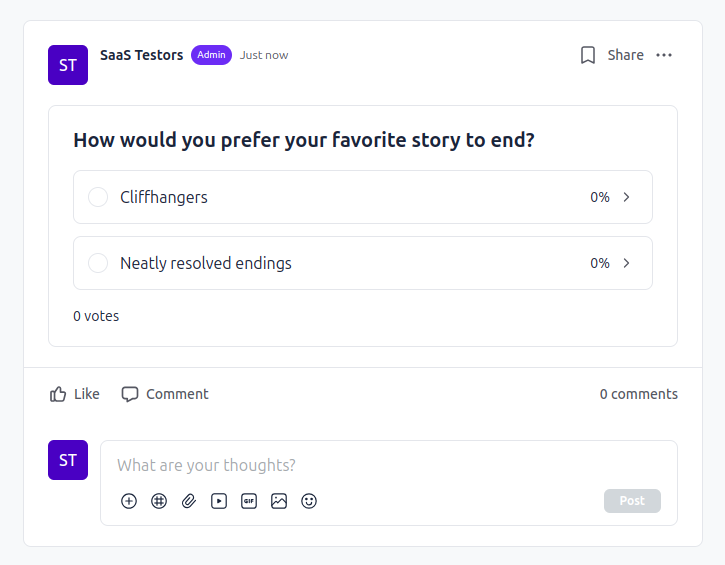
On the other hand, Circle offers similar tools for member engagement: community posts, group chats, events, leaderboards and polls. However, their polls are limited to one format and lack the visual appeal of Mighty Networks.
Mighty Networks’ community feed offers more granular control, but Circle focuses on simplicity
Mighty Networks’ feed offers extensive customization with advanced filters and sorting options, enabling a highly tailored user experience. Using it, members can filter community posts on their feed with filter options like “Everything”, “Personal Feed”, “Your Activity”, “From Your Hosts”, “Near You”, “Unanswered”, “Quick Posts”, “Questions and Polls”, “Articles” and “Events” and they can even select multiple filters at one time.

In addition, members can sort content, by clicking the “Showing By” button, for Top (most relevant), Newest (most recently published), or Oldest (oldest published).
Meanwhile, Circle tends to keep everything simple with its basic filter options. Members can easily jump in and see the latest discussions, and hottest topics (through the trending posts sidebar), or revisit older content.

Circle offers stronger community moderation tools than Mighty Networks
Circle provides robust moderation tools to ensure a safe environment for community members. It includes automatic profanity filters to remove offensive language from posts and comments reducing the burden on moderators in maintaining a respectful community atmosphere. You can block as many keywords as needed, ensuring comprehensive coverage as per your community guidelines.
Circle also allows you to flag specific members for review enabling moderators to closely monitor and manage potentially problematic individuals.
Mighty Networks, on the other hand, provided fewer moderation options when I tested it. Unlike Circle, you cannot configure specific moderation rules for different spaces within your community. It lacks profanity filters requiring moderators to manually review and remove offensive language, which can be time-consuming and less efficient.
Circle has a workflow builder from its Business plan, and Mighty Networks now has built-in automations
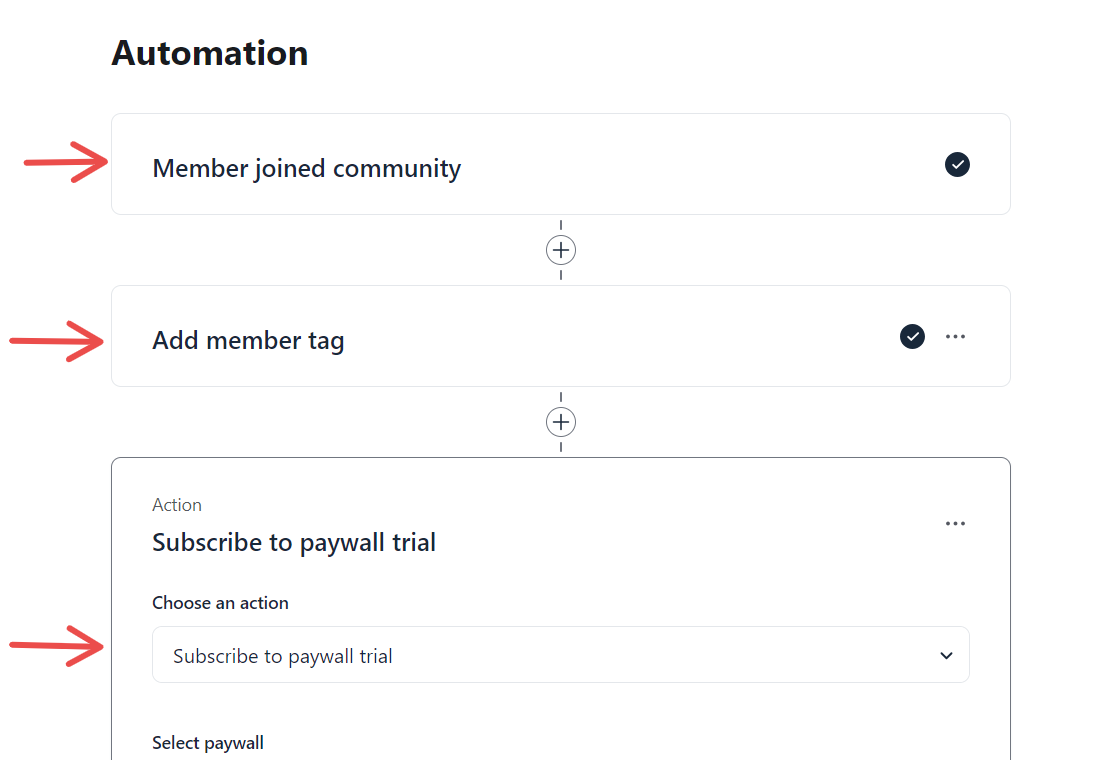
Circle’s built-in workflow builder allows you to automate community tasks without needing external tools. For example, using its “if-then” automation rules you can create a workflow where you can automatically add a tag to members and enroll them in a paywall trial upon joining a specific space.
Workflows are not part of Circle’s Professional plan. Business includes 20 automations and 20 scheduled workflows, and Scale makes both unlimited.
When I first tested Mighty Networks, it had no workflow builder, and automating tasks meant a third-party service like Zapier. That has changed. Its pricing page now lists course and gamification automations on every plan, onboarding and attendance automations from Scale, and activity and content automations with AI filters on Growth.
Verdict: This is a tough call, but Mighty Networks has the edge over Circle in several key areas. It excels with its flexible spaces, advanced gamification, improved member profiles, and a more dynamic community feed. On the other hand, Circle shines in community management, thanks to its strong moderation tools and workflow builder. If you prioritize engagement features, Mighty Networks is the better choice. However, for simpler community management, Circle is the way to go.
Mighty Networks vs Circle: online course creation
| Mighty Networks | Circle |
|---|---|
| ⭐⭐⭐⭐ Can combine community features and online courses in a single space. Includes quizzes but has a cumbersome content drip scheduling setup process. | ⭐⭐⭐⭐ Simple online course builder but limited video tracking tools. Better drip scheduling for course content. |
Both Circle and Mighty Networks let you offer online courses in various content formats, such as text, video, and downloadable resources. You can import content from YouTube, Wistia, and Vimeo. Both support content dripping and provide mobile apps for iOS and Android, allowing members to access course materials on the go.
However, there are areas where each excels and falls short, and in this section, we’ll dive deeper and show you how both tools measure up in terms of online course building.
Mighty Networks puts community features inside your course space, while Circle keeps them in separate spaces
Mighty Networks fosters community-based learning by allowing you to integrate community features into your online course space. During setup, the platform offers two major templates: cohort courses and content-only courses.

The Cohort Course allows you to bring your learning materials and community together in the same space for community-based learning.
In this space, you can conduct group discussions, host live events, and create polls, among other features.

On the other hand, Circle simplifies things by keeping courses in separate spaces. Discussion boards and events are kept separate from courses and cannot be combined.
Mighty Networks tracks video progress on embeds and uploads, while Circle tracks uploads only
Mighty Networks online course builder offers a video tracking feature that requires students to watch at least 90% of the video before unlocking the next lesson. The feature is available for both video material imported from external content hosting platforms like YouTube, Wistia e.tc and content uploaded from your local computer to your allocated storage in Mighty Networks.

Meanwhile, in Circle, the video tracking feature is only available for content manually uploaded to their platform to ensure members watch the content before proceeding to the next lesson.

However, if your video content is hosted on external platforms such as Wistia, Vimeo, or YouTube and imported using Circle’s embed feature, the video tracking functionality is disabled. This limits the tracking to only the content hosted on Circle.

Setting up drip scheduling is more straightforward in Circle than in Mighty Networks
Circle offers a “Structured” course space type specifically designed for course content drip scheduling. This feature allows you to easily manage the timing of content release relative to members’ enrollment.

You can choose to release course modules immediately after a member joins or schedule them for later. For example, you can unlock the first module immediately, release the next module the following day, and continue this pattern for subsequent modules. This flexibility makes it easy to control the pace of the course.

Meanwhile, Mighty Networks offers nearly the same functionality but can be cumbersome to set up. Unlike Circle whose setup is super straightforward, in Mighty Networks it takes more steps and can be daunting for beginners. First, you need to access your content modules and click the three vertical dots menu to display more settings.

After which you need to click on “Section Settings” where you’re redirected to a new tab. Next, you need to locate the “Unlock Options” section, then click on “Timed” and the duration when you want to release the course module relative to members enrolling to the space.

Then you need to repeat the same process for all of your modules that you want to drip schedule which can be cumbersome if you have a large course or various courses.
Both have quizzes, but only Mighty Networks issues certificates
When I first compared them, neither platform could issue completion certificates. Mighty Networks has since added it: its pricing page lists quizzes and tests plus “Automatically Award Badges & Certifications” on every plan. Circle still has no built-in certificates, so you need a third-party tool such as Certifier or Accredible connected to your Circle courses.
Verdict: Mighty Networks is better for building community-based learning for larger communities with multiple membership tiers. Meanwhile, Circle is best suited for coaches and growing creators who want a simple online course builder to offer digital courses in their communities.
Mighty Networks vs Circle: customization and branding
| Mighty Networks | Circle |
|---|---|
| ⭐⭐⭐⭐ Add logo, and space icons, customize individual space appearances, and change community background color. Host your community on a custom domain. Your own branded apps (only on Mighty Pro). | ⭐⭐⭐⭐ Add logo, customize community background, header, active items, and space icons. Custom domain on every plan. White-label your community from Business, branded apps (Circle Plus only). |
The ability to customize most aspects of your community such as color themes, layout, logos, and others to match your branding needs matters a lot, and there’s a clear distinction on how Circle vs Mighty Networks approach this:
Circle gives more control over the overall look, while Mighty Networks lets each space look unique
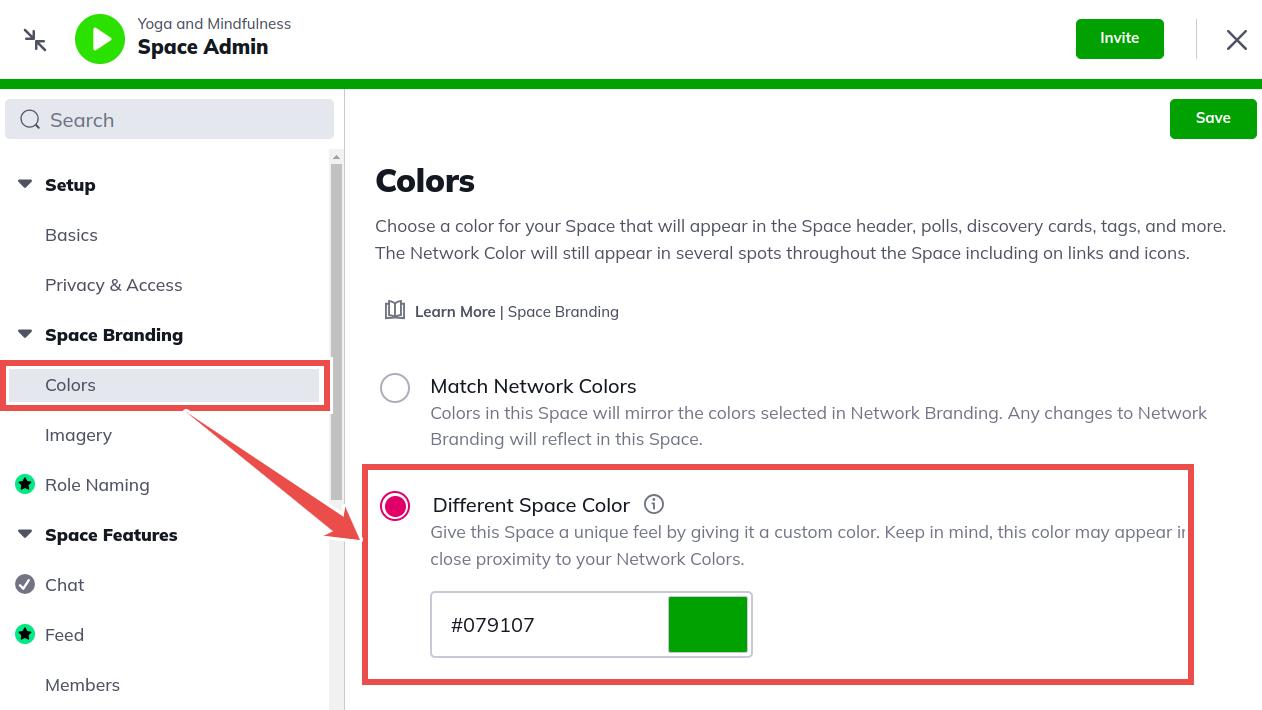
Mighty Networks allows you to customize individual community spaces to feel unique, and topic-specific. This is huge for established brands with multiple community spaces.
You can add a custom color pallet for individual spaces:
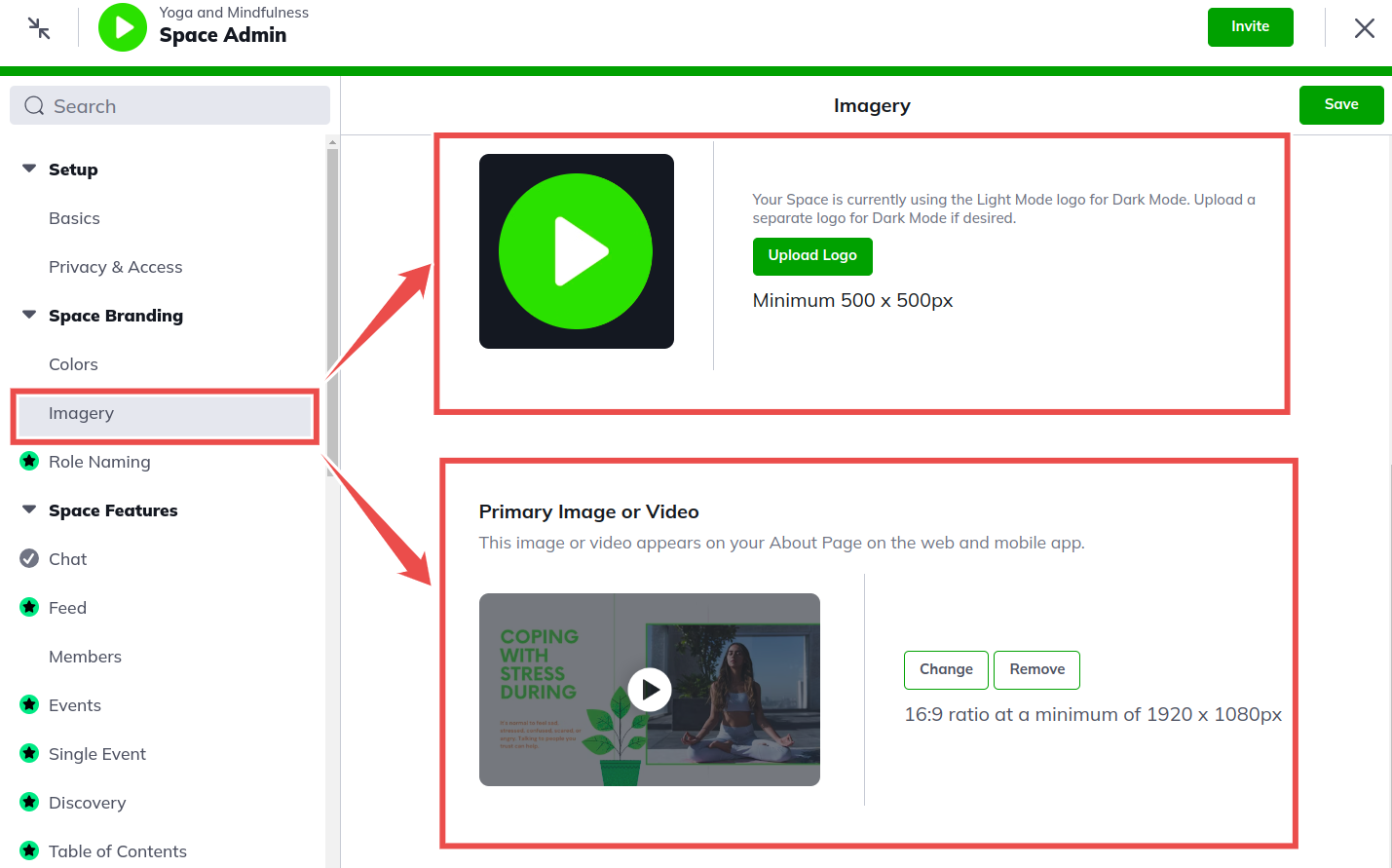
a custom space icon and a banner image where you can also add video at the hero section of your community space sign-up page.
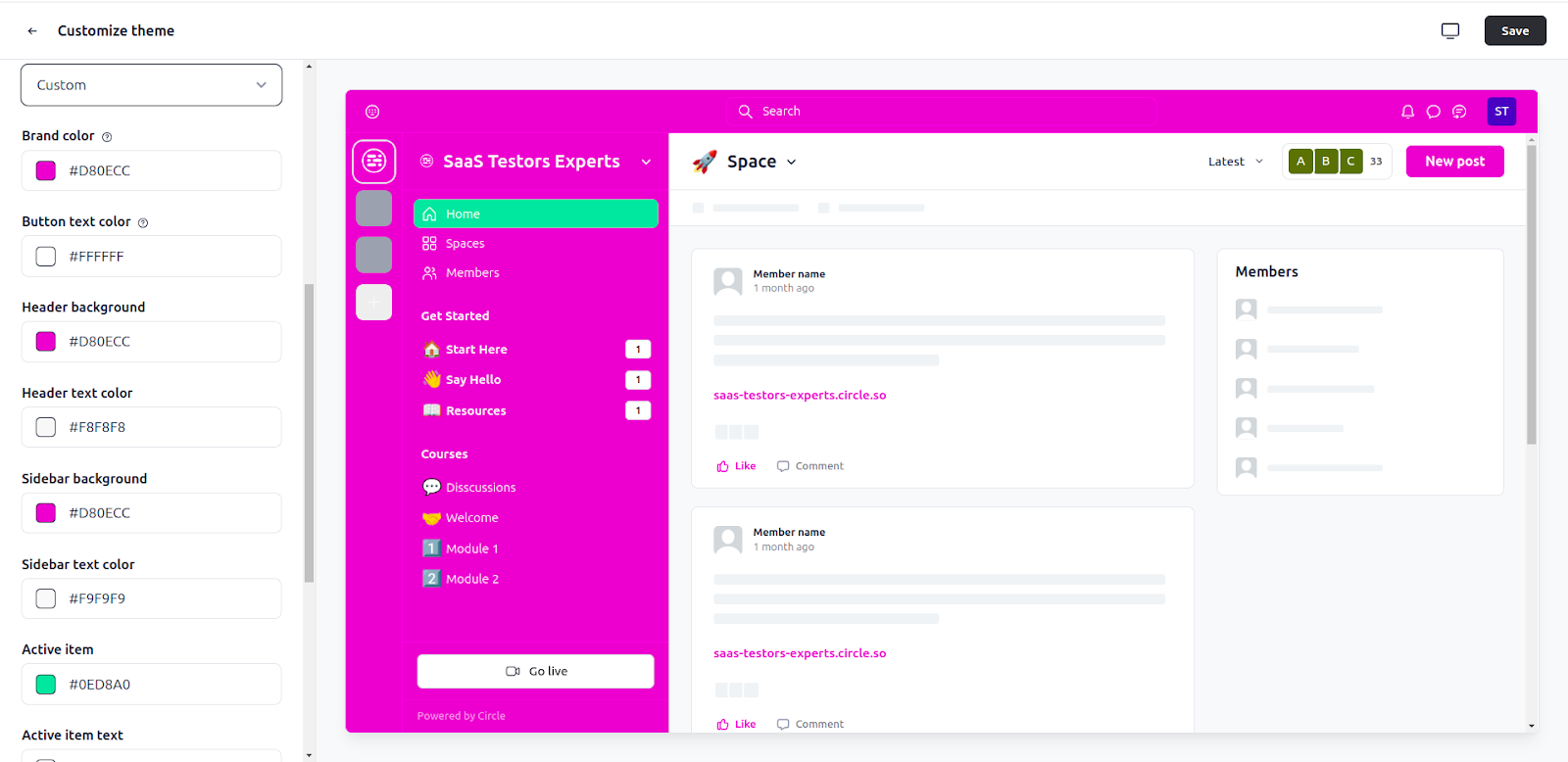
While Circle allows you to customize individual spaces (icons and banners), it focuses more on creating a cohesive look and feel across the entire community with a single theme color, where you can add a custom color for your community header, background, sidebar, buttons, and active items.
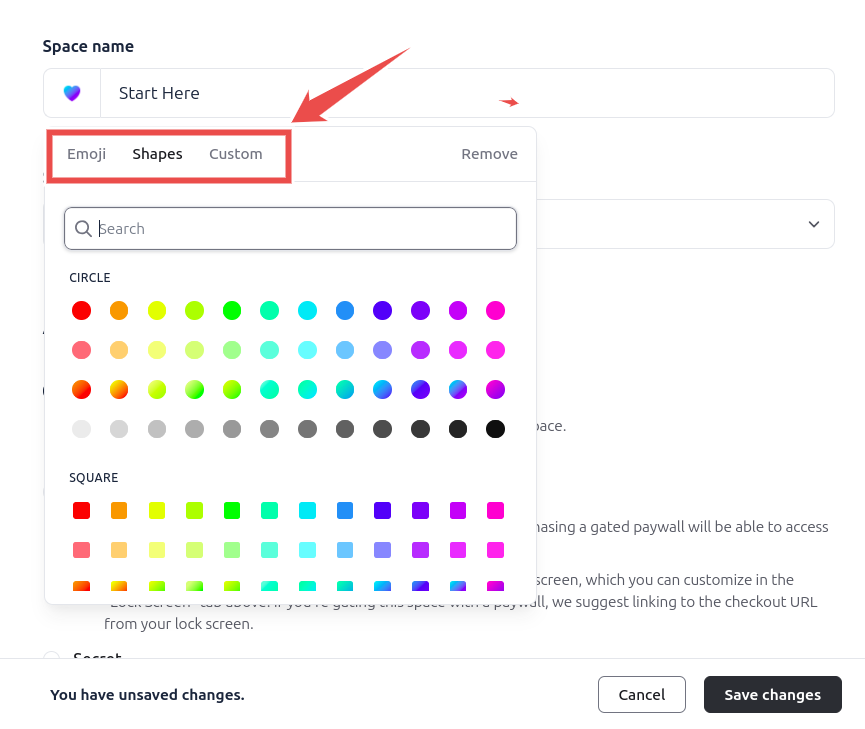
It also offers more options for adding custom space icons allowing you to choose from emojis, shapes, or custom icon designs.
Plan matters here too. Both include a custom domain on every plan. Circle removes its branding from Business upward and adds custom CSS and JavaScript snippets on every plan, while branded mobile apps need the custom plan on both: Circle Plus or Mighty Pro.
Verdict: Both platforms offer fair customizations and from the experience, none perform objectively better than the other. In that case, it’s a draw.
Circle vs Mighty Networks: pros and cons
Circle pros and cons
Pros
- Intuitive user interface
- Better community moderation
- Native live streaming
- Workflow automations
- Minimalistic course builder
- Mobile apps
- Custom domain on every plan
Cons
- Transaction fees of 2% on Professional and 1% on Business and Scale
- Workflows and API access start on the Business plan
- No built-in course certificates
Mighty Networks pros and cons
Pros
- Flexible community spaces
- Community gamification
- Quizzes, badges and certificates in courses
- Mobile apps
- Native live streaming
- Unlimited members and spaces on every plan
- Highly customizable spaces
Cons
- Complex user interface
- Limited reporting
- Basic landing page builder
- No built-in email marketing
Circle vs Mighty Networks vs Skool
If you are also looking at Skool, it is the simplest and cheapest of the three to start. Skool’s pricing page lists two plans: Hobby at $9 a month with a 10% transaction fee, and Pro at $99 a month with a 2.9% fee. Both include unlimited members, courses, videos and live calls, and the fee already covers card processing.
The trade-off is structure and branding. Skool gives you one feed with categories, a classroom and a calendar, but no spaces, no quizzes or certificates, and branding limited to a name, icon and cover image. I rate it 3.5 out of 5 in my community platforms roundup, against 4.8 for Circle and 4.3 for Mighty Networks.
| Circle | Mighty Networks | Skool | |
|---|---|---|---|
| Starts at | $89/month billed annually | $79/month billed annually | $9/month |
| Transaction fees | 2% to 0.5%, plus Stripe | 2% to 0.5% | 10% on Hobby, 2.9% on Pro (card processing included) |
| Spaces | 20 to 100, unlimited on Circle Plus | Unlimited | One feed with categories |
| Best for | Polished, well-moderated communities | Course-led communities with strong engagement | Simple paid groups with gamification |
For the full head-to-head, read my Skool vs Circle comparison and my Skool review.
Final verdict: which is better, Circle or Mighty Networks?
Both Circle and Mighty Networks are two huge contenders when it comes to building learning-focused community spaces.
As seen from our Circle vs Mighty Networks review, both tools share a bunch of similarities. But when it comes to flexibility, customization, and community engagement, that’s where they chart their differences.
Opt for Circle if you want a simple, easy-to-navigate, yet robust online community platform. Circle also allows you to sell online courses, making it a good choice if you’re looking for a straightforward, user-friendly solution.
On the other hand, go with Mighty Networks if you prioritize flexibility, better branding features, and diverse community engagement tools. Mighty Networks offers more customization options, enabling you to create a unique and engaging community experience.
On price, Mighty Networks is cheaper at every matching tier, and its free trial runs on the Growth plan so you can test everything. Circle‘s trial is also 14 days, and it adds a 30-day money-back guarantee if you change your mind after paying.
Also read:
- Circle vs Kajabi
- Circle vs Skool
- Circle vs Podia
- Circle review
- Mighty Networks review
- The best community platforms
Circle vs Mighty Networks: FAQs
Is Circle better than Mighty Networks?
Circle is better if you want an easy, clean community with strong moderation and a workflow builder. Mighty Networks is better if you want courses, chat and events in one space, stronger gamification and certificates. I rate Circle 4.8 and Mighty Networks 4.3 out of 5.
Is Mighty Networks cheaper than Circle?
Yes, at every matching tier. On annual billing Mighty Networks costs $79, $179 and $354 a month against Circle’s $89, $199 and $419. Month to month it is $95, $215 and $425 against $129, $219 and $499.
How much does Mighty Networks cost?
Mighty Networks costs $95 a month on Launch, $215 on Scale and $425 on Growth, or $79, $179 and $354 a month billed annually. Mighty Pro, with your own branded apps, is custom priced. There is no free plan.
Does Mighty Networks charge transaction fees?
Yes. Mighty Networks charges 2% on Launch, 1% on Scale and 0.5% on Growth and Mighty Pro. Circle charges 2% on Professional, 1% on Business and Scale and 0.5% on Circle Plus, on top of Stripe’s processing fees.
Does Mighty Networks have a free trial?
Yes. Mighty Networks offers a 14-day free trial with no credit card, and every trial runs on the Growth plan. Circle also offers a 14-day free trial with no card, plus a 30-day money-back guarantee.
Is Mighty Networks worth it?
It is worth it if your community is built around courses, cohorts or challenges and you want engagement tools in every space. It is less suited to people who want the simplest interface. See my Mighty Networks review for the full test.
Which is better for online courses, Circle or Mighty Networks?
Mighty Networks, for course-led communities: it supports cohort and live courses, tracks video progress on embeds as well as uploads, and issues badges and certificates. Circle is simpler to set up and its drip scheduling is easier, but it has no built-in certificates.
Do Circle and Mighty Networks have mobile apps?
Both have iOS and Android apps on every plan, and Circle also has a desktop app. Your own branded app needs the custom plan on both: Circle Plus or Mighty Pro.
Circle vs Mighty Networks vs Skool: which should I choose?
Choose Circle for a polished, well-moderated community, Mighty Networks for course-led communities with strong engagement, and Skool for the simplest paid group with gamification from $9 a month. See my Skool vs Circle comparison.
Can I move my community from Mighty Networks to Circle?
Yes. Circle’s pricing page lists free payment migrations for eligible accounts on every plan, course migrations from the Business plan, and full content and member migrations on Circle Plus. Mighty Networks offers migration services on its Growth plan and above.