


I’ve been testing and reviewing community softwares for well over five years and if there’s one thing I’ve learned, it’s that few platforms are worth your money. Many should be avoided, no matter how polished they look or how affordable they seem to be.
Good news: It’s my job to find the tools that help you grow your community and won’t leave you scrambling to migrate a year from now. These are my favorite community management platforms that I highly recommend you build on.

1. Circle
Best all-in-one solution for creators, coaches and business brands.
Pricing $89/mon to $419/mon (billed annually)

2. Bettermode
Best for brandability, integration capability and developer tools.
Pricing $149/mon to $1,500/mon (billed annually)

3. social.plus
Best for businesses building social and community features directly into their own apps.
Pricing Custom, usage-based pricing

4. Hivebrite
Best for alumni networks, professional associations, and large membership organizations.
Pricing Starting from $8,000/year

5. Glue Up
Best for associations wanting strong native CRM features and membership management tools.
Pricing Starting from $3,000/year

6. BuddyBoss
Best for WordPress users looking to build and manage communities in one place.
Pricing Starting from $199 to $2,149 for the first year
Community management software vs. community platforms: what’s the difference
Community platform and community management software two terms often interchangeably used. But they can mean two different solutions.
A community platform is software that lets you create an online space where members can gather, interact, share resources and build relationships. It’s where people join discussions, access content, attend events, exchange ideas and connect with one another.
Meanwhile, a community management software focuses more on the operational, administrative, and analytical part of running an online community. It gives you tools to onboard new members, manage access and permissions, moderate discussions, track engagement and automate everyday tasks. It also lets you connect your community to other tools you rely on, such as your CRM, help desk and payment system.
Of course, there’s considerable overlap between the two. Many modern community platforms now include advanced member management, automation, analytics and integrations. Likewise, community management software often comes with all the features you’d expect from a community platform, including discussion spaces, member directories, events and content sharing.
But as you look deeeper, you’ll see that community management software tends to offer more sophisticated administrative and organizational capabilities, making it a better fit for alumni networks, professional associations, nonprofits, chambers of commerce and large membership organizations. These groups often have complex membership structures, different access levels, renewal processes and administrative workflows to manage.
Now in this guide, I’m looking at platforms that help businesses and organizations build and manage communities, rather than simply provide a space for people to interact. If you’re a creator or coach looking for somewhere to host a paid membership community, you’ll find my guide to the (best community platforms for creators) more helpful.
What makes the best community management platform
Getting people to join a community is great marketing. Getting them to stay, contribute, and invite others is good management.
But even the best community manager will struggle if the platform makes everyday tasks harder than they need to be. Without the right tools and structure, you risk ending up with yet another ghost town forum with no structure and direction.
Here’s what I looked for:
- Strong onboarding workflows: A new member’s first experience can shape whether they become an active participant or quietly drift away. The best platforms make it easy to create guided welcome flows, checklists, and personalized next steps that help people find their feet, connect with others, and start participating from day one.
- Engagement tools that bring members back: A community isn’t built on sign-ups alone. People need a reason to keep coming back, even when life gets busy. I looked for features like activity digests, smart notifications, events, gamification, and member-to-member connections that make participation feel worthwhile.
- Moderation that keeps conversations healthy: As a community grows, keeping discussions respectful becomes harder to do manually. Strong reporting tools, keyword filters, approval queues, and AI-assisted moderation help you catch problems early and maintain clear standards without having to police every conversation yourself.
- Organization that scales: A growing community can quickly become difficult to navigate if everything is scattered across different spaces. I looked for platforms that make it easy to organize discussions, resources, events, and member groups so people can find what they need without digging through endless posts.
- Strong member management: Not everyone in a community needs the same level of access. Detailed profiles, custom roles, granular permissions, and tiered access make it easier to manage free members, paying members, moderators, and admins without relying on manual workarounds as the community grows.
- Automation: Repetitive tasks like welcomes, access changes, reminders and follow-ups should run on their own, freeing you to spend time on the conversations that need a real person.
- Integrations with your existing stack: Your community shouldn’t operate in isolation. Connections to your email platform, CRM, payment processor, and course tools help keep members’ information and workflows in sync. I also considered support for tools like Zapier, webhooks, and APIs, especially for communities with more complex needs.
- Community health metrics: Total members is a vanity number. I prioritized platforms that track active members, participation, retention and churn risk, so you can spot problems before members quietly leave.
- Reporting and analytics: Beyond tracking community health, good reporting should help you understand what’s working and what needs attention. Clear dashboards and exportable reports make it easier to spot trends, evaluate your efforts, and decide what to improve next, without needing a data analyst to make sense of the numbers.
- Built-in monetization: If you charge for access, then payments, subscriptions, tiered memberships and free trials should be native, with transparent transaction fees that don’t quietly eat into your revenue as you grow.
- Events and live experiences: Some of the strongest community connections happen beyond written discussions. Live calls, workshops, AMAs, and cohort sessions give members a chance to learn together and build relationships. The best platforms make it easy to manage scheduling, RSVPs, reminders, replays, and video calls without forcing members to jump between tools.
- Brand control. Your community should feel like yours, not the platform’s. Custom domains, branding, white-labeling and, at the top end, your own branded app build trust and recognition.
The best community management platforms: my detailed reviews
While plenty of platforms promise to help with these things, not all of them deliver the tools you need to manage and grow a thriving online community.
So, in this guide, I’ll break down the best community management platforms, and why you should use them.
Let’s get right into it.
1. Circle
The all-in-one platform for creators, coaches and brands looking to build engaging communities, deliver learning and grow membership businesses.
Circle
4.6/5
- Best for Creators running paid memberships, courses and events
- Price From $89/month, billed annually
- Free plan No
- Transaction fees 0.5% to 2%
- Setup Self-serve in the browser, no code needed
Circle is the community management platform I recommend if you’re a creator, coach or digital business owner looking for a complete solution for your community memberships, events and learning programs.
I’ve spent the past 5 years reviewing community software, and Circle has consistently stood out for its ability to bring several key aspects of community management together including:
- Community structure and organization
- Access and membership management
- Member engagement
- Event hosting and livestreaming
- AI agents and workflows
- APIs and Webhooks
Let’s look at how the platform handles the core aspects of community management and scaling it into a sustainable membership.
Rich community spaces that support more than simple forum posts and chats
Circle uses Spaces to organize your community around different types of content and activities.
Think of each Space as a dedicated area where members can find relevant discussions, resources, and experiences without having to sift through an endless feed.
Using spaces you can create private sections in your community for things like:
- Discussion posts
- Courses and learning programs
- Live chats
- Multimedia content
- Events
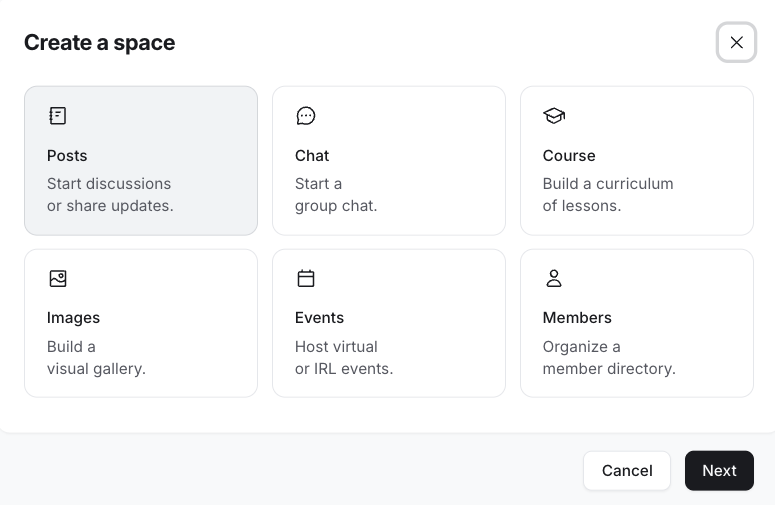
This structure makes community management easier as your membership grows. You can separate beginner discussions from advanced topics, keep paid content away from general conversations, and give members a clearer idea of where to go for specific needs.
Access management with Access Groups that scale
In Circle, you can manage access and visibility at the individual space level. That’s possible because each space acts as its own independent section.
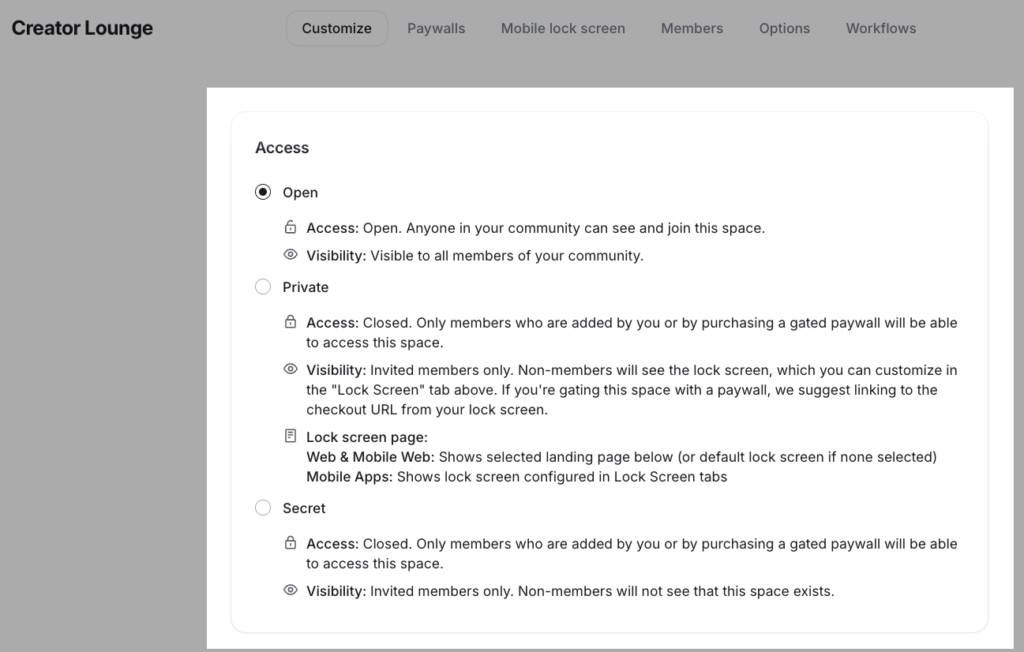
But what happens when you have a bunch of spaces and you want to assign access to different segments of your members?
Managing permissions one space at a time even while using automated workflows quickly becomes complicated and chaotic.
That’s what Access Groups are for.
Essentially, they let you bundle access to multiple spaces and manage permissions collectively. Instead of granting access to each space individually, you can organize related spaces into a single group and assign access more efficiently.
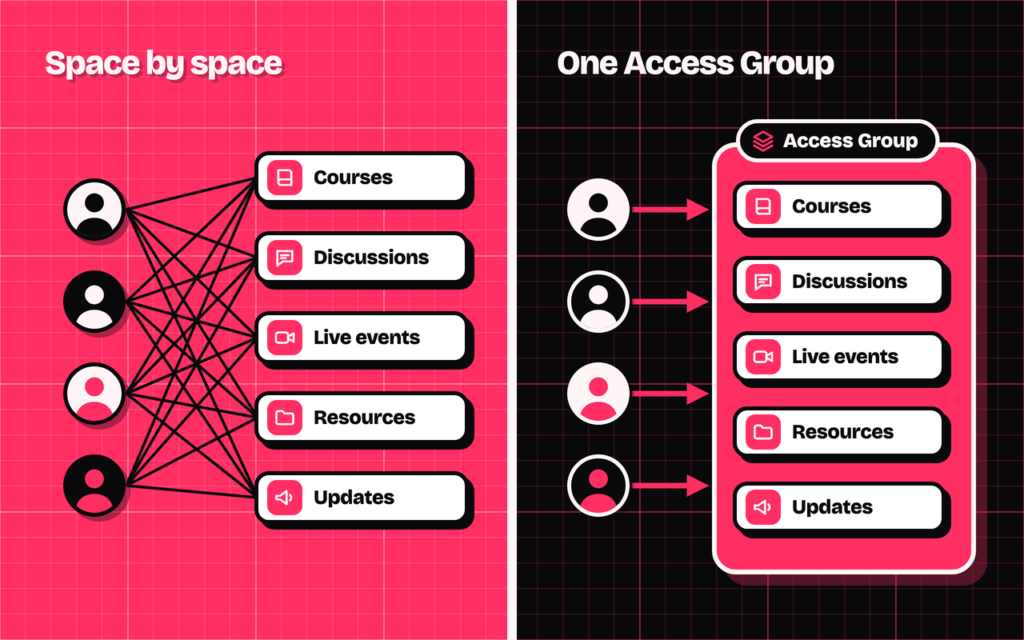
For example, imagine you’re running a paid learning community with separate spaces for courses, discussions, and live events.
You can bundle these spaces into one Access Group and grant eligible members access to the entire learning experience without configuring permissions for each space separately.
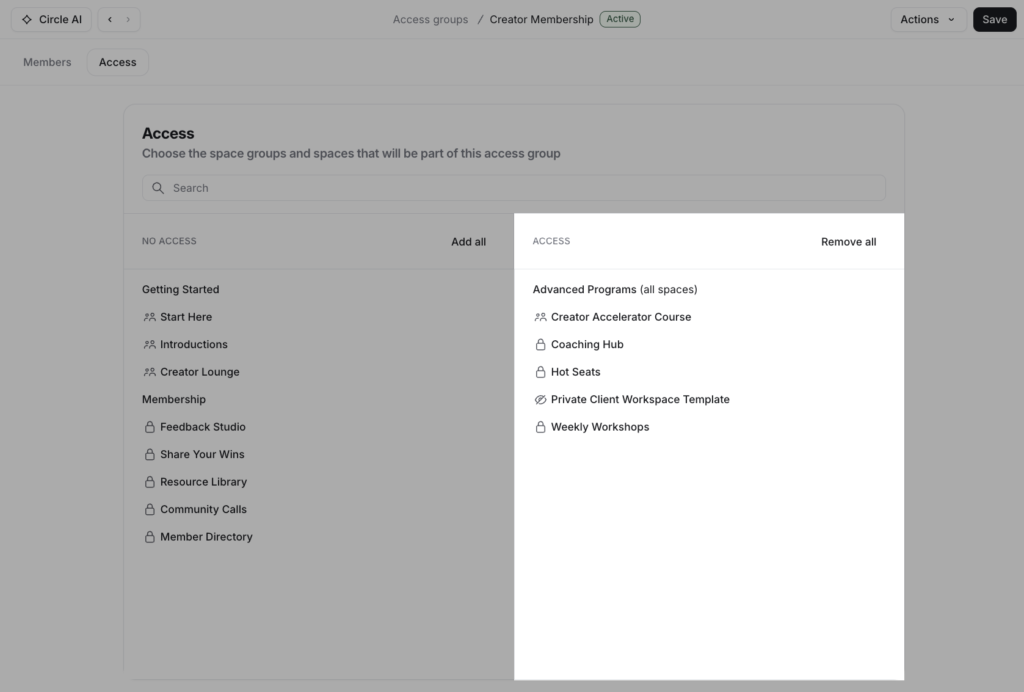
But Access Groups aren’t just useful for organizing permissions. They can also help you structure and manage different membership tiers.
Well, how? Simply create an Access Group for your membership tier.
Then connect it to your paywall offer.
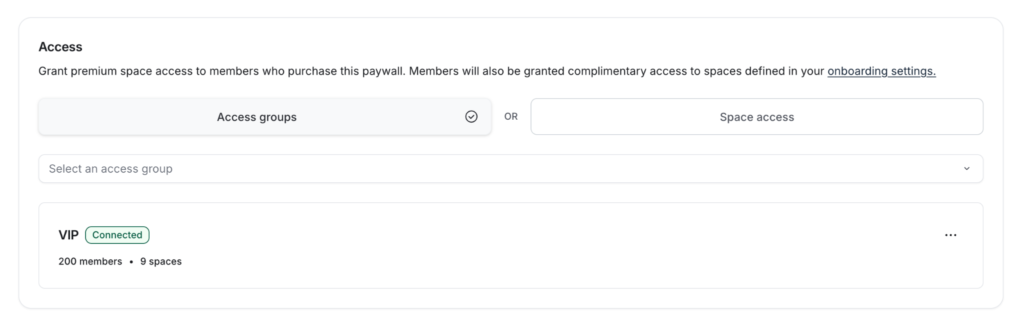
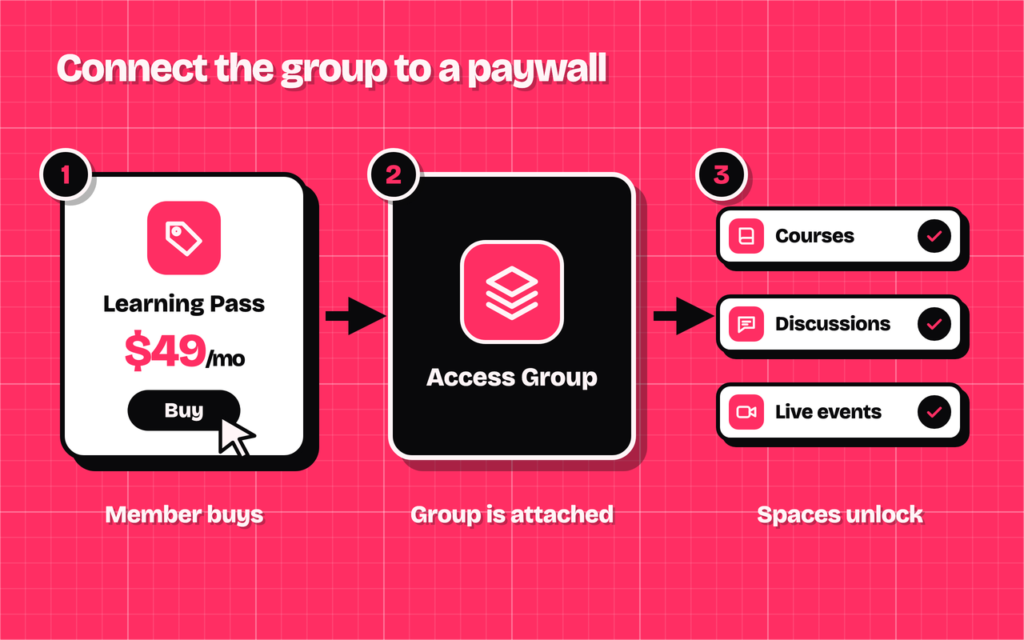
When someone purchases an eligible offer, they can receive access to the spaces associated with that offer.
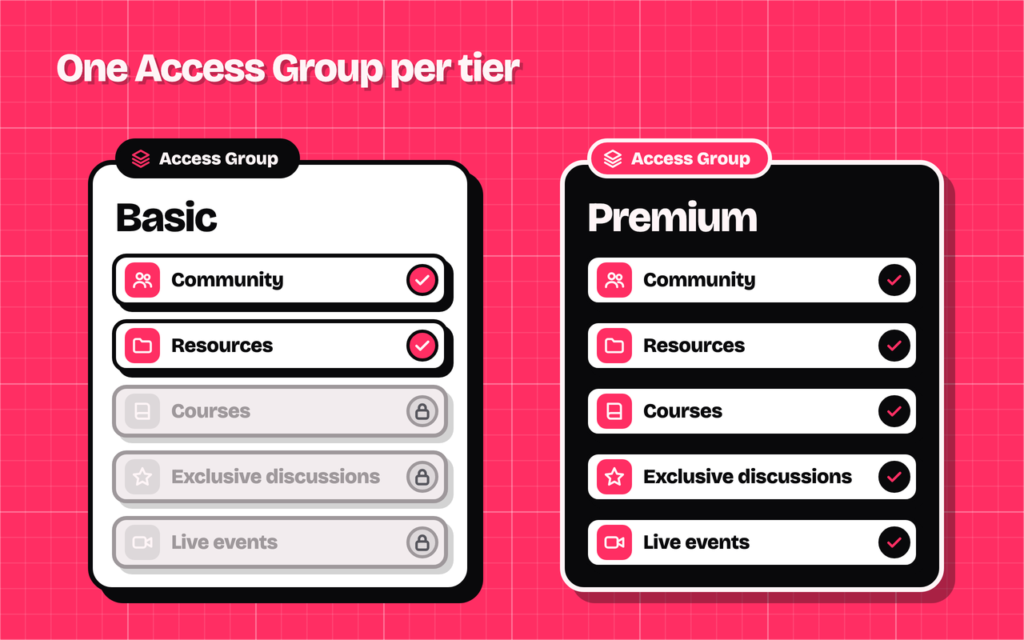
You can take this further by creating different Access Groups for different membership tiers.
For example, a basic membership can include access to the community and selected resources, while a premium membership unlocks courses, exclusive discussions, and live events.
For communities with multiple paid offerings, this makes it easier to manage who gets access to what as the community grows, without increasing the administrative workload.
Workflows builder to automate repetitive tasks
Circle’s Workflows let you automate tasks based on member activity, specific triggers, and defined conditions.
You can build a workflow from scratch using the visual builder:
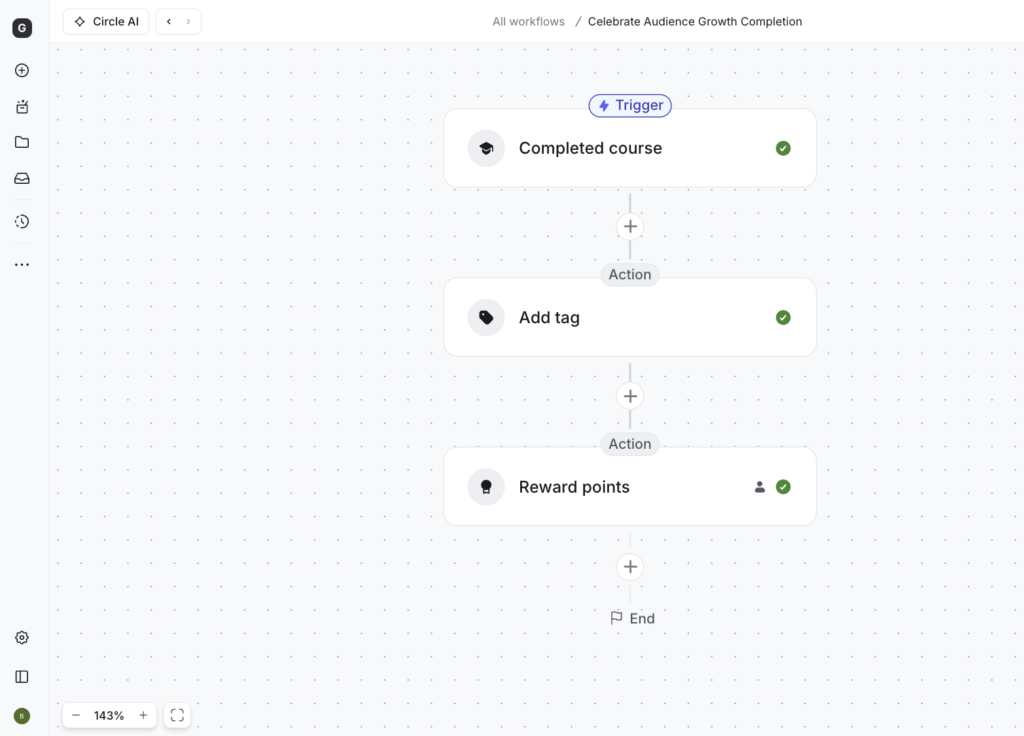
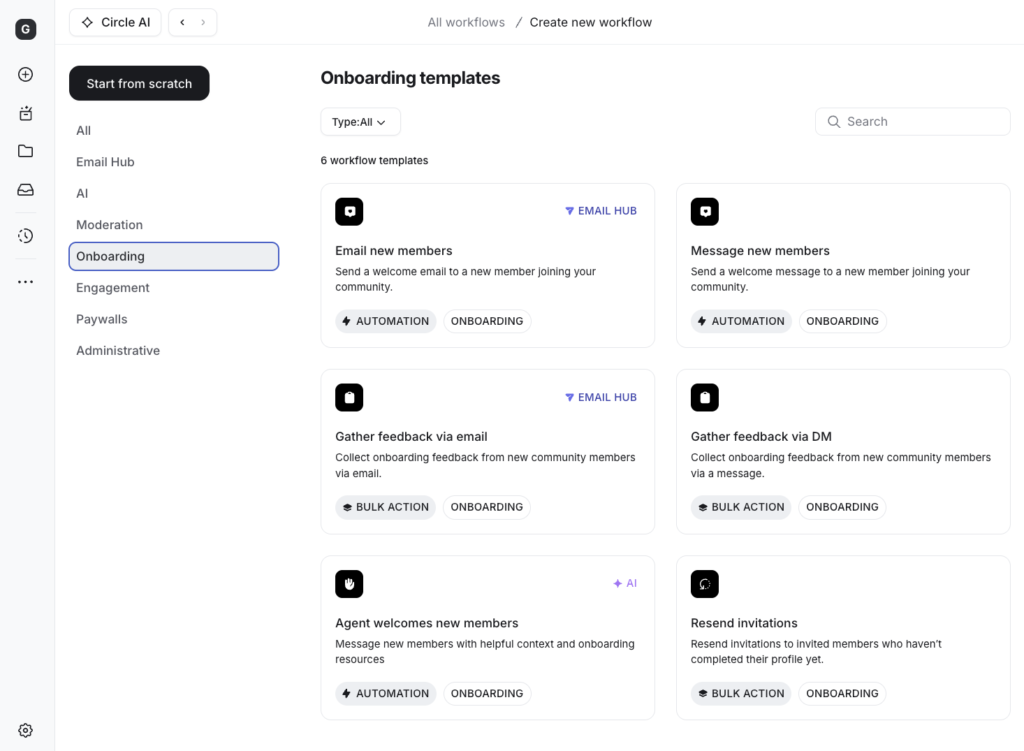
Or you can start with one of Circle’s prebuilt templates, which cover common tasks such as onboarding, member engagement, event reminders, assigning tags and more.
Compared with other creator-focused community platforms I’ve tested, including Mighty Networks, Skool, and Heartbeat, Circle gives you a broad range of triggers and actions to work with.
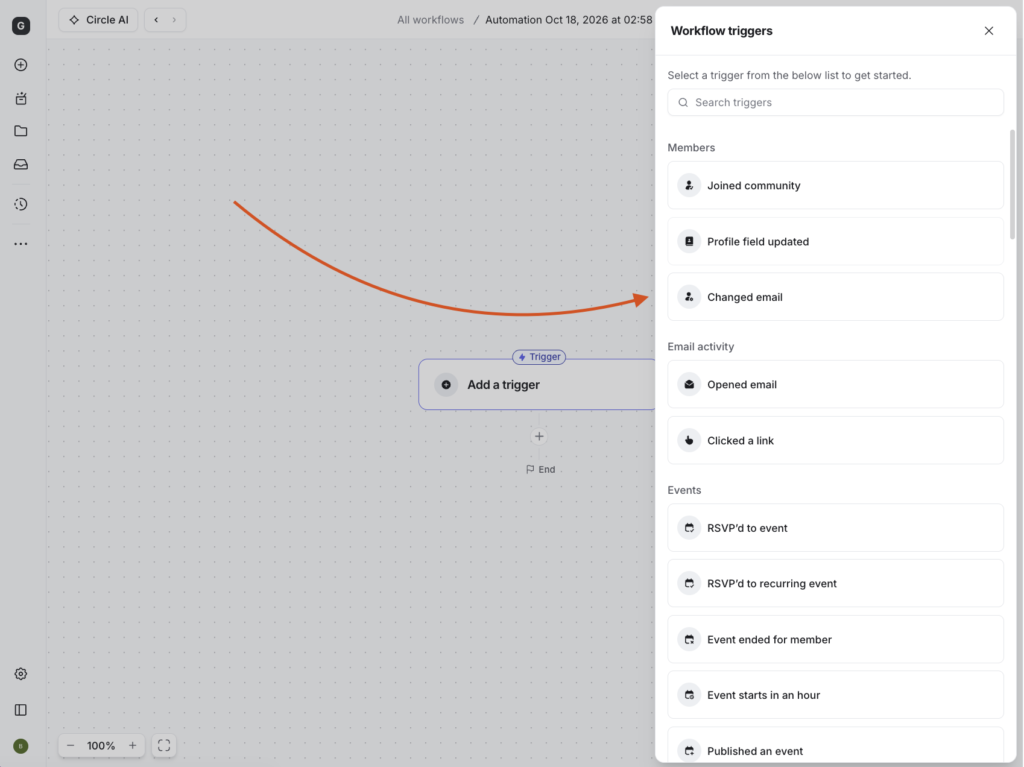
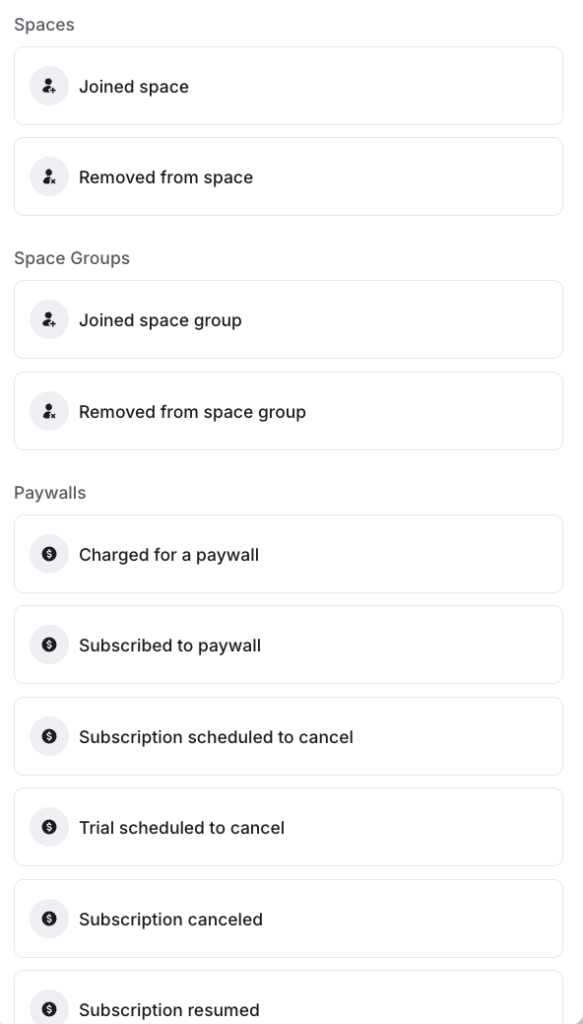
You can trigger workflows when someone joins a space, purchases a paywall, cancels a subscription, completes a course, fails a quiz, or other supported platform activities.
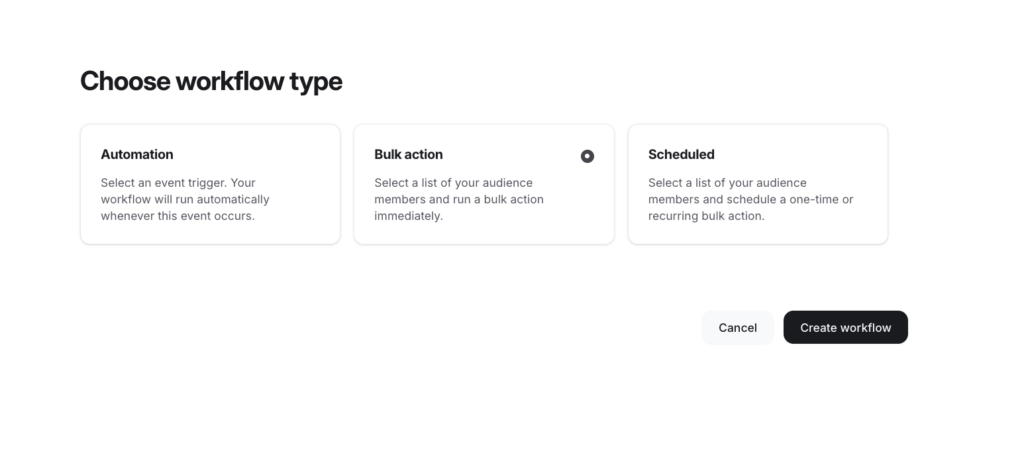
You can also run bulk workflows for specific groups of members or schedule actions to run at a set time or on a recurring basis.
And because Circle lets you filter your audience using criteria such as tags, subscription status, space membership, and saved segments, you can tailor these automations to specific groups rather than treating every member the same.
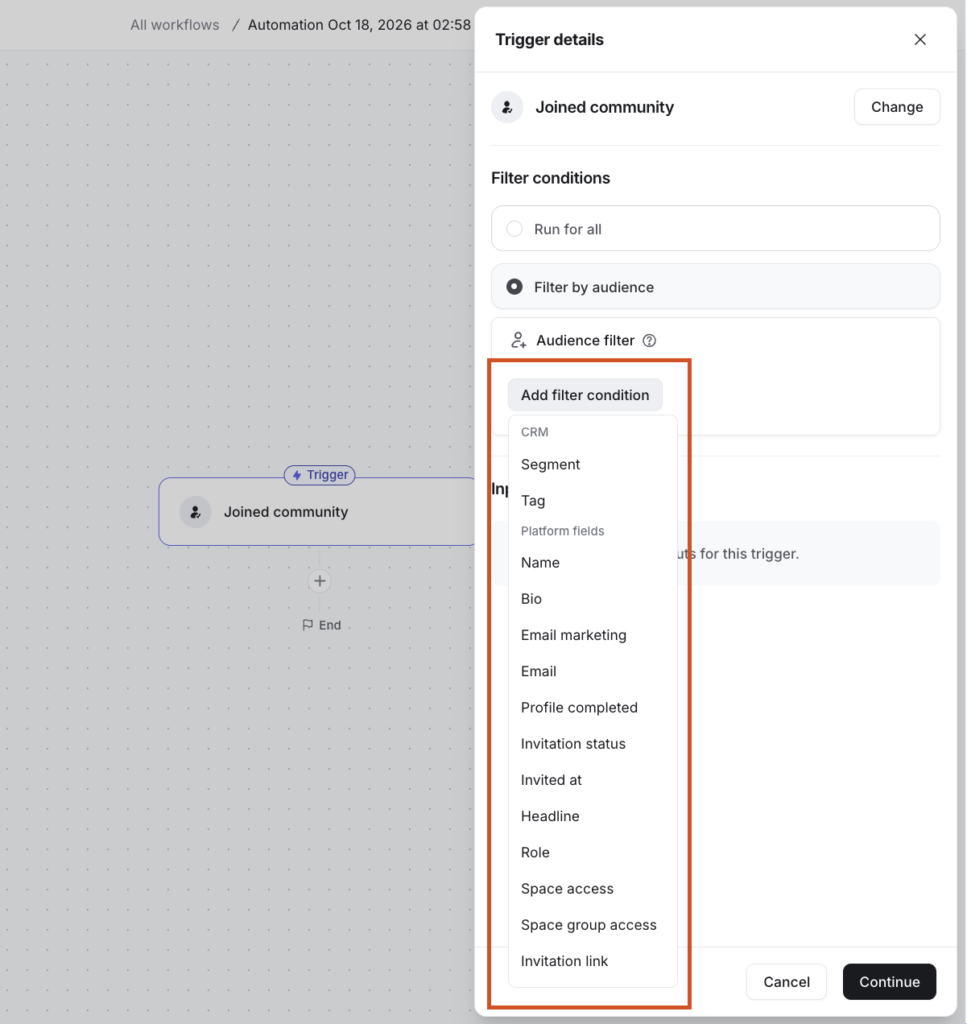
But when it comes to building advanced workflows with multi-path decision trees that’s where you start to hit limitations.
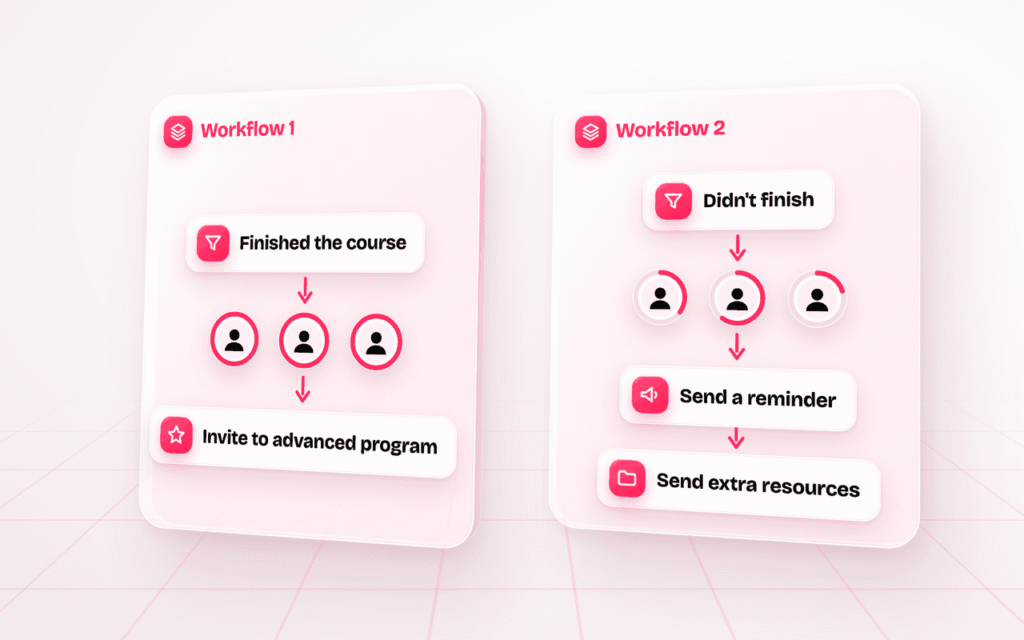
Say you want to follow up with members after they start a course. You’d like to invite those who finish it to an advanced program, while sending those who don’t finish it a reminder or additional resources.
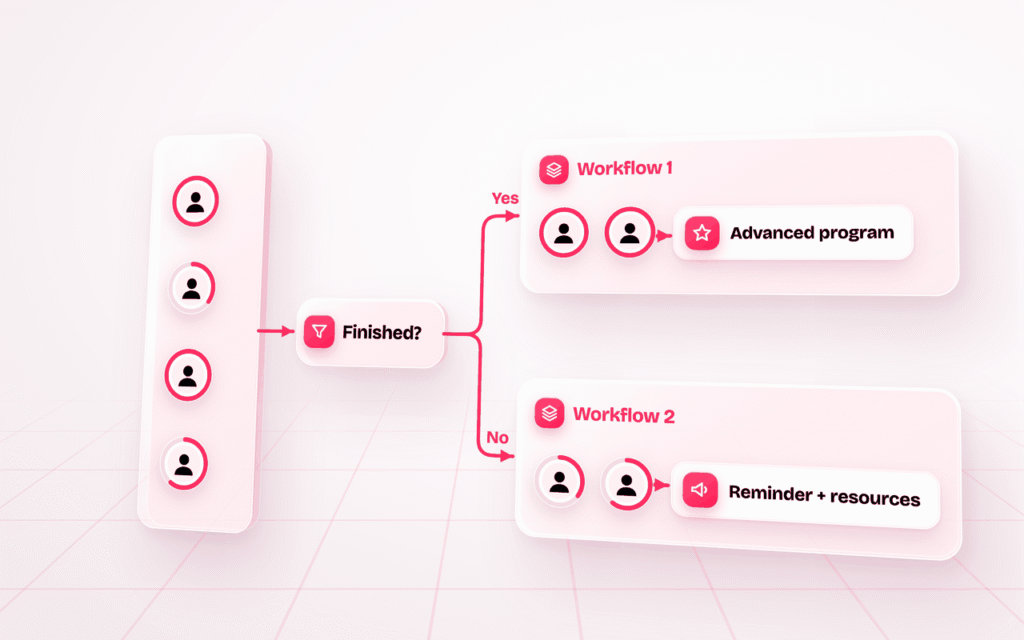
Circle’s targeting rules can help you identify these different groups, but you can’t build that entire branching journey as one workflow. As a result, you’ll need to create separate workflows to handle that.
Advanced Integrations: Webhooks, and Admin, Data and Headless APIs
Circle offers an ecosystem of APIs and webhooks that cover community automation, custom apps and data integration, making it easier to connect Circle with the rest of your tech stack.
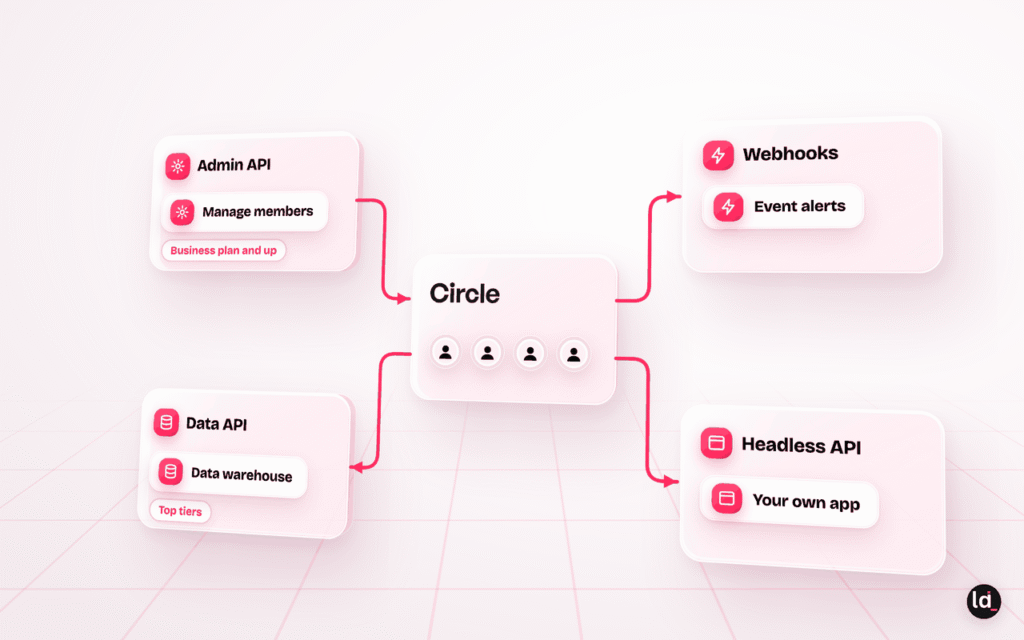
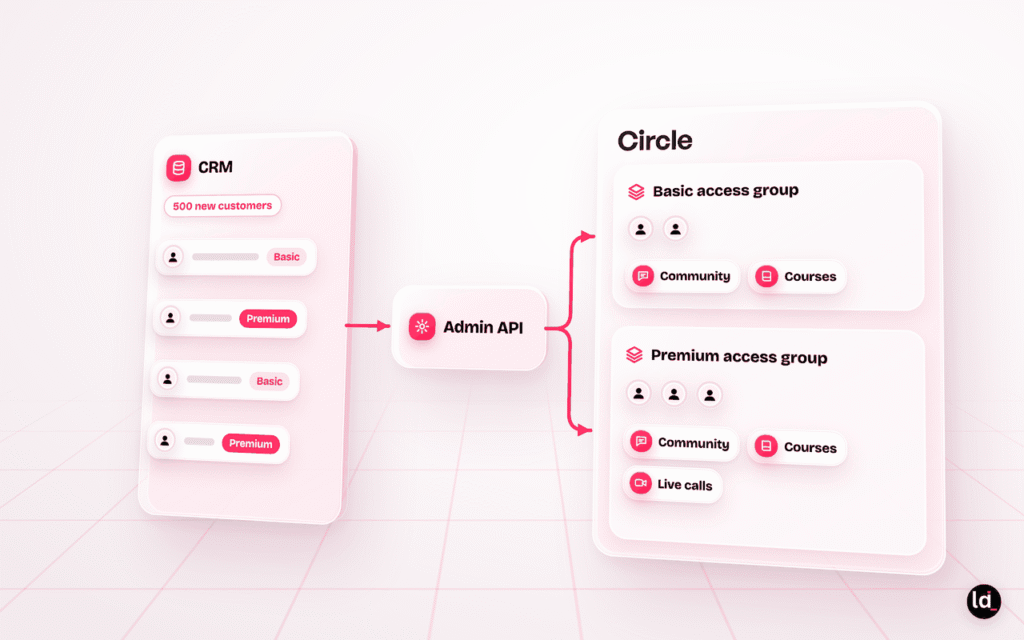
On the Business plan and above you get access to its Admin API. This allows you to handle backend management, perform bulk member updates, manage space permissions, and programmatically move content.
For example, say you’re onboarding 500 new customers into your community. You could connect your CRM to Circle’s Admin API to automatically create member accounts and assign them to the right spaces, and access groups based on their subscription tier.
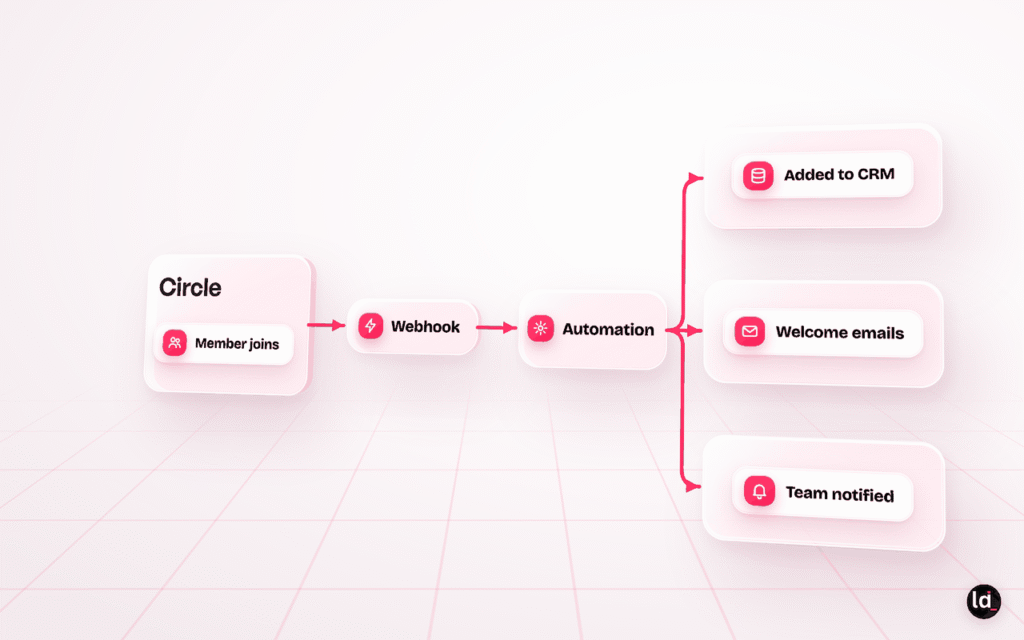
Its webhook complements these capabilities by triggering external workflows when specific community events occur. For example, when someone joins your community, a webhook could trigger an automation that adds them to your CRM, starts a welcome email sequence, and notifies your customer success team.
For enterprise environments with high traffic and demanding workloads, Circle’s API infrastructure is designed to support large-scale operations.
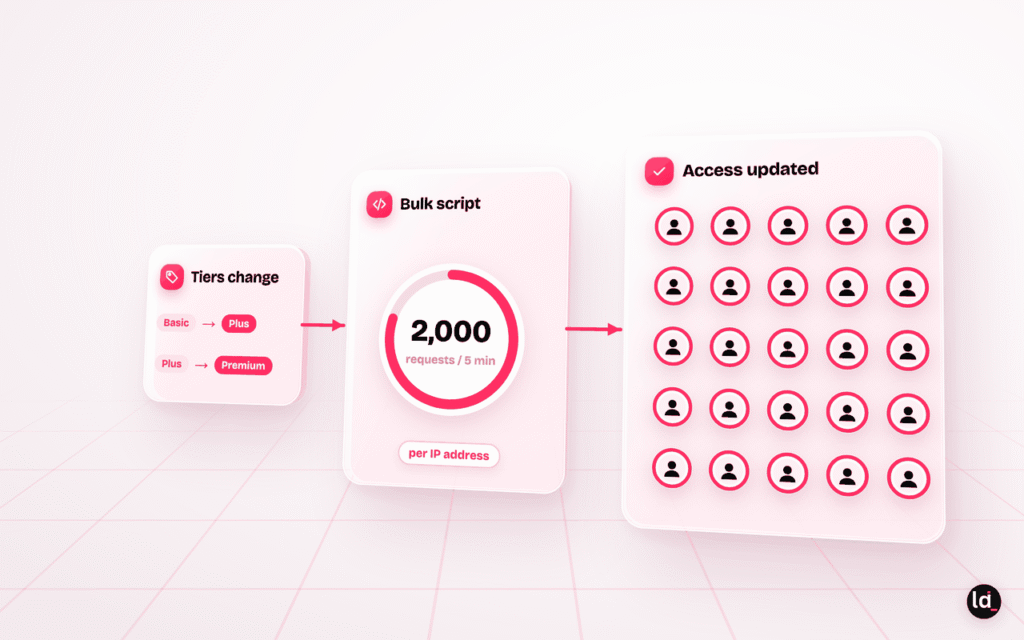
The Admin API has a global rate limit of 2,000 requests per five minutes per IP address which is great especially when processing intensive bulk scripts without bottlenecks.
For example, if you change your membership tiers and need to update access permissions for thousands of members, you could run a script to identify affected accounts and apply the changes in bulk instead of updating each member individually.
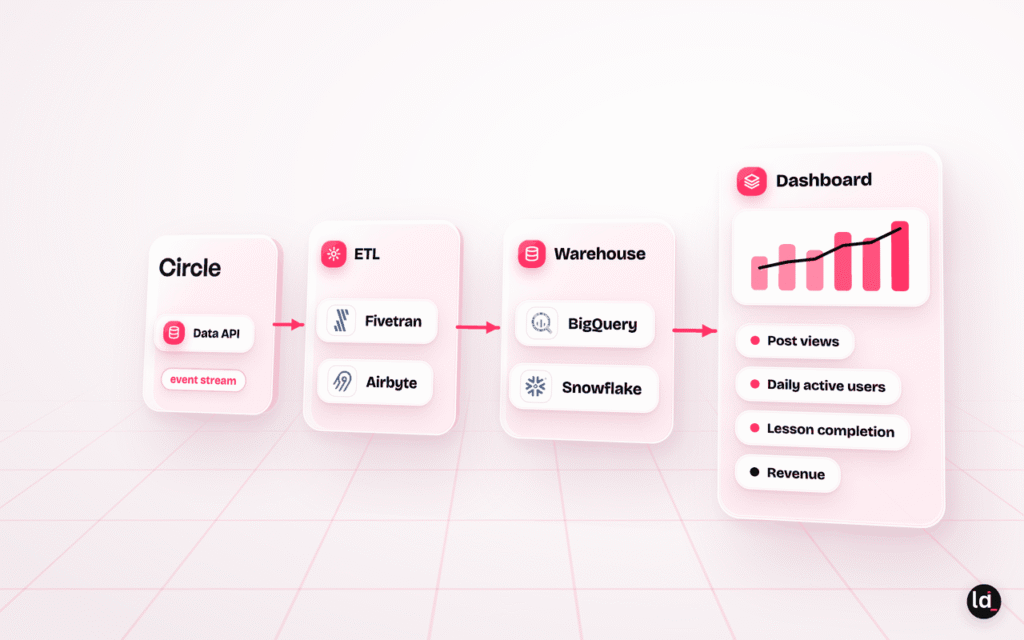
But if you want to take integrations further to large-scale operations requiring absolute synchronization across your entire tech stack, Circle offers a specialized high-throughput Data API on its highest tiers.
Instead of relying on manual CSV exports or brittle API scripting to extract metrics, the Data API allows your data teams to connect an automated event stream directly to enterprise data warehouses like BigQuery or Snowflake using ETL tools like Fivetran and Airbyte.
Circle’s Headless API offers another level of flexibility. It allows your business to integrate community functionality directly into your existing applications.
You can integrate features such as:
- Posts and comments
- Rich profiles
- Events
- Courses
- Custom notifications
- Members directory
Moderation and AI filters
Circle comes with some baseline moderation tools including:
- Keyword profanity filters
- Manual content flagging by members or hosts
- Proactive review queues for specific spaces
- Posting and access restrictions for problematic users
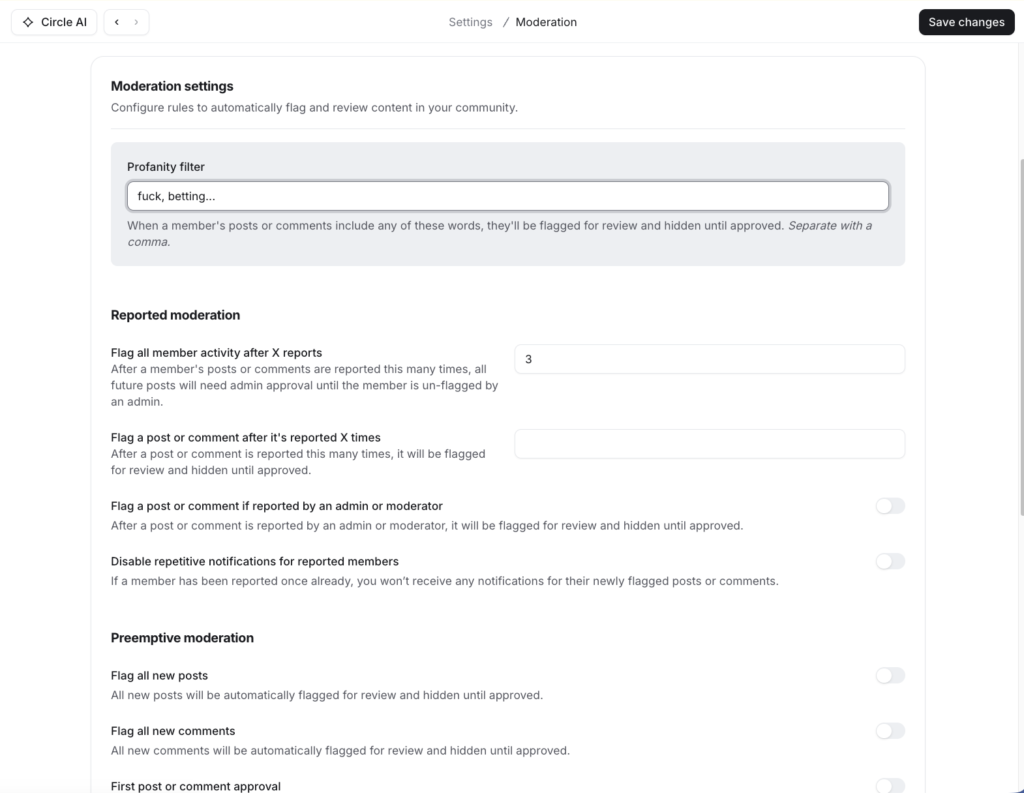
While these are enough for small communities, as you scale to a few thousand members moderation can become a major bottleneck.
To address this, Circles enables you to create AI workflows to help with moderation.
You can add AI filters into your workflows that evaluate context, tone, and member intent of a post or comment.

And when violation is detected, the workflow triggers automated background actions:
- AI Reports: The system automatically flags a piece of content, hides it from featured algorithmic feeds, or closes the comment section entirely during heated or off-topic arguments.
- Automated Explanations: The engine generates AI-powered moderation reasoning. When a post is flagged, it appends context-specific explanations directly to the admin dashboard, giving human moderators clear transparency into why the content broke community guidelines without requiring manual documentation.
- Proactive Interventions: Circle’s member restrictions can programmatically limit a flagged user’s ability to post, comment, send direct messages, or join live text chats automatically putting future posts under a mandatory review queue.
Other key Circle features
- Dynamic Audience Segments: Circle allows you to combine filter rules such as member tags, spaces, profile fields, activity, location and access groups to build member groups that update in real time. Members are added or removed from each segment automatically as their data changes, so you always reach the right cohort with email broadcasts, workflow automations or branded-app push notifications.
- AI Activity Scores: Circle’s machine learning model scores each member from 1 to 10 based on their visits, posts and comments, likes and RSVPs, and direct messages. Scores are benchmarked against activity across all Circle communities and refresh every two weeks. This allows you to measure your community health and catch at risk members. Available on the Business plan and above.
- Member Directory: Circle gives members a central place to discover and connect with others based on shared interests, roles, spaces, tags, location, and profile details. Members can browse profiles in grid or list view, use the map view to find people nearby, and narrow results with filters such as online status.
- Custom Profile Fields: You can add your own fields to member profiles, including short and long text, dropdowns, checkboxes, numbers and links. Put them on your sign-up form to learn about members as they join, or keep them internal so only admins see them. You can then use the data to segment members for targeted email broadcasts and workflows. Available on the Business plan and above, or as a $49/month add-on on the Professional plan.
- Event Scheduling: Circle allows you to run workshops, virtual meetups and recurring cohort sessions right inside your community. You can set the session to repeat daily, weekly, bi-weekly, monthly or annually, and members can RSVP to a single session or a whole series in one step. Attendees receive a confirmation email with a calendar invite and an in-app reminder an hour before the event, and you can schedule extra email reminders on top.
- Single Sign-On (SSO): Connect your community login to your existing website or membership platform, and members sign in once with the credentials they already have. Circle offers built-in SSO with WordPress, Memberful, MemberSpace, Memberstack, Outseta, Auth0 and Bubble, plus custom SSO through OAuth 2.0. Available on the Scale plan and above.
- Integrated Native Paywalls: Circle lets you sell memberships, recurring subscriptions, gated course access and paid event tickets directly inside your community.
- Gamification & Levels: Members earn points when their posts and comments receive likes, climbing through nine levels with point thresholds you set. A leaderboard spotlights your top contributors. On the Business plan and above, workflows let you reward members automatically when they reach a new level.
- Live Streams & Public Webinars: Circle lets you host live video sessions inside your community or run public livestreams that non-members can join. Sessions can include real-time chat and co-hosts, making them suitable for workshops, expert interviews, product demonstrations, and public webinars. You can record sessions, save the recordings in your admin dashboard, and email them to attendees for later viewing.
Circle pricing review
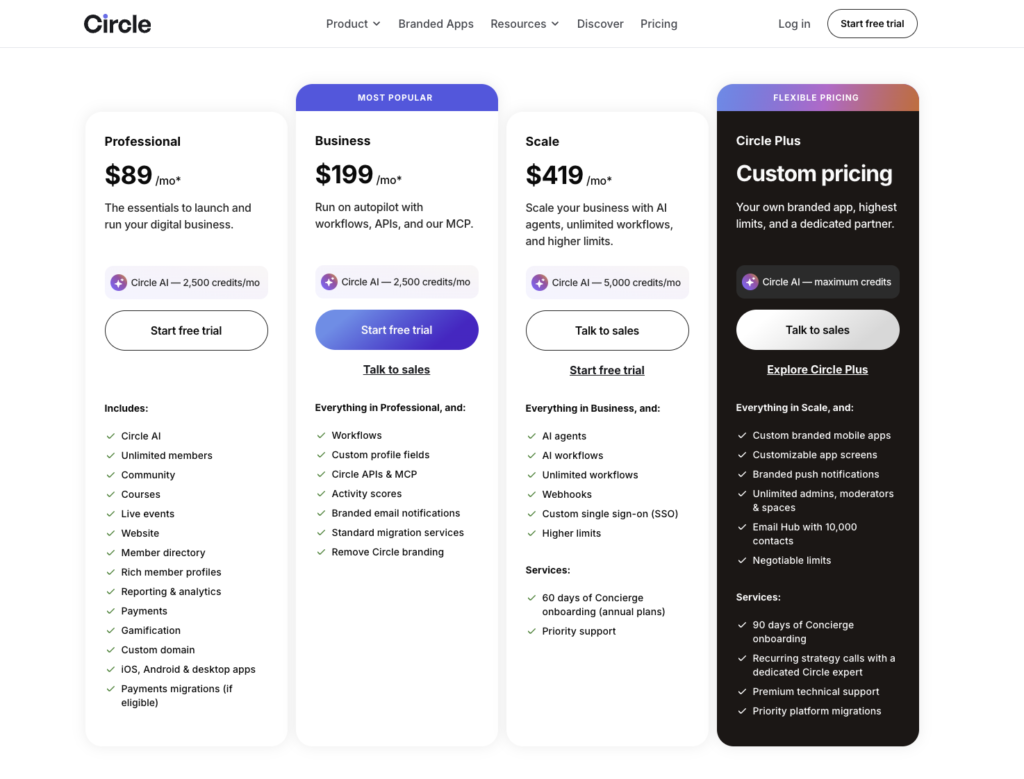
Circle offers three paid plans and one custom plan, with a 14-day free trial and no free plan:
| Plan | Monthly billing | Transaction fee |
|---|---|---|
| Professional | $129/mon ($89/mon on annual billing) | 2% |
| Business | $219/month ($199/mon on annual billing) | 1% |
| Scale | $419/month (same on annual billing) | 1% |
| Circle Plus | Custom | 0.5% |
Now, when you compare Circle with the wider community platform market, Circle sits in the middle on price while offering more advanced management and integration tools than most competitors. That makes it a good fit not only for creators and coaches, but also for growing digital businesses. For the full picture, read my Circle review.
Circle pros and cons
Pros
- Versatile spaces supporting posts, courses, chat, events, and media
- Access Groups that simplifies access control and member segmentation
- Native paid paywalls to charge for memberships, courses, and events
- Visual workflow builder with prebuilt templates
- Admin, Headless, and Data APIs for deep integrations
- AI moderation filters built into workflows
- AI activity scores that flag at-risk members
- Dynamic audience segments that update in real time
- Built-in live streams and public webinars
- Native SSO with WordPress and popular membership tools
Cons
- Transaction fees on every plan
- Workflows can’t branch into multi-path journeys
- Key features locked to Business and Scale plans
- Branded mobile app available only on the Circle Plus
2. Bettermode
The best community management platform for SaaS and tech brands to build customer communities for product education, support and feedback.
Bettermode
4.4/5
- Best for SaaS, B2B businesses and tech brands
- Price From $149/month, billed annually
- Free plan No
- Transaction fees None
- Setup No-code and self-serve
Bettermode has some of the best native community design tools, integrations, and developer flexibility you’ll find. You can build a community around your brand, connect it to your existing software, and extend its functionality as your needs change.
As a SaaS brand, this matters a lot. You want a community management software that will fit into your product and customer experience and not force you to work around the platform’s limitations. Which is where Bettermode thrives against most community platforms.
Advanced customization and branding that lets you build a community that looks like your brand
Design Studio is Bettermode’s native community building and customization tool. It’s a visual builder that lets you adjust your branding, colors, fonts, page layouts, and the elements of your community.
For example, while building a community space, you can customize its header, sidebar, and general components, such as tab views, announcement bars, and properties, by adding or removing blocks.
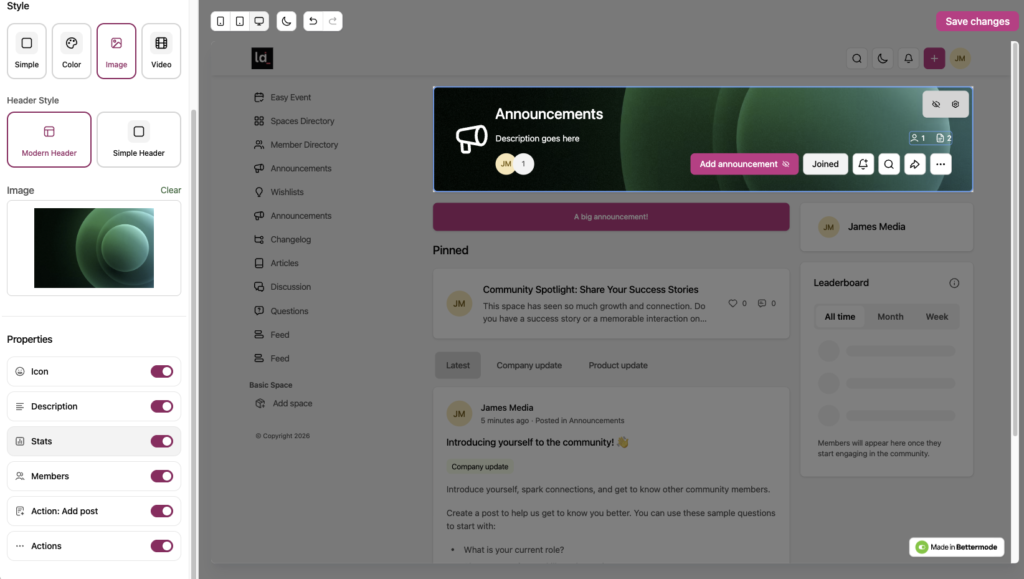
This is design flexibility you won’t find on many community building platforms. Most of them only allow you to upload a logo, set a theme and that’s all.
Bettermode offers the Standard Design Studio on its Starter and Growth plans. Premium takes customization further with the Advanced Design Studio, which gives you:
- Full CSS control to fine-tune the appearance of your community
- Custom blocks beyond the standard building components
- Reusable layout templates to keep a consistent design across pages and spaces
Premium also includes a Custom CMS, so you can define your own content types and fields instead of relying only on Bettermode’s standard content structure.
Developer tools that let you extend the community beyond the native integrations
Bettermode integrates with the tools that most SaaS teams already use to manage customer relationships, support requests, marketing, and product analytics.
Depending on your plan, these include:
- CRM: HubSpot and Salesforce allowing you to connect community activity with customer and account records.
- Customer support: Zendesk integration and federated search helping customers find relevant information across your community and help center.
- Customer engagement: Intercom which brings community information into your wider customer experience.
- Product analytics: Amplitude, Mixpanel, and Fullstory which help teams understand how customers interact with their products.
- Marketing and automation: Mailchimp, Slack, Discord, Zapier, and Make that lets you build email campaigns and workflow automation.
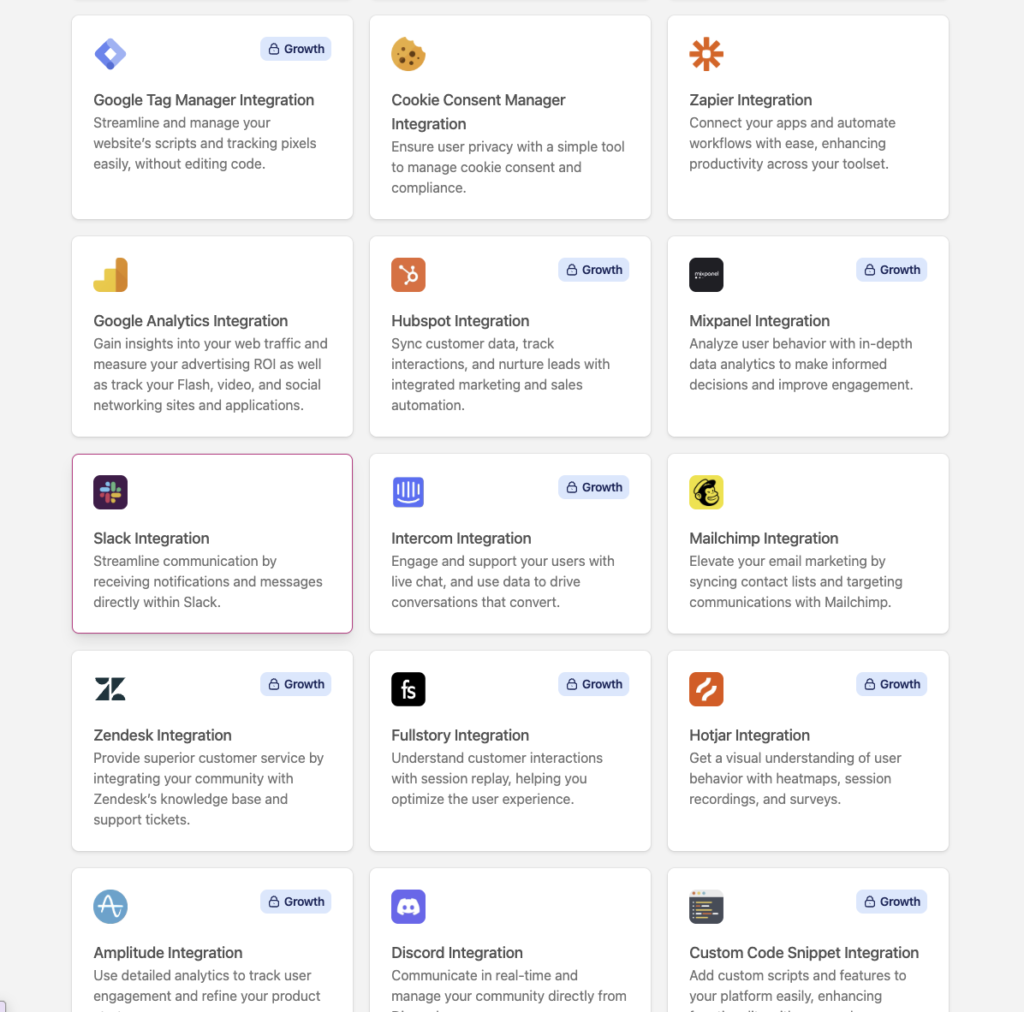
But compared to many community building platforms that’ve tested like Circle, the scope of its third-party integrations is quite limited. I also didn’t like the fact that they limit essential integrations to its Growth plans and above something I like to call “desparate nickel-diming” efforts.
Now, there’s so much you can do with native integrations until you hit some roadblocks. For a SaaS business with a more complex product or customer journey, you’ll want your community to share data with your own application, trigger actions in other systems, or deliver a more customized experience.
This is where Bettermode’s developer tools come in handy. It offers:
- GraphQL API: Grants deep, programmatic CRUD access to Bettermode’s entire relational schema via dedicated endpoints. Your developers can query or mutate live data for members, spaces, posts, and engagement tokens, effectively bridging community interaction with external CRMs and databases
- Webhooks: Lets you deliver real-time HTTP POST payloads to external endpoints for supported community events. This eliminates resource-heavy API polling and allows you to immediately trigger automated workflows, event tracking, or third-party notifications.
- Custom code: You can add custom scripts, use its Liquid template engine, or build interactive blocks directly into your community.
- Developer portal and app-building tools: Provides a central workspace to engineer, manage, and publish custom applications. Apps built here can listen to webhooks, add items to native menus, extend default search results, and monetize tools via the global App Store.
- Sandbox environment: Offers an isolated, staging network to build, test, and safely test your builds before to move them to a live deployment. This enables you to validate custom integrations and app settings before deploying changes to a live, active community.
However, it’s important to know that you’ll get most of the access on the Growth plan and above.
Enterprise-grade security and SSO to meet your IT and data-protection requirements
Customization and integrations are only as useful if the community platform also meets your company’s security and data-protection requirements.
Bettermode provides several safeguards and compliance-related features across its plans, including:
- SOC 2 Type II: A security framework for assessing how a service provider manages and protects information. Bettermode states its platform is compliant across all plans, although access to the SOC 2 report is reserved for Premium customers.
- GDPR and CCPA support: Helps address data-protection obligations for customers in the EU and California.
- Data residency: Lets you choose between US and German data storage locations.
- Encryption: Protects member data at rest and in transit.
- Access controls: Roles, private spaces, and other settings help you control who can access community content.
The platform also offers different single sign-on options depending on your plan:
- Starter: Social login through providers such as Google, LinkedIn, Slack, Discord, and Facebook.
- Growth: Adds OAuth2 and JWT options for connecting sign-in to your existing systems.
- Premium: Adds SAML single sign-on, along with additional enterprise security features.
Other key Bettermode features
- Moderation: Bettermode gives you one place to review pending posts, reported content, flagged members, and new members waiting for access. You can also set rules to catch problematic content before it goes live, such as blocking specific keywords or sending posts from brand-new accounts for review. For most customer communities, these tools cover the basics well. But if you’re managing thousands of members and want AI to handle more of the routine moderation work, Bettermode offers Toggy as a separate add-on starting at $750/month.
- Multilingual Support: If your customers span different countries, you don’t have to make everyone use the same language. Bettermode supports upto 10 languages native to its UI. You can set a default for new members and guests, and allow members to choose their preferred language in their account settings. There’s also a built-in Google Translate option that lets members translate posts written in other languages.
- Enterprise Reliability and Procurement: Bettermode offers a 99.9% uptime SLA, formal security and legal reviews, and custom invoicing with purchase orders. These features are particularly useful if you’re evaluating the platform for a larger organization, where reliability commitments and established procurement processes can matter just as much as the community features themselves.
- Analytics Dashboards: Bettermode includes analytics dashboards on every plan, so you can track new and active members, page views, reach, and member activity over time without exporting everything to a spreadsheet. You can filter results across periods ranging from the last 24 hours to the last 12 months. Growth adds an activity log, while Premium includes a 90-day audit log for tracking admin actions.
- Embeddable Community Widgets: Rather than making customers visit a separate community website whenever they need help, Bettermode lets you embed community content directly into your website, help documentation, or product. For example, you could add a Q&A feed beneath a help article or embed a discussion space inside your app’s help panel. Customers can then ask questions and find answers without leaving the product they’re using.
Bettermode pricing review
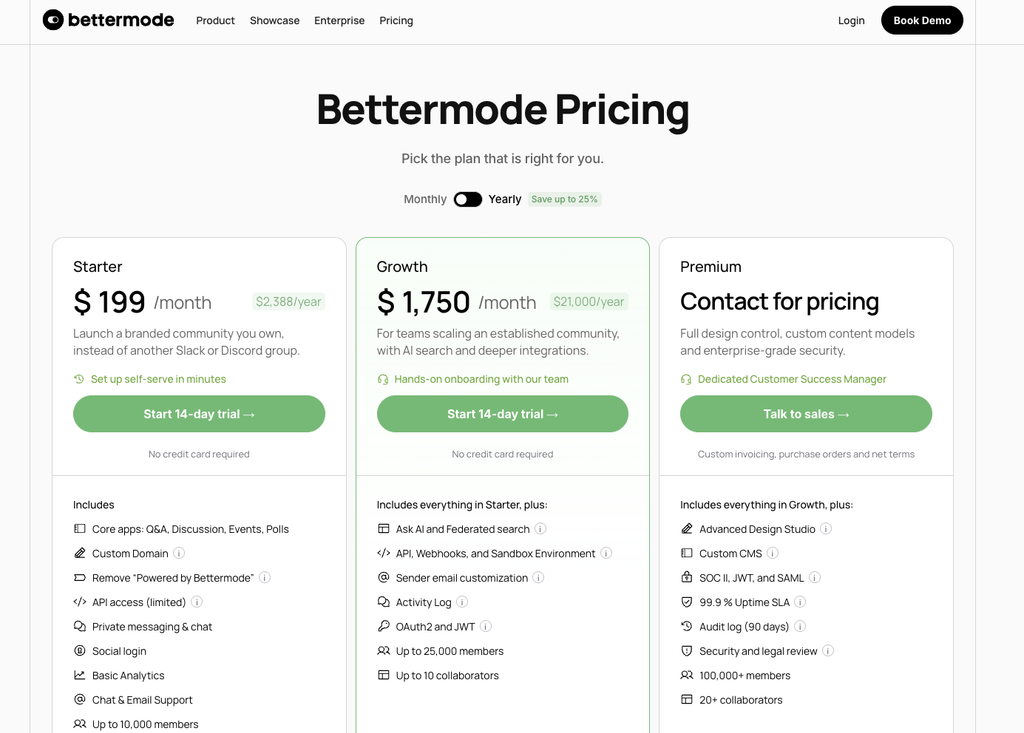
Bettermode offers 2 paid tiers and one custom plan. Below is a simple table breakdown
| Plan | Price | Members | Admins and moderators |
|---|---|---|---|
| Starter | $199/month | Up to 10,000 | 5 |
| Growth | $1,750/month | Up to 25,000 | 10 |
| Premium | Custom | 100,000+ | 20+ |
Starter is an affordable way to launch. You get a branded community on your own domain, the core content types, private messaging, moderation, multilingual support, and social login.
But there’s a big price jump between Starter and Growth.
The features that make a customer community measurable, including HubSpot, Salesforce, Zendesk, and Intercom integrations, full API access, and AI search, all start on Growth.
Bettermode pros and cons
Pros
- Block-based Design Studio for brand-matched layouts
- Embeddable widgets for your website and product
- Native HubSpot, Salesforce, Zendesk, and Intercom integrations
- GraphQL API, webhooks, and sandbox for developers
- AI search across your community and help center
- SOC 2 Type II compliant on every plan
- Choice of US or EU data residency
- Flexible SSO with OAuth2, JWT, and SAML
- Clean, familiar interface members pick up quickly
- Fast setup, with many teams launching within days
Cons
- Steep price jump from Starter to Growth
- Key integrations locked to Growth and above
- Extra languages and AI moderation cost extra
- No native workflow builder or paywalls
- No native online course builder
- No built-in livestreaming
3. social.plus
The in-app community toolkit for businesses building social and community features directly into their own apps.
social.plus
4.4/5
- Best for Consumer apps and digital products with an existing app (fitness, sports, retail)
- Price Custom, based on monthly active users (MAU).
- Free plan No
- Transaction fees No
- Setup Developer-led, using SDKs, APIs and customizable UI kits.
Social.plus is the best solution if you’re looking to add community experiences into your product. It offers strong social engagement and management infrastructure featuring: Chat, feeds, stories, events, livestreaming, moderation, analytics and commerce system. It also offers SDKs, APIs and pre-built UI kits that lets you embed a full community experience directly inside their app.
The thinking behind it is that the community should be part of your product allowing you to offer value and build relationships with your customers or members. That said, members can post, react and talk inside your app, and that participation compounds to growth and revenue.
Below I’ll show you how Social.plus fairs.
A complete set of community features
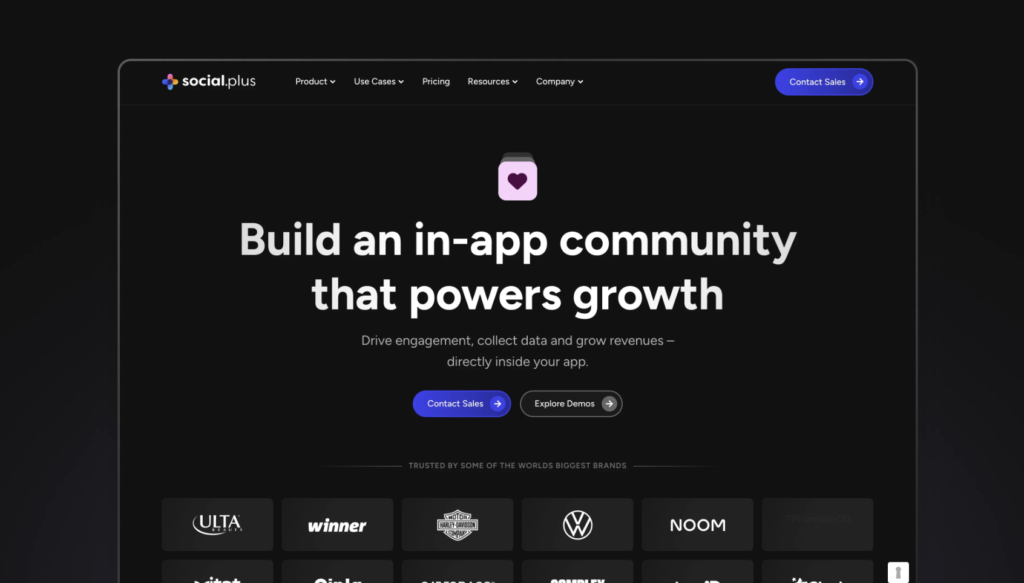
social.plus covers the full range of experiences an in-app community needs:
- Communities: public, private and official groups, with categories and discovery
- Feeds: an algorithmic “For You” feed that works without setup, plus custom ranking when you want more control
- Posts: text, images, video, audio, polls, short clips, livestreams, events, files and custom types
- Chat: 1:1, group and live chat
- Stories, events and livestreams: ephemeral stories, event posts, feeds, and discovery, and broadcasts with co-hosts
Because everything shares one moderation layer and one analytics layer, your team manages it all in one place.
Community rules and approvals
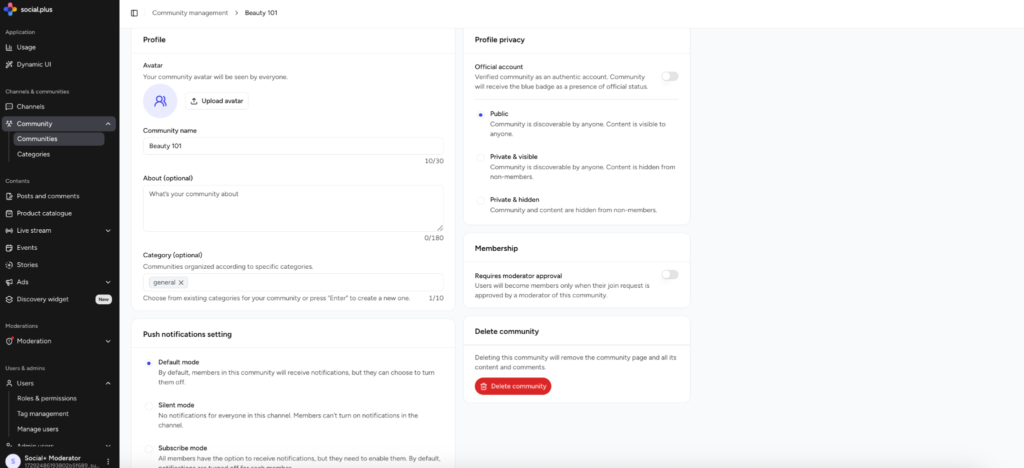
Each community gets its own posting rules: it can be open to everyone, require approval before posts go live, or be limited to admins for announcements. Comment approval can be turned on separately. A casual fan group and a brand-led space can sit side by side in the same app, each run the way it should be.
Role-based access for your whole team
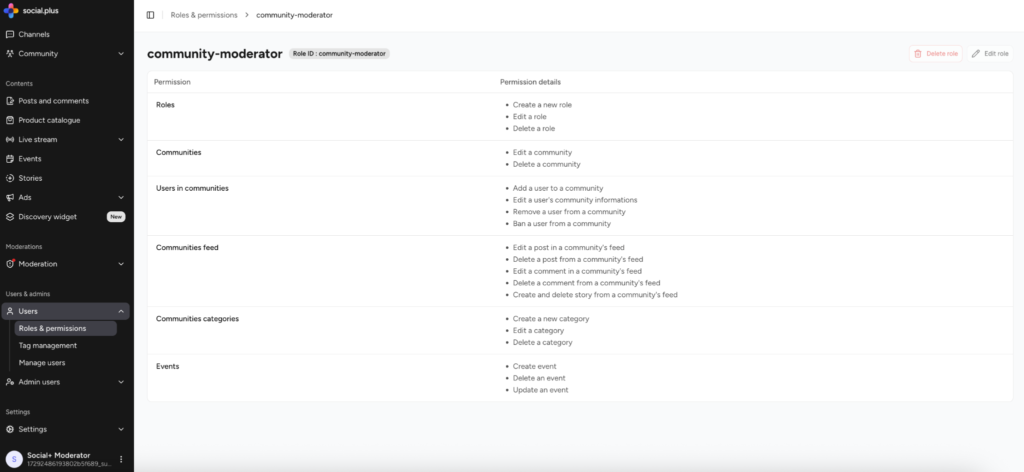
The admin console uses role-based access. Admins, community managers and moderators each get a role suited to their work, and analysts and other stakeholders can get view-only access. You can also limit access to specific communities, so everyone sees what they need and nothing more.
AI-assisted moderation
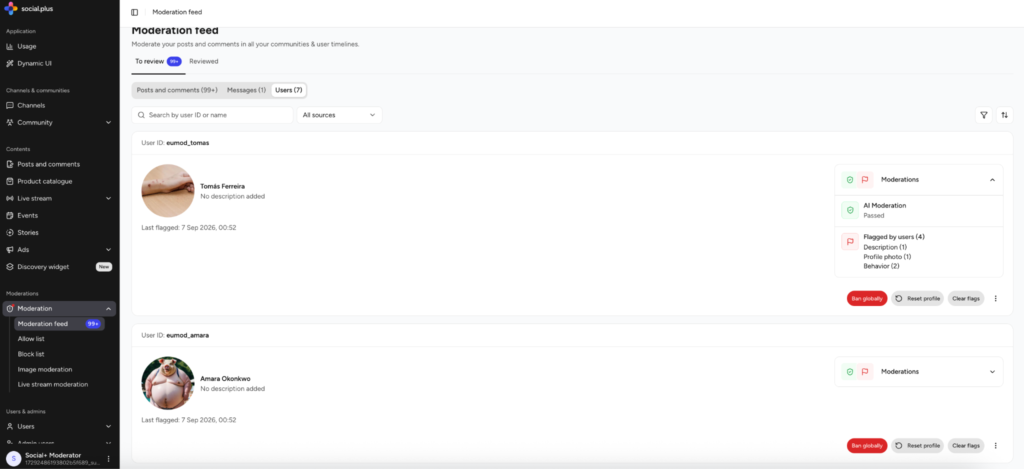
AI moderation reviews posts, comments, chat, profiles and livestreams, removes clear violations and flags borderline cases for a person to decide. You set how strict it is. Moderators work from a single feed that shows why each item was flagged, which keeps decisions fast and consistent.
Admin on the go

Admin on the go brings the console to a phone’s browser, so moderators can clear the approval queue and community managers can publish or schedule posts from anywhere, with the same permissions they have on desktop.
Analytics
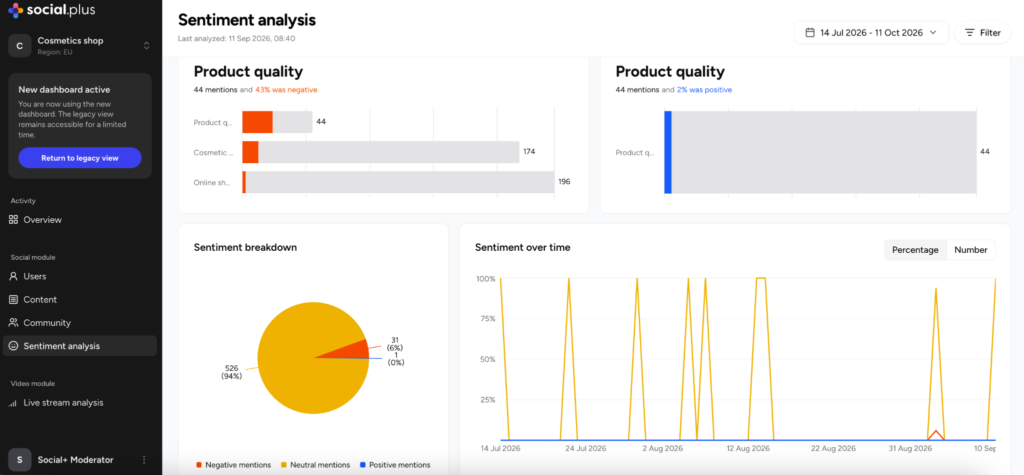
Because the community lives in your app, every interaction becomes first-party data you own. Beyond tracking growth, AI Insights shows what members are talking about and how they feel about it. With Agentry, your team can ask questions about that data in plain language, right from ChatGPT or Claude.
Commerce built into the conversation
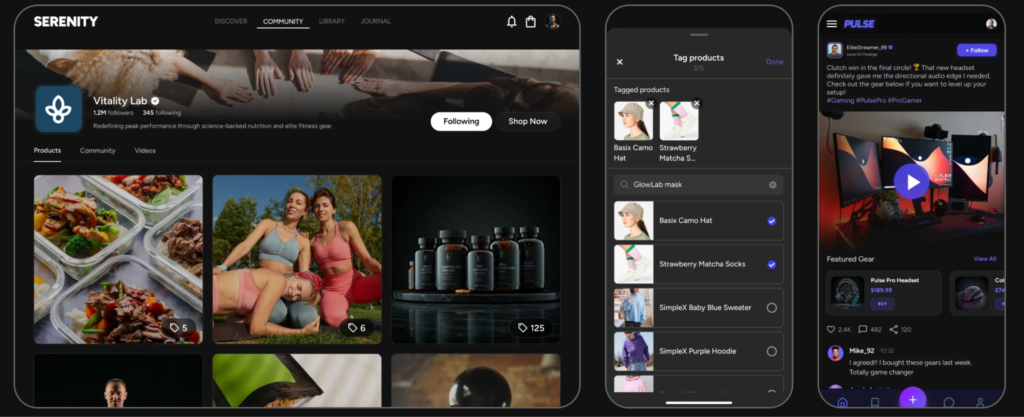
People often decide what to buy based on what others in their community share. social.plus brings that moment into your app. Products can be tagged in posts and videos, and hosts can pin a product on screen during a livestream while answering questions in chat, which works well for live shopping and exclusive drops. Sponsored content in feeds and stories adds another revenue stream, placed on your terms.
Pre-built, customizable UI kits
Building community features from scratch takes a lot of design and engineering time. social.plus’s pre-built UI kits give teams a fully customizable UI, so colors, typography and layouts can match your brand and the community feels native to your app. Teams that want a completely custom design can build their own interface on the same SDKs.
Built for teams working with AI

social.plus is building for the way teams work now. Developers can connect their AI coding assistants to its documentation through an MCP server, and Vise adds guardrails that help AI agents build social.plus features more accurately. Together with Agentry, AI supports both how teams build and how they understand their community.
social.plus pricing review
There’s no public price list. Pricing is based on monthly active users, with volume discounts as you grow. Here’s what the published suite covers:
| Included in the suite | Paid add-ons |
|---|---|
| Full feature access | AI content moderation |
| UI kits and pre-built components | AI insights (advanced analytics) |
| Full SDK and API access | |
| Moderation tools and admin console | |
| Engagement analytics | |
| Standard technical support |
Usage beyond plan limits (file storage, concurrent connections, video streaming, image moderation) is billed as overage. When you weigh the cost, compare it with what it takes to build and run the same features yourself, including moderation and maintenance, not just the subscription.
social.plus pros and cons
Pros
- A complete community experience inside your app, under your brand
- Pre-built UI kits you can fully customize to match your brand
- Feeds, chat, stories, livestreams, events and commerce work as one system
- Every interaction becomes first-party data you own
- Flexible community rules and role-based access for your whole team
- AI tools for building (MCP Server, Vise) and for understanding your data (Agentry)
Cons
- Needs a development team to integrate
- No free plan, and pricing is quote-based
- No 1:1 or group video calling (livestream broadcasts only)
- No built-in courses or email newsletters
- Cloud only, with no on-premise deployment
4. Hivebrite
The best community management and membership platform for alumni networks, professional associations and large membership organizations.
Hivebrite
4.3/5
- Best for Alumni networks, associations and membership organizations
- Price From $8,000/year
- Free plan No
- Transaction fees Not stated
- Setup Sales-led, with hands-on onboarding
Hivebrite has the strongest infrastructure to run associations, alumni networks, nonprofits, and other membership-based organizations requiring strong tools to manage members, facilitate networking, organize events, and build engagement around a shared mission.
From all the platforms I’ve tested, Hivebrite excelled when it comes to covering the needs of memberships orgs including:
- Member directories and chapter structures
- Memberships, dues, donations, and events
- Mentoring, career, and networking programs
- Built-in email campaigns and automation
- Integrations with association and advancement CRMs
- Security and data residency for regulated organizations
Let’s look at how the platform fairs when it comes to all these aspects.
A searchable member directory that helps members find each other
For most associations and alumni networks, the member directory is the reason people log in. Hivebrite gives every member a rich profile and makes the whole membership searchable. Members can filter by fields like location, industry, graduation year, or job title, and an interactive map shows who’s nearby
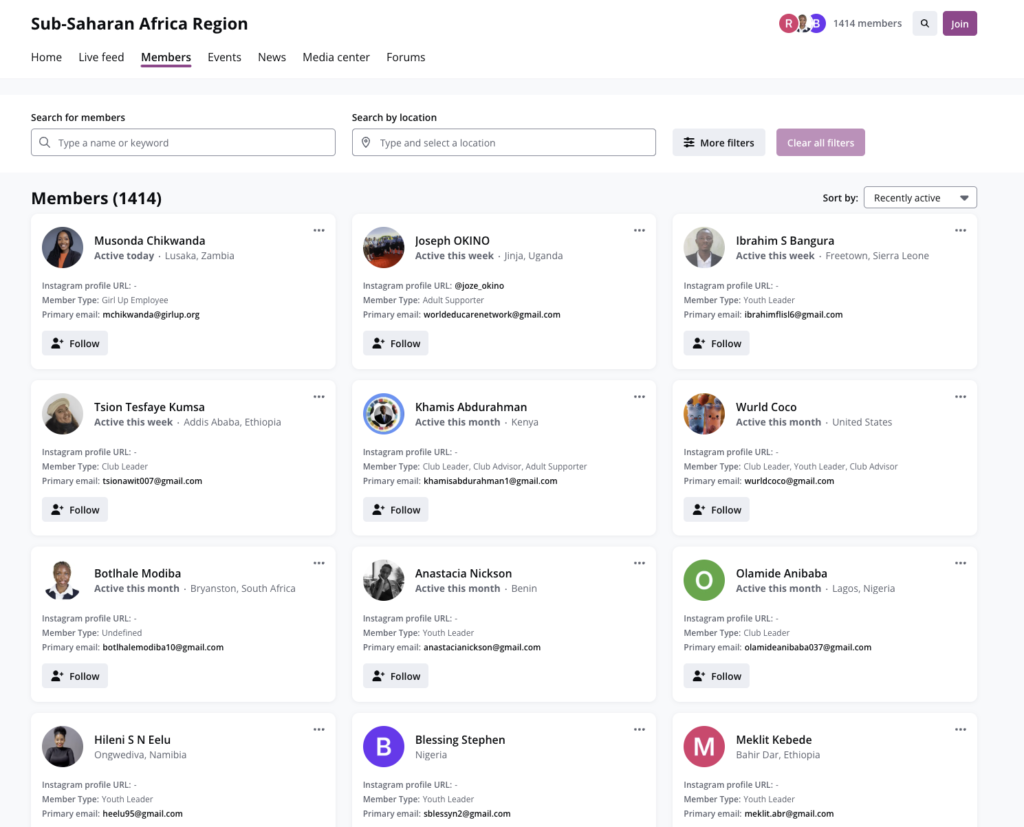
For example, an alumni network could let a graduate moving to a new city search for alumni in that city who work in the same industry, then message them directly.
That’s the kind of connection that keeps members renewing, because it gives them something they can’t get from a LinkedIn search.
Groups and sub-communities that mirror your chapters and committees
Most membership organizations aren’t one big community. They’re made up of chapters, committees, special interest groups, and regional branches.
Hivebrite handles this with groups and sub-communities. Each group can have its own members, news feed, events, discussions, and admins.
For example, a professional association could create a group for each regional chapter, plus separate groups for its certification committee and its early-career network. A member in the London chapter sees London events and news, while still having access to everything at the national level.
The number of groups you can run depends on your plan. Core includes up to 5 groups and Flex up to 10. Prime adds autonomous sub-communities with their own governance under one umbrella, which suits federated organizations with independent chapters.
Membership, dues, and donations managed in the same platform as your community
Most associations fund themselves through dues, events, and donations. Hivebrite lets you handle all three without a separate payment tool.
You can:
- Sell memberships with different tiers and renewal periods
- Track renewals and send reminders before memberships expire
- Collect one-time and recurring donations, including through fundraising campaigns
- Charge for event tickets and premium content
For example, a professional association could offer a standard membership and a premium tier that includes discounted conference tickets. When a member’s renewal date approaches, Hivebrite can send them a reminder, and once they pay, their access updates automatically.
Event management from registration to check-in
Events are one of the main reasons people stay in a community membership organization, and Hivebrite covers the full event lifecycle.
You get:
- A central events calendar, plus calendars for individual chapters and groups
- Registration and RSVPs
- Tiered ticketing, such as member, non-member, and early-bird prices
- Automated reminders
- QR code check-in
- Zoom integration for virtual and hybrid events
But there are gaps. Hivebrite doesn’t have a built-in waitlist, so once an event sells out, someone on your team has to manage extra demand manually. Reviewers also mention limited ticket options and no dedicated section for past events.
Mentoring programs with AI matching built in
Mentoring is one of the most valuable things a membership organization can offer, and one of the hardest to run manually.
Hivebrite’s mentoring module handles it inside the platform. Members sign up as mentors or mentees, and matches are made either by your admins or by members choosing for themselves. AI matching, powered by Orbiit, can also suggest pairings based on members’ goals and backgrounds.
For example, an association could match senior members with early-career professionals in the same field, then track how many pairs actually meet and what participants think of the program.
A job board that keeps career opportunities inside your community
For alumni networks and professional associations, career opportunities are a big reason members even join such memberships in the first place.
Hivebrite includes a job board where members and partner organizations can post openings. Members can browse listings and get notified when a new job matches their search.
For example, a university alumni network could let alumni-owned companies post roles specifically for recent graduates. Graduates get access to opportunities they wouldn’t find on public job boards, and the network becomes something they actually use after graduation.
Email campaigns and automation included on every plan
This is where Hivebrite pulls ahead of many community management platforms.
Email campaigns and automations are included on every plan, so you don’t need a separate email tool or Zapier to handle routine communication.
You can segment members by fields like membership tier, region, chapter, certification level, or interest, and send each segment relevant emails.
Automations then handle the messages that would otherwise fall through the cracks, such as:
- Welcome and onboarding emails when someone joins
- Re-engagement emails for members who’ve gone quiet
- Renewal reminders before a membership expires
But if you need more complex, custom workflows that go beyond the built-in automations, you’ll need technical resources to build them through Hivebrite’s API.
AI agents that take on moderation and admin work
Hivebrite inclueds AI agents to handle some of the repetitive work of running a large community.
These agents can:
- Monitor and filter user-generated content for moderation
- Recommend people for members to connect with
- Recommend content based on member interests
- Turn analytics data into plain-language insights
There’s also an MCP setup, which lets your team manage the community by giving instructions to an AI assistant in plain language. For a small team running a community of thousands, this can take a lot of routine work off their plate.
Multi-language support for international membership bases
If your members are spread across countries, Hivebrite can run your community in several languages, with live translation of content.
For example, a European federation of national associations could let members in France, Germany, and Spain use the platform in their own language while still taking part in the same discussions.
Like the branded mobile app, multi-language support is sold as an add-on on the standard plans.
Integrations with the third-party tools that most associations already use
Most membership organizations already have a system of record, whether that’s an association management system, a fundraising CRM, or a university advancement database. Your community management platform has to work with it, not replace it.
Hivebrite connects to the systems these organizations commonly run, including:
- Salesforce and HubSpot
- Microsoft Dynamics
- Blackbaud Raiser’s Edge NXT and Blackbaud CRM
- Ellucian for higher education
- Stripe and QuickBooks for payments and finance
- Zoom for virtual events
Many of these connectors support two-way sync, so a change in one system updates the other.
For example, a university alumni office could sync Hivebrite with Raiser’s Edge NXT. When an alumnus updates their job title in the community, the change flows into the advancement database. And when they make a donation, it’s recorded in both places.
For anything the native connectors don’t cover, Hivebrite offers a documented API, and you can connect other tools through Zapier or Make.
The catch is that connectors are sold as add-ons on the standard plans, and reviewers say integrations can involve some friction during setup.
Security and data residency built for regulated organizations
Associations, universities, and nonprofits often hold sensitive member data, and many operate under strict procurement and privacy rules.
Hivebrite has the certifications including:
- ISO 27001 certification
- PCI-DSS v4.0 compliance for payment processing
- TX-RAMP Level 1 certification, relevant for Texas public institutions
- GDPR and CCPA compliance
- AES-256 encryption for data at rest and in transit
It also supports single sign-on, multi-factor authentication, and role-based access controls.
One of its strongest points is hosting choice. You can host your data in the EU, the US, Switzerland, or Australia, which matters for organizations with strict data residency requirements.
The main gap is audit logging. Hivebrite’s audit logs only cover workspace events from the past month, which may be too short for organizations with strict compliance requirements.
Journeys handle onboarding and light learning, but they’re not a full LMS
Hivebrite’s Journeys module lets you build guided paths for members. You can combine videos, PDFs, and links, and track simple milestones.
This works well for onboarding new members, introducing volunteers to their role, or running a short professional development series.
For example, a new member could follow a Journey that walks them through completing their profile, joining their local chapter, and registering for an upcoming welcome event.
But if you run certification programs or formal courses, Journeys won’t be enough. It doesn’t offer advanced quizzes, grading, or detailed learner progress tracking, so you’ll need a separate learning management system.
Hivebrite pricing review
Hivebrite is super expensive. Even though it offers outstanding membership management tools I still have a hard time to justify its pricing.
With Hivebrite, you get to choose from two tiers: the Focus plan, which has a published price, and a Custom plan built around your organization’s needs.
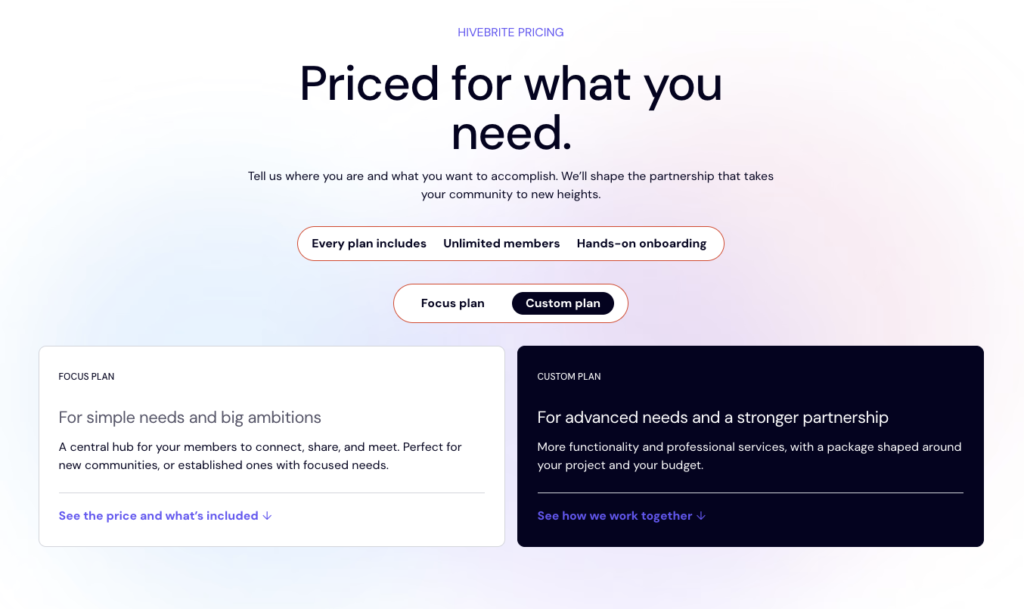
Both include unlimited members and hands-on onboarding. Below is a simple table breakdown:
| Plan | Price | Admin seats |
|---|---|---|
| Focus | Starts at $8,000/year, billed annually | 1, with the option to add more |
| Custom | Custom quote | Sized to your team |
Focus includes the member directory, messaging, events with tickets, forums, unlimited member journeys, public pages with a no-code page builder, engagement scoring, member surveys, moderation, and AI search and recommendations.
But at that nerve-wrecking price it still doesn’t includes:
- Communication channels cost extra, at $2,300 a year each:
- a branded mobile app, email campaigns, and WhatsApp.
- And many of the features associations rely on most, including groups and autonomous sub-communities, the full membership suite with digital cards and group memberships, mentoring, SSO, API access, and CRM integrations, which are all offered as part of a Custom plan with no published price.
My advice: if you need a branded home for your members with a directory, events, and payments, Focus is a reasonable starting point: reasonable not fairly priced. But if you’re planning to have chapters, mentoring programs, or need your community synced with your CRM, you’ll want to choose the Custom plan. And if you’re a small organization with a few hundred members, $8,000 a year is a lot per member, and Glue Up or Circle will be a better fit.
Hivebrite pros and cons
Pros
- Searchable member directory with an interactive map
- Groups and sub-communities
- Dues, donations, and event tickets in one platform
- Built-in mentoring with AI-powered matching
- Email campaigns and automations on every plan
- Data hosting in the EU, US, Switzerland, or Australia
- ISO 27001, PCI-DSS, and TX-RAMP certified
- Unlimited users with no per-member pricing
Cons
- It’s expensive and offers no free trial
- Mobile app, languages, and connectors cost extra
- Customization is mostly visual, not functional
- Can slow down with large amounts of content
5. Glue Up
The association management platform with a built-in CRM for managing members, events and renewals in one place.
Glue Up
4.2/5
- Best for Associations and chambers managing members and events
- Price From $3,000/year, billed annually
- Free plan No
- Transaction fees Not stated
- Setup Sales-led, with personalized training
Glue Up takes a different approach to community management. Rather than putting discussion forums and member interactions at the center, it builds around CRM and membership management, with community, networking and event management features supporting them.
This makes it a strong choice for chambers of commerce and professional associations, where maintaining member relationships goes beyond hosting conversations. You also need to handle membership records, renewals, events, communications and the administrative work that keeps the organization running. Glue Up brings these activities together, reducing the need to juggle spreadsheets and multiple disconnected tools.
So, how well does it actually deliver on this promise? Let’s take a closer look.
A built-in CRM that doubles as your member database
At the heart of Glue Up is a CRM that brings all your organization’s contacts into one place, including members, prospects, sponsors, event attendees, and partners.
Each contact has a profile that brings their interactions with your organization together. Event registrations, invoice payments, email engagement, and membership renewals all contribute to a clearer picture of your relationship with them.
For example, a chamber of commerce can look up a local business and see that it’s been a member for three years, sponsored last year’s gala, sent two employees to recent networking events, and still has an outstanding invoice.
Unlike community-first platforms that may require a separate CRM to manage these relationships, Glue Up makes contact and member management part of the same system you use to run your association.
Automated membership applications and renewals
Glue Up lets you automate much of the membership lifecycle, from applications and approvals to renewals. You can create different membership types and tiers, accept applications online, and approve them within the platform. Members can also update their profiles, manage their subscriptions, and renew through a self-service portal.
Its Membership Workflow Manager takes care of renewal reminders and automatically generates invoices when memberships are due. This reduces the manual follow-ups involved in keeping memberships active and gives your team more time to focus on member relationships and retention.
Invoicing and payments that connect to your accounting software
Glue Up also connects membership administration with the financial side of running an association. You can issue invoices for memberships, events, and sponsorships, accept payments through credit cards, wire transfers, and gateways such as Stripe, and manage transactions in multiple currencies.
It also integrates with QuickBooks Online and Xero, while supporting multi-entity accounting for organizations with multiple chapters. This allows individual chapters to manage their finances while headquarters maintains oversight.
For example, an international chamber with branches in several countries can invoice members in their local currencies and track each chapter’s revenue separately, without having to reconcile everything manually at the end of the month.
Chapter management for organizations with branches and affiliates
Managing a national association or international network comes with an added layer of complexity: each chapter needs room to operate independently, but headquarters still needs oversight.
Glue Up’s Chapter Management module supports this structure by allowing individual chapters to manage their members, events, and communications while keeping everything within a central system. You can also assign granular permissions so chapter leaders only access the information and operations relevant to their branch, while headquarters monitors activity across the organization.
For example, a national professional association with 20 regional chapters can let local leaders manage events and membership renewals while the national office tracks membership growth, retention, and chapter activity from one place. Because chapter records remain in the central system, member data and operational history are also preserved when volunteer leaders change.
Event management for in-person, virtual, and hybrid events
Event management is one of Glue Up’s established strengths. The platform supports in-person events with registration, ticketing, mobile check-in, and badge printing, as well as virtual events, webinars, and hybrid formats.
Glue Up also includes speed networking, which pairs attendees for short one-on-one conversations, a useful format for chambers and professional networking events.
AI tools for member engagement and administrative tasks
Glue Up has introduced several AI features to help association teams reduce administrative work and make better use of their member data. These include AI Copilot for drafting emails, event content, and surveys; engagement scoring to identify members at risk of disengaging or not renewing; and AI-assisted segmentation for more targeted communications.
The platform also includes a duplicate finder to identify and merge duplicate contact records, although this is reportedly available on higher-tier plans.
Engagement scoring is arguably the most useful feature for membership teams. For example, if a member hasn’t opened emails or attended events in six months, your team can identify them as a potential retention risk and reach out before their membership expires. Rather than waiting for a missed renewal payment, you have an opportunity to understand what’s changed and re-engage them.
Separate mobile apps for members and administrators
Glue Up offers two mobile apps designed for different sides of association management. The member app lets members update their profiles, manage memberships, register for events, message other members, exchange digital business cards, and have one-on-one conversations.
The Glue Up Manager app gives administrators access to operational tasks, including event check-ins, registrations, payments, and membership applications and renewals.
Multilingual support for international associations
Glue Up supports organizations operating across different countries and languages, with interface and communication options that include English, Chinese, French, Spanish, and Arabic. Combined with multi-currency invoicing, this makes it easier to serve international members without managing separate systems for each market.
This is useful for international chambers of commerce, where members may include local businesses and foreign companies. For example, a chamber can communicate with members in different languages, invoice them in the appropriate currency, and coordinate events across multiple cities.
Glue Up also has strong roots in the Asia-Pacific region, making its regional experience relevant to associations operating there, particularly in China. However, check the payment requirements in your country before committing.
Glue Up pricing review
Glue Up isn’t the cheapest association management platform, but its pricing can offer good value if you need its membership, CRM, and event management tools. The catch is that the advertised plan prices don’t tell the whole story. Several features that you might expect to be included cost extra, making it important to understand what you’ll actually pay before committing.
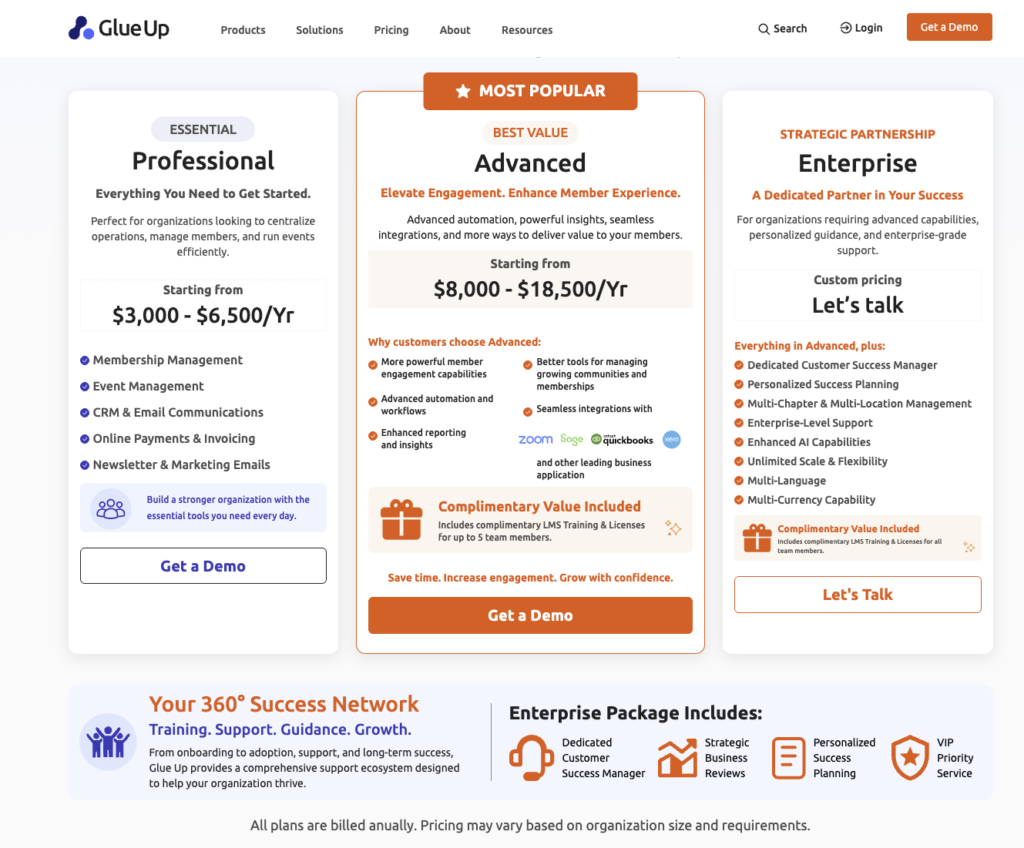
Glue Up has three plans, all billed annually:
| Plan | Annual price | Best for |
|---|---|---|
| Professional | $3,000 to $6,500 | Managing memberships, events, CRM, email, and payments |
| Advanced | $8,000 to $18,500 | Growing organizations needing more automation, integrations, and reporting |
| Enterprise | Custom | Multi-chapter and international organizations |
The Professional plan covers the core association management tools, including memberships, events, CRM, email campaigns, newsletters, online payments, and invoicing. That’s a reasonable amount of functionality for the price, especially with email marketing included. For comparison, Hivebrite charges an additional $2,300 per year for email marketing on its Focus plan.
However, the Professional and Advanced price ranges are fairly wide, and your final cost can increase depending on the features and usage limits you need. Some capabilities come at an additional cost, including:
- Community module: Groups, community feeds, and member messaging.
- Chapter Management: Tools for managing multiple chapters.
- Certification Management: Tracking CPD and CPE credits.
- Custom-branded member app and SSO: Additional branding and authentication capabilities.
- Higher usage limits: More contacts, events, emails, administrators, and integrations.
Multi-language and multi-currency capabilities are also offered only under the Enterprise plan.
My recommendation: If you’re a single chamber or professional association that mainly needs membership administration, CRM, events, and invoicing, Professional can offer good value. However, get your contact, event, and email limits in writing, and ask for the Community module to be priced separately before signing up. Without it, you’re primarily paying for an association management system rather than a full community platform.
If you manage multiple chapters or operate internationally, you’ll likely need Enterprise. At that level, compare Glue Up’s custom quote with Hivebrite’s pricing to see which platform gives you more of the functionality you need within your budget.
Glue Up pros and cons
Pros
- Centralized CRM for members, sponsors, and prospects.
- Automated membership renewals and invoice reminders.
- Accounting integrations reduce duplicate data entry.
- Supports payments in multiple currencies.
- Headquarters can monitor all chapters from one dashboard.
- Manages training credits and certificates without spreadsheets.
- Supports in-person, virtual, and hybrid events.
- The mobile app lets staff check in guests and collect payments.
- Engagement scoring helps identify members at risk of not renewing.
- Onboarding and customer support receive consistently strong reviews.
Cons
- Pricing isn’t publicly transparent; you’ll need to contact sales for a quote.
- Some modules come at an additional cost.
- Growing contact lists can increase subscription costs.
- Community discussions and group features are less developed than those of Hivebrite or Circle.
- The platform has a steep learning curve for staffs and community managers
6. BuddyBoss
The WordPress community platform for site owners who want to run a community and membership site on their own website.
BuddyBoss
4.1/5
- Best for WordPress sites adding a community, courses or memberships
- Price From $199 the first year, then $399/year
- Free plan No
- Transaction fees None
- Setup Plugins and a theme on your own WordPress site
BuddyBoss is a WordPress-based community platform that lets you build your member experience directly into your existing website. Unlike hosted platforms like Circle, it gives you greater control over your website, member data, and the tools you use to run your community.
Now: BuddyBoss isn’t the only way to build a community on WordPress. Plenty of WordPress plugins like LifterLMS, Memberpress, and AccessAlly have community features.
However, BuddyBoss brings social networking, paid memberships, and online courses together in one ecosystem, making it a well-rounded option for anyone looking to build a community-based membership business without piecing together multiple plugins.
Let’s look at what BuddyBoss offers, how well it handles community management, and if it’s worth your money.
Groups work like sub-communities, each with its own feed, forum, and members
BuddyBoss lets you create multiple groups within your community, each functioning as a smaller community with its own members, discussions, and content. You can use them to organize members around shared interests, professional fields, courses, or regional chapters.
Each group comes with its own:
- Activity feed: Members can share posts, polls, photos, videos, and updates.
- Discussion forum: Host structured, threaded conversations around specific topics.
- Member directory: Keep track of group members, organizers, and moderators.
- Group messaging: Send announcements and updates to group members.
- Meetings: Schedule Zoom meetings directly within the group.
- Course access: Link a group to a course through an integrated LMS such as LearnDash.
You can make groups public, private, or hidden, and control who can create them. Members can also subscribe to group updates, making it easier to keep discussions active without relying on a single community-wide feed.
BuddyBoss also gives you two levels of group management. Organizers control group settings, membership, and privacy, while moderators handle day-to-day discussions by editing or removing posts. This allows you to delegate community management to trusted members instead of having administrators oversee every group.
Social features that give your community the feel of a social network
BuddyBoss gives members familiar social networking features, making it easier for them to interact beyond simply reading and replying to forum posts. Members get customizable profiles, an activity feed for sharing updates, photos, polls, and GIFs, private messaging, notifications, and a searchable member directory.
For example, in a fitness coaching community, members can share weekly progress photos, comment on each other’s updates, and message accountability partners directly. This creates more opportunities for peer interaction and helps members build relationships around shared goals.
You also control which features are enabled. If private messaging isn’t relevant to your community, you can turn it off and keep the experience focused on the interactions that matter.
Courses and community under one roof
BuddyBoss includes its own course-building functionality, so you can create and deliver online courses without relying on a separate learning platform. More importantly, those courses connect directly to your community, allowing members to learn, discuss lessons, and interact in the same environment.
You can link courses to private groups where enrolled students share discussions, ask questions, and support each other’s progress. Course activity can also feed into the community activity stream, giving members opportunities to celebrate completions and engage with one another.
If you need more advanced learning management features, BuddyBoss also integrates with dedicated LMS plugins such as LearnDash. However, its built-in course functionality means you don’t have to purchase an additional LMS just to combine online learning with community engagement.
Memberships and payments with no platform fees on higher plans
BuddyBoss lets you monetize your community by charging for access to memberships, courses, and exclusive content. You can use its built-in BuddyBoss Memberships or connect external WordPress tools such as MemberPress and WooCommerce.
Depending on your setup, you can offer one-time or recurring memberships, create different access levels, and restrict specific groups, forums, and courses to paying members.
For example, a coaching business could offer a free membership with access to its main community, then reserve premium courses and private mastermind groups for paying members.
One pricing detail worth considering is the transaction fee on BuddyBoss’s built-in memberships and courses. The entry plan carries a 2.9% platform fee, while higher plans reduce this to 0%, leaving you with your payment processor’s fees. This can make a difference as membership revenue grows, although you’ll want to compare the total cost of each plan with your expected sales volume.
A polished design with full WordPress flexibility
BuddyBoss gives your WordPress community a more modern, social-network-style interface through the BuddyBoss Theme. You can customize profile and group layouts, adjust brand colors, and switch between light and dark modes. If you prefer to keep your existing WordPress theme, ReadyLaunch lets you use BuddyBoss community pages without installing the BuddyBoss Theme.
You also have access to WordPress’s broader customization options. With the right technical skills or developer support, you can modify templates, add custom code, and extend how your community looks and functions.
That’s an important distinction from hosted platforms like Circle or Skool, where customization is limited to the options the provider makes available. With BuddyBoss, you have more control, but you’re also responsible for the technical work required to maintain that flexibility.
A branded mobile community app
BuddyBoss also offers a branded mobile app that connects directly to your WordPress community. Unlike simply accessing your website through a mobile browser, members can download an app published under your organization’s name and branding through the Apple App Store and Google Play.
The app supports push notifications, in-app purchases, offline access to course content, and gamification. Members can access their community, groups, and learning content from their phones.
The mobile app is sold separately from BuddyBoss’s website plans. There are options for launching on one mobile platform or both iOS and Android, so factor this additional cost into your budget. Third-party pricing trackers have previously listed the app at $79 to $179 per month, but check BuddyBoss’s current pricing page for the latest rates.
BuddyBoss pricing review
BuddyBoss is considerably cheaper upfront than hosted community platforms like Circle and Mighty Networks. However, the annual license is only part of the cost. Since you’re running your community on WordPress, you’ll also need to account for hosting, additional plugins, maintenance, and potentially a developer.
The core BuddyBoss plugin is free, but its paid web plans are as follows:
| Plan | Annual price | Platform fee |
|---|---|---|
| Start | Not published | 2.9% |
| Launch | $199 first year, then $399 | 0% |
| Scale | $349 first year, then $699 | 0% |
| Done For You Web | $2,149 first year, then $2,499 | Setup included |
All plans support unlimited members, groups, and courses, and come with a 14-day money-back guarantee. However, the branded mobile app is sold separately.
My recommendation: If you already run a WordPress website and have the technical resources to maintain it, BuddyBoss can be a cost-effective way to build a community without paying the higher recurring fees of hosted platforms. The Launch plan is worth considering if you intend to monetize memberships and courses through BuddyBoss’s built-in tools, since it removes the 2.9% platform fee.
However, don’t compare the $399 annual license directly with Circle’s or Mighty Networks’ subscription prices. Factor in hosting, additional software, and maintenance to get a realistic picture of what running your community will cost.
BuddyBoss pros and cons
Pros
- Full ownership of your community and member data
- Deepest group features of any WordPress plugin
- Community, courses, and memberships in one platform
- No transaction fees on Launch and Scale plans
- White-label mobile app under your own brand
- Native integrations with popular plugins like LifterLMS and LearnDash
- Unlimited members, groups, and courses on every plan
- Fully customizable with code and WordPress plugins
- Free core plugin to start
- Large ecosystem of developers and tutorials
Cons
- You handle hosting, updates, and security
- Needs quality managed hosting to perform well
- Branded mobile app costs extra
- Renewals can cost more than the first year
Which community management platform should you choose?
There’s no single platform that’s the right choice for every organization. The right solution all comes down to type of community you’re building, the features you need and how much complexity you’re prepared to manage. Here’s where I’d start based on your use case, along with the alternatives worth considering.
| Organization | My first pick | Also consider | Why |
|---|---|---|---|
| B2B and SaaS companies | Bettermode | Circle | Q&A, ideas voting and native HubSpot, Salesforce, Zendesk and Intercom integrations (Growth plan and above) |
| Apps adding community to their own product | social.plus | Circle (Headless API, Business plan and above) | SDKs and UI kits for iOS, Android, React, TypeScript and Flutter |
| Tech startups testing a community | Bettermode Starter | Circle Professional | A branded community on your own domain from $149 or $89 a month billed annually, with a 14-day free trial on both |
| E-commerce and consumer brands | Circle | BuddyBoss | Circle sells memberships, subscriptions and paid events inside the community; BuddyBoss works with WooCommerce and takes no cut of your sales |
| Small businesses on a budget | Circle | BuddyBoss | Circle starts at $89 a month billed annually; BuddyBoss starts at $199 for the first year on your own WordPress hosting |
| Associations and chambers of commerce | Glue Up | Hivebrite | A built-in CRM, automated renewals, chapter management and multi-currency invoicing |
| Alumni networks and universities | Hivebrite | Glue Up | A searchable member directory, mentoring with AI matching and a job board |
| Nonprofits | Hivebrite | Glue Up | Membership, dues and donations managed in the same platform as the community |
| Event-led communities | Glue Up | Hivebrite | Registration, ticketing, mobile check-in and badge printing, plus virtual and hybrid events |
| Enterprise teams with strict security needs | Bettermode | Hivebrite | SSO, role-based access and GDPR support |
| WordPress sites | BuddyBoss | None | Self-hosted, with a free, open-source core plugin |
White-label apps and integrations compared
If you want your community to feel like an extension of your brand and work seamlessly with the tools you already use, pay close attention to white-label options and integrations. Some platforms give you control over the domain and branding but charge extra for a branded mobile app. Others offer APIs and webhooks for deeper customization but require more technical work to connect everything.
| Platform | Branded or white-label app | Integrations and API |
|---|---|---|
| Circle | Custom domain on every plan; Circle branding removable from Business; branded iOS and Android apps on Circle Plus only | Zapier on every plan. Admin and Headless APIs from Business, webhooks from Scale and Data API on higher tiers. |
| Bettermode | Custom domain and no “Powered by Bettermode” on every plan; no native branded mobile app. | Limited API on Starter. GraphQL API, webhooks and sandbox from Growth. Native HubSpot, Salesforce, Zendesk and Intercom integrations from Growth, plus Zapier, Make and Slack. |
| social.plus | Built into your own app or website with SDKs and UI kits, so it carries your brand by default. | Full SDK and API access, webhook events and SSO; no CRM or help desk integrations. |
| Hivebrite | White-label mobile app published under your organization’s name in the App Store and Google Play. Available as an add-on on standard plans. | REST API; Salesforce and HubSpot connectors (add-ons); Zapier and Make |
| Glue Up | Offers a branded version of its My Glue member app as a paid power-up. | API and webhooks, integrations with QuickBooks, Xero, Sage, Stripe, PayPal, Zoom and Cvent. Includes a built-in CRM, with Salesforce listed as coming soon. |
| BuddyBoss | Offers a separate subscription for publishing your own branded app in the App Store and Google Play. Self-hosted, giving you control over your website, domain and branding. | REST API and integrations with LearnDash, LifterLMS, MemberPress Courses, Tutor LMS, WooCommerce, Stripe, Zoom and OneSignal. |
Wrapping up: Choose software that won’t hold your community back
Here’s my biggest advice: don’t choose community management software based on how many features it offers or how impressive its interface looks. Choose it based on how well it supports the community you want to build.
My recommendation is to shortlist two or three platforms that match your use case, test the member experience and compare what you’ll actually pay as you scale. Don’t let an attractive entry-level price or an impressive feature list lure you.
If you’re still unsure where to start, here’s how I’d narrow down the options:
- Circle: My top choice for creators, coaches and brands that want an all-in-one platform for community engagement, online learning and paid memberships.
- Bettermode: Best for SaaS companies and businesses that prioritize customization, integrations, brand control and developer flexibility.
- Social.plus: Best for businesses that want to build social networking and community features directly into their own mobile or web applications.
- Hivebrite: My recommendation for universities, alumni networks, professional associations and large membership organizations that need structured community management.
- Glue Up: A strong option for associations looking to combine member management, CRM, events and administrative workflows.
- BuddyBoss: Best for WordPress users who want greater ownership and flexibility when building a branded online community.