

Kajabi offers three pricing plans: Basic at $179/month, Growth at $249/month, and Pro at $499/month. If you choose annual billing, you’ll save 20%, bringing the monthly cost down to $143, $199, and $399, respectively.
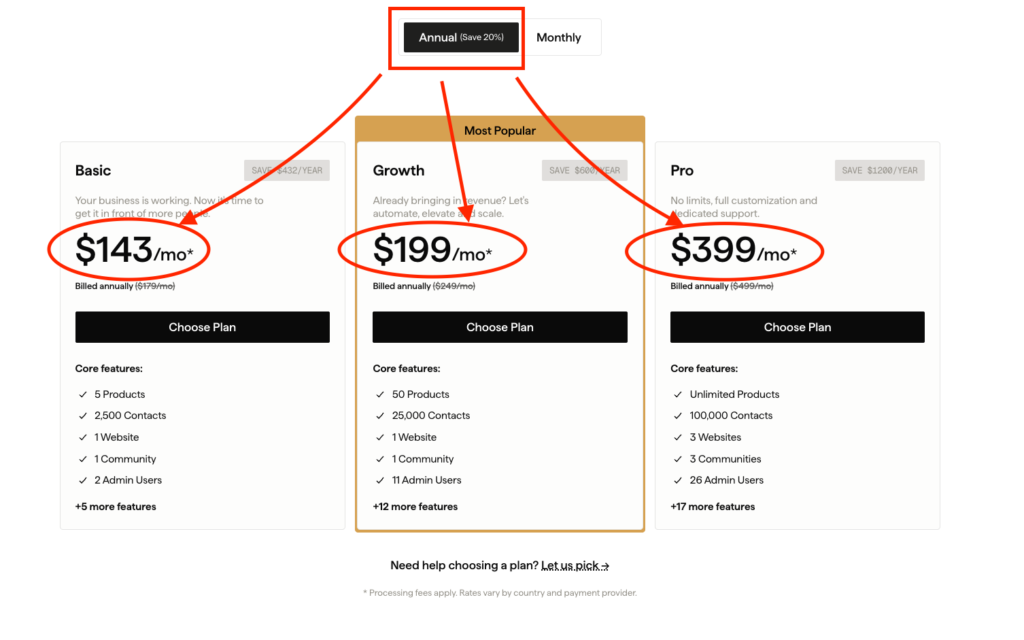
While Kajabi doesn’t offer a free plan, it does include a 14-day free trial so you can explore the platform before committing. Though you’ll need to input your credit card information to access the free trial.
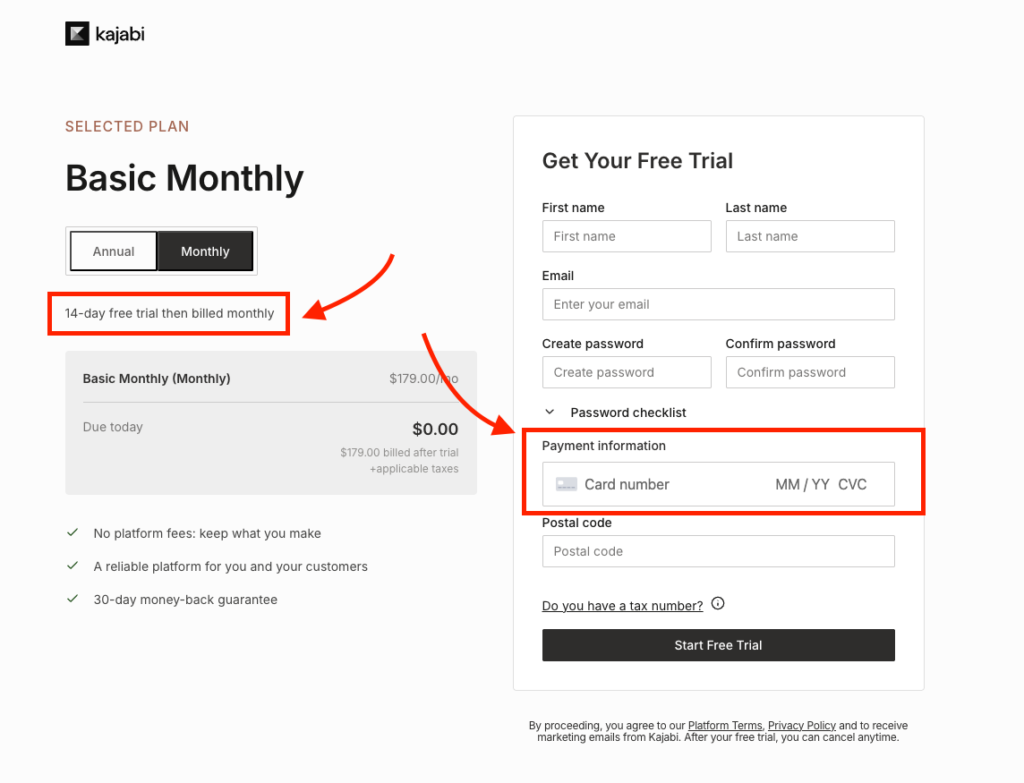
(Pro tip: you can unlock an extended 30-day free trial using my exclusive link here.)
That said, the subscription price is only part of the total cost. Once you factor in payment processing fees, Kajabi’s subscription and international transaction surcharges, and the add-ons, the real cost can end up being higher than what it advertises on the pricing page.
In this guide, I’ll break down what you’ll actually pay to use Kajabi, whether you choose monthly or annual billing. I’ll also compare Kajabi’s pricing with its biggest competitors so you can decide whether it’s the right fit for your budget, business model, and long-term growth.
Kajabi pricing tiers at a glance
| Basic | Growth | Pro | |
|---|---|---|---|
| Monthly | $179 | $249 | $499 |
| Annual (per month) | $143 | $199 | $399 |
| Annual total | $1,716 | $2,388 | $4,788 |
| Kajabi Payments base rate | 2.9% + 30¢ | 2.8% + 30¢ | 2.7% + 30¢ |
| Third-party processor fee | +2% | +1% | +0.5% |
| Products | 5 | 50 | Unlimited |
| Contacts | 2,500 | 25,000 | 100,000 |
| Admin users | 2 | 11 | 26 |
| Websites | 1 | 1 | 3 |
| Marketing emails | Unlimited | Unlimited | Unlimited |
| Video hosting & bandwidth | Unlimited | Unlimited | Unlimited |
| Remove Kajabi branding | ❌ | ✅ | ✅ |
| Affiliate program | ❌ | ✅ | ✅ |
| Advanced automations | ❌ | ✅ | ✅ |
| Custom code editor | ❌ | ❌ | ✅ |
| Branded mobile app | $199/mo add-on | $199/mo add-on | Included |
| API access | ❌ | ❌ | ✅ |
How much does Kajabi cost in 2026 (detailed cost breakdown)
Kajabi offers three paid plans in 2026: Basic, Growth, and Pro. You can pay month-to-month or save 20% by choosing annual billing.
Below, I’ll break down what each plan includes, the costs that aren’t immediately obvious, and which type of business each plan is best suited for.
Kajabi Basic: $179/month ($143/month billed annually)
Basic is Kajabi’s entry-level plan. It’s designed for solo creators and new businesses that want everything needed to build, market, and sell digital products without paying for advanced features they won’t use yet.
What’s included:
- 5 digital products
- 2,500 contacts
- 2 admin users
- 1 website
- 1 community
- Unlimited marketing emails
- Unlimited video hosting
- Unlimited sales funnels
- Landing pages and a custom checkout builder
- Basic email automations
- Creator Studio
- Kajabi Backstage
- Video transcription and translation
Beyond the monthly subscription, every sale also incurs payment processing fees based on the payment provider you choose to use.
- Kajabi Payments: 2.9% + $0.30 per transaction
- Third-party payment processor: an additional 2% surcharge
These fees are separate from your monthly subscription and can have a meaningful impact on your overall costs as your sales grow. (I’ll explain later on this post)
Verdict
The Basic plan offers decent features for launching an online business. However, at $1,716 per year on annual billing, it’s still an expensive entry point, and many creators eventually upgrade to Growth as their audience and product catalog expand. Or better yet, choose a much affordable alternative like Systeme or Thinkific.
Kajabi Growth: $249/month ($199/month billed annually)
Growth is Kajabi’s mid-tier plan and, for most creators, the sweet spot in the lineup. It offers more capacity while unlocking many of the platform’s most valuable features.
Everything included in Basic carries over, along with:
- 50 digital products
- 25,000 contacts
- 11 admin users
- Advanced automations
- Affiliate marketing
- Webhooks
- Universal Inbox
- Comment-to-DM automation
- White-label branding (remove Kajabi branding)
Growth also slightly reduces your payment processing costs.
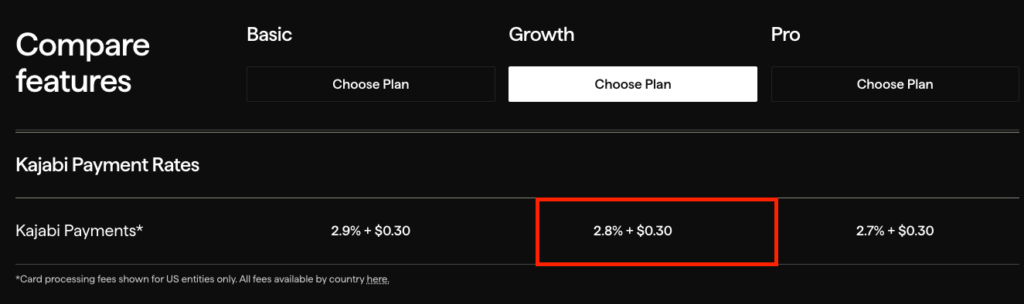
If you use Kajabi Payments, the processing rate drops from 2.9% + $0.30 on Basic to 2.8% + $0.30 per transaction.
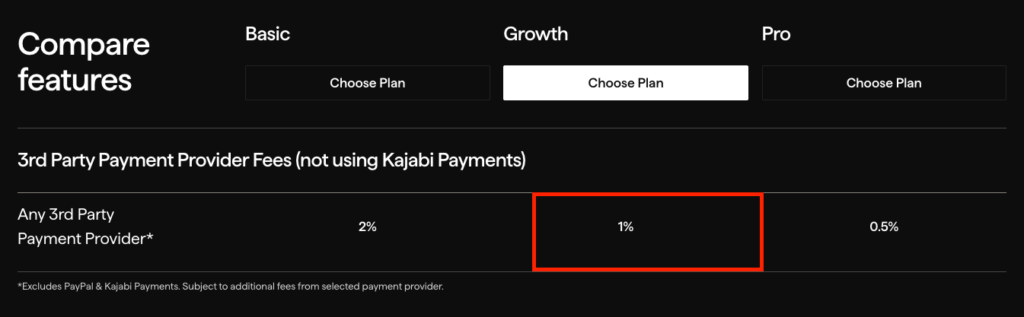
And if you’re using a third-party payment provider instead of Kajabi Payments, Kajabi’s surcharge also reduces to 1%.
Verdict
Growth strikes the best balance between features, capacity, and price. It’s the plan where Kajabi’s all-in-one value proposition truly comes together, making it the best choice for the majority of established creators and online businesses.
Kajabi Pro: $499/month ($399/month billed annually)
Pro is Kajabi’s highest-tier plan, designed for larger businesses that need substantially higher usage limits, deeper customization, and more flexibility.
Along with everything included in Growth, Pro adds:
- Unlimited products
- 100,000 contacts
- 26 admin users
- Three websites on separate domains
- Custom code editing (HTML, CSS, and Liquid)
- API access
- Branded mobile app included
Pro further reduces payment processing costs to 2.7% + $0.30 when using Kajabi Payments. If you’re using your own payment processor instead, Kajabi’s surcharge drops to 0.5%.
However, these savings alone aren’t enough to justify the upgrade for most businesses.
Upgrading from Growth to Pro costs an additional $2,400 per year, but the lower payment processing rate alone isn’t enough to justify that increase for most businesses.
As you’ll see later in this guide, the improved processing rate saves only around $300 annually on $300,000 in revenue. You’d need to process approximately $2.4 million per year before the payment fee savings alone covered the cost of upgrading.
Verdict
Pro is a capacity and control purchase, not a revenue milestone. Unless you need the branded app, the second and third websites, the API or the code editor, Growth at $199 delivers more per dollar.
What happened to the Kajabi $89 Kickstarter plan?
Kajabi removed the Kickstarter plan from its public pricing page in January 2026. It cost $89 per month, or $71 billed annually
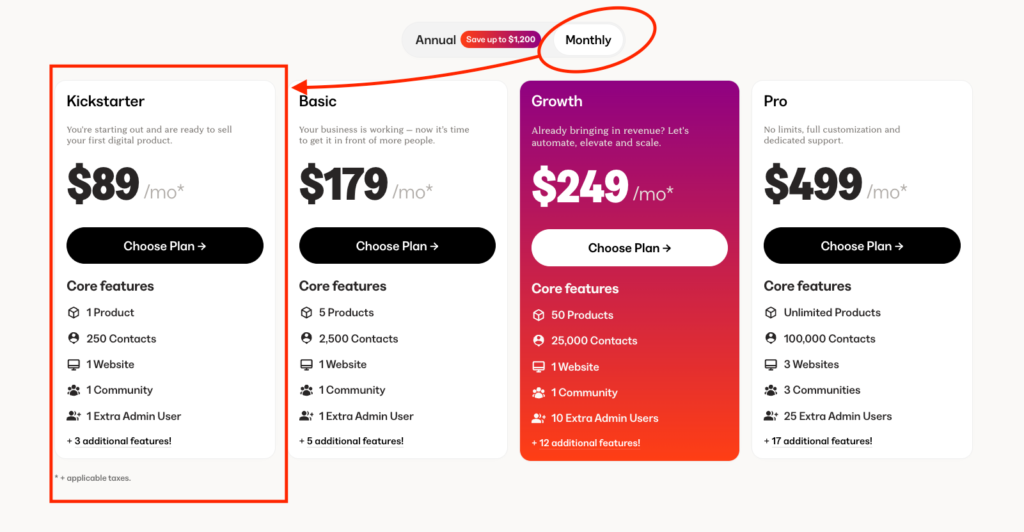
It was designed as an “affordable” entry point for new creators. And the reason I put that in quotes is because the value it offered was just ridiculous. I mean paying $89 per month only just to have:
- 1 digital product
- 1 community
- 250 contacts
- 1 admin user
That was poor value anyway and Kajabi was right to retire it.
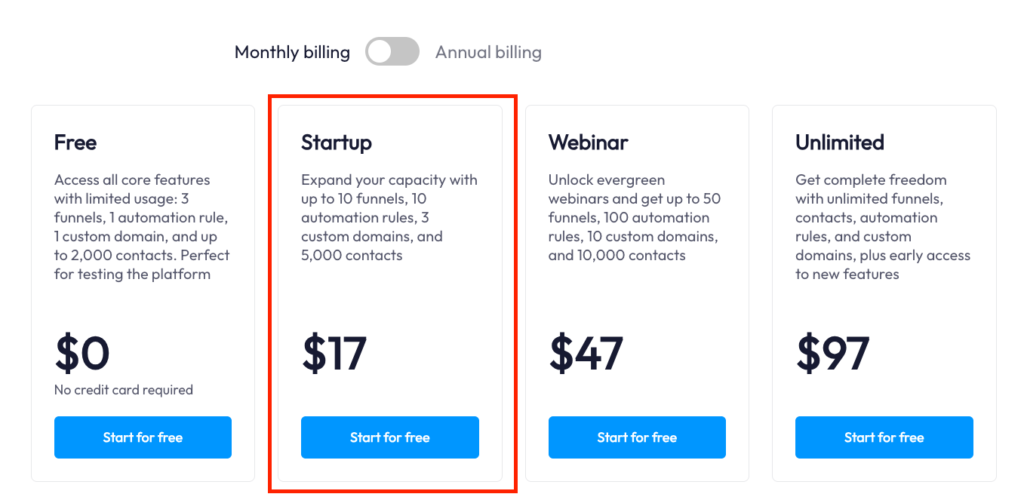
Compare the same price tag to a platform like Systeme.io which gives you up to 10 funnels, 5 courses, and 5,000 contacts for as low as $17 per month.
Read our Kajabi vs Systeme review
Kajabi transaction fees in 2026
Kajabi takes no revenue share, and that is the true half of its best pricing claim. It still charges transaction fees, and on a subscription business sold internationally those fees reach 5.1% on the Basic plan.
How much you pay depends on which of two routes you take:
- Kajabi Payments, its own payment processor
- Your own Stripe account, connected to Kajabi
Kajabi Payment fees
Kajabi Payment advertised processing rate starts at 2.9% + 30¢, falling as you move up the plans.
But aside from that, it charges additional fees for subscription plans and international cards as shown.
| Component | Basic | Growth | Pro |
|---|---|---|---|
| Base card rate | 2.9% + 30¢ | 2.8% + 30¢ | 2.7% + 30¢ |
| Subscriptions & payment plans | +0.7% | +0.7% | +0.7% |
| International card surcharge | +1.5% | +1.5% | +1.5% |
This is worth paying attention to because the effective cost can end up being much higher than the advertised processing rate.
For example, if you’re on the Basic plan and most of your revenue comes from memberships, you’re effectively paying 3.6%, not the advertised 2.9%. That’s roughly 24% higher than the headline rate.
If those memberships are purchased using international cards, your effective processing cost rises to 5.1%, which is nearly 76% higher than the number Kajabi advertises on its pricing page.
Now, the table above only covers card payments. Kajabi also charges different rates for ACH Direct Debit and Buy Now, Pay Later payment methods.
Also there are additional fees for things like Kajabi sales tax, invoicing, manual purchases, disputes, currency conversion, and instant payouts.
Let’s cover them.
ACH direct debit fees
Kajabi Payments supports ACH Direct Debit for eligible US merchants. ACH costs less than card processing on anything over about $625, because the 0.8% rate is capped at $5.
| Fee | Rate |
|---|---|
| ACH payment processing | 0.8% (capped at $5.00) |
| Bank account verification | $1.50 per verification attempt |
| Failed ACH payment | $4.00 |
Buy Now, Pay Later fees (Afterpay and Klarna)
Kajabi supports Afterpay and Klarna, and both cost roughly double a card.
| Payment method | Rate | Additional charges |
|---|---|---|
| Afterpay | 6.0% + $0.30 | +1.5% for cross-border transactions |
| Klarna | 5.99% + $0.30 | Kajabi’s standard per-transaction fees apply on top |
The Kajabi Payments fees that are not in the headline rate
Some of these apply to every transaction, and others fire only when you use a specific feature. None of them revealed in the 2.9% figure Kajabi advertises.
| Fee | Rate | When it applies |
|---|---|---|
| Kajabi Sales Tax | $0.15 per transaction | Applies to transactions that use Kajabi Sales Tax |
| Kajabi Invoicing | +0.4% | Added to every invoice payment, on top of the processing fee |
| Manual card entry | +0.5% | First payment made with a manually entered card |
| Dispute (chargeback) | $15 per dispute | Charged on every disputed transaction |
| Currency conversion | +1% | Included in the exchange rate when conversion is required |
| Instant Payout | 1.5% (minimum $0.50) | Applies each time you request an instant payout |
Connecting your own Stripe account to Kajabi
If you choose ot connect your own Stripe account instead of using Kajabi Payments, the rates work a little differently.
Rather than charging subscription or international surcharges itself, Kajabi adds a flat platform fee based on your plan:
- Basic: +2%
- Growth: +1%
- Pro: +0.5%
That sits on top of whatever Stripe charges you. Stripe’s standard US online card rate is 2.9% + 30¢ for domestic transactions, with its own cross-border and currency conversion fees where they apply.
| Sale type | Basic (+2%) | Growth (+1%) | Pro (+0.5%) |
|---|---|---|---|
| Domestic (one-time or subscription) | 4.9% | 3.9% | 3.4% |
| International card | 6.4% | 5.4% | 4.9% |
| International card + currency conversion | 7.4% | 6.4% | 5.9% |
Worked examples: what Kajabi’s fees actually cost
Percentages can feel a bit abstract, so let’s put some real numbers behind them. The examples below assume you’re a U.S.-based creator using the standard pricing discussed earlier. Your exact fees may vary depending on your country, payment method, or Stripe pricing, but the comparisons illustrate how Kajabi’s pricing works in practice.
Example 1: a one-time $997 course on the Basic plan
Sell a $997 course to a US customer.
Using Kajabi Payments
- Processing fee: 2.9% + 30¢ = $28.91 + $0.30
- Total fees: $29.21
- What you keep: $967.79
Using your own Stripe account
- Stripe processing: 2.9%
- Kajabi platform fee: 2%
- Total percentage: 4.9%
- Percentage fee: $48.85
- Fixed fee: $0.30
- Total fees: $49.15
- What you keep: $947.85
The gap is $19.94 a sale. Sell that course 100 times in a year and connecting your own Stripe account has cost you $1,994, which is more than the $1,716 annual price of the Basic plan itself.
Example 2: a $97 membership on the Growth plan
Run a $97-per-month membership with 200 active members: $232,800 a year across 2,400 recurring payments.
Using Kajabi Payments. The effective rate is 3.5%: 2.8% base plus the 0.7% subscription surcharge.
- Percentage fees: $8,148
- Fixed transaction fees: $720
- Total annual fees: $8,868
Using your own Stripe account. The effective rate is 3.9%: 2.9% to Stripe plus Kajabi’s 1% platform fee.
- Percentage fees: $9,079
- Fixed transaction fees: $720
- Total annual fees: $9,799
Example 3: a $497 course sold internationally on the Growth plan
You are in the US and sell a $497 course to a customer in the UK paying in pounds, with Stripe’s standard cross-border and conversion fees applied.
Using Kajabi Payments. 2.8% base plus 1.5% international is 4.3%.
- Percentage fees: $21.37
- Fixed fee: $0.30
- Total fees: $21.67
- You keep: $475.33
Using your own Stripe account. 2.9% Stripe plus 1.5% cross-border plus 1% conversion plus 1% Kajabi is 6.4%.
- Percentage fees: $31.81
- Fixed fee: $0.30
- Total fees: $32.11
- You keep: $464.89
That is $10.44 a sale. At 300 international sales a year it is $3,132, which buys most of a year on the Growth plan.
Kajabi Payments or your own Stripe account?
There is no single winner. It turns on your plan, your business model and where your customers bank.
| If you’re… | I’d choose… | Why |
|---|---|---|
| On the Basic plan | Kajabi Payments | The 2% platform fee makes your own Stripe account more expensive on almost every kind of sale. |
| On Growth selling one-time products | Kajabi Payments | 2.8% against an effective 3.9% is not close. |
| On Growth running memberships | Kajabi Payments, narrowly | The gap is 0.4 percentage points. That is a cheap price for owning your own Stripe account. |
| On Pro selling subscriptions | Either | Both land on 3.4%. Price has stopped being the deciding factor. |
| On Pro selling one-time products | Kajabi Payments | 2.7% still beats the effective 3.4% you’d pay through your own Stripe account. |
| In a country without Kajabi Payments | Your own Stripe account | You have no choice, and Kajabi waives the platform fee where its own processor isn’t supported. |
| Selling heavily to international customers | Compare both | Cross-border and conversion fees swing the answer by country, currency and payment method. |
My overall take on Kajabi Payments
On Basic, use Kajabi Payments. Paying 2% to Kajabi for the privilege of using your own Stripe account is hard to justify unless you have a specific operational reason.
On Growth it gets closer. Kajabi Payments is still cheaper in most scenarios, but at 0.4 percentage points on subscription revenue, owning your Stripe account, keeping your own payment history and staying portable start to outweigh the saving.
On Pro, for a domestic subscription business, the two cost the same. At that point the conversation is about which checkout you prefer and how likely you are to leave Kajabi in the next two years.
The one rule underneath all of it: do not chase the lowest percentage. Chase the lowest total for your business model, your customers’ countries and your own flexibility.
The Kajabi costs that are not in the subscription price
A $249 Growth plan can bill $448 a month once the branded app is on it. Some of these are optional and some become hard to avoid as you grow.
| Item | Typical cost | Notes |
|---|---|---|
| Branded mobile app | $199/month | Optional add-on for Basic and Growth. Included with Pro. |
| Public API | $25/month | Included with Pro. A paid add-on on lower plans. |
| Premium website widgets | About $5–27/month | Custom prebuilt design templates and third-party widgets to elevate your website design and functionality |
| Additional contacts | $25/month per 5,000 contacts | Available once your account is eligible for Kajabi’s contact expansion. |
| Premium website themes | Varies | Third-party themes if Kajabi’s default templates aren’t enough. |
| Parked Plan | $29/month plus tax | Keeps your site and content while your subscription is paused. You can’t sell or use paid features until you reactivate. |
Why is Kajabi so expensive?
Kajabi is expensive because it is priced against your software stack rather than against other course platforms, and whether that is fair depends entirely on how much of the stack you actually use.
For example, Thinkific hosts courses for $54 a month. Kajabi’s cheapest plan is $179. The difference is not course hosting, because both do that well.
The difference is that Kajabi’s price includes email marketing, funnels, a website builder, checkout, automations and a community, to a level that Thinkific simply can’t.
And if you think about it, the big question is:
What does Kajabi replace in your tech stack?
Host a single course on Kajabi and $179 a month is difficult to defend. At $700 a month in revenue that subscription is 20.4% of the top line before processing fees, ads, contractors or tax. That is a very high cost for a business still proving demand.
But if you run your whole operation on it, the comparison changes. A best-in-class stack of Kit.com at $39, ClickFunnels at $97, Thinkific at $54 and Circle at $129 comes to $319 a month. Kajabi Growth is $249.
Now you are not comparing Kajabi to Thinkific. You are comparing it to four invoices, and it is winning.
Kajabi pricing plans vs the alternatives
No platform here is objectively the cheapest. Some keep the monthly price low and take a percentage of every sale. Others cover one job well and expect you to buy the rest.
Kajabi’s subscription costs more than any of them and includes more than any of them. The comparison below shows where Kajabi fits alongside some of its biggest competitors..
| Platform | Starting price | Platform transaction fees | Best suited for |
|---|---|---|---|
| Kajabi | $179/month ($143 annually) | None with Kajabi Payments. Your own Stripe account pays 2% / 1% / 0.5% by plan. | Replacing an entire software stack with one subscription |
| Systeme.io | Free (paid from $17/month) | None | Budget-conscious creators who want funnels and email cheaply |
| Teachable | $39/month ($29 annually) | 7.5% on Starter, 0% on Builder and above | New course creators who want a low monthly cost |
| Thinkific | $54/month ($40 billed annually) | None with Thinkific Payments. Third-party gateways charge 5%, 2%, 1%, or 0.5% depending on plan. | Course businesses focused on teaching online |
| Podia | $42/month (Mover) | 5% on Mover, | Creators selling courses, memberships, coaching or downloads |
| Kartra | $59/month (Essentials) | 5% transaction fees on Essentials plan | Businesses built around sales funnels and automation |
| Skool | $9/month (Hobby) | 10% on Hobby, 2.9% on Pro ($99) | Community-first businesses with simple courses |
| Circle | $129/month ($89 billed annually) | 2% on Professional, 1% on Business & 0.5% on Circle Plus | Membership communities that also run courses and events |
| GoHighLevel | $97/month (Starter) | None | Agencies and service businesses wanting better a CRM and lead management |
| Uscreen | $49/month (Starter) | 10% on one-time sales; Growth at $149 adds $1.99 per subscriber per month | Video memberships, streaming and creator apps |
How to save on your Kajabi costs
Kajabi isn’t the cheapest platform, but you don’t necessarily have to pay full price.
Here are the best ways to reduce your costs.
1. Pay annually
Annual billing offers Kajabi’s biggest built-in discount. Compared to paying month to month, you’ll save about 20% over the course of a year.
| Plan | Annual saving |
|---|---|
| Basic | $432 per year |
| Growth | $600 per year |
| Pro | $1,200 per year |
If you’re confident you’ll use Kajabi for at least a year, annual billing is usually the better value.
3. Take advantage of promotional offers
Kajabi occasionally runs limited-time promotions for new customers.
One of the most common offers is $99 per month for your first three months, which reduces the upfront cost while you build your business and start generating revenue.
Promotions change throughout the year, especially around major sales events like Black Friday. Before signing up, check whether Kajabi is running a discount. A few minutes of research could save you a few hundred dollars.
4. Use Kajabi Payments where it’s supported
If you’re in a country where Kajabi Payments is supported, it’s usually the cheaper option.
Using Kajabi Payments removes the additional platform transaction fee that Kajabi charges when you connect an external Stripe account in supported regions.
As shown earlier in this guide, that difference can have a noticeable impact on your processing costs, especially if you’re on the Basic plan or process a high volume of sales.
5. Keep your contact list clean
Kajabi bills by contact, and going over means upgrading or buying blocks of 5,000 at $25 a month. Cut inactive subscribers, bounced addresses, duplicates and anyone who hasn’t opened an email in six months. A smaller list costs less and delivers better.
6. Use the free trial properly
Kajabi usually offers a 14-day free trial.
(But I was able to partner with Kajabi to offer a 30-day extended free trial. Claim it here).
But don’t spend the trial exploring menus.
Instead, try to recreate how you’ll actually use the platform:
- Build a product.
- Create a landing page.
- Set up an email sequence.
- Test the checkout process.
- Connect the tools you plan to use.
By the end of the trial, you should know whether Kajabi fits your workflow—not just whether the dashboard looks good.
So, is Kajabi worth it in 2026?
Kajabi pricing is worth it when it replaces four or more tools you are already paying for, and it’s poor value at any price when it does not. That is a pricing verdict; my full Kajabi review covers whether the software holds up after two years of use.
If you are already earning consistently and you’ll use the email marketing, the automations, the website builder, the checkout and the funnels, Kajabi consolidates that stack into one $179 per subscription. The consolidation is the product. Course hosting is table stakes, and Thinkific does it for $54 per month.
If you’re starting out, Kajabi’s pricing isn’t for you. At its entry level plan, before you have proven the offer, Kajabi costs $1,716 a year to host a business that does not exist yet.
Instead, I’d recommend you start on Systeme.io’s free plan at 2,000 contacts to validate your offer.
And whichever way you go, price the fees, not the plan. The subscription is the number Kajabi advertises. The 3.6% on domestic memberships, the 5.1% on international ones and the $199 mobile app are the numbers that decide what Kajabi actually costs you, and none of them are on the pricing page.
If the total came out higher than you expected, the Kajabi alternatives I’ve tested covers the ten platforms worth moving to and what each one costs.
Kajabi pricing FAQ
Is there a free Kajabi plan?
No. Kajabi has no free plan and no free tier. New users get a free trial instead: 14 days as standard.
How much does Kajabi cost per month?
$179, $249 or $499 per month on monthly billing, and $143, $199 or $399 per month if you pay annually. Add payment processing of 2.7% to 5.1% on everything you sell.
Does Kajabi take a percentage of my sales?
Kajabi takes no revenue share. Every sale carries payment processing of 2.9% + 30¢ on Basic, falling to 2.7% + 30¢ on Pro, plus 0.7% on subscriptions and 1.5% on international cards. Connect your own Stripe account and Kajabi adds 2%, 1% or 0.5% by plan on top of Stripe’s fees.
What is the cheapest way to use Kajabi?
Basic on annual billing at $143 a month, using Kajabi Payments, with your contact list kept under 2,500. That is $1,716 a year before processing.
Can I use my own Stripe account with Kajabi?
Yes, Kajabi supports a connected Stripe account on every plan. Where Kajabi Payments is available, Kajabi adds a platform fee of 2% on Basic, 1% on Growth or 0.5% on Pro on top of Stripe’s own processing fees. Where Kajabi Payments isn’t supported, that platform fee is waived.
What happens if I reach my contact limit?
Kajabi will notify you as you approach your limit. You’ll then need to either upgrade your plan or reduce your contact count to stay within your allowance.
Does Kajabi have transaction fees?
Kajabi charges payment processing fees but no revenue share. Kajabi Payments charges 2.9% to 2.7% + 30¢ by plan, with +0.7% on subscriptions and +1.5% on international cards, and a connected Stripe account carries a 2% to 0.5% Kajabi platform fee.
Does Kajabi offer a money-back guarantee?
Yes. Kajabi has a 30-day money-back guarantee for new subscriptions. You can read about it in Section 4.6 of their Refund Policy.
Can I use my own domain name?
Yes, every paid Kajabi plan supports a custom domain. Basic and Growth allows up to one website; Pro lets you add up to 3 domains.
Can I use Kajabi outside the United States?
Yes, you can sell worldwide on all three Kajabi plans. Kajabi Payment is supported in the US, Canada, Australia, UK and some selected countries in Europe. Where it isn’t available you can connect Stripe instead.
When should I upgrade from Kajabi Basic?
When you hit 5 products or 2,500 contacts, or when you need affiliate marketing, advanced automations or your own branding on checkout. Those four are Growth-only and no add-on unlocks them on Basic.
Is the Kajabi branded mobile app worth $199 a month?
Only if you’re on Growth and staying there. Growth plus the app is $4,776 a year and Pro is $4,788, so if you want the app, Pro costs $12 more a year and includes unlimited products, 100,000 contacts and API access.