


Kajabi vs Systeme.io in 60 seconds:
| Value for money | Systeme.io wins. Costs as low as $17 per month with generous usage limits and a strong marketing stack. Doesn’t charge any platform fees. Kajabi’s expensive starting from $179 to $499, plus a 2% to 0.5% surcharge fees if you use your own Stripe account. |
|---|---|
| Courses and coaching | Kajabi wins. A well-rounded online course builder that also supports live classes, quizzes and assessments. Allows you to diversify learning to cohort courses, 1:1 and group coaching without requiring you to use a third-party tool. |
| Community | Kajabi wins. Refined community builder that supports tiered access control and more engagement features like challenges, meetups and leaderboards. |
| Funnels and automation | It’s a split. Systeme.io has A/B tests, deadline pages, webhooks and a sales pipeline on every plan. Kajabi’s Advanced Automations offer better branching and integrates well with its product ecosystem. |
| Physical products and payment gateways | Systeme.io wins. Native physical products and nine gateways, against Kajabi’s Shopify workaround and three gateways. |
| Bottom line | Choose Kajabi if you make your money teaching and can pay for it. Choose Systeme.io if you need to sell first and teach second. |
Kajabi has earned its reputation as one of the top leading all-in-one platforms for creators and knowledge entrepreneurs.
It lets you sell a wide range of digital products including: courses, coaching programs, memberships, downloadables, and communities.
More importantly, it gives you the tools to market and sell those products from the same platform. That way, you won’t have to integrate third-party tools for things like website building, sales funnels, email marketing, automation and payments.
But this convenience comes with a premium price tag starting at $179 per month.
Meanwhile, Systeme.io promises to offer much of the same all-in-one setup at prices that are hard to ignore: as low as $17 per month.
So, what’s the catch?
In this Kajabi vs. Systeme.io comparison, I’ll put both platforms to the test and show you how they compare on course creation, website building, funnels, automation, email marketing, communities and pricing.
By the end, you’ll have a much clearer idea of which platform to choose and which one offers the best value for your business.
Let’s get into it, shall we?
My Quick Verdict on When to Choose Kajabi or Systeme
Both Kajabi and Systeme are all-in-one digital business platforms for creators, coaches and knowledge entrepreneurs. Though they have a lot in common, after using both tools it’s clear they also have their fair share of differences making them ideal choices for different users and businesses.
Kajabi is the best choice for established creators, coaches and info businesses.
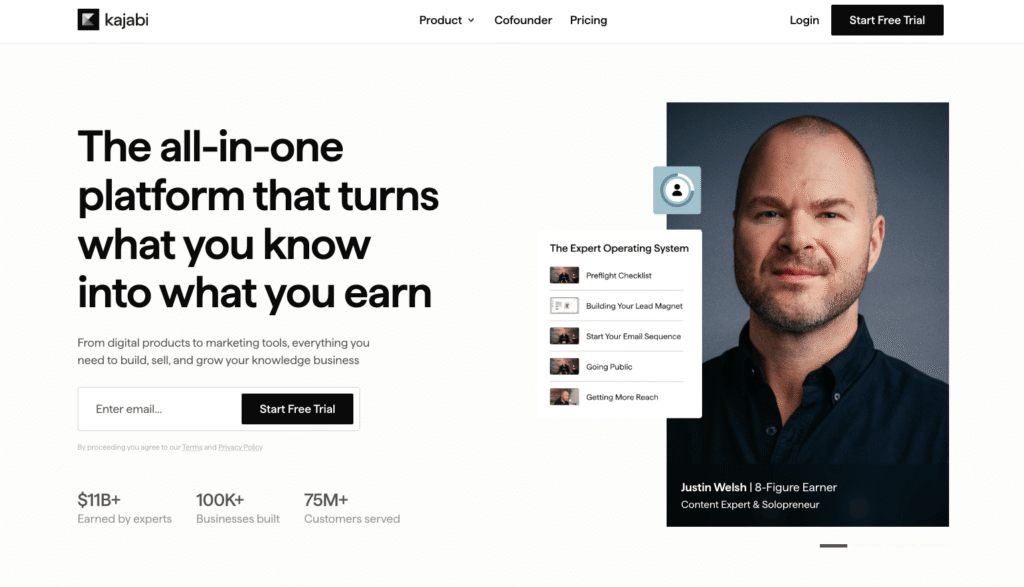
Kajabi is the platform I’d recommend to creators, coaches, and knowledge entrepreneurs that want to build their business around courses, coaching, memberships, and community. It gives you a stronger environment for delivering these products while keeping your marketing and sales tools in the same ecosystem.
A lot of all-in-one platforms offer excellent marketing tools but terribly fail when it comes to online learning. Systeme.io is a good example. You get a robust sales funnel builder but weak course creation tools.
Choose Kajabi if:
- You want to offer knowledge products like: courses, coaching programs, masterminds and community memberships.
- You want the best combination of course delivery, community, and marketing tools in one platform.
- You’d rather manage one polished ecosystem than connect multiple specialized tools.
- You’re running an established knowledge business and want software that can grow with you.
- You’re happy to pay more for a platform that’s refined, reliable, and easy to manage over the long term.
👉 Explore Kajabi or read my detailed Kajabi review.
Systeme.io is the best budget friendly all-in-one digital business platform.
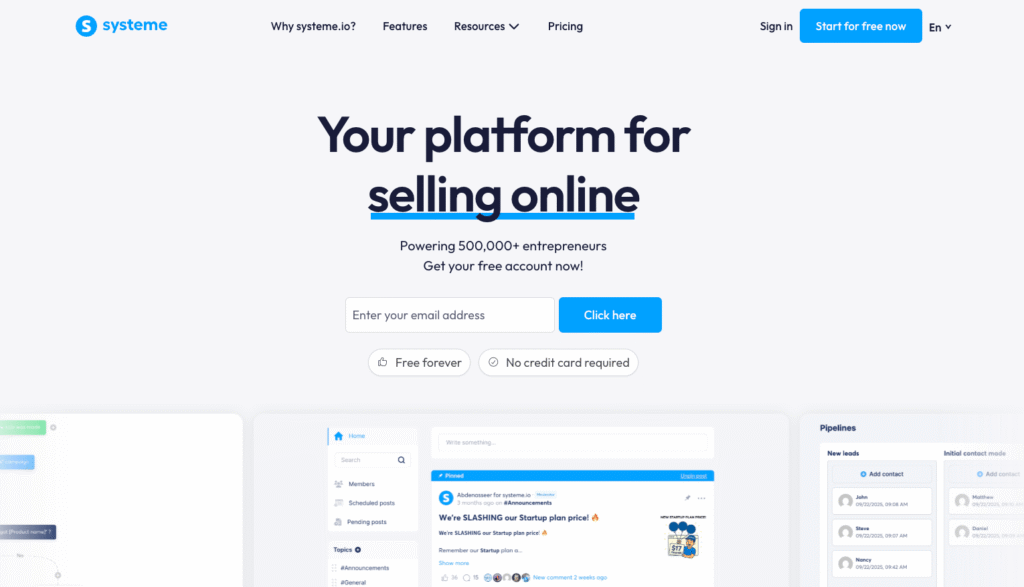
Systeme is the ideal solution if you want a complete marketing software to run your knowledge business without paying the high price tags that usually come with all-in-one platforms.
It offers a strong marketing and commerce tech stack featuring: sales funnels, email marketing, webinars, workflow automation and checkout tools. Though it empowers you to create courses, coaching and community memberships, they aren’t as comprehensive as Kajabi’s.
This trade-off is easier to justify when you’re on a tight budget or just starting out. For as low as $17 per month Systeme.io gives you a surprisingly capable business stack. It also offers a generous free plan that lets you validate an offer and make your first sales before committing to a paid subscription.
Choose Systeme.io if:
- You are validating a new offer and wish to keep software expenses low.
- You intend to sell both physical and digital products using a single platform.
- You want built-in affiliate management and funnel optimization without relying on external services.
- You manage multiple brands and need features such as sub-accounts.
- You want to white-label the platform or incorporate it into your own service offerings.
Kajabi vs Systeme: Comparison at a Glance
| Kajabi | Systeme.io | |
|---|---|---|
| Price | ★★★½3.5/5 $179 to $499/month. No free plan, 14-day free trial. | ★★★★4.0/5 Free plan, then $17 to $97/month. |
| Transaction fees | ★★★½3.5/5 0% on Kajabi Payments. 0.5% to 2% extra with your own Stripe. | ★★★★★5.0/5 0% on every plan, including free. |
| What you can sell | ★★★★4.0/5 Courses, coaching, memberships, communities, podcasts, newsletters and downloads. | ★★★★½4.5/5 Courses, memberships, downloads, bookings and physical products. |
| Courses | ★★★★4.0/5 Stronger builder with quizzes, certificates, live lessons and cohorts. | ★★★½3.5/5 Solid basics: drip, quizzes and certificates. No cohorts or live lessons. |
| Community | ★★★★½4.5/5 Access groups, challenges, meetups and leaderboards. | ★★2.0/5 A basic forum: posts, topics and comments. |
| Funnels and email | ★★★★4.0/5 12 funnel blueprints. Advanced Automations on Growth and Pro. No webinar tool. | ★★★★½4.5/5 A/B tests, deadline funnels and webhooks. Unlimited emails. Evergreen webinars from $47/month. |
| Checkout and payments | ★★★★4.0/5 Upsells and order bumps. Kajabi Payments, Stripe and PayPal. | ★★★★4.0/5 Upsells, order bumps and physical products. Nine gateways, including Stripe, PayPal and Razorpay. |
| Mobile app | ★★★★½4.5/5 Free iOS and Android app. Branded app included on Pro, or $199/month on other plans. | ★★2.0/5 No app. Mobile web only. |
Systeme.io vs Kajabi: Pricing & Value for Money
Pricing and value for money
Winner

Systeme.io
4.0/5

Kajabi
3.5/5
Systeme is more budget-friendly and offers better value for money for small creators and coaches
Systeme is hands down more affordable than Kajabi.
Here’s a quick pricing comparison summary:
 Systeme.io |  Kajabi | |
|---|---|---|
| Free plan | ✅ Yes | ❌ No |
| Entry plan | $17/mo | $179/mo |
| Mid-tier | $47/mo | $249/mo |
| Top tier | $97/mo | $499/mo |
| Transaction fees | 0% | 0.5% to 2% |
| Value for money | ★★★★★ 5/5 | ★★★★☆ 4/5 |
| Best for | Small creators & coaches | Established creators, coaches & businesses |
| Systeme.io pricing | Kajabi pricing |
But having a lower pricing is one thing.
When you compare what you actually get on each tier, you’ll see that Systeme offers better value for beginners, small creators, and digital entrepreneurs.
Let me show you:
Systeme’s entry-level paid plan starts at $17 per month.
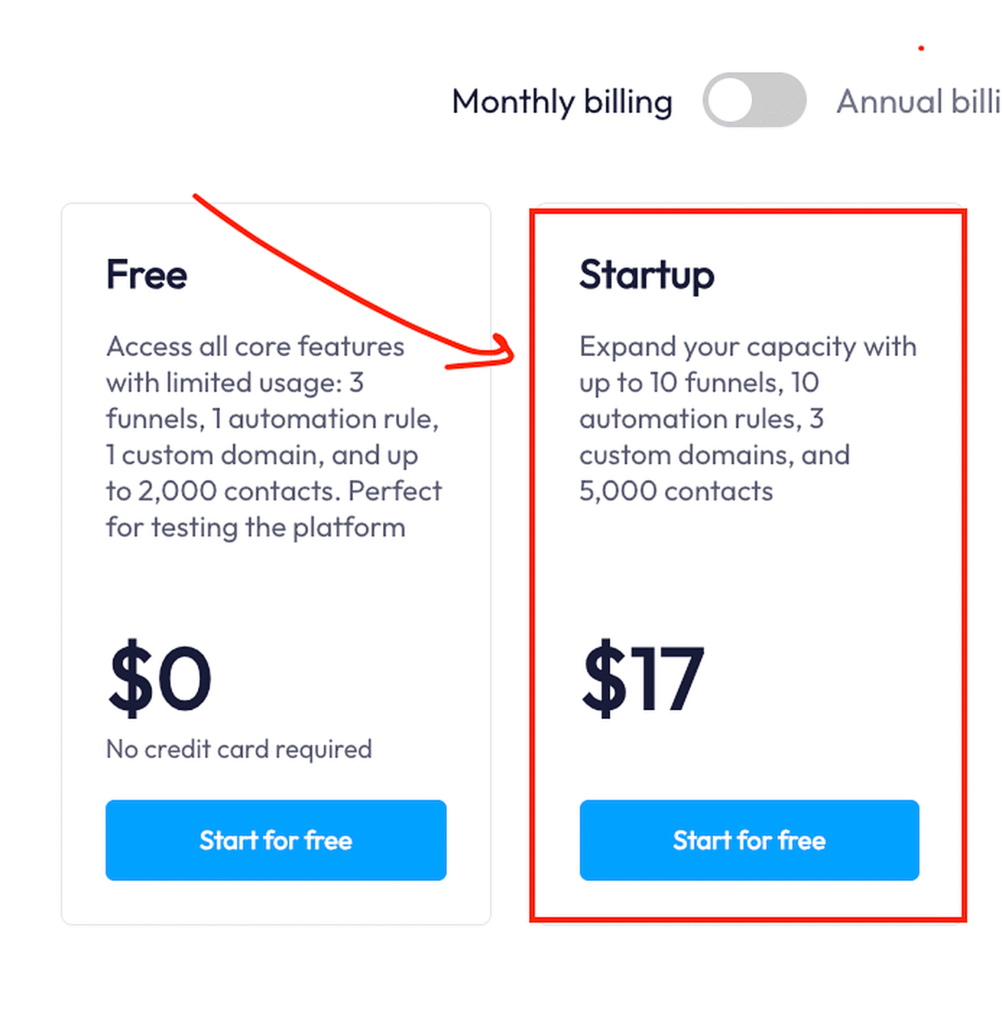
That’s less than a tenth of Kajabi’s $179 entry-level plan.
And for $17 per month, you get up to 5 courses, 5 communities, and 5,000 contacts.
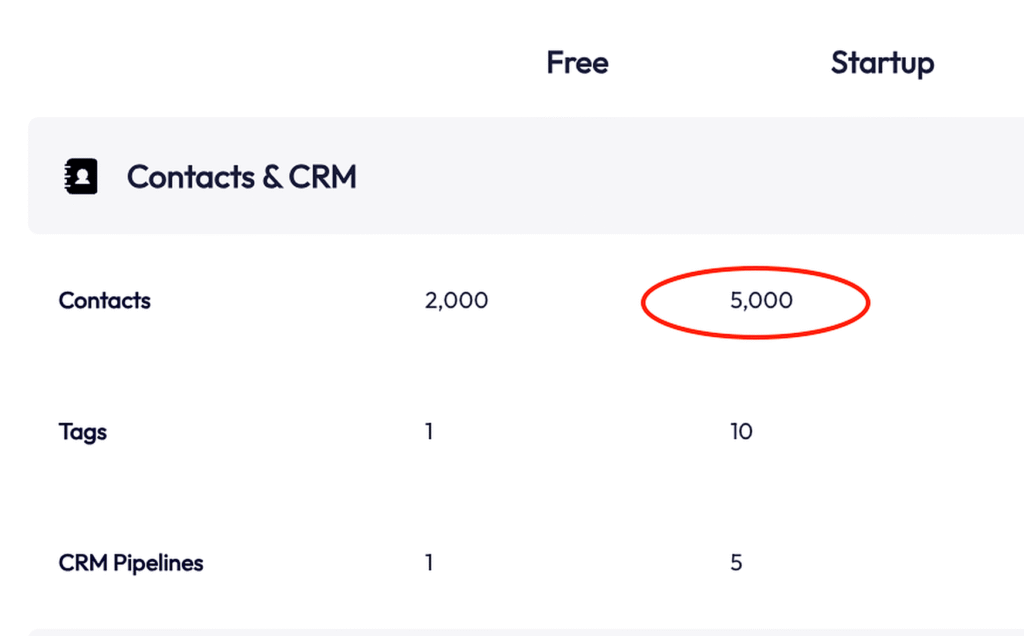
Which is plenty of room for a creator who is launching their first product, building an audience, or validating an offer.
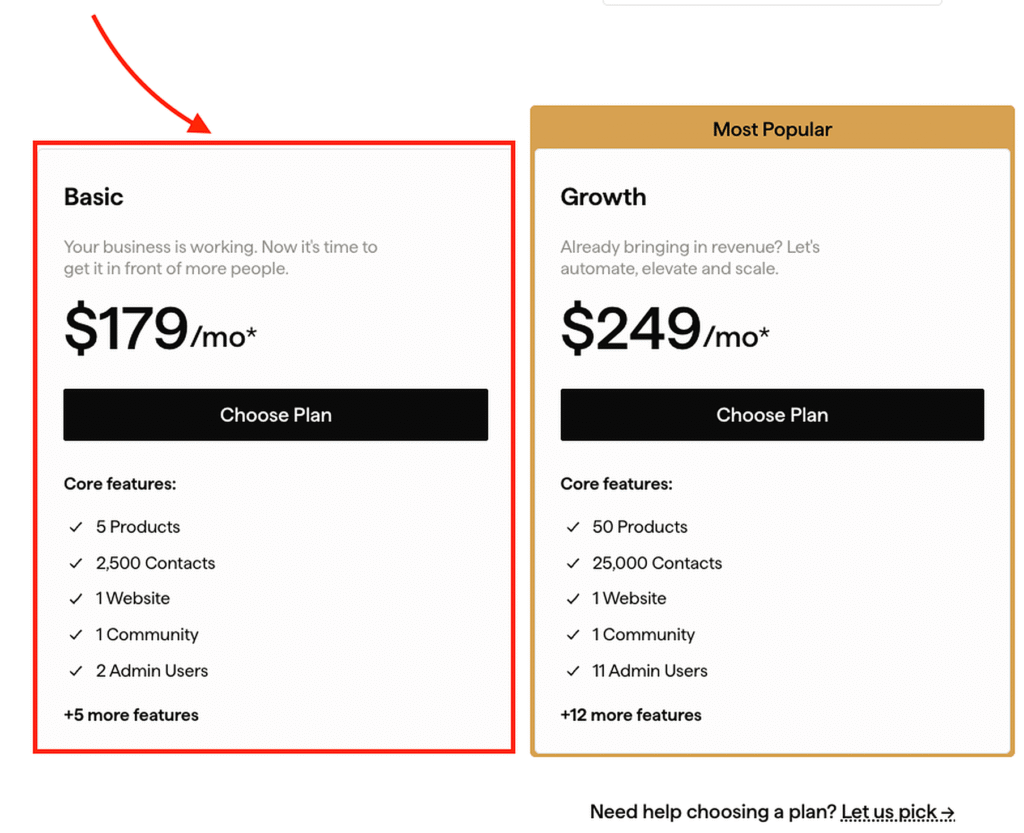
Meanwhile, Kajabi’s Basic plan costs $179 per month. It allows up to 5 products, but limits you to 1 community and 2,500 contacts.
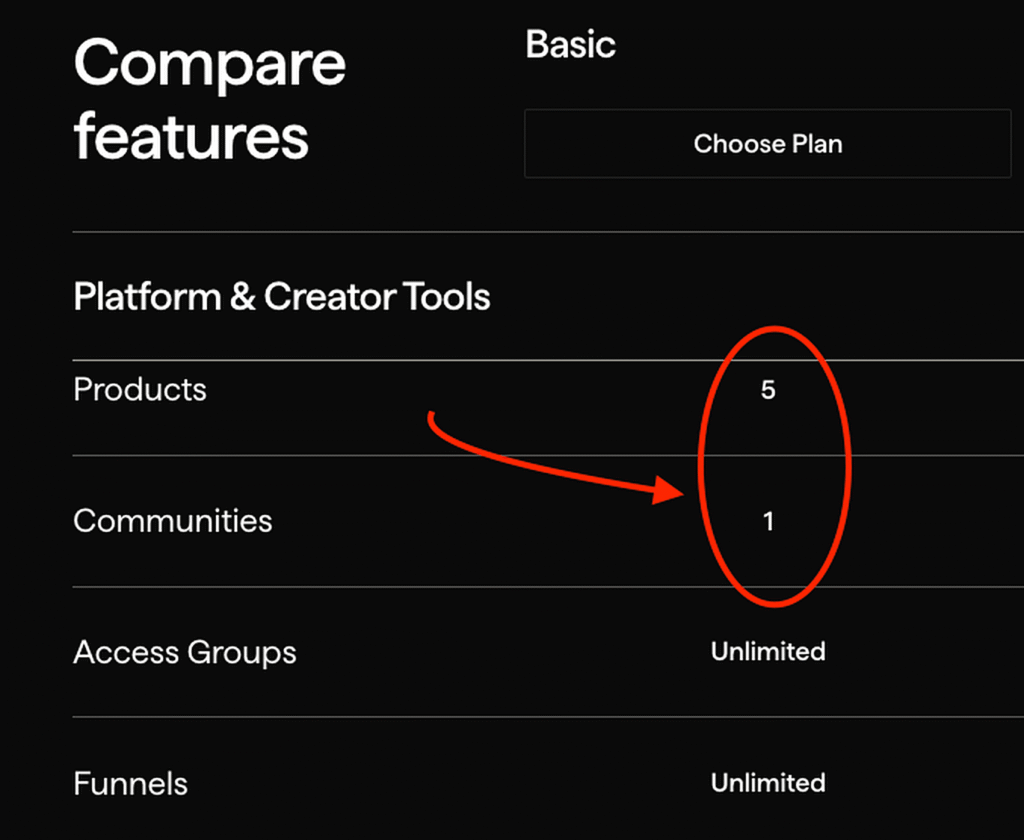
As you move up the pricing, both Kajabi and Systeme extend their usage limits significantly allowing you to scale without bottlenecks.
But there are still some apparent differences.
Systeme’s $97 plan removes most of its usage limits. You get unlimited courses, contacts, custom domains, websites, subaccounts, calendar bookings, webinars, communities, and more.
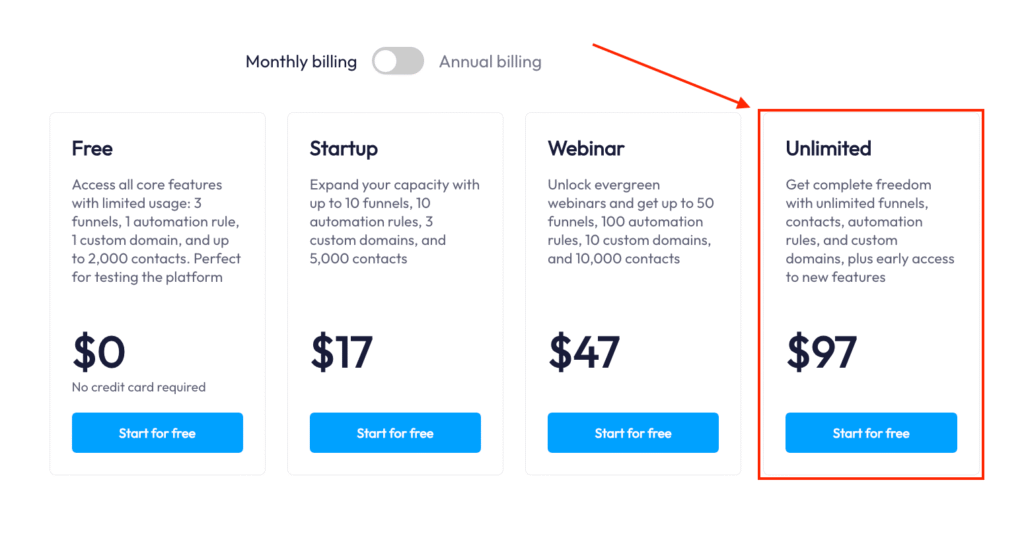
Kajabi’s $499 plan also increases its limits. You get unlimited products, 3 communities, 3 websites, and up to 100,000 contacts.
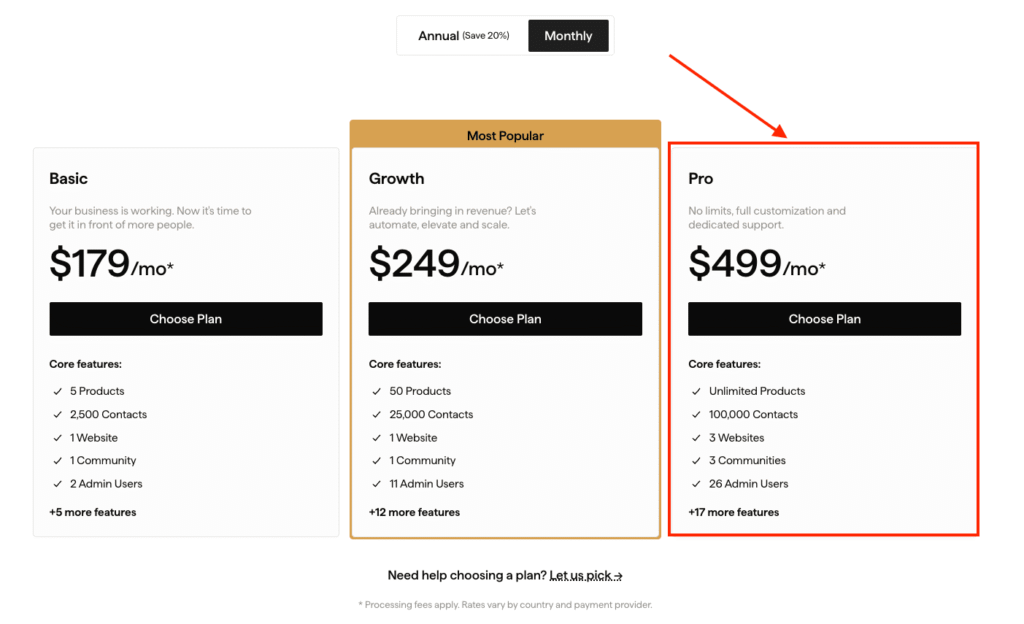
Which is a substantial capacity increase. But you’re still paying X5 as much as Systeme’s highest-priced plan.
However, it’s not only about pricing that makes Systeme a more affordable alternative to Kajabi.
The way each platform counts products also affects how much value you get from your plan.
In Kajabi, courses, coaching programs, communities, downloadable files, newsletters, and podcasts all count toward your overall product limit.
So, on its Basic plan, with just 1 course, 1 coaching program, and 3 downloadable products you’d have hit your entire 5-product allowance.
On Systeme, different product types have their own limits. Courses, events, calendar bookings, evergreen webinars, and downloadable products, are counted separately.
This gives you more flexibility to build different parts of your business without having every asset compete for the same product allowance.
Additional reading: Kajabi’s detailed pricing breakdown and the total costs.
Pricing Verdict
Systeme offers better value for money.
Its lower price, generous limits, and lack of additional transaction fees make the cost difference hard to justify unless you specifically need what Kajabi offers. Kajabi is the better choice if you’re willing to pay more for its more mature, polished digital-product experience.
Kajabi vs Systeme: Online Learning and Engagement
TLDR; Kajabi is the stronger option for building education products like courses, live classes, cohorts, and group coaching
Online learning and engagement
Winner
Kajabi
4.0/5
Systeme.io
3.5/5
Kajabi simply outclasses Systeme.io when it comes to all things online learning. It has a well refined online course builder, supports cohort-based courses and coaching without needing external tools to bring together various learning experiences.
Systeme.io, on the other hand, is a broader all-in-one business platform that happens to include course building, and booking calendars alongside its marketing suite. In short, it doesn’t fare well when it comes to building education programs.
And below I’ll show you how: starting with an online course.
Kajabi has a more intuitive course creation experience than Systeme and it also supports live learning within course experience.
Of some of the online course builders I’ve tested before, Kajabi is among the few platforms with beginner-friendly course creation workflows.
It follows a simple setup wizard with clear steps and items guiding you through the process.
Simply, choose whether to create an evergreen or cohort-based course.
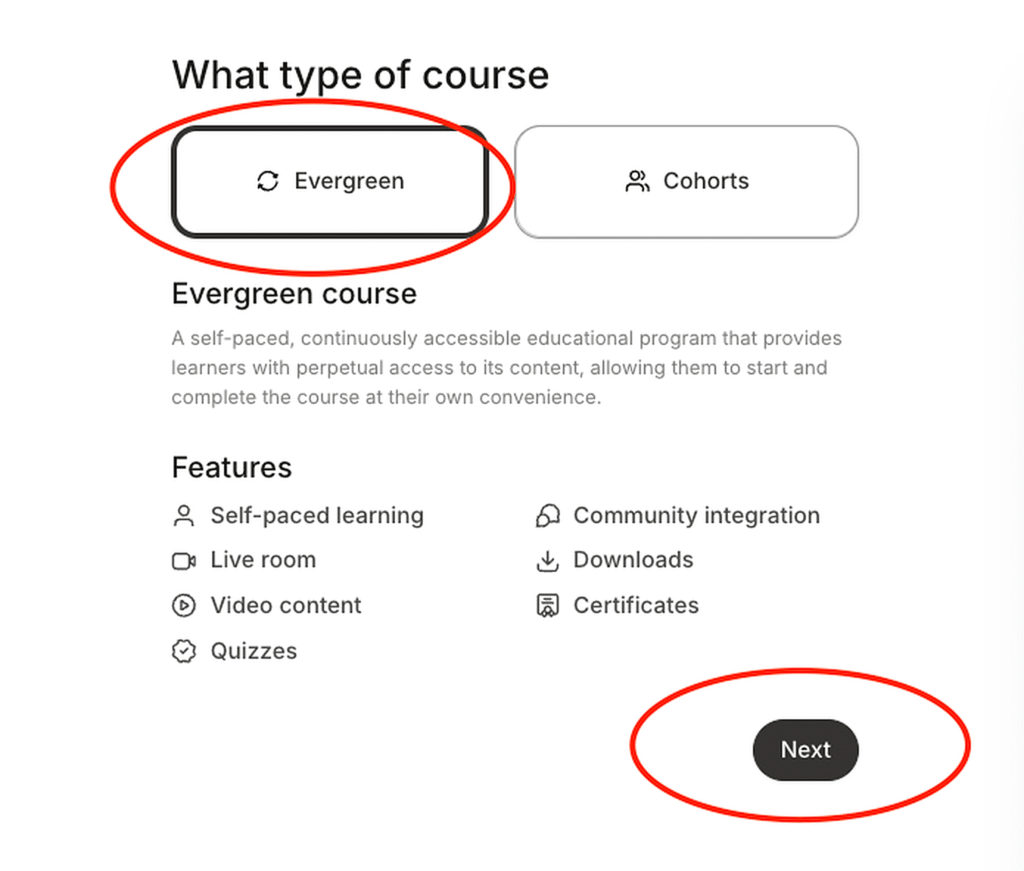
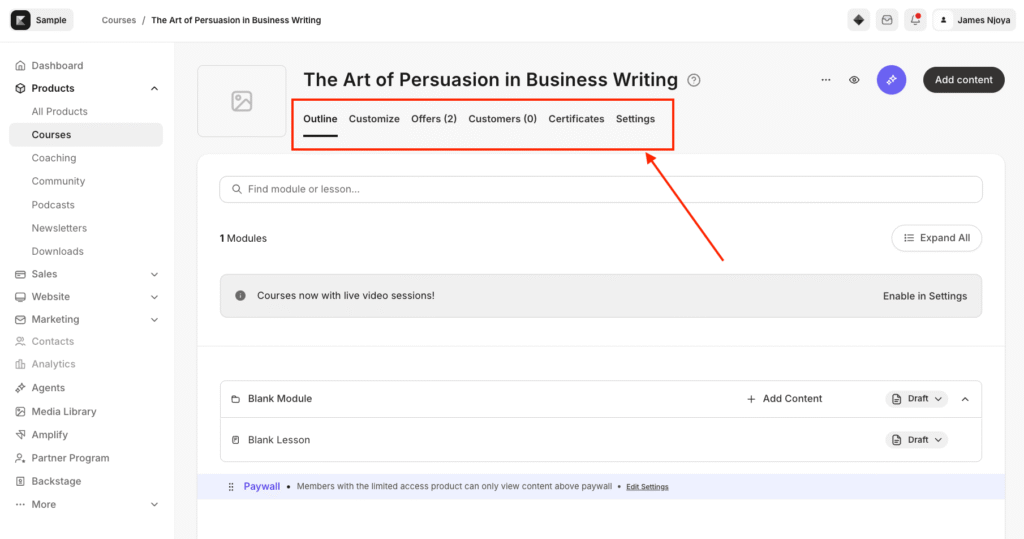
Then add your course title, description, branding and pricing.

From there, you’ll be able to create your course outline, add content, customize the theme, add the certificate and view students who’ve signed up for the course. All of which you can easily navigate using the top menu present in the builder.
Now, if you don’t want to start from a blank slate, Cofounder, Kajabi’s AI assistant, can generate a first draft of your curriculum structure from a topic, along with sales page, email copy.
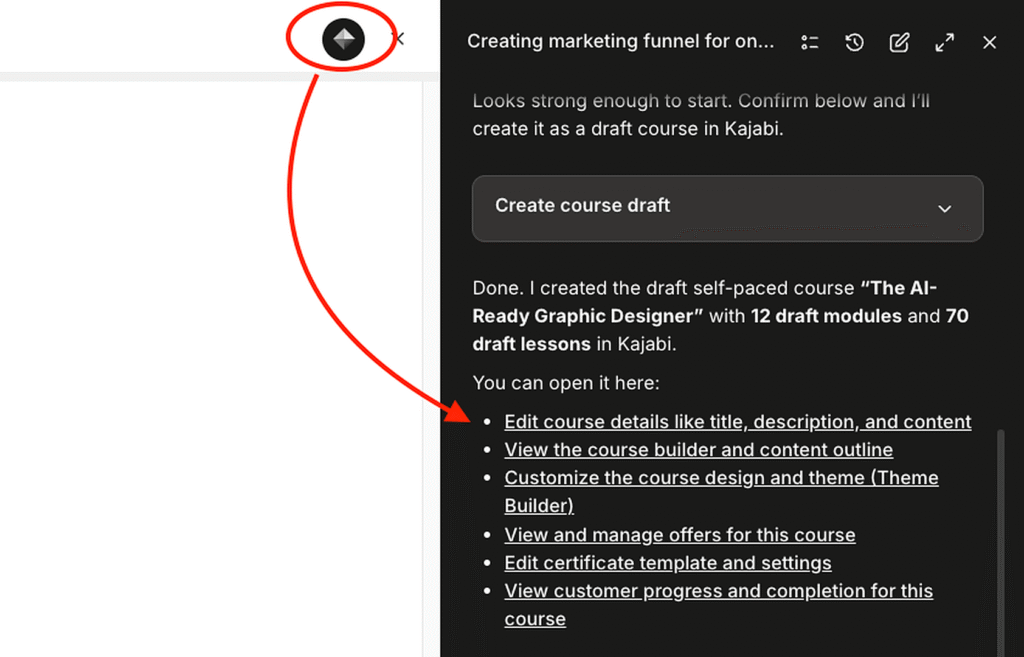
Now, I wouldn’t publish any of that as-is. As you’ll want to tweak it, cut most of it, and rewrite the rest until it sounds like you. That’s true of every AI draft you’ll ever get.
But the copy was never the point.
What’s helping you do instead is skip most of the setup process.
For example, I asked Cofounder to create a course outline, sales funnel, email sequence, and related automations for a course, and it configured the pieces together for me. That saved time compared with building the entire workflow from scratch.
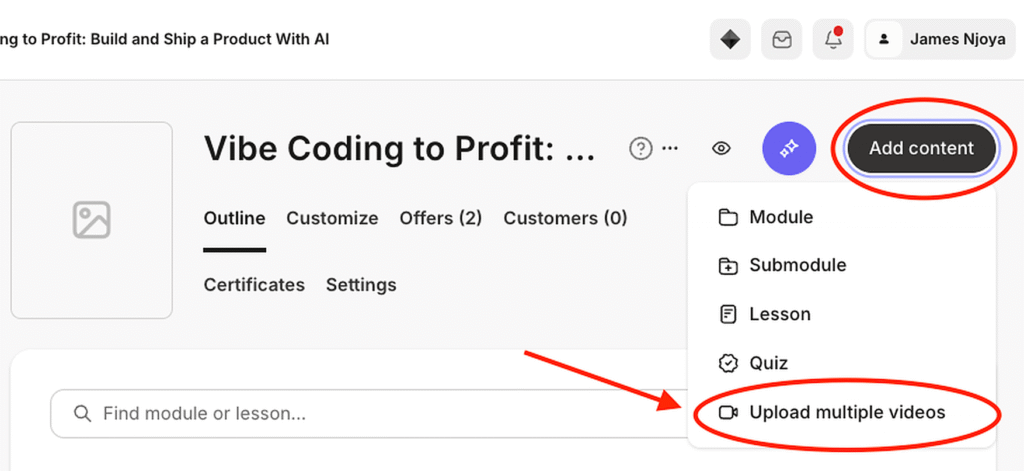
Once your course is set up, you can drag and drop to rearrange modules and lessons and upload lesson videos in bulk, though Kajabi limits individual video files to 4GB.
The lesson editor keeps things just as simple. Rather than giving you a full page builder to design every part of the lesson, Kajabi focuses the editor on the essentials: choose your media, add a lesson thumbnail, and write the lesson content using the rich-text editor. There are no layers of layout controls to work through, which makes it easy to get a lesson published without having to design the page itself.
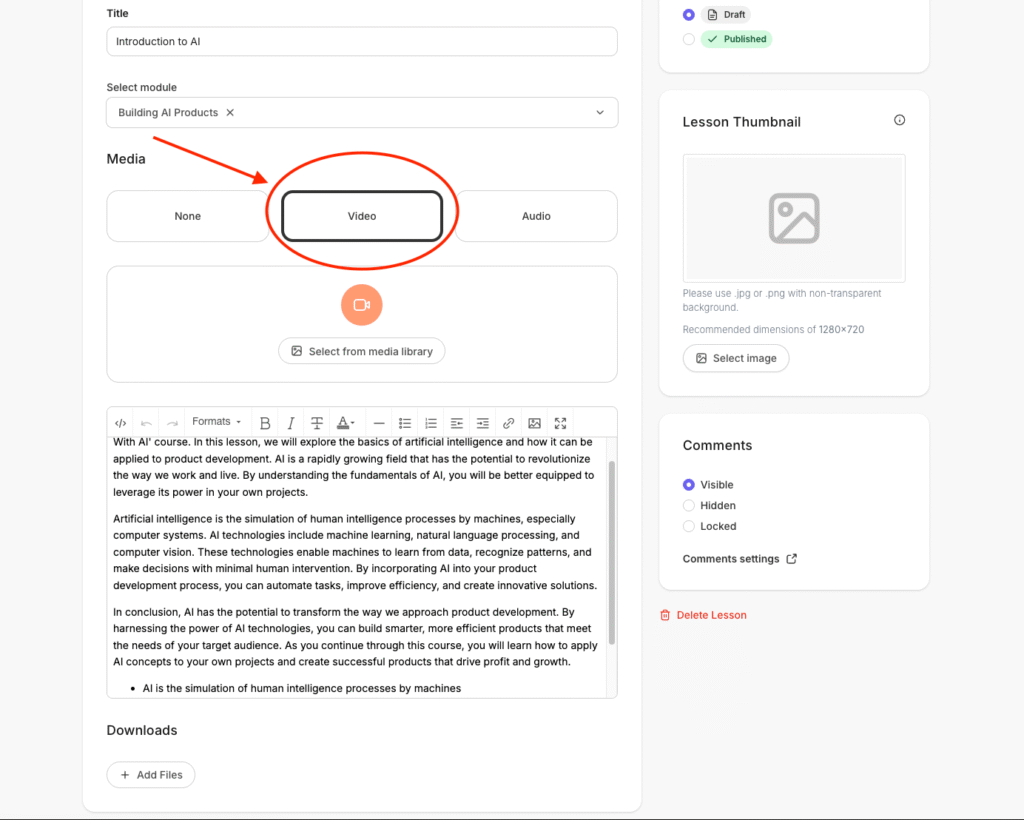
Meanwhile, Systeme.io takes a different approach. Creating an individual lesson feels more like building a landing page because the lesson editor uses the same page-building layout. That gives you control over the layout, but I found it more tedious to remove and edit the template without disrupting the page structure.

Systeme.io also lacks Kajabi’s generative AI tools for creating a course outline and doesn’t offer some of the same conveniences, such as bulk lesson-material uploads.
Both platforms let you natively host course materials, drip lessons, assess students, and issue course certificates, but Kajabi also supports live learning.
Both Kajabi and Systeme.io cover the core features you need to deliver an online course. You can host your course content, release lessons on a schedule, create quizzes, and issue certificates when students complete the course.
The assessment tools are fairly comparable, although Kajabi gives you more flexibility. Its quiz builder supports multiple-choice, checkbox, short-answer, and file-submission questions.
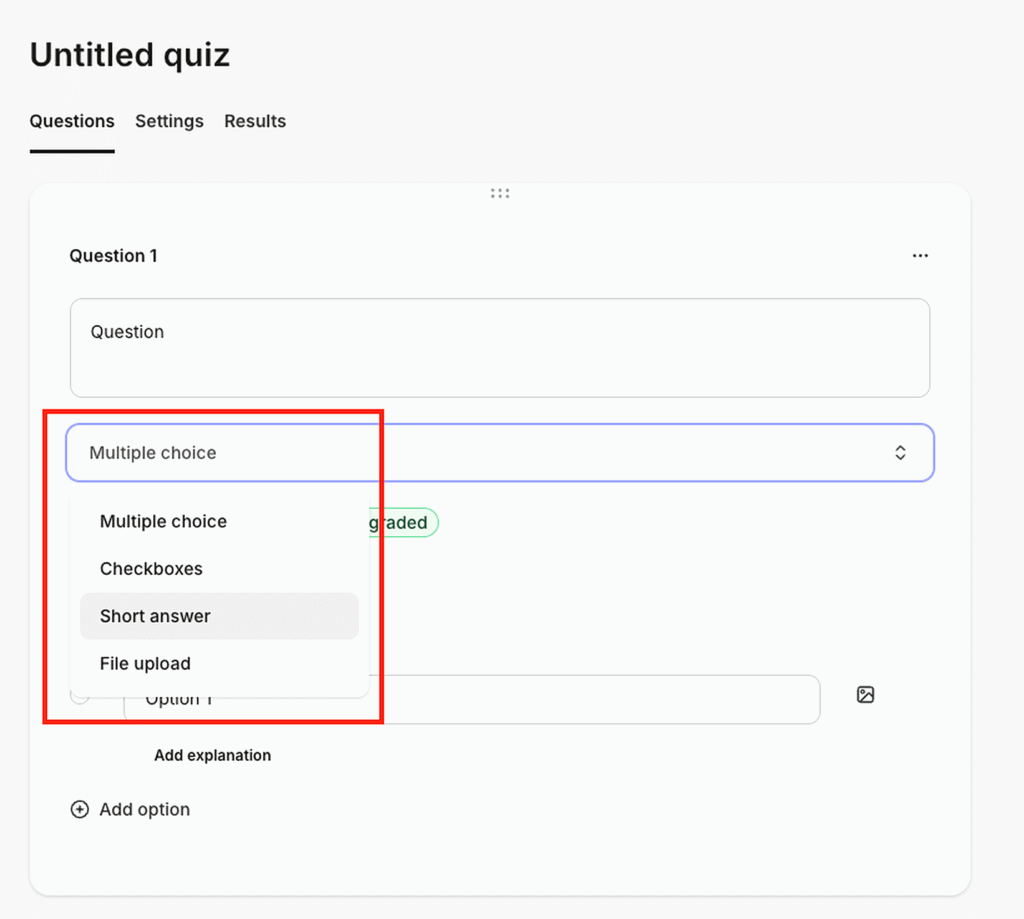
You can automatically grade objective questions, manually review written or file-based submissions, set passing grades, and control whether students can progress based on their results.
Systeme.io also supports quizzes, automatic grading, and assignments, but its quiz builder is limited to single-choice questions.
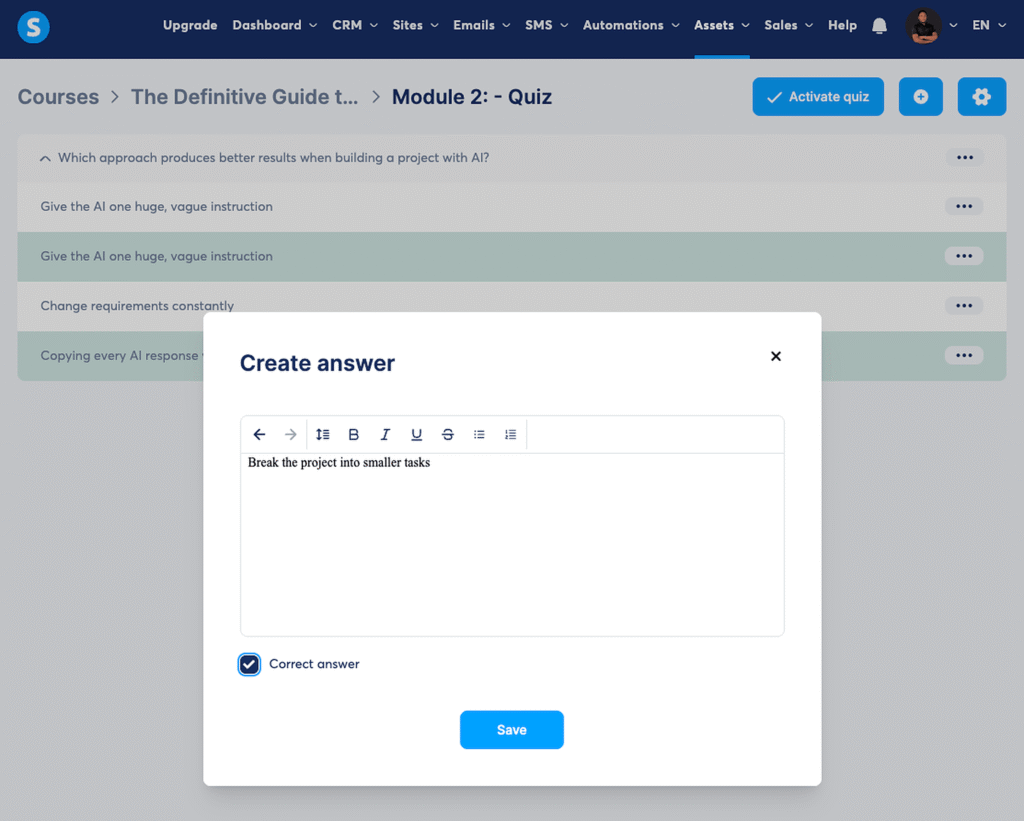
Neither platform, however, is built for advanced assessment. You won’t find features such as rubric-based grading, comprehensive gradebooks, visual quizzes, surveys, or advanced assignment workflows that you’d get with a more education-focused platform such as LearnWorlds.
While both have fairly limited native assessment tools, Kajabi goes ahead enabling you to incorporate live learning into the course curriculum.
Its native livestreaming tool is built into the course experience, so you can run live classes, Q&As, and workshops alongside your regular course content. You can also record those sessions and repurpose them as lessons, giving you a way to combine live sessions with evergreen content in the same course.

Systeme.io doesn’t offer an equivalent native live-learning experience. You can create a similar setup using its calendar, webinar, automation, and external conferencing integrations, but that means piecing together several tools like its native calendar tools for scheduling and Zoom for live video.
Kajabi supports cohort-based courses while Systeme doesn’t
On the Growth and Pro plans, Kajabi lets you create cohort-based courses, allowing you to deliver time-bound learning experiences where a group of students moves through the material on a shared schedule. Cohorts can also support features such as scheduled live sessions, calendar integration, and community engagement.
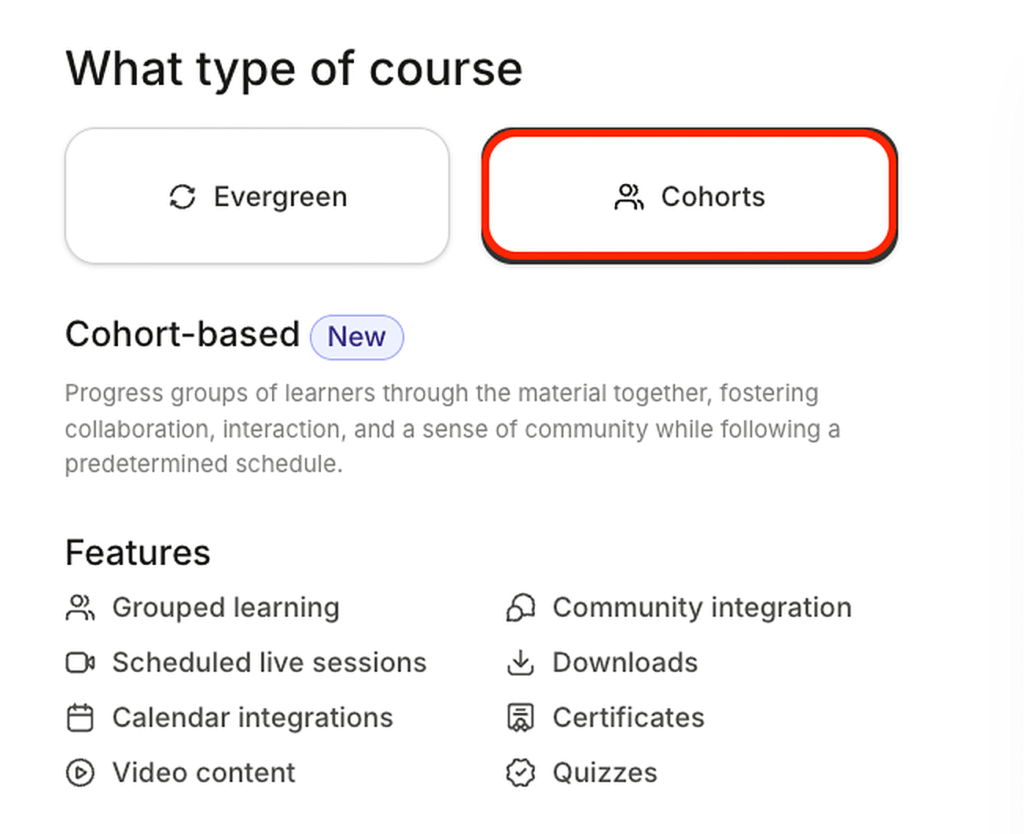
You can create multiple cohorts within a single course, assess learners with quizzes, and award certificates when they complete the course.
Meanwhile, Systeme.io doesn’t offer comparable native cohort-based course functionality, even on its higher-tier plans. If you want to run a cohort-based program on Systeme.io, you’ll need to integrate a few third-party tools for things such as live sessions, and group learning. For example, you could combine Zoom for live classes, and Circle or Discord for community interaction.
Kajabi offers a complete coaching program creation tool while Systeme.io requires you to combine its calendar, automations and Zoom.
Beyond self-paced courses, Kajabi has a dedicated coaching product for running both 1-on-1 and group coaching programs.
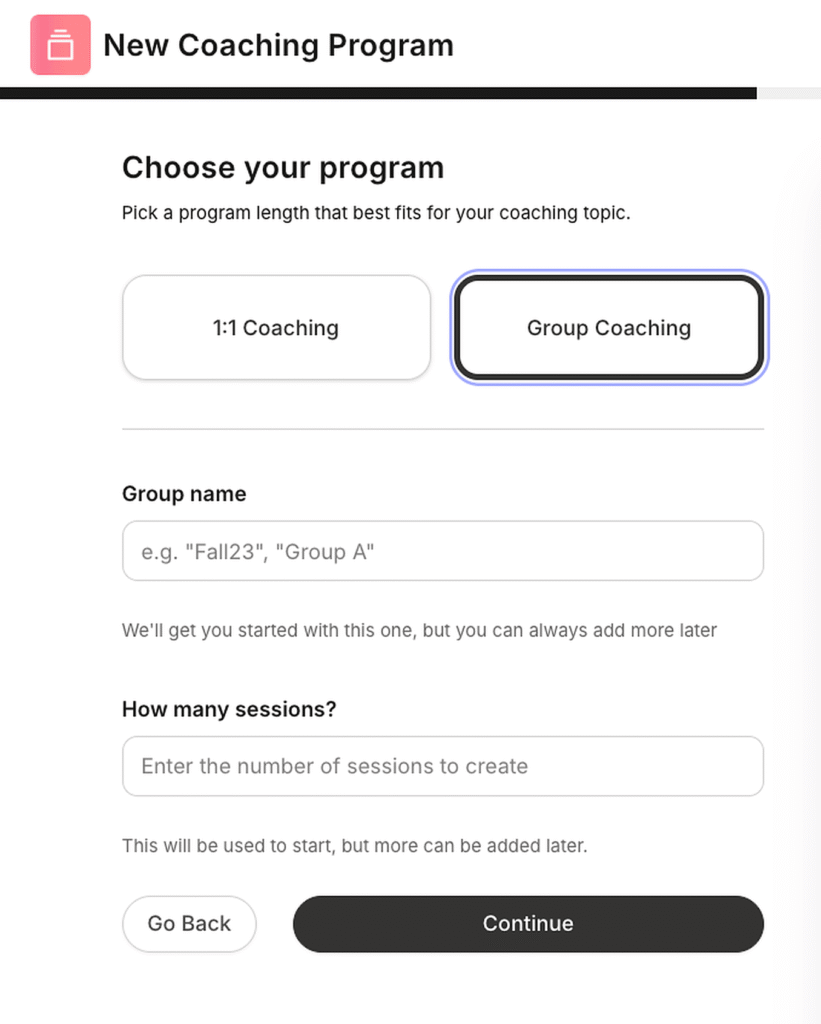
You can structure coaching into a defined program, set milestones and timelines, share resources, schedule sessions, communicate with clients, and manage the coaching experience from the same platform.
Additionally, Kajabi offers a native scheduling tool that connects with your ideal calendar including Google, and Outlook. It also supports native livestreaming using Kajabi Live Video, allowing you to natively host live sessions.
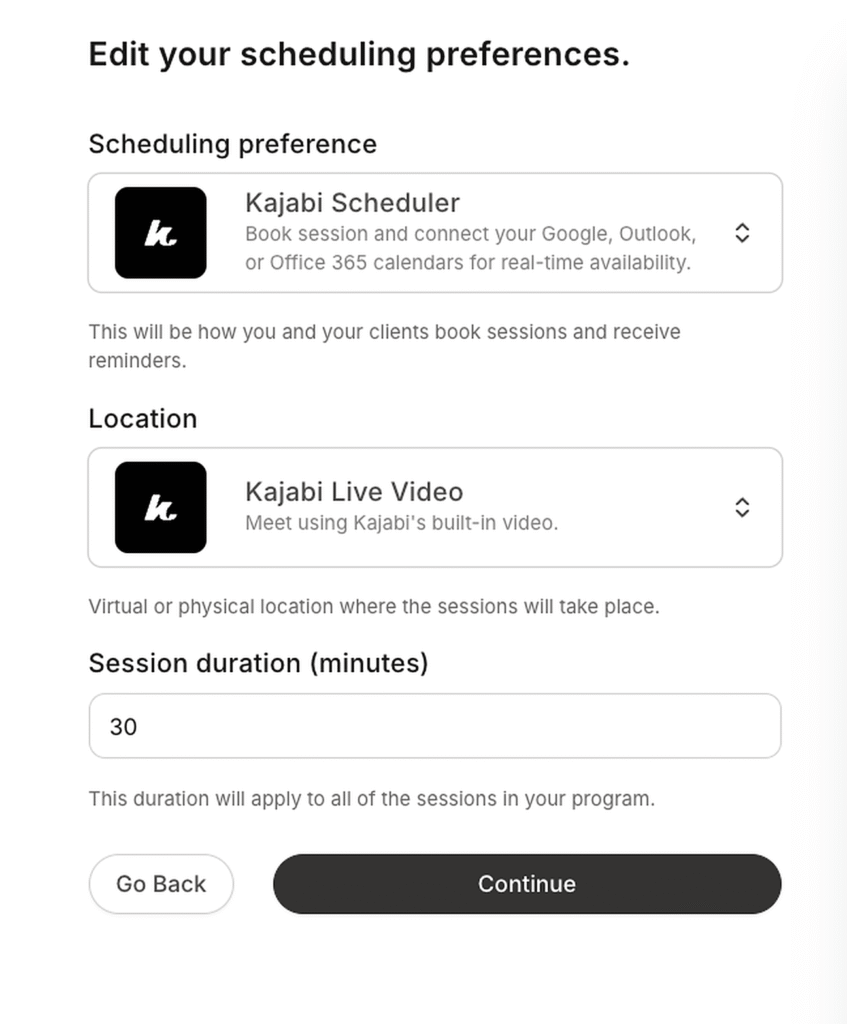
Systeme.io can also support a coaching business, but the workflow is spread across different parts of the platform. You can use its calendar for sessions, but you’ll need to integrate a third party tool for things like live video.
Online Learning Verdict
Kajabi wins because it offers stronger online learning tools.
It has better course tools, native live-learning capabilities, and cohort features that give you more ways to teach, engage, and support students. Systeme.io covers course hosting and certification, but falls short when it comes to student engagement.
Kajabi vs Systeme: Community Building and Memberships
Community building and memberships
Winner
Kajabi
4.5/5
Systeme.io
2.0/5
Kajabi is the better solution for building online communities because it offers stronger organization, access control, and member engagement tools.
Kajabi Community has Access Groups which allow you to control which members can access specific areas and experiences within your community.
Using them, you can organize different types of community experiences, including:
- Channels: threaded discussions or group chats for ongoing conversations
- Challenges: one-time or recurring activities designed to drive participation
- Meetups: scheduled community events and gatherings
- Announcements: broadcasts for communicating important updates to members
More importantly, you can use Access Groups to structure your community by creating different sections and give each its own combination of channels, challenges, meetups, and announcements.
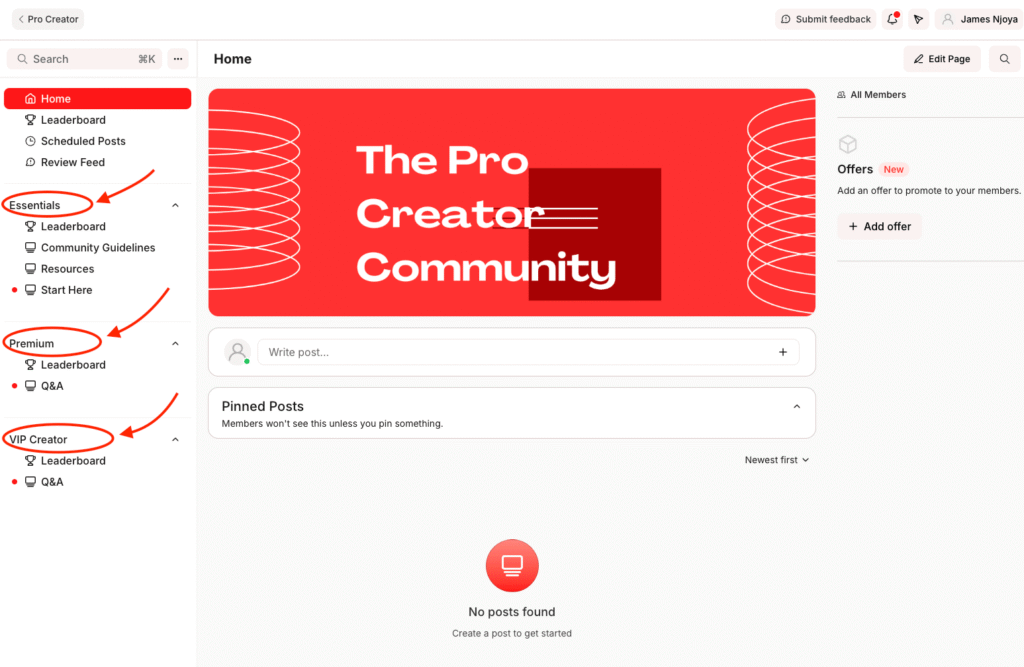
Because Kajabi allows you to create multiple Access Groups within the same Community, you can also create different levels of access for different types of members and connect those access levels to specific offers, such as courses, memberships, cohorts, or coaching programs.
This enables you to build a multi-level community where different members get different experiences based on what they have purchased or been given access to.
For example, you could have a Free Members group with general discussions and announcements, a Course Members group with course-specific discussions and challenges, and a VIP Members group with private channels, exclusive meetups, and coaching. A member can belong to multiple Access Groups, allowing their community experience to expand as they purchase additional offers.
Kajabi also provides more ways to engage members. In addition to threaded discussions and group chats, you can run challenges, schedule live meetups, and use badges and leaderboards to recognize and encourage participation.
Systeme.io covers the basic functionality you would expect from a community forum. You can create public or private communities, organize discussions by topic, schedule posts, allow comments, upload files and voice memos, and control member access. Community access can also be connected to funnels and automations, allowing members to be added or removed based on purchases or workflow conditions.
Where Systeme.io falls behind is the depth and flexibility of the community experience. Its structure is primarily centered around posts and topics, whereas Kajabi gives you a richer system of Access Groups, channels, challenges, meetups, and engagement features that can be combined to create different experiences for different members.
Community Verdict
Kajabi is the better platform for building an online community than Systeme.io.
Access groups let you give free members, course buyers and VIP clients their own spaces inside one community, and challenges, meetups, badges and leaderboards give people a reason to keep showing up. Systeme.io covers the basics of a forum: posts, topics, comments and member access. That is enough for a simple group around one offer, but not for a layered membership where different buyers get different experiences.
Kajabi vs Systeme: Marketing & Sales Tools
Marketing and sales tools
Kajabi
4.0/5
Winner
Systeme.io
4.5/5
Systeme.io has the stronger drag-and-drop website editor, with more flexible design controls and better-looking templates out of the box. Kajabi gives you more customization through its custom code editor.
When it comes to building a complete website both Kajabi and Systeme.io give you the essential tools you need, including pre-built themes and drag-and-drop page builders.
However, after building websites with both platforms, I found Systeme.io to be the stronger option overall, because it gives you more design flexibility without having to write code.
First, let’s see how both platforms’ themes collection compare.
Both platforms give you a selection of pre-built website themes to get started.
Kajabi offers 11 and an additional 6 legacy themes.

The themes look okay: but not outstanding. That said, it’ll take you a lot of effort and time to customize them to feel unique and to your brand.
Meanwhile, Systeme gives you 7 themes.

But I liked Systeme’s templates better because they look nicer and a bit more modern out of the box. Still they don’t look that great either.
Both platforms use drag-and-drop editors, but Systeme.io gives you more freedom over the customization layout.
You can build with rows and columns, move elements around the canvas, and control things like padding, margins, backgrounds, and spacing.
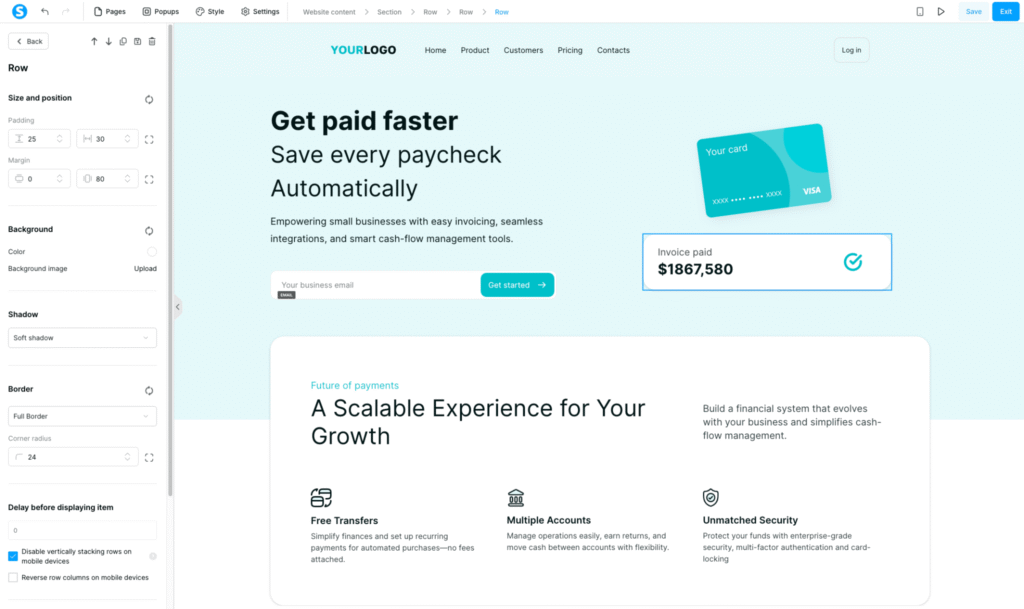
It feels closer to a modern page builder like Elementor. Not quite as powerful, but surprisingly close for an all-in-one marketing platform.
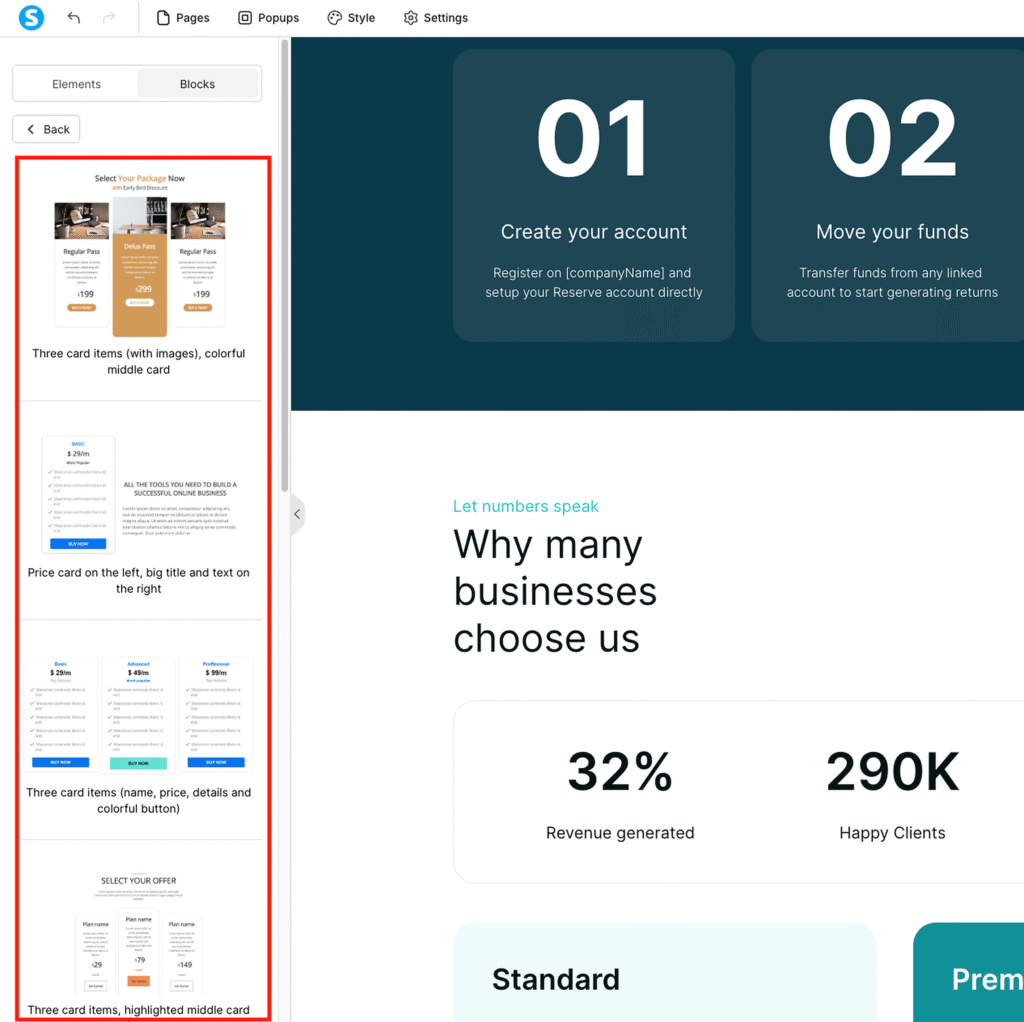
Systeme.io also has a good library of pre-built blocks. Instead of building every section from scratch, you can drop in things like opt-in forms, pricing cards, and other page sections, then customize them as you like.
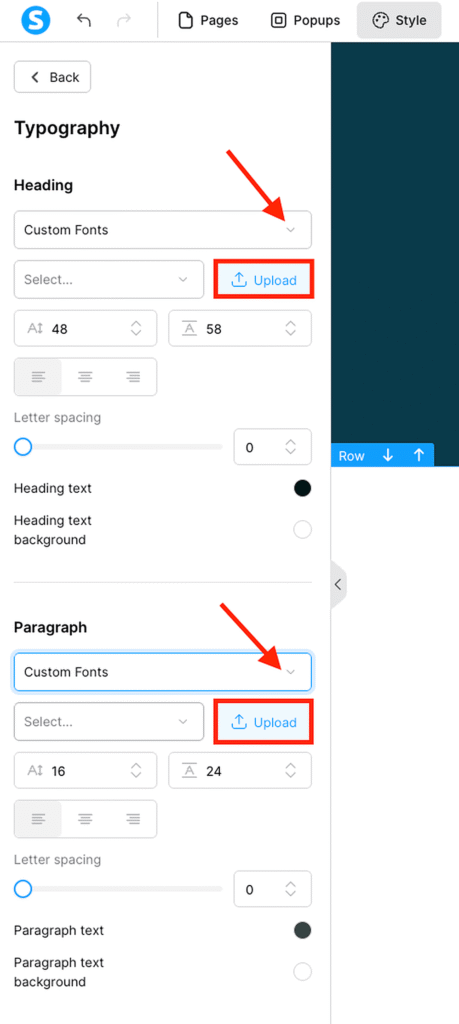
You also get more control over the site’s visual style. You can set your brand colors, add HTML and CSS, and choose from fonts such as Roboto, Lato, Open Sans, and Playfair, or upload your own custom fonts.
Kajabi’s builder feels more restrictive by comparison. You can change or add things like page blocks, spacing, padding, margins, background color and animations.

Unlike Systeme, you can’t freely move elements around the canvas as you like.
However, Kajabi does have a few tricks up its sleeve.
You can upload custom themes, buy themes from its marketplace, and use CSS and JavaScript to modify your site.
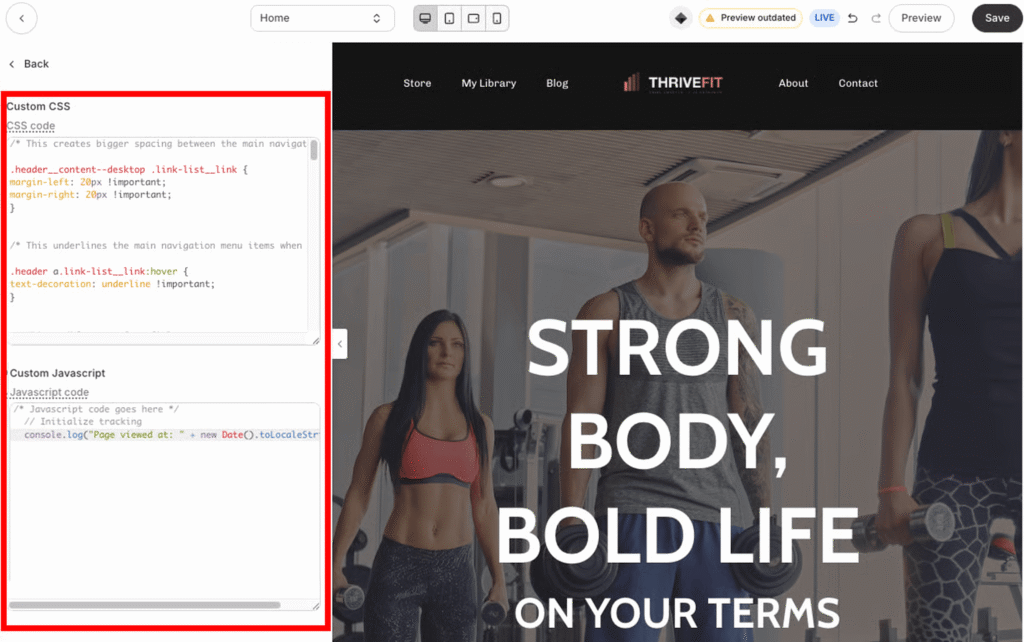
On its Pro plan you’ll be able to view and modify your template code directories and corresponding files
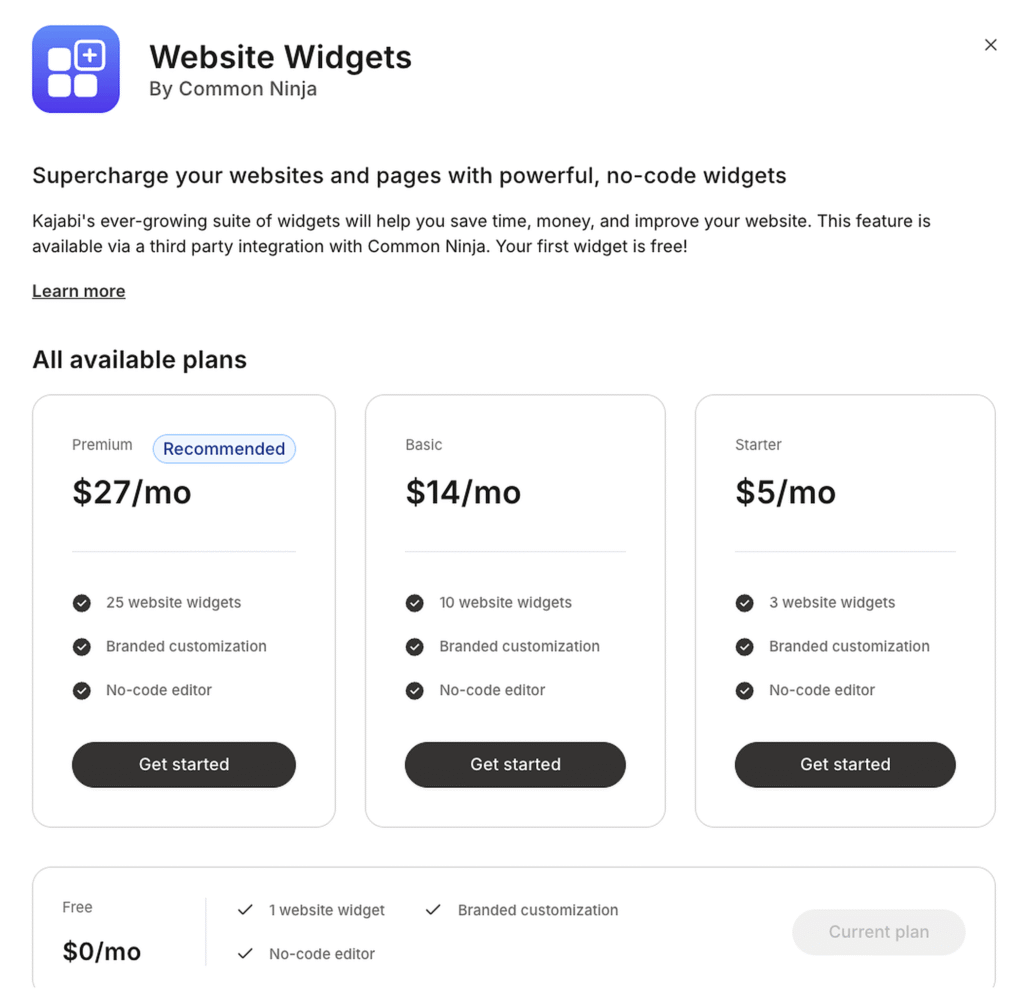
Kajabi also has custom widgets, which can give you reusable design component blocks. The catch is they’re a paid add-on.
Systeme has better funnels which include A/B testing, deadline pages, and per-step automations.
Systeme.io does not offer a visual funnel map in the same way Kajabi does. Instead, its funnel interface lists the individual steps in a sidebar, while the main panel gives you access to the selected step’s configuration, automation, reporting tools and other settings.
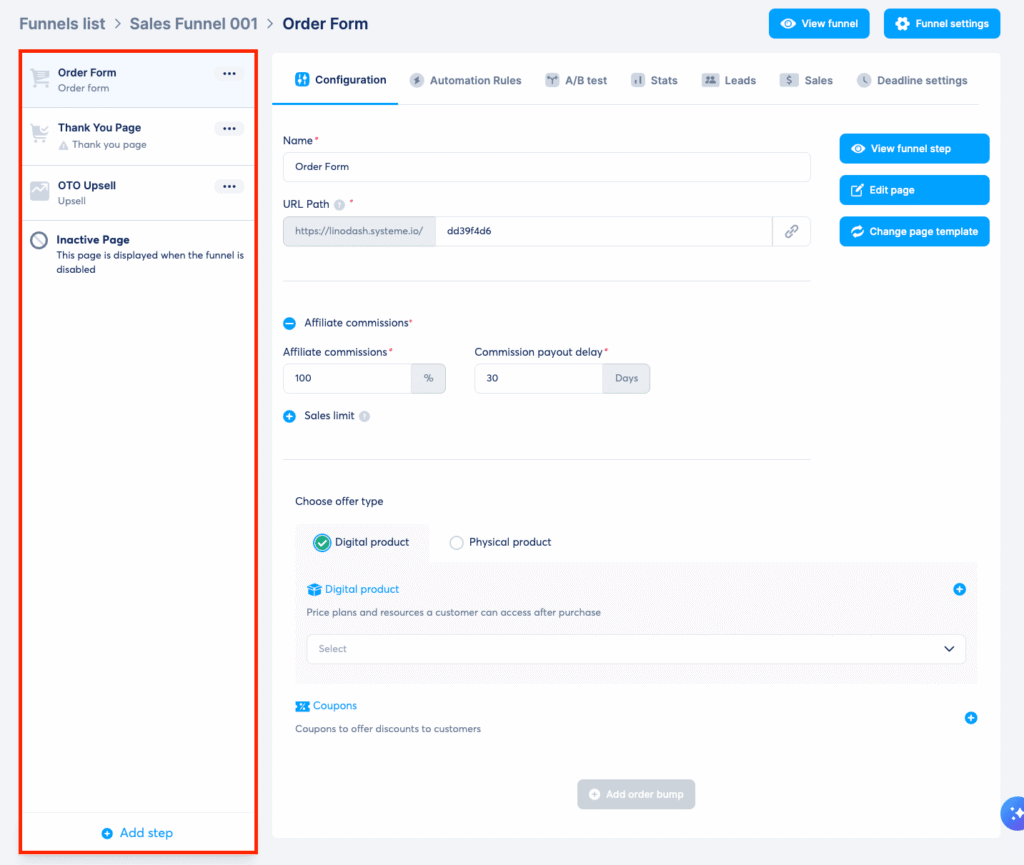
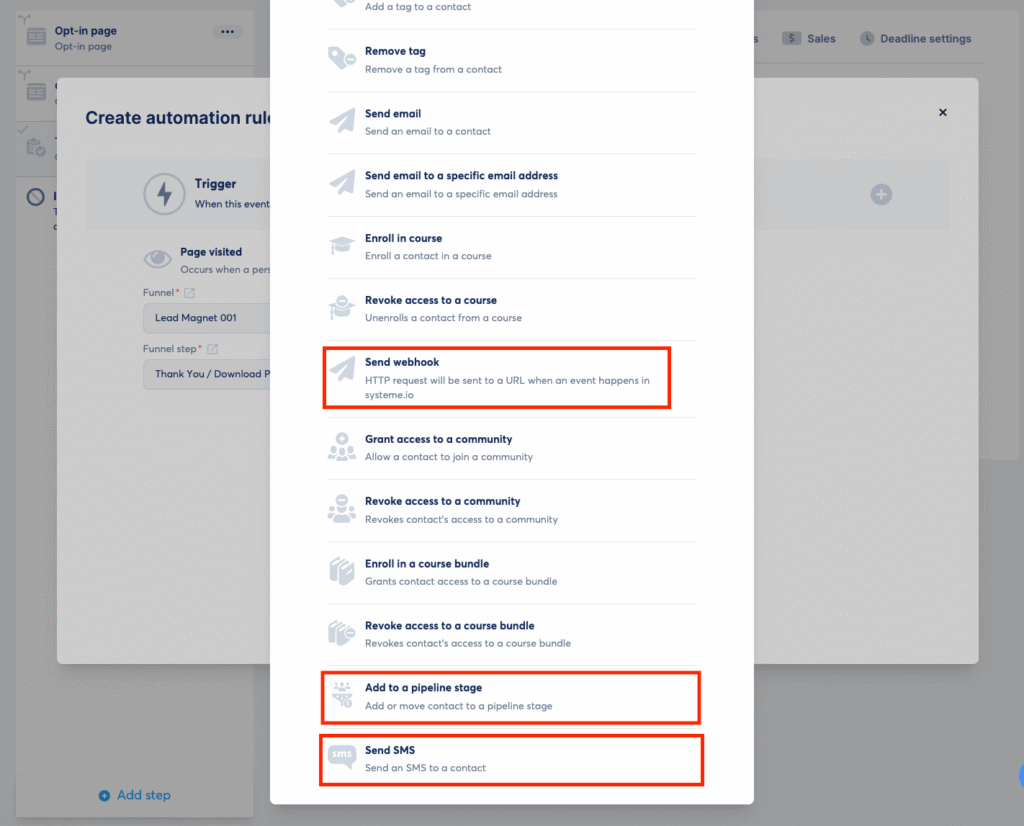
Each funnel step has its own automation and configuration options, allowing you to trigger actions such as sending a webhook request, moving a contact to a specific pipeline stage, or sending an SMS. This puts more operational control directly inside the funnel.
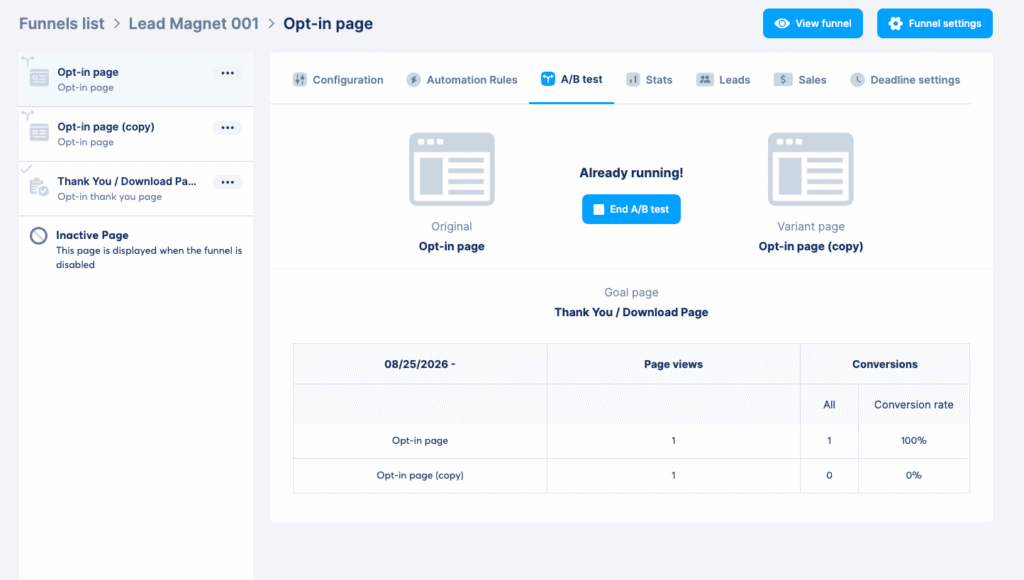
Systeme.io also has stronger built-in tools for optimizing funnel performance. You can A/B test different versions of a page to determine which one generates better results, allowing you to make funnel decisions based on actual conversion data.
On top of that, Systeme.io allows you to create time-limited offers by setting an expiration point for a funnel page or step and specifying where visitors should be redirected once the deadline passes.
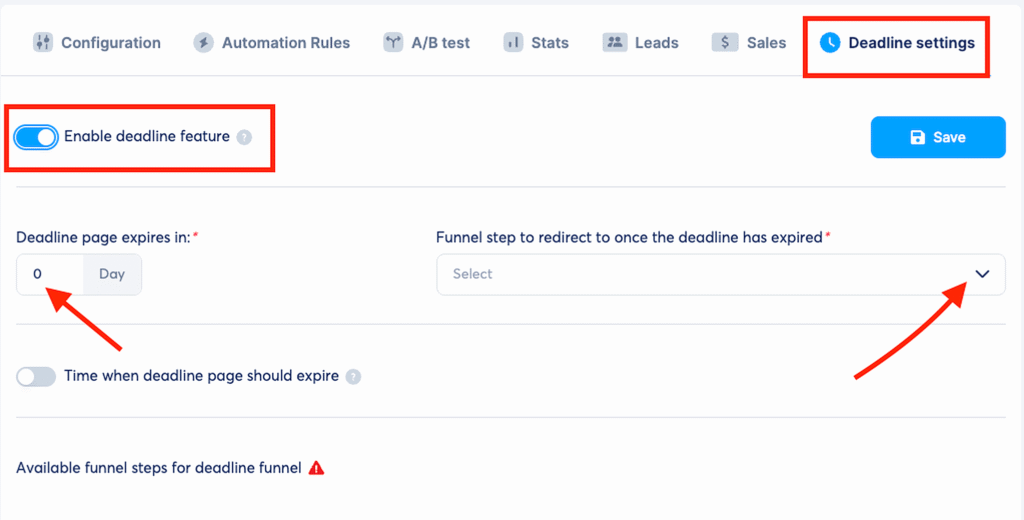
That way, you can effortlessly build funnels for launches, limited-time promotions, and evergreen campaigns without some pesky automation setup.
Meanwhile, Kajabi’s funnel builder makes it much easier to launch.
Which comes down to Funnel Blueprints.
These are pre-built, end-to-end funnel templates designed around use cases such as product launches, webinars, coaching, and sales campaigns.
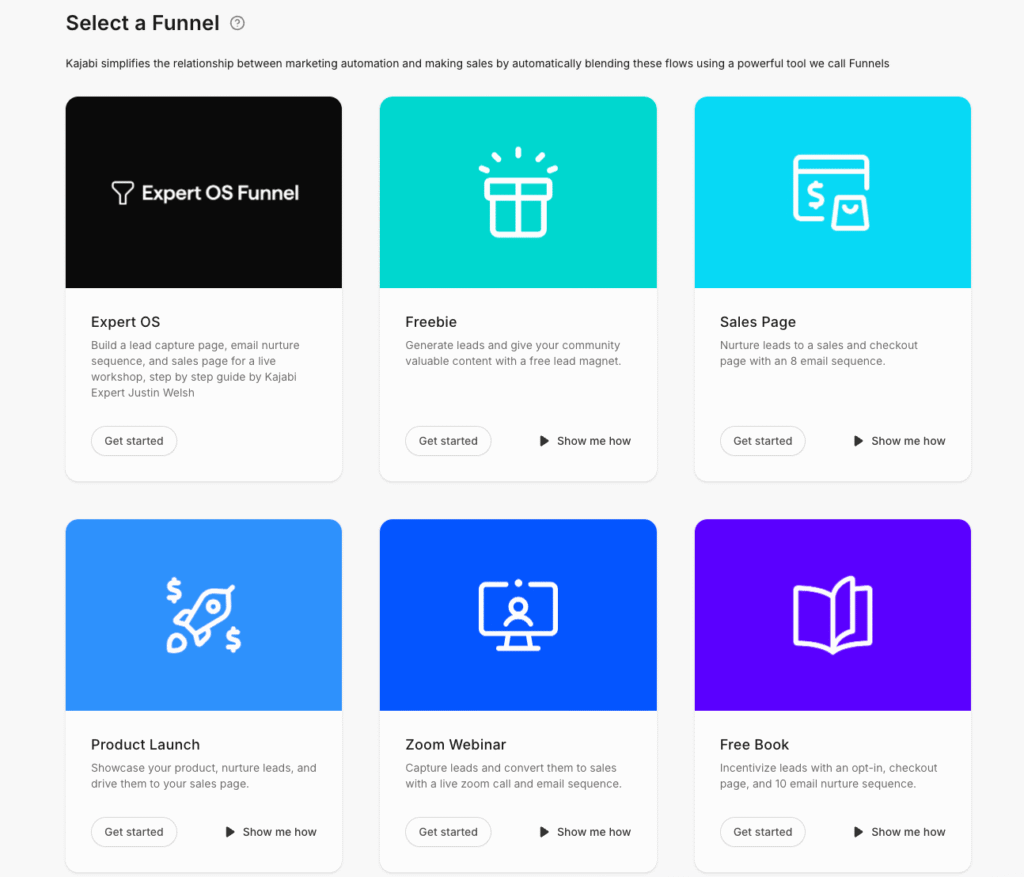
Instead of starting with a blank funnel and deciding which pages, forms, and emails you need, you can select a Blueprint that matches the campaign you want to run. Kajabi then provides a pre-built structure with the relevant pages and email sequences already connected.
That way, what you’ll need to do is customize the copy, branding, offers, and other elements without having to build the underlying funnel structure yourself.
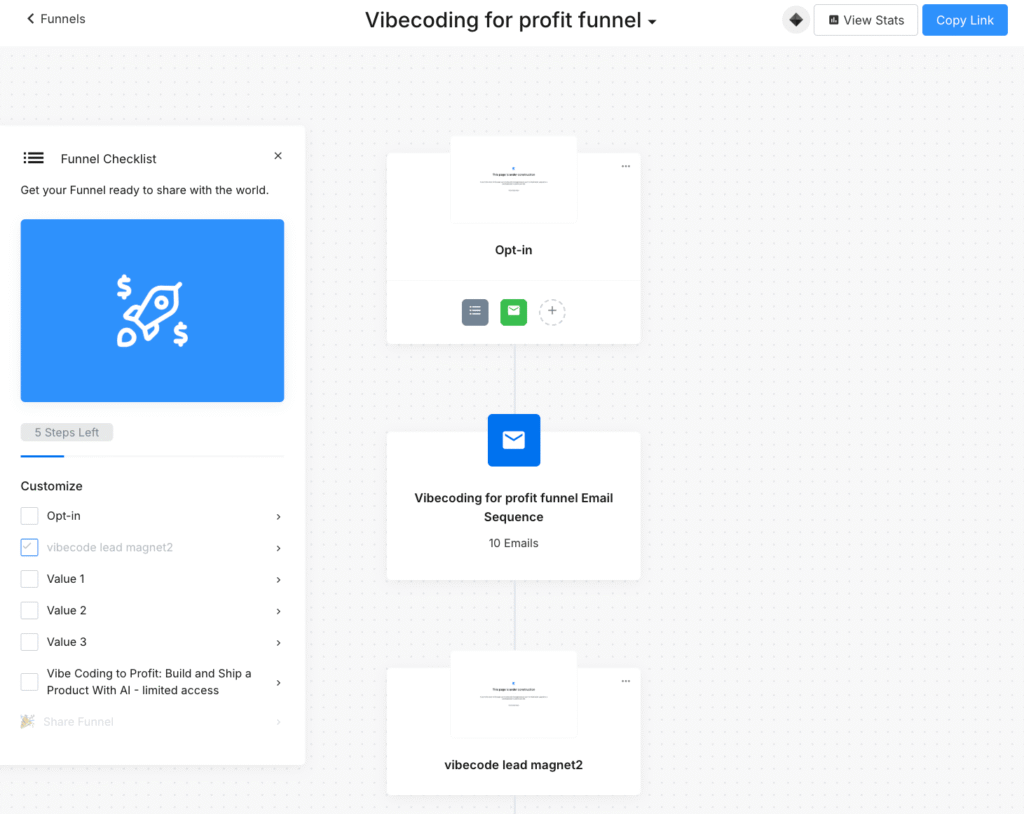
This makes Blueprints particularly appealing if you are new to funnel building.
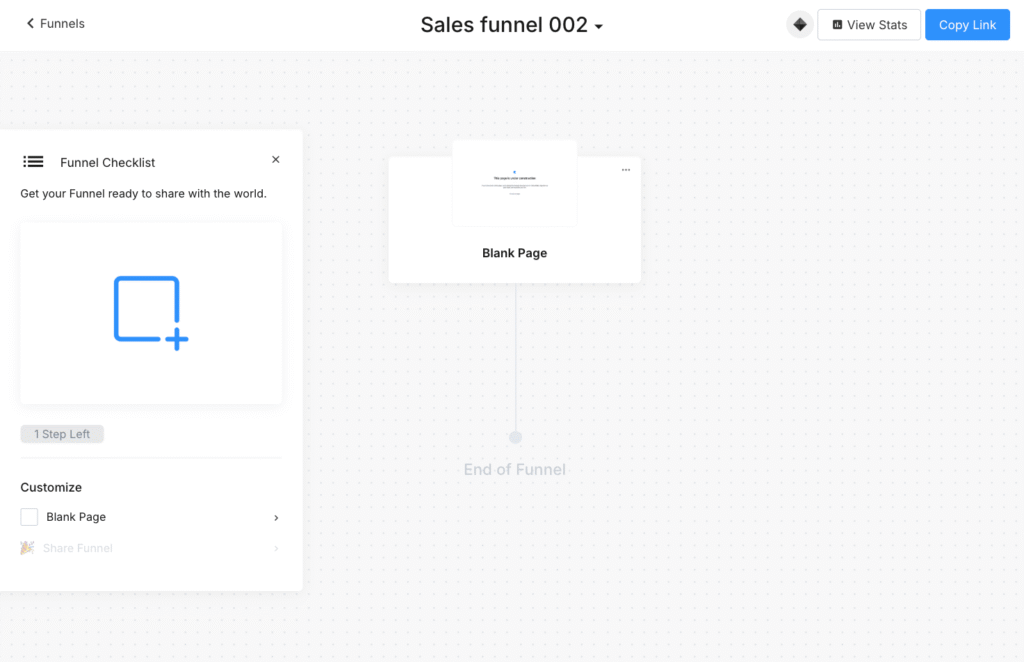
However, Kajabi isn’t completely restrictive, either. If you prefer to build your own funnel, you can use its visual builder to create and connect the different steps yourself.
Like Systeme.io, Kajabi also lets you add automation using its “When” and “Then” logic though its automation is less granular and offers fewer funnel-specific actions than Systeme.io.
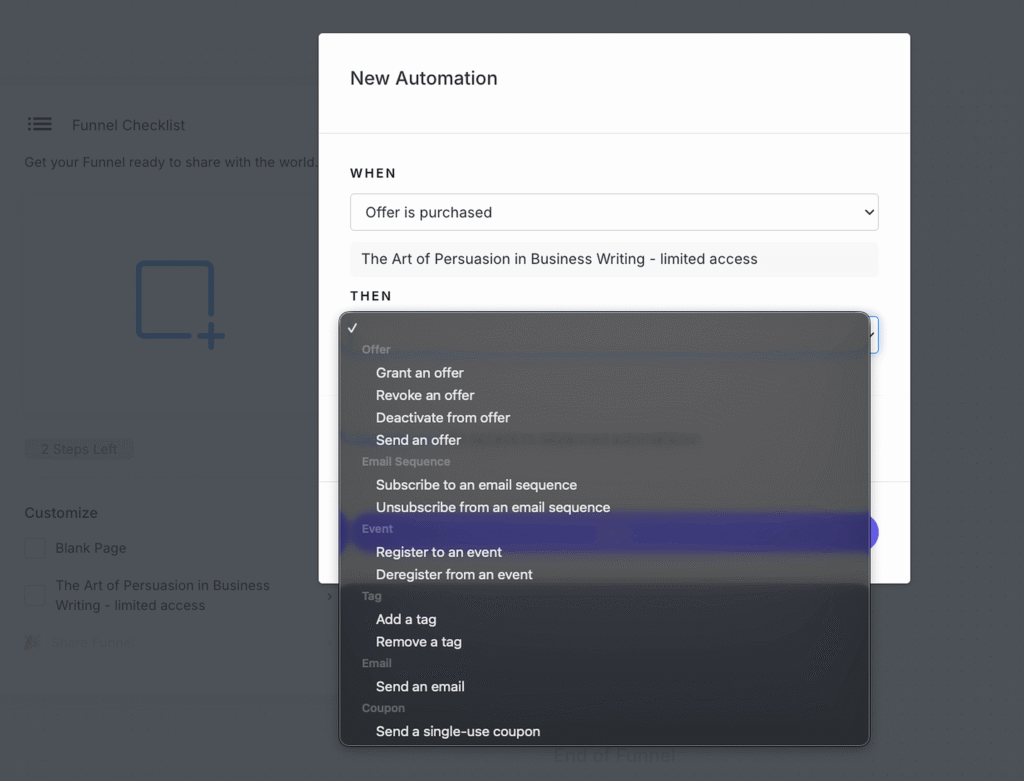
Also unlike Systeme, you get fewer built-in options for direct funnel experimentation and urgency-based campaigns. As it doesn’t provide the same native A/B testing and deadline-funnel capabilities within the funnel-building experience. You can still test individual pages through Kajabi’s page-building functionality, but that is different from having experimentation integrated directly into the funnel workflow.
Both offer essential email marketing tools but Kajabi offers advanced automation but at a premium price tag
Both Kajabi and Systeme.io offer built-in email marketing tools so you won’t need to integrate third-party solutions like Kit, MailerLite or ActiveCampaign.
At a basic level, they are fairly evenly matched because each one lets you:
- send broadcasts and automated sequences,
- segment contacts with tags and fields
- A/B test emails
- trigger workflows based on actions such as purchases or form submissions
- create email templates with drag-and-drop builders
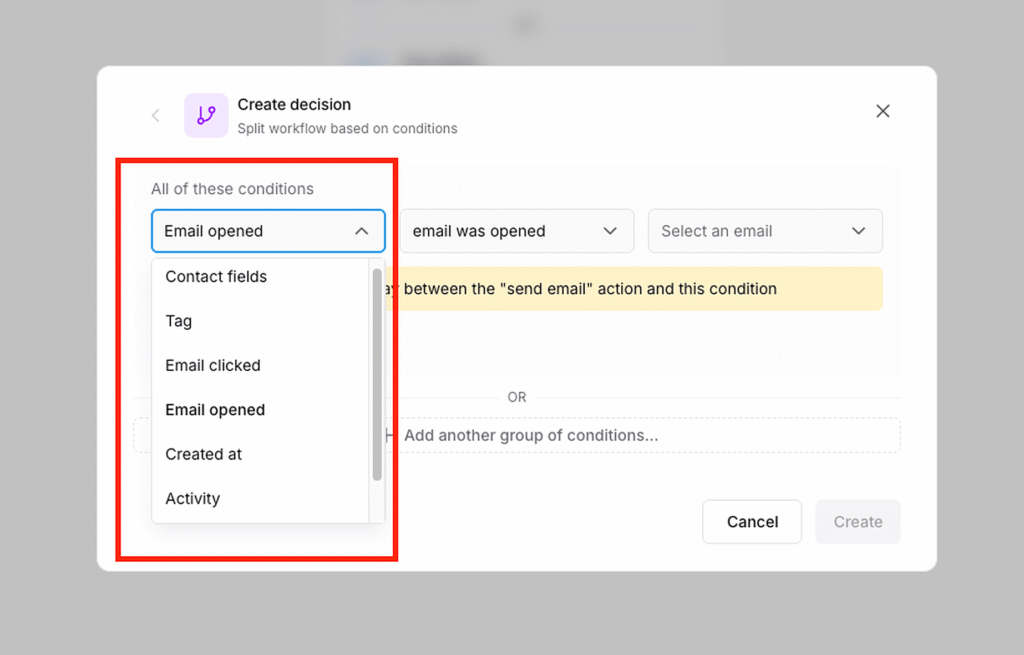
However, looking deep and analyzing both platforms I found that Kajabi gives you a much broader set of conditional filters through its Advanced Automations. It provides 56 predefined filters covering areas such as contact data, customer activity, email engagement, email activity, events, and tags and more. You can also combine conditions, create multiple entry points, and build workflows with branching logic that sends contacts down different paths based on their actions or attributes.
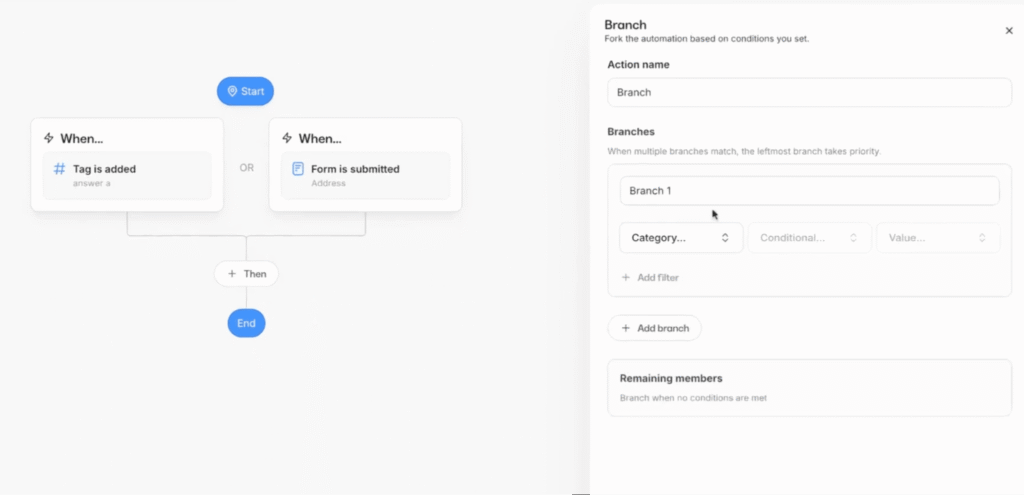
However, it’s important to know that this capability is only available via Kajabi’s Advanced Automation which you can only access on the Growth and Pro plans.
Systeme.io handles straightforward automations well, but its conditional logic is considerably more limited. Its workflows rely mainly on simple if this then that rules, with fewer conditions and branching options. This works for basic sequences, but becomes restrictive when you need to build more sophisticated, behavior-based email journeys.
Systeme.io does have one advantage though: its built-in pipeline. You can move leads through Kanban-style stages, giving you a visual overview of where each prospect is in the conversion journey.
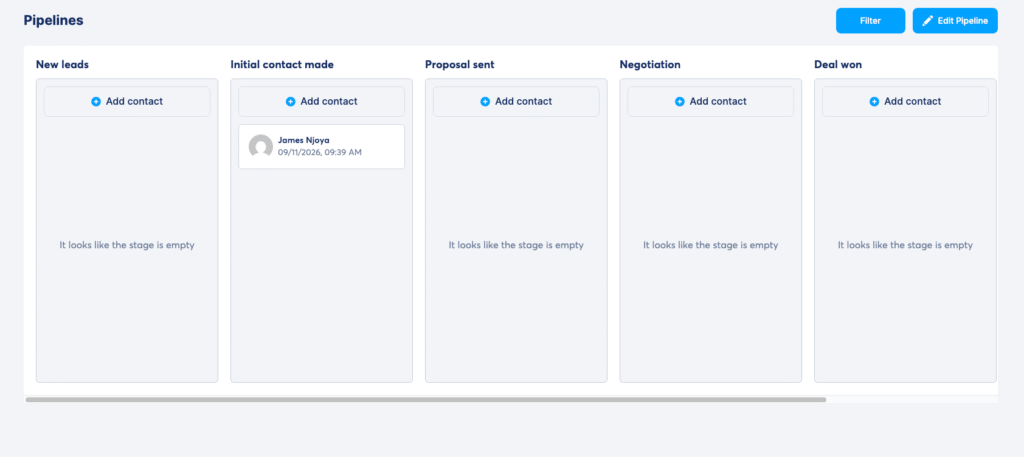
That can be useful for high-ticket coaching and consulting, allowing you to track prospects and personalize follow-up messages.
Contact Management: Kajabi Knows Your Customer. Systeme.io Knows Your Pipeline.
Both Kajabi and Systeme.io have strong contact management, but they approach it differently. Systeme.io’s contact management is more capable than it gets credit for. A contact record includes the usual identity and address details, custom fields, tags, affiliate information, and a surprisingly deep set of panels covering subscriptions, payments, email history, campaigns, surveys, communities, courses, automation tasks, workflows, notes, and tag history.
The last two are especially useful: tag history gives you an audit trail of what changed and when, while workflows and automation tasks give you visibility into what automation activity is happening around that particular contact. So if someone says, “Why did I get this email?”, you have more to investigate than just a tag. Systeme.io also has solid filtering, with conditions for text fields, tags, contact status, payment status, email activity, and other contact data.
You can stack conditions and save them as filters. The catch is that Systeme.io often makes you create the context yourself. If you want to distinguish Beginner Course buyers from Advanced Course buyers, for example, you will generally use tags and automations to record those purchases. That works, but it means maintaining the tagging system as your business grows. And there is one major thing Systeme.io has that Kajabi doesn’t: a sales pipeline.
You can move prospects through stages such as New Lead, Initial Contact, Proposal Sent, Negotiation, Deal Won and Deal Lost, create multiple pipelines, add notes, and move contacts automatically through workflows. For a coach or consultant selling through applications and calls, that’s genuinely useful. It isn’t a full CRM (there’s no serious forecasting, deal management, or sales-team functionality), but for a simple sales process, it’s a feature Kajabi simply doesn’t have.
Kajabi’s contact management is more customer-centric. Its profile gives you the information you’d expect when the main question is, “What’s this person’s relationship with my business?” You can see the products and offers they have access to, purchases, forms submitted, email activity, notes, tags, and other customer information. More importantly, Kajabi summarizes the commercial relationship with purchase count and net revenue per contact, so you don’t have to read through a payment history to work out how valuable someone has been.
You can also grant an offer directly from the contact profile. Its segmentation is where that customer context becomes even more useful: Kajabi gives you a large set of filters based on things such as products owned, products not owned or previously owned, offers held, coupons used, assessments, forms, and email behaviour. So if you want to email everyone who bought your Beginner Course but hasn’t bought the Advanced Course, you can build that directly from purchase data: Owns Beginner Course → AND → Does not own Advanced Course.
In Systeme.io, you’d typically create and maintain tags for those two purchases and segment using them. That’s not a question of whether Systeme.io can do it. It can. But Kajabi requires less infrastructure to get there. So I’d give Kajabi the edge if your business is primarily about courses, memberships, or digital products, because it gives you a clearer picture of the customer you’ve already won. I’d give Systeme.io the edge if you’re selling services and need to manage prospects through a sales process.
Put simply: Kajabi is better at telling you who the customer is; Systeme.io is better at showing you what’s happening with the contact and where the prospect is in the pipeline.
Marketing and Sales Tools Verdict
Systeme.io has the stronger marketing and sales toolkit for the money, while Kajabi has the deeper email automation.
With Systeme.io you get a more flexible page editor, funnels with A/B tests, deadline pages and per-step automations, and a built-in sales pipeline that helps if you sell calls or high-ticket offers. Kajabi wins back ground with Funnel Blueprints that set up a whole launch for you and Advanced Automations with 56 filters, but those automations are only on the Growth and Pro plans. If you sell first and teach second, pick Systeme.io. If your funnels feed courses and memberships, Kajabi keeps everything in one tidy ecosystem.
Kajabi Has the Stronger Checkout, While Systeme.io Offers More Payment Flexibility
Both platforms have built-in checkouts, so you don’t need a separate shopping cart to sell courses, memberships, or coaching packages. Both support one-time payments, payment plans, subscriptions, coupons, order bumps, and upsells.
Systeme.io gives you more ways to get paid.
It supports Stripe, PayPal, Flutterwave, Razorpay, Mollie, GoCardless, Xendit, Mercado Pago, and SecureAndPay. It also supports cash on delivery for physical products.
That’s a big advantage if you sell outside North America and Western Europe, where Stripe and PayPal aren’t always the best (or even available) options.
Kajabi supports three: Kajabi Payments, Stripe, and PayPal.
Kajabi Payments is the better option when it’s available. It supports payment methods Systeme.io doesn’t, including Apple Pay, Google Pay, Afterpay, and Klarna.
The catch is availability. Kajabi Payments is limited to the US, Canada, UK, Australia, UAE, and parts of Europe. If you’re outside those markets, you’re generally back to Stripe or PayPal.
But Kajabi wins on the checkout itself.
Its Enhanced Checkout gives you more control over how the payment page looks and works. You can customize the layout, branding, form fields, and payment options without touching code.
You can also put multiple pricing options on the same checkout (say, pay in full, a payment plan, and a subscription) and mark one as the recommended option.
Systeme.io’s checkout is more functional than fancy.
It’s built into the page editor and supports multiple price plans, an order bump, coupons, and one-click upsells and downsells. It does the job. But visually, it feels much more like a standard Systeme.io page, and you don’t get Kajabi’s recommended-option controls or wallet buttons.
Then there’s the cost.
Systeme.io charges no additional transaction fee.
You pay your payment processor’s fee and nothing to Systeme.io, even on its free plan.
Kajabi’s fees depend on how you process the payment. With Kajabi Payments, processing starts at 2.9% + 30¢ on Basic, dropping to 2.8% on Growth and 2.7% on Pro.
And if you use your own Stripe account, Kajabi adds another 2% on Basic, 1% on Growth, or 0.5% on Pro on top of the processor’s fee. PayPal payments are exempt.
So if you process $10,000 a month through Stripe on Kajabi’s Basic plan, that’s another $200 going to Kajabi. Systeme.io wouldn’t take that cut.
Systeme.io has built-in tools to sell you physical products while Kajabi requires you to integrate a dedicated e-commerce tool like Shopify
In Systeme.io, a physical product is just another product. You create it, add variants like size and colour, and it builds the combinations for you, each with its own SKU, price, images, and stock count. You set shipping fees on the product, drop it into any funnel’s order form, and you can offer it as an order bump next to a course. A printed workbook, a book, a piece of merchandise: the buyer pays for all of it in one checkout, and you manage all of it in one place.
Meanwhile, Kajabi has no physical product type at all. The official route is a Shopify Buy Button, which means Shopify handles the product, the inventory, the order, and the checkout, and Kajabi just hosts the button. You can send Kajabi purchases to a fulfillment service through Zapier, but the product still lives outside Kajabi. That means a second platform, a second login, a second monthly bill, and two places to look when a customer asks where their order is.
Systeme.io’s tools stop at the basics. Physical products are one-time purchases only, so no subscription boxes, and each product is tied to the currency of its funnel, so selling in two currencies means two funnels. If you’re running a real store with hundreds of SKUs, that isn’t enough. If you’re a course creator who also sells a book, it’s exactly enough, and Kajabi gives you nothing.
Payments and Checkout Verdict
Systeme.io gives you more ways to get paid and takes nothing from your sales, while Kajabi has the more polished checkout.
Systeme.io works with nine payment gateways, sells physical products natively and charges no transaction fee on any plan, which matters if you sell outside North America and Western Europe or ship a book next to your course. Kajabi’s Enhanced Checkout looks better, offers Apple Pay, Google Pay, Afterpay and Klarna through Kajabi Payments, and lets you show several pricing options on one page. The catch: Kajabi Payments is only available in some countries, and Kajabi adds 0.5% to 2% when you use your own Stripe account.
Kajabi vs Systeme.io: Pros and Cons
Kajabi pros and cons
Pros
- Purpose-built course delivery with quizzes, assessments, cohorts and live sessions
- Full community with access groups, challenges, badges and leaderboards
- Coaching, podcasts and newsletters alongside courses and memberships
- Kajabi app for iOS and Android, and a branded app included on Pro
- Advanced automations with conditional filters and branching (Growth and Pro)
- Email A/B tests for broadcasts
- Cofounder AI drafts course outlines, sales pages and email sequences
- 0% platform fee on Kajabi Payments
Cons
- Starts at $179/month, with no free plan
- Basic is tight: 5 products and 2,500 contacts
- Affiliates and advanced automations need Growth ($249/month, or $199 billed annually)
- No A/B testing for pages or funnels
- No webinar tool for large public events
- No support for physical products
Systeme.io pros and cons
Pros
- A free plan with no time limit and no card needed
- Unlimited plan at $97/month: unlimited contacts, funnels, courses and automation rules
- 0% transaction fees on every plan
- Page A/B tests, deadline funnels, order bumps and one-click upsells
- Your own affiliate program on every plan
- Evergreen webinars from the Webinar plan ($47/month)
- Sells physical products with shipping, inventory and variants
- Unlimited sub-accounts, each with the same limits as your plan
- Nine payment gateways plus cash on delivery
Cons
- Basic course builder: lessons are built like pages, with no cohort courses or live lessons
- Basic community with no access levels
- No student mobile app yet
- Simpler automations, with fewer conditions and branches than Kajabi
- Free plan stops at $10,000 in total sales
- No podcast or newsletter product types
My Final Take on Kajabi and Systeme.io
Both Kajabi and Systeme are fantastic all-in-one digital business platforms. But if you carefully look at what each offers you’ll see they serve different types of users.
Kajabi works well for knowledge entrepreneurs, creators and coaches. It has more refined teaching and student engagement tools. And on top of that, a solid marketing stack to help you market your digital business. But all this comes at a premium price tag making it one of the highly priced solutions out there.
Also see how Kajabi compares to other tools on my detailed guides:
Systeme, on the other hand, is a budget-friendly all-in-one online marketing software. It’s a great choice for small creators, beginners and solo digital business owners. It features nearly the same tech stack as Kajabi but at a much lower price tag. Though its course creation, online learning and community building tools aren’t that great, you’ll appreciate its comprehensive marketing toolset that makes selling much easier.
Top Kajabi and Systeme.io Alternatives Worth Considering
Although both platforms are strong digital business tools, they’re also not ideal for everyone. Here are other alternatives to choose from depending on what you’re looking for.
Top alternatives for course creation and online learning
Thinkific: No transaction fees on Thinkific Payments, unlimited courses on all plans, stronger course builder than Systeme.io, and a page editor that handles basic landing page needs. A solid middle ground before committing to Kajabi.
Teachable: Clean course delivery with 0% transaction fees on Builder plan and above, global tax compliance, and a much lower entry point than Kajabi. Pair it with a separate email tool when you’re ready to scale your marketing.
Top alternatives for community building, memberships and group learning
Podia: Simple all-in-one for courses, downloads, memberships, and coaching, with no transaction fees from the Shaker plan up (Mover adds 5%). Cleaner course builder than Systeme.io with a more modern interface, at a comparable price point.
Top alternatives for more marketing power
Kartra: All-in-one with a stronger funnel builder than Kajabi, native webinar hosting, advanced automation, and multi-level memberships. Worth comparing directly if you find Kajabi’s funnel tools limiting.
GoHighLevel: The right upgrade path if your business grows into needing CRM pipelines, SMS marketing, and multi-client management alongside course delivery. Kajabi’s marketing tools, but deeper on the operations side.
Kajabi vs Systeme.io: FAQs
Is Systeme.io better than Kajabi?
Systeme.io is better than Kajabi on value, funnels, payments and physical products. Kajabi is better for courses, coaching and community, with cohort courses, live lessons and access groups. If your product is education, Kajabi is the stronger platform; if you are building a marketing-led business on a budget, Systeme.io wins.
Which is better for solo creators, Kajabi or Systeme.io?
For most solo creators, Systeme.io. Its free plan and $17 Startup plan cover funnels, unlimited email, a first course and a community, with 0% transaction fees. Move to Kajabi when courses, coaching or a paid community are the business and you need its teaching and community tools.
Is Systeme.io really free?
Yes. The free plan has no end date and needs no card. It includes 2,000 contacts, 3 sales funnels, 1 blog, 1 course with up to 500 students, 1 affiliate program and unlimited emails. Free accounts have a lifetime sales limit of $10,000, and some features are capped, like 1 automation rule.
Does Kajabi have a free plan?
No. Kajabi offers a 14-day free trial and a 30-day money-back guarantee. Plans then cost $179, $249 or $499 a month, or $143, $199 or $399 a month billed annually. My Kajabi pricing guide breaks down every plan.
Do Kajabi and Systeme.io charge transaction fees?
Systeme.io charges 0% on every plan; you only pay Stripe or PayPal’s processing fees. Kajabi charges no platform fee on Kajabi Payments, where card processing applies, but adds 2% on Basic, 1% on Growth and 0.5% on Pro if you use your own Stripe account.
Is Systeme.io good for online courses?
It is fine for a simple course: you get drip content, quizzes and up to 5 courses on the $17 plan. But lessons are built like landing pages, and there are no cohort courses or built-in live lessons. For structured courses, Kajabi or a course platform like Thinkific is easier. See my best online course platforms.
Does Systeme.io have a community feature?
Yes, a basic one. You can create public or private communities, organize discussions by topic, schedule posts and control member access. It lacks Kajabi’s access groups, challenges, meetups and leaderboards.
Can Systeme.io sell physical products?
Yes. Systeme.io sells physical products with shipping fees, stock counts and variants, and supports cash on delivery. Kajabi sells digital products only, so you would need Shopify alongside it.
Does Systeme.io have a mobile app?
Not for students yet. Systeme.io’s own community page says it does not offer a branded mobile app, so members use the browser. Kajabi has an app for iOS and Android on every plan, and its Pro plan includes your own branded app.
Is Kajabi worth the price over Systeme.io?
Only if you will use what it adds: cohort courses, live lessons, coaching, a richer community and a mobile app. If you mainly need funnels, email and a course or two, Systeme.io does that for a fraction of the cost. If Kajabi is too much, my Kajabi alternatives guide covers nine cheaper options.